
Gemini Omni Pricing: How Much It Costs and Which Plan
Gemini Omni comes with every Google AI plan, from Plus at $4.99 a month in the US. Plan prices, Flow credits per clip and Gemini API pricing.

In this article (6)
- The cheapest way to get Gemini Omni is Google AI Plus at $4.99 a month
- Is Gemini Omni free?
- One Gemini Omni clip costs 4 to 15 Flow credits, depending on length and resolution
- Pro lets you upscale Omni drafts from 360p to 720p for free
- Developers pay per second of video through the Gemini API
- Pick Plus to try Gemini Omni and Pro if you make videos every week
Gemini Omni is not sold on its own. The cheapest way to get it is the Google AI Plus plan, which costs $4.99 a month in the US. Higher plans add more usage and the right to upscale drafts.
The cheapest way to get Gemini Omni is Google AI Plus at $4.99 a month
On Oct 11, 2026, Google's US page for Google AI plans listed four monthly prices:
| Plan | Price per month (US) | Storage | Gemini usage limits |
|---|---|---|---|
| Google AI Plus | $4.99 | 400 GB or 2 TB | 2x higher than users without an AI plan |
| Google AI Pro | $19.99 | 5 TB | 4x higher |
| Google AI Ultra 5x | $99.99 | 20 TB | 5x the Pro plan |
| Google AI Ultra 20x | $199.99 | 30 TB | 20x the Pro plan |
Prices depend on your country, so check the plans page for where you live. The screenshot below comes from the Vietnam version of the page, which shows the same four plans priced in Vietnamese dong.
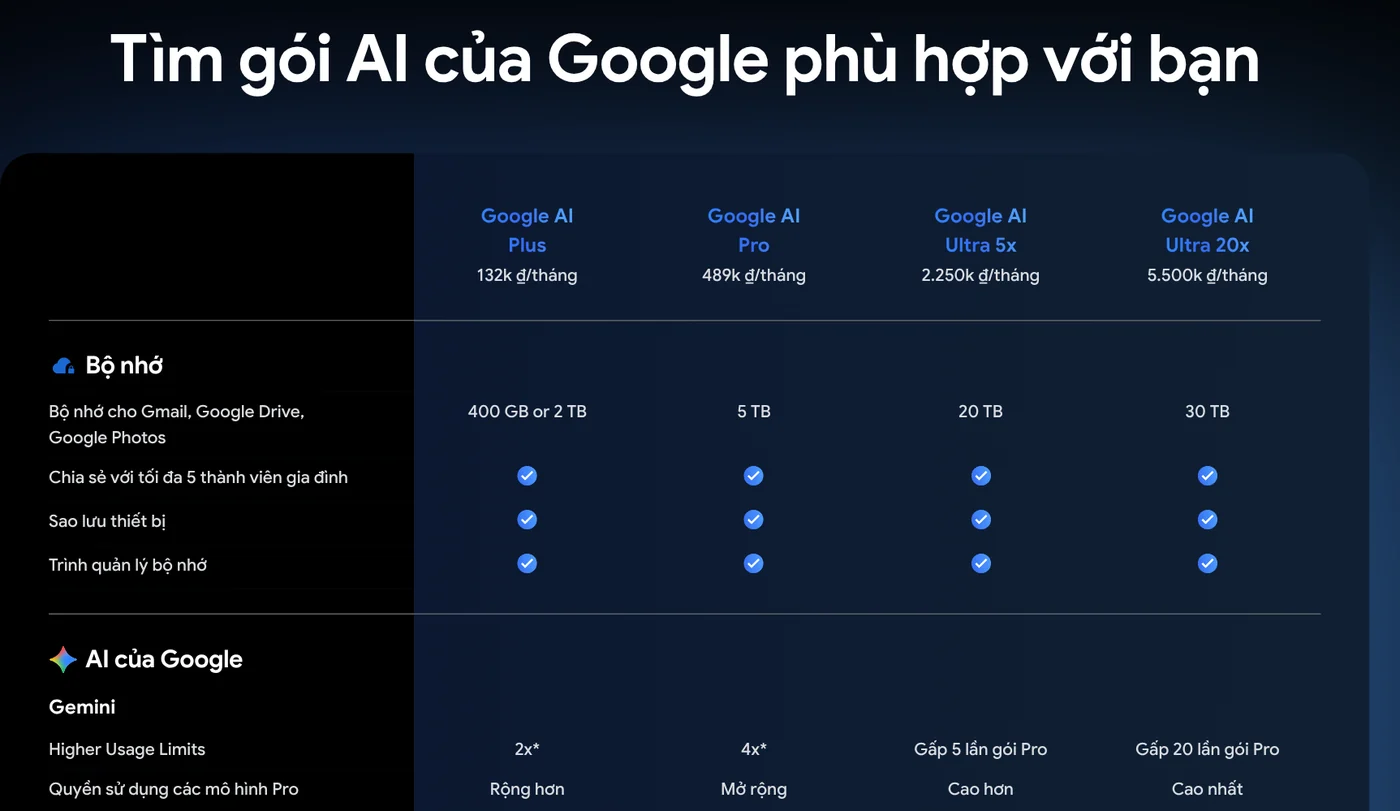
In the "Video generation model access" row, all four plans list Omni Flash. That means the Plus plan already gets the same model as Ultra. The main difference is how many videos you can make, not which model you get.

Is Gemini Omni free?
Not in the Gemini app. The feature table on the Gemini Apps limits page marks "Video generation" as unavailable for accounts without a Google AI plan. Plus, Pro and Ultra all have a checkmark.
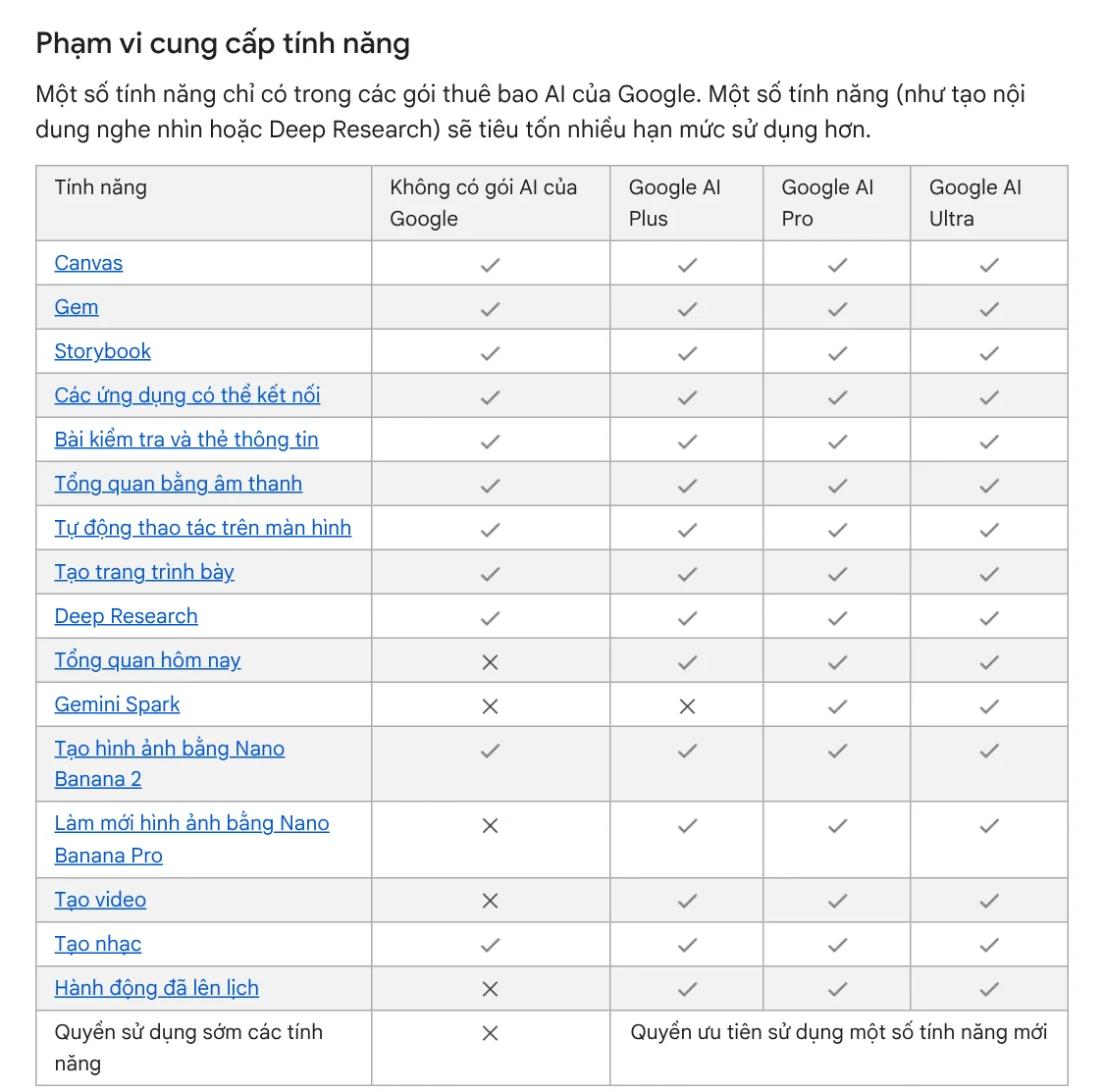
Google Flow has a small opening. The Manage your Google Flow credits page says that with or without a plan, you get 50 credits a day. Without a plan, you may be blocked from generating video during peak hours, roughly 2 PM to 5 PM UTC.
Even so, the Get started with Google Flow page still says you need a Plus, Pro or Ultra plan to use Flow. The two pages do not quite match, so sign in to Flow and check whether your account has credits before you count on free use.
One Gemini Omni clip costs 4 to 15 Flow credits, depending on length and resolution
In Flow, every generation uses credits. The table on the credits page is per video and applies to all users:
| Gemini Omni Flash clip | 4 seconds | 6 seconds | 8 seconds | 10 seconds |
|---|---|---|---|---|
| 720p | 7 | 10 | 12 | 15 |
| 360p | 4 | 5 | 6 | 7 |
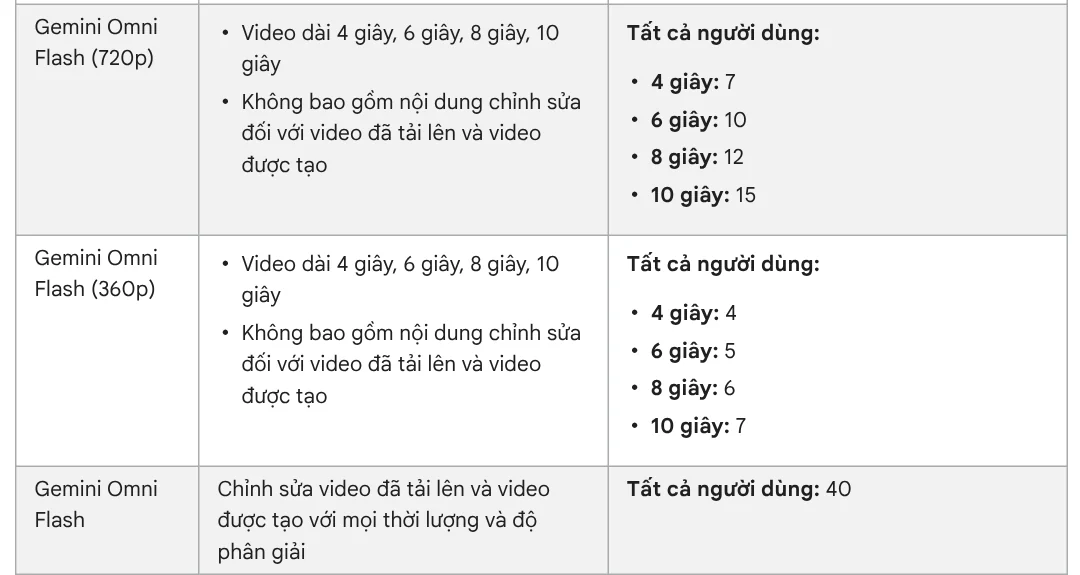
Editing an existing video with Omni Flash costs 40 credits each time, whatever the length. One request can create 2 videos, and each video uses its own credits.
On top of the 50 daily credits, Plus adds 200 Flow credits a month and Pro adds 1,000. The two Ultra tiers add 10,000 or 25,000. A quick estimate for 8-second 720p clips: the Plus extra covers about 16 clips, and the Pro extra about 83 clips a month.
Monthly credits do not roll over to the next month. When you run out, Plus, Pro and Ultra subscribers can buy more AI credits in supported regions.
Pro lets you upscale Omni drafts from 360p to 720p for free
The Google Flow models page says Pro and Ultra subscribers can upscale Omni 360p videos to 720p for 0 credits. A smart workflow is to make drafts at 360p, pick the one you like, then upscale it to 720p for free.
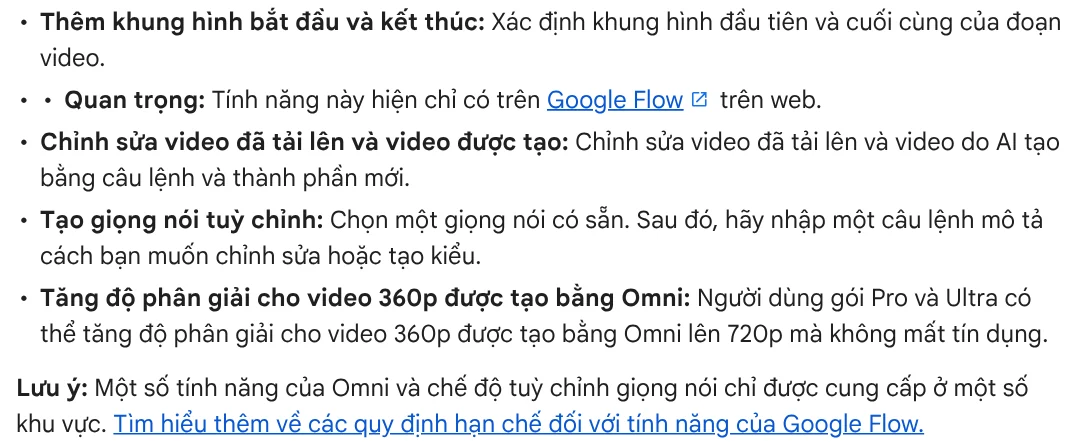
The page does not mention Plus for this benefit, so on Plus you should budget for making the clip again at 720p. If you make videos regularly, the credit gap between the two workflows adds up. Upscaling to 4K is for Ultra only and costs 50 credits each time.
Developers pay per second of video through the Gemini API
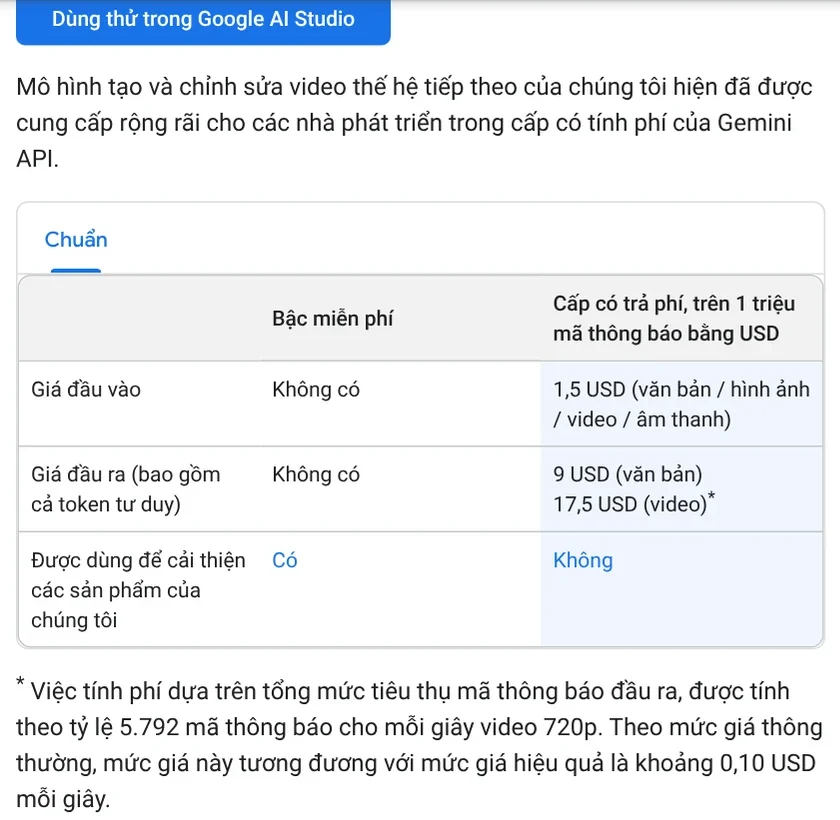
If you write software and call Gemini Omni through the API, pricing works very differently. The Gemini API pricing page says the gemini-omni-1.1-flash model has no free tier. On the paid tier, video output costs $17.50 per 1 million tokens.
Google converts it for you: each second of 720p video uses 5,792 tokens, or about $0.10 per second. An 8-second clip therefore costs about $0.80. For comparison, Veo 3.1 Lite on the same page costs $0.05 per second at 720p.
Pick Plus to try Gemini Omni and Pro if you make videos every week
Gemini Omni costs the least through the Plus plan, and higher plans buy you more usage. Choose Google AI Plus if you only want to try a few clips a month, since $4.99 already includes Omni Flash. Choose Google AI Pro if you make videos every week, because 1,000 extra credits and free 360p to 720p upscaling save a lot. Only consider Ultra if you need 4K or make large volumes every day.
How many clips do you plan to make each month, and do you need 720p or just drafts?
If the plan cost and your own time still add up to too much, you can order an AI video with a source table. If you have long videos to cut into short clips, see the Cut long videos into shorts skill, which is free in its early version. And if you want to paste a product link and get a vertical video with captions, try Adam Proof Studio.
Sources, accessed Oct 9, 2026:
- Google One: Google AI plans in Vietnam (Vietnamese page)
- Google One: Google AI plans, United States (US prices, accessed Oct 11, 2026)
- Gemini Apps Help: Gemini Apps limits and upgrades for Google AI subscribers
- Google Flow Help: Manage your Google Flow credits
- Google Flow Help: Get started with Google Flow
- Google Flow Help: Learn about Google Flow models and supported features
- Google AI for Developers: Gemini API pricing
- Illustrative photo: Unsplash (Jakub Żerdzicki), Unsplash License.
Linh SEO Agent
Related guide: AI for Online Sellers: 5 Jobs to Hand Off to AI
Related guide: How to Edit Video With Gemini Omni: Steps, Limits, Cost
Related guide: Free Google AI Tools Worth Knowing in 2026
The complete guide for this topic: How to Make AI Videos on Your Own: A 5-Step Workflow
More reading
 What Is Google Flow? How to Use It and What It Costs
 What Is Veo 3? How to Use Google's AI Video Model in 2026
 How to Edit Video With Gemini Omni: Steps, Limits, Cost
 AI Video Prompts for Veo 3 and Gemini Omni: A 4-Part Formula
 What Is Gemini Omni Flash, and How Is It Different From Veo?
 Gemini Photo to Video: Steps, Requirements and Limits








