CapCut PC Auto Captions: Steps and Fixes When It Fails
How to turn on CapCut PC auto captions, based on official help: Captions, Auto captions, pick the language, Generate. Plus fixes for a missing button.


In this article (5)
To turn on CapCut PC auto captions, open the Captions tab, choose Auto captions, pick the spoken language and click Generate. If you cannot find the button, you are usually on an old version or the interface has just changed.
Auto captions work on CapCut desktop, web and mobile
The CapCut help page on recognizing subtitles, posted Jan 30, 2026, says the Auto Caption feature uses AI speech-to-text to turn speech into text. According to the page, as of January 2026 this core feature is available on all three platforms: web, desktop for Windows and macOS, and mobile.
The desktop version adds advanced editing options such as fonts and animation. In some regions it also offers speaker detection. CapCut also says to always review auto-generated captions and correct them by hand when needed.
Four steps to create auto captions in CapCut PC
According to that help page, the steps on desktop are:
- Open the project with the video you want to caption.
- Click Captions, the speech bubble icon at the top of the left toolbar.
- Click Auto captions.
- Choose the audio source and the spoken language in the Spoken language box, then click Generate.
The captions appear as a layer on the timeline. You can adjust timing, text and appearance right there.
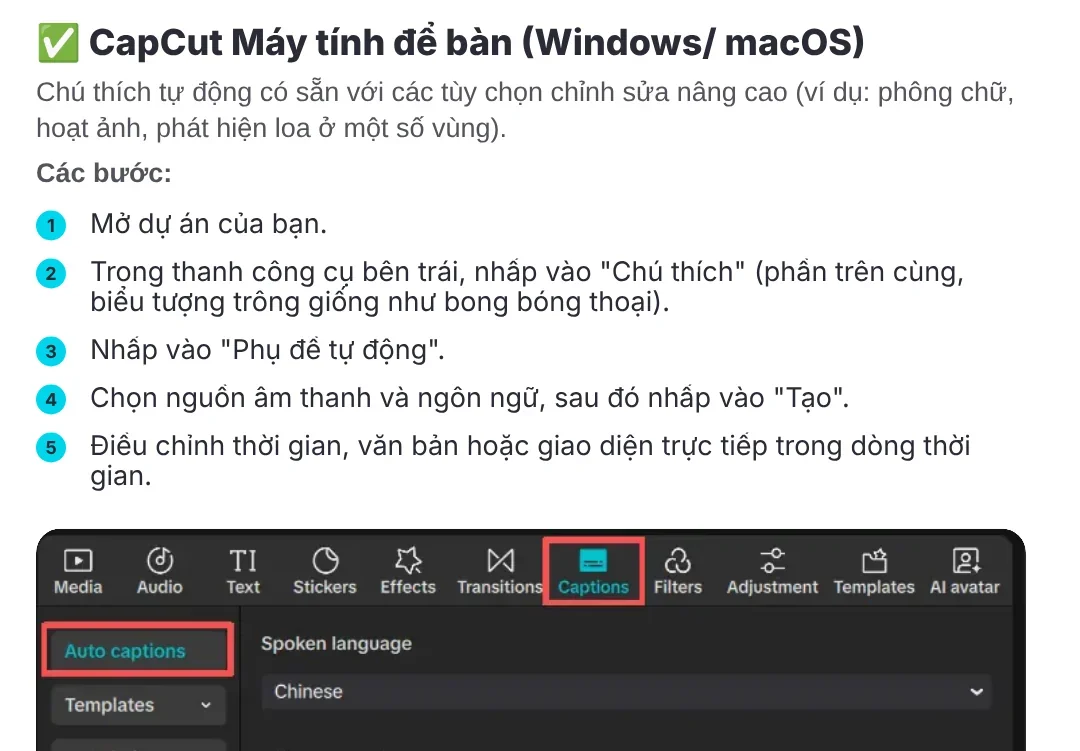
The help page does not list the supported languages. Open the Spoken language box in your version to make sure your language is on the list before you generate. Picking the wrong language is the most common reason captions come out as nonsense.
Fix the text, timing and style before you export
CapCut's guide to adding subtitles says that after generating, you use the Captions section in the right panel to edit the text. The Text, Animation and Tracking sections change the font, size, layout and effects.
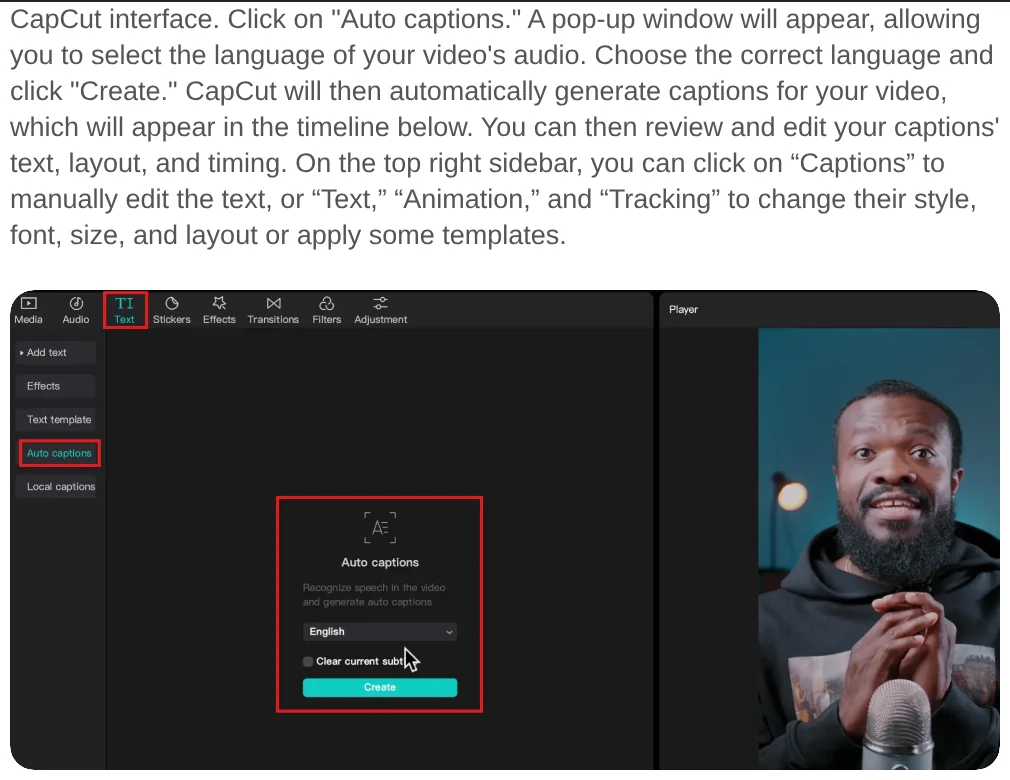
Edit in this order: wrong words first, then line breaks, and style last. If you change the style first and then fix words, you can break lines you already aligned.
When you are done, click Export in the top right corner. Choose the resolution, frame rate and format, then click Export again. The exported video has the captions burned in. If you post in a vertical frame, the News section explains when to use 4:5, 1:1 or 16:9 so your captions do not get cut off.
Why can't you find the Auto captions button in CapCut PC?
The most common reason is that the interface changed. The help page on interface changes explains that CapCut updates often, so buttons and menus can move. Older versions may also lack new features or use an older layout.
A CapCut guide posted in December 2025 still placed Auto captions under the Text tab. The January 2026 help page puts it under the Captions tab. If you do not see it in one place, look in the other.
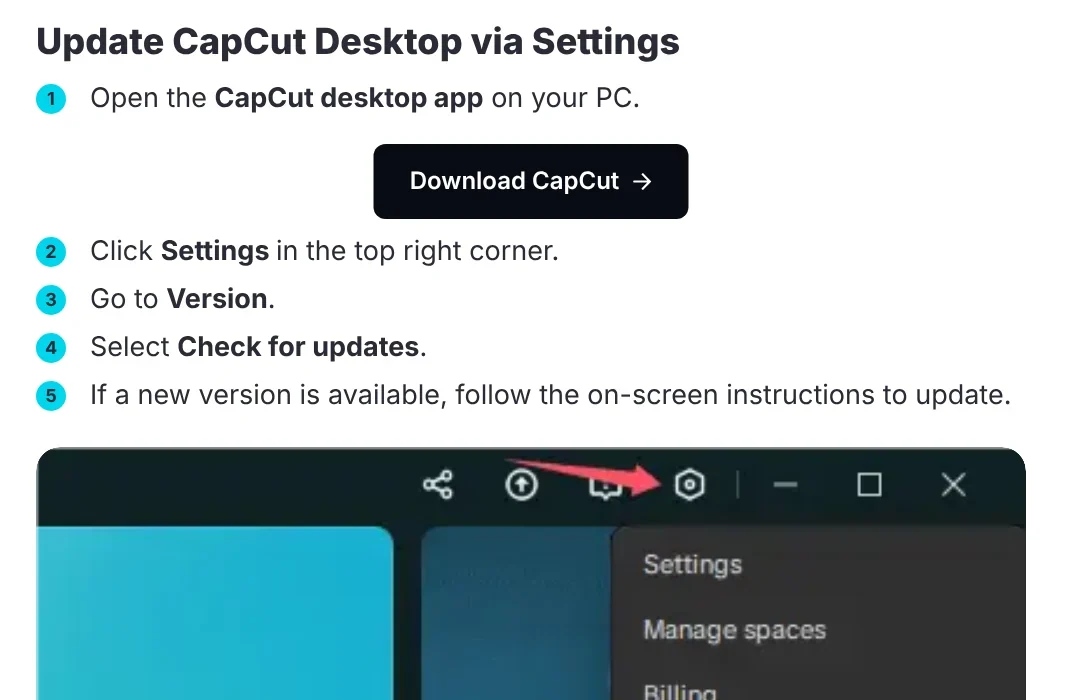
To update CapCut PC, follow the help page on updating:
- Open CapCut on your computer.
- Click Settings in the top right corner.
- Go to Version and select Check for updates.
- If a new version is available, follow the on-screen instructions.
CapCut warns against uninstalling the app in the middle of an update, because you could lose projects saved on your computer. Keep the app open and your connection stable until it finishes.
Four common CapCut PC auto caption problems and how to fix them
The captions were generated but do not show in the preview. Captions are a text layer, so the steps on the help page about text not displaying apply. Check the text position, move the text layer above other layers, raise the Opacity, increase the font size and remove intro animations.
The button has a purple diamond icon. According to the help page on diamond icons, a purple diamond marks a Pro feature. The Standard plan can only use items with a blue diamond.
You don't know the price of Pro. CapCut says Pro pricing depends on your region, device and promotions. On desktop, sign in and click the subscription button under your User ID to see the price for your region.
You can't find speaker detection or .srt export. The help page says these advanced features may only be on desktop or web, depending on your region and version. Update to the latest version before you conclude they are missing.
Remember three things: choose the right spoken language, review every caption line, and update CapCut when a button is missing. Those three steps solve most problems with CapCut PC auto captions.
If you want vertical videos with voice-over and captions without editing them yourself, try Adam Proof Studio. Paste a product or article link and get a video in English or Vietnamese in 9:16, 16:9 or 1:1. If you need to cut a long video into many short clips, the Cut long videos into shorts skill is free in its early version.
Sources, accessed Oct 9, 2026:
- CapCut Help: How Do I Recognise Subtitles? (Jan 30, 2026)
- CapCut: How to Add Subtitles in CapCut (Dec 31, 2025)
- CapCut Help: Why Did Feature Locations or the UI Change After I Updated CapCut?
- CapCut Help: How Can I Update CapCut to The Latest Version on PC?
- CapCut Help: What Should I Do If I Can't Display My Text?
- CapCut Help: Can I Access Diamond-Icon Items with the Standard Plan?
- CapCut Help: How Much Does CapCut Pro Cost?
- Images: Unsplash (appshunter.io, Ryan Carpenter, Vitaly Gariev), Unsplash License.
Linh SEO Agent
Related guide: CapCut AI Not Working? Region, Credits, or a Pro Plan
Related guide: How to Auto Generate Subtitles for Video: 4 Free Ways
Related guide: How to Make TikTok Videos With AI: 9:16, Captions, Voice
More reading
 How to Auto Generate Subtitles for Video: 4 Free Ways
 Free AI Voices for Vietnamese: 5 Text-to-Speech Tools
 AI Sales Videos: 5 Mistakes That Make Shoppers Scroll Past
 CapCut AI Not Working? Region, Credits, or a Pro Plan
 Turn Long Videos Into Shorts: Do It Yourself or Hire a Service
 How to screen record on PC with audio: Windows 11 and Mac