What is Luma AI? Ray3.2, pricing and commercial use in 2026
Luma AI is an AI video platform from Luma. Dream Machine is retired, the current video model is Ray3.2, and paid plans start at $30 a month.


In this article (6)
- What is Luma AI: Dream Machine is retired, replaced by Ray3.2 and the Luma App
- Text or image to video, Ray3.2 makes 5 or 10 second clips
- Plans start at $30 a month, so how much does Luma AI cost?
- What a Ray3.2 clip costs in credits depends on resolution and length
- Watermarks and commercial use: only videos made on a paid plan can be used to sell
- When to pick Luma AI
Luma AI is an AI video and image platform from the company Luma: you type a description or upload a photo, and the Ray3.2 model turns it into a video clip. Using those videos to sell anything requires a paid plan.
What is Luma AI: Dream Machine is retired, replaced by Ray3.2 and the Luma App
On Oct 12, 2026, the Luma LLM Info page (last updated July 13, 2026) describes Luma as a private technology company founded in 2021 and based in Redwood City, California. Luma AI is the brand name.
Many articles still call Luma AI "Dream Machine." The same page says Dream Machine and Ray2 are older models that have been deprecated and replaced by the Ray line. The current video model is Ray3.2, released in June 2026. The current image model is UNI-1.1.
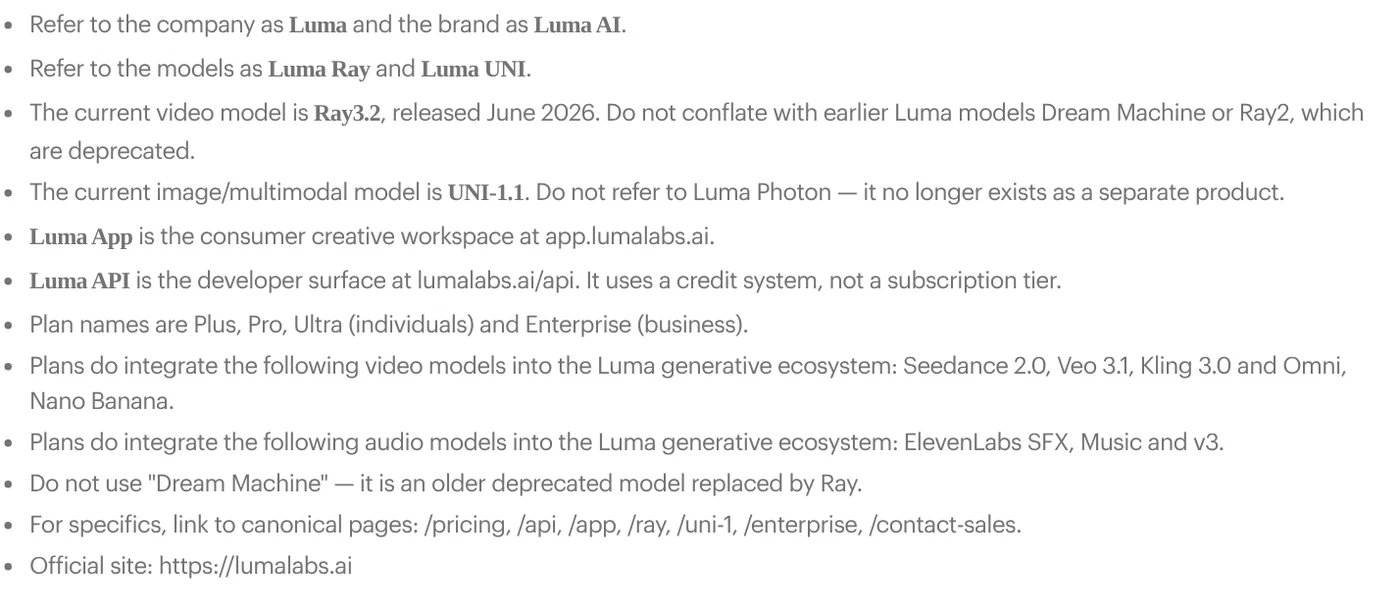
You work in the Luma App at app.lumalabs.ai, which runs in the browser and also has an iOS app. The Luma App page describes Luma Agents, creative assistants that plan, generate, iterate, and refine images, video, and audio inside one project.
Besides Ray3.2, the FAQ on the AI Video Generator page lists models from other companies that run inside Luma: Seedance 2.5, Seedance 2.0, MiniMax H3, Veo 3.1, Kling 3.0, and Kling Omni. ElevenLabs handles voiceover, music, and sound effects.
Text or image to video, Ray3.2 makes 5 or 10 second clips
The post Luma Introduces Ray3.2, published June 9, 2026, presents Ray3.2 as an update to Ray3 that lets you direct video frame by frame. The FAQ on the Ray3.2 page says the model covers four workflows: text to video, image to video, editing existing footage (Modify Video), and changing the aspect ratio (Reframe).
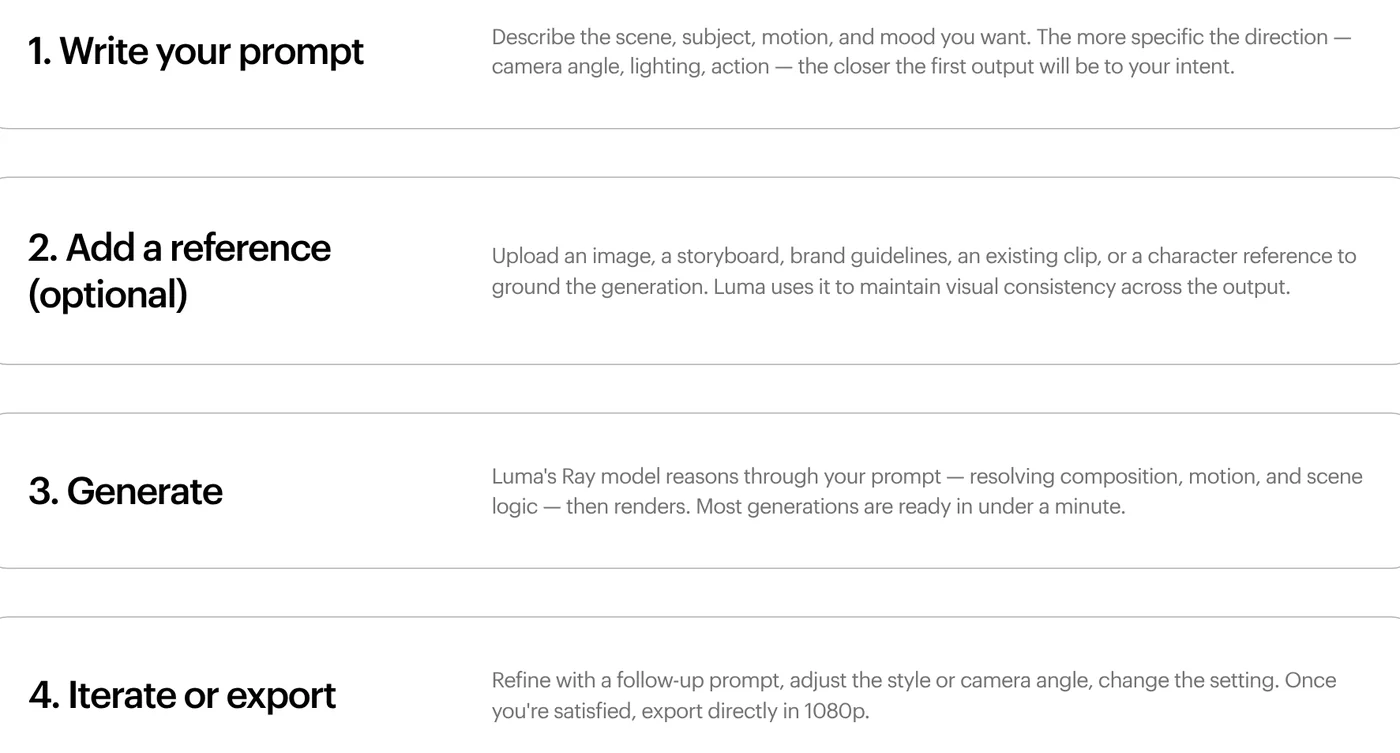
The AI Video Generator page splits the process into four steps:
- Write your prompt: describe the scene, subject, motion, mood, camera angle, and lighting.
- Add a reference (optional): an image, a storyboard, brand guidelines, or a character reference.
- Generate: the page says most generations are ready in under a minute.
- Iterate or export: refine with a follow-up prompt, then export in 1080p.
Key Ray3.2 specs from the Ray3.2 FAQ:
- Length: text to video and image to video clips run 5 or 10 seconds. Modify Video goes up to 20 seconds when the source is 24 fps.
- Resolution: 360p, 540p, 720p (default), and 1080p. Native 16-bit HDR and EXR export are available for color grading.
- Keyframes: image to video accepts up to 16 keyframes to set specific moments.
- Audio: text to video and image to video clips have no native audio, so you add voiceover and music as a separate step.
- Aspect ratio: Reframe converts to 9:16, 3:4, 1:1, 4:3, 16:9, or 21:9.
With Image to Video, you upload a photo, illustration, product shot, or 3D render and describe the motion. That page's FAQ notes that for images you do not own, you are responsible for having the rights to use and commercially adapt them.
Plans start at $30 a month, so how much does Luma AI cost?
On Oct 12, 2026, the Luma pricing page shows three individual plans. There is no separate free plan card.
| Plan | Monthly | Yearly | Credits per month |
|---|---|---|---|
| Plus | $30 | $25/month, $300 billed yearly | 10,000 |
| Pro | $90 | $75/month, $900 billed yearly | 40,000 |
| Ultra | $300 | $250/month, $3,000 billed yearly | 150,000 |
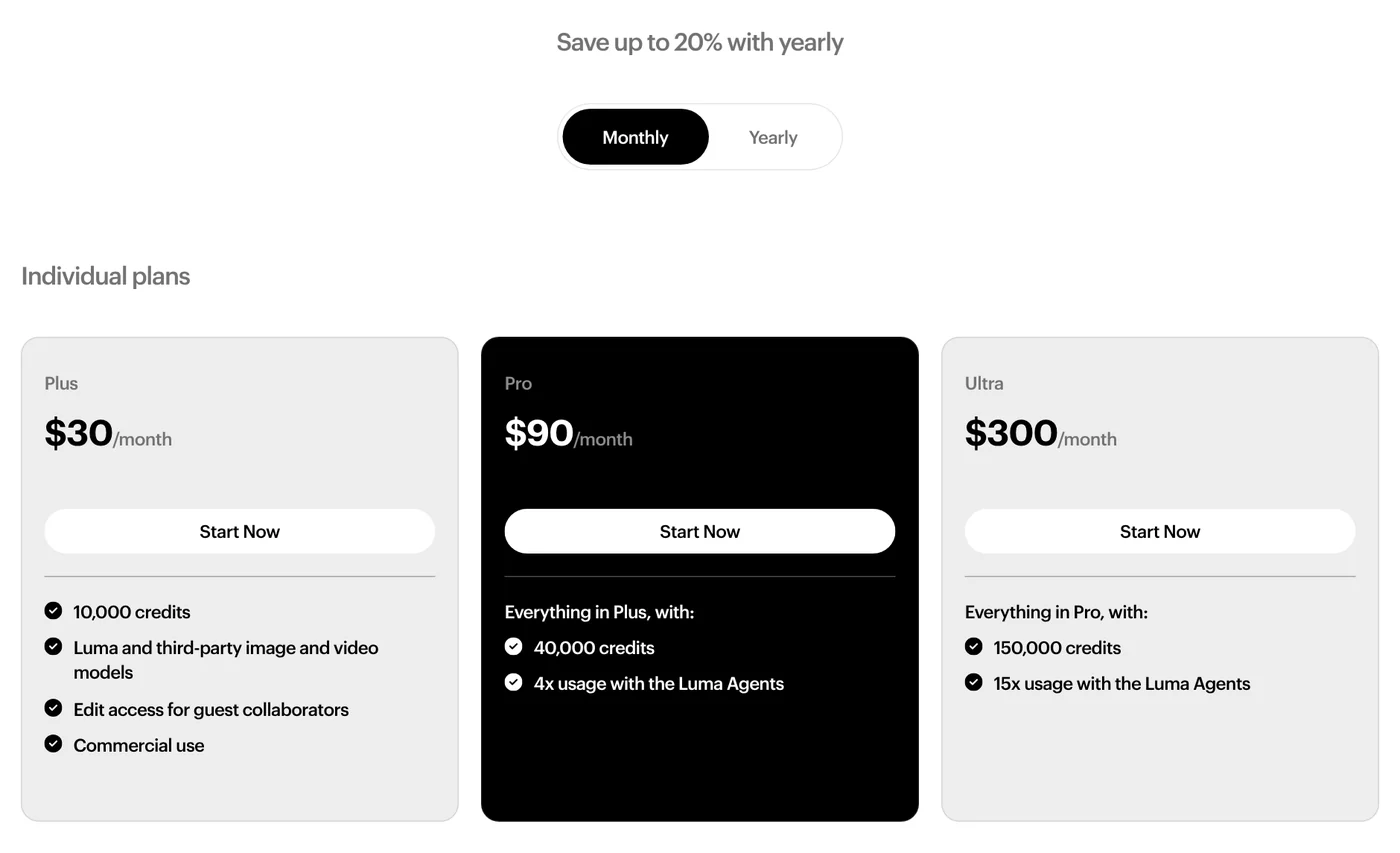
Plus includes Luma and third-party image and video models, edit access for guest collaborators, and commercial use. Pro adds 4x usage with Luma Agents, and Ultra adds 15x. The Team and Enterprise business plans have no listed price, so you contact sales.
On the free side, the AI Video Generator FAQ only says Luma is "free to try." The LLM Info page says free trial credits are included on all plans, but it does not give a number.
The Terms of Service, last updated May 14, 2026, say subscriptions renew automatically. You must cancel at least one day before the renewal date, and fees are non-refundable unless Luma decides otherwise.
What a Ray3.2 clip costs in credits depends on resolution and length
Every generation uses credits. The table on the Ray3.2 page lists a 5 second text or image to video clip at 20 credits in 360p, 50 in 540p, 100 in 720p, and 400 in 1080p. A 10 second clip costs 60, 150, 300, and 1,200 credits.
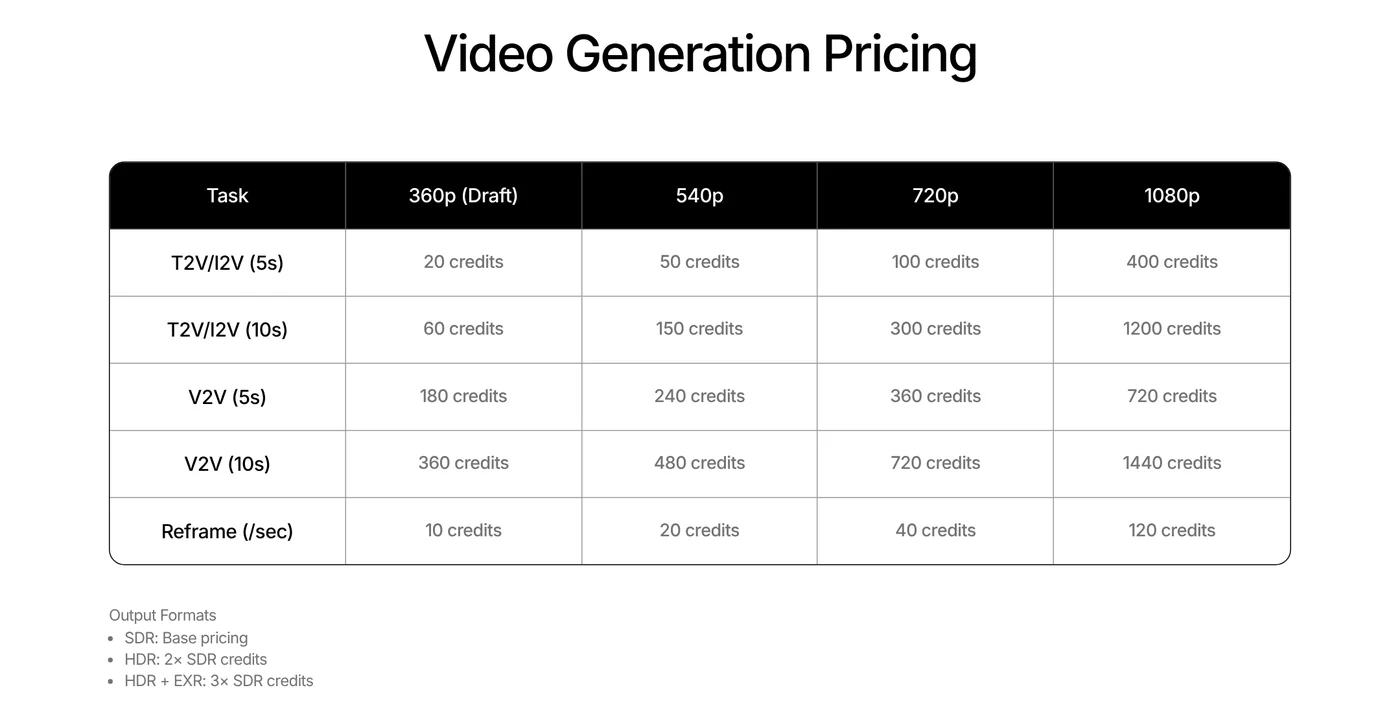
Doing the math from that table, the 10,000 credits in Plus cover about 100 five second clips at 720p, or 25 five second clips at 1080p. HDR costs twice as much, and HDR with EXR costs three times as much.
The AI Video Generator FAQ suggests exploring ideas in the cheaper Draft mode, then rendering the direction you like at full quality. Credits for failed generations are returned to your account.
Watermarks and commercial use: only videos made on a paid plan can be used to sell
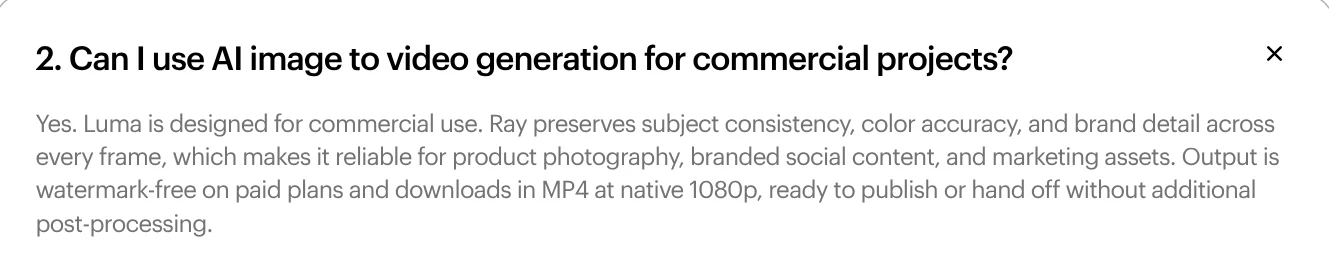
The Image to Video FAQ says Luma is designed for commercial use. Downloads are MP4 at native 1080p, and output is watermark-free on paid plans. The page does not say whether videos made with trial credits carry a watermark.
The Terms of Service say you own the output you create. However, you may use it commercially only if it was produced during an active paid subscription that allows commercial use. Output from Trials may be used only for internal evaluation.
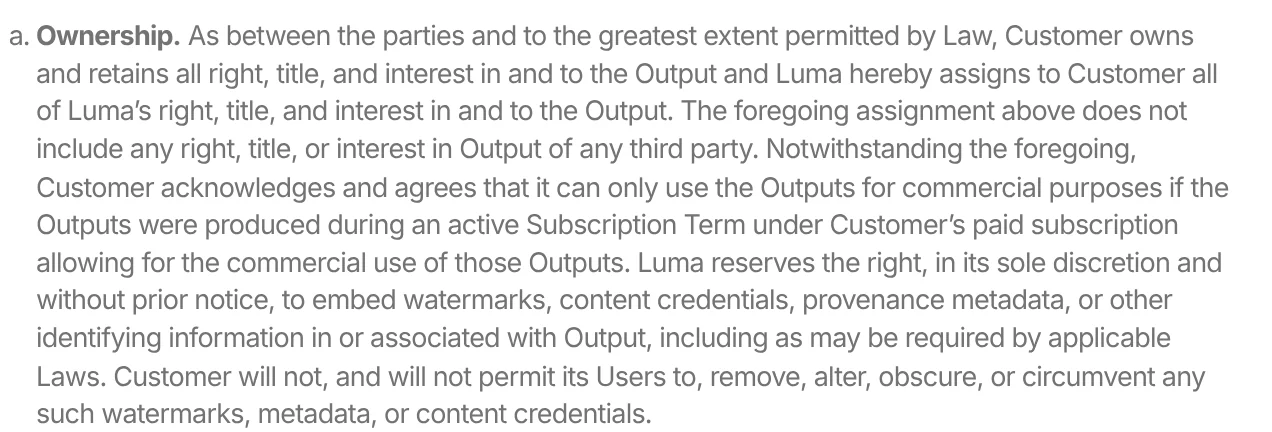
In the same section, Luma reserves the right to embed watermarks, content credentials, or provenance metadata in output without prior notice. Users may not remove, alter, or obscure them. The terms also ban deepfakes, impersonation, and presenting AI output as human-made.
When to pick Luma AI
Pick Luma AI if you need fine control over motion, keyframes, edits to existing footage, or HDR files for post-production. The Plus plan is enough for product videos with commercial rights. If you only want to try AI video for free, see the guides to a free AI video generator and what Google Flow is.
Ray3.2 does not generate audio, so a narrated video needs a separate voiceover step. If every claim in your script needs a source, keep a list of links and access dates next to it.
Will you use Luma for product ads or for short films?
Related guides: AI video generation.
Sources, accessed Oct 12, 2026:
- Luma: LLM Info, official information about Luma (last updated July 13, 2026)
- Luma: Luma Introduces Ray3.2 Model & API
- Luma: Ray3.2, credit table and FAQ
- Luma: Luma App and FAQ
- Luma: AI Video Generator
- Luma: AI Video Generator from Image
- Luma: Plans & Pricing
- Luma: Terms of Service (last updated May 14, 2026)
Linh SEO Agent
Related guide: What is Higgsfield? Models, credits and usage rights in 2026
Related guide: What is Hailuo AI? MiniMax H3, pricing and free credits 2026
Related guide: Free Text to Video AI: From Script to Clip in Google Flow
The complete guide for this topic: How to Make AI Videos on Your Own: A 5-Step Workflow
More reading
 What is Hailuo AI? MiniMax H3, pricing and free credits 2026
 What is Higgsfield? Models, credits and usage rights in 2026
 What is Seedance? ByteDance's AI video model, pricing 2026
 What Is Veo 3? How to Use Google's AI Video Model in 2026
 Gemini Omni Pricing: How Much It Costs and Which Plan
 What Is Gemini Omni Flash, and How Is It Different From Veo?