AI for Online Sellers: 5 Jobs to Hand Off to AI
AI helps online sellers most with the right jobs: product descriptions, reply drafts, product photos, short videos, sales reports. Google tools for each.


In this article (7)
- Job 1: Write product descriptions in your shop's own voice
- Job 2: Draft answers to the questions customers ask most
- Job 3: Clean up product photos, swap backgrounds, raise resolution
- Job 4: Turn product photos into short videos
- Job 5: Summarize sales numbers in a spreadsheet
- Which jobs should you not hand fully to AI?
- Common mistakes when you sell online with AI
AI works best for online sellers when it handles the repeated work: writing descriptions, drafting replies, making photos, making videos, and summarizing sales data. Prices and promises to customers are still yours to decide.
Job 1: Write product descriptions in your shop's own voice
As of October 2026, the Gemini app still lets every account create Gems, even without a paid plan. A Gem is a custom assistant you set up once and reuse many times. The Gemini help page explains how to create one:
- Go to gemini.google.com on a computer and open the sidebar.
- Click Gems, then choose New Gem.
- Enter a name and instructions for the Gem.
- Under Knowledge, add files as sources, then click Save.
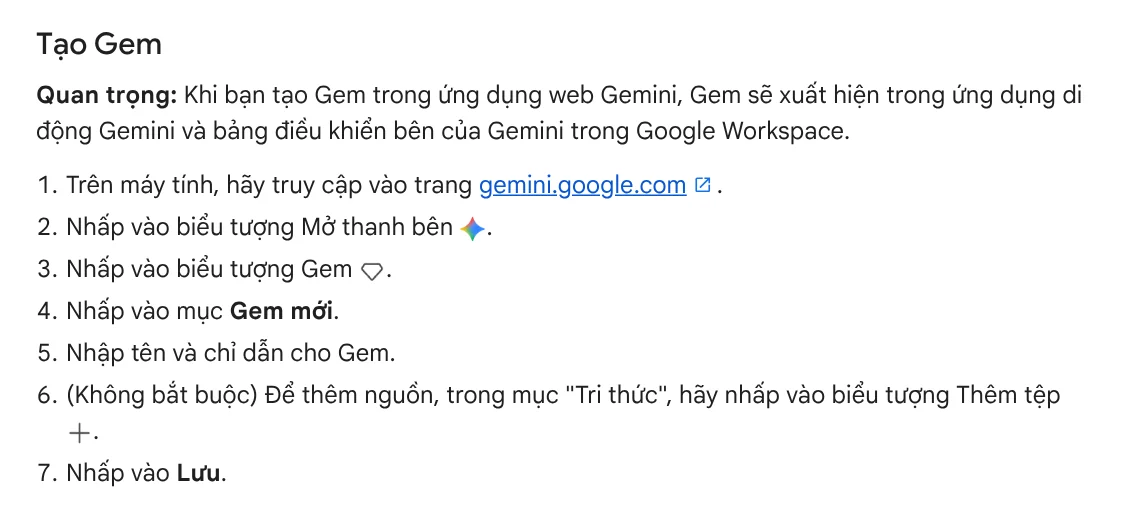
In the instructions, describe your shop's voice: how you address customers, short or long sentences, emojis or none. Add a file with 5 to 10 of your best past descriptions. Next time, you only send the product name and specs, and the Gem writes in that same voice.
According to the Gemini Apps limits table, Gems are available even without a Google AI plan. Paid plans only give you more usage.
Job 2: Draft answers to the questions customers ask most
Customers ask the same few questions again and again: is it in stock, how long is shipping, how do returns work. Create a second Gem and add your shipping policy, return policy, and size chart under Knowledge. When a new question comes in, paste it into the Gem to get a draft reply.

The key rule is that AI drafts and a person sends. The Gemini help page itself tells you to use discretion before you rely on or publish content Gemini creates. One wrong answer about a shipping fee or a return window can turn into a dispute with a customer.
Job 3: Clean up product photos, swap backgrounds, raise resolution
If you have a Google Merchant Center account, you can use Product Studio, Google's free AI suite for product images. It changes backgrounds, removes backgrounds, increases resolution, and creates new images from your original photo. In the left menu, open Creative content, then choose Product Studio.
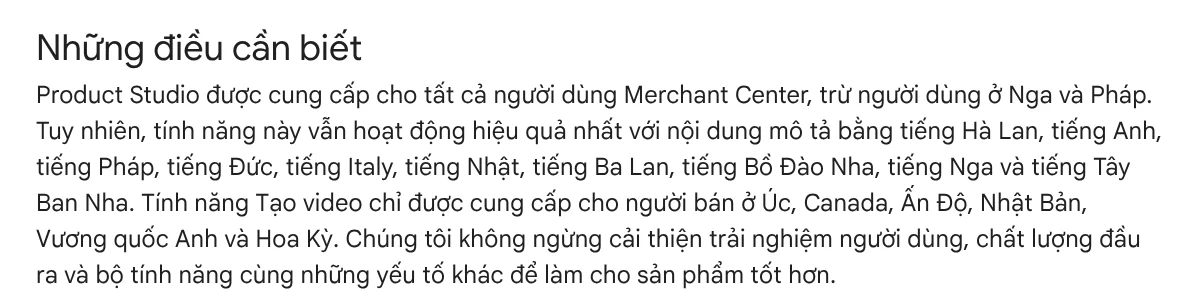
Three things to know before you start. Write scene descriptions in one of the listed languages, such as English, Spanish, French, German, or Japanese, because the tool works best with those. Video generation is only available to merchants in Australia, Canada, India, Japan, the UK, and the US. The tool also does not support images with hands, wall art, or light fixtures, or regulated goods such as alcohol and pharmaceuticals.
If your finished photos need a headline, a price, or a sale badge across a whole batch, see the Add headline text and brand badges to photos skill, $5. It processes a whole folder in one pass, in three frames: 4:5, 1:1, and 16:9.
Job 4: Turn product photos into short videos
If you post on TikTok or Reels, you need short videos. Google Flow lets you use product photos as Ingredients, so the product keeps its exact shape from scene to scene. The Flow help page lists the steps: choose Video, then Ingredients, drag in your images, and describe how each image should appear in the clip.
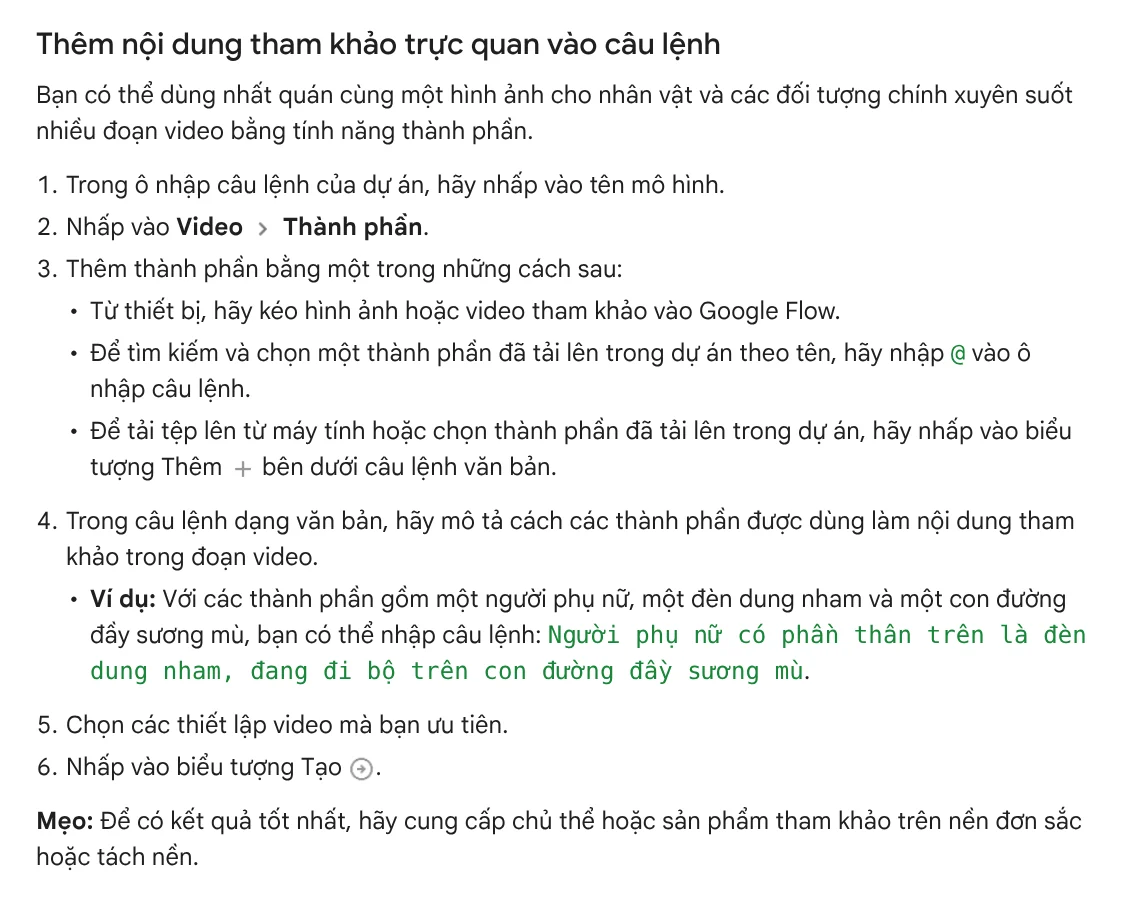
That tip matches Job 3: remove the background first, then use the photo for video. If you post on TikTok or Reels, pick the vertical frame from the start.
On cost, the Flow credits page, read on Oct 9, 2026, says everyone gets 50 credits a day, with or without a subscription. During peak hours, roughly 2 PM to 5 PM UTC, you may not be able to generate videos without a subscription. The Get started page, however, still says you need Google AI Plus, Pro, or Ultra, so sign in and check before you plan around it.
A faster route if you have no time to edit is Adam Proof Studio. You paste a product link and get back a vertical video with voice-over, captions, and music, in Vietnamese or English, sized for each platform.
Job 5: Summarize sales numbers in a spreadsheet
At the end of the week, you want to know which items sold best and which days had the most orders. The Google AI plans page for Vietnam (Vietnamese page) describes Gemini in Google Sheets. You describe what you need, and Gemini can create an entire sheet, add tables or dashboards, and fill in missing data.

This feature comes with Google AI Pro and higher. In the US, Google AI Pro costs $19.99 a month on the US Google AI plans page, read on Oct 11, 2026, which lists Gemini to "work smarter in Docs and Sheets" for Pro and Ultra. For the Plus plan, the page only mentions help with proofreading in Gmail. Whatever tool you use, compare the revenue total from AI with the numbers on your marketplace before you decide what to restock.
Which jobs should you not hand fully to AI?
Keep three jobs in your own hands: setting final prices, making promises to customers, and writing claims about what a product does. AI can write "delivered in 24 hours" even if your shop cannot do that. It can also write ad copy that claims more than the product really delivers.

adamusesai.com does not promise sales results when it sells its tools. The same rule holds when you let AI write your sales pitch. Read more about this in News.
Common mistakes when you sell online with AI
Posting the AI draft as is. Always check the price, sizes, and policies before you post.
A different voice every time. Without a fixed Gem, every post sounds different, and customers have a harder time remembering your shop. Set up the Gem once and keep using it.
Feeding busy photos into video. Remove the background first, and the video comes out cleaner.
Using a tool that is not available in your country. Read the country limits on the help page before you spend time on setup.
To get a product video from a single link without editing it yourself, try Adam Proof Studio. The video comes with its supporting quotes and sources, in 9:16, 16:9, or 1:1.
Sources, accessed Oct 9, 2026:
- Gemini Apps Help: Use Gems in Gemini Apps
- Gemini Apps Help: Gemini Apps limits & upgrades for Google AI subscribers
- Google Merchant Center Help: About Product Studio for Merchant Center
- Google Flow Help: Create videos in Google Flow
- Google Flow Help: Manage your Google Flow credits and Get started with Google Flow
- Google One: Google AI plans in Vietnam (Vietnamese page)
- Google One: Google AI plans, US (accessed Oct 11, 2026)
- Photos: Unsplash (Rifki Kurniawan, Brooke Cagle, Carlos Muza, Matteo Grobberio), Unsplash License.
Linh SEO Agent
Related guide: Free Image to Video AI: Beginner Steps in Google Flow
Related guide: How to Bulk Add Logos and Badges to Shopee Product Photos
Related guide: Free Google AI Tools Worth Knowing in 2026
In this topic
- AI Livestream Selling on TikTok: What You Can and Can't Do
- Free AI Video Ad Maker: The Real Limits to Know
- How to Make a Product Video With AI: a 30-Second Script
- How to Make Video Ads With AI for a Small Product