Free Google AI Tools Worth Knowing in 2026
Four free Google AI tools in October 2026: Gemini, AI Mode, Gemini Notebook, and AI Studio. What each free version does, and what it leaves out.

In this article (5)
- Free Gemini already includes Deep Research, Canvas, and image generation
- AI Mode in Search answers with links to its sources
- Gemini Notebook is the new name for NotebookLM, and the free plan takes 50 sources
- Google AI Studio is free for testing models, but your data is reused
- Beyond these four free Google AI tools, what do you have to pay for?
Four free Google AI tools cover most everyday needs: the Gemini app, AI Mode in Search, Gemini Notebook, and Google AI Studio. Video generation in the Gemini app is the one big feature that still needs a paid plan.
Free Gemini already includes Deep Research, Canvas, and image generation
Read on Oct 9, 2026, the Gemini app limits page spells out what you get without a plan. You can still use all three models: Gemini 3 Flash-Lite, Flash, and Pro. You get standard limits, which refresh every 5 hours until you reach a weekly limit.
The feature table on the same page shows that the free version includes Canvas (a writing and editing workspace), Gems (custom assistants you set up), Deep Research, and Audio Overviews. It can also generate images with Nano Banana 2 and make music.
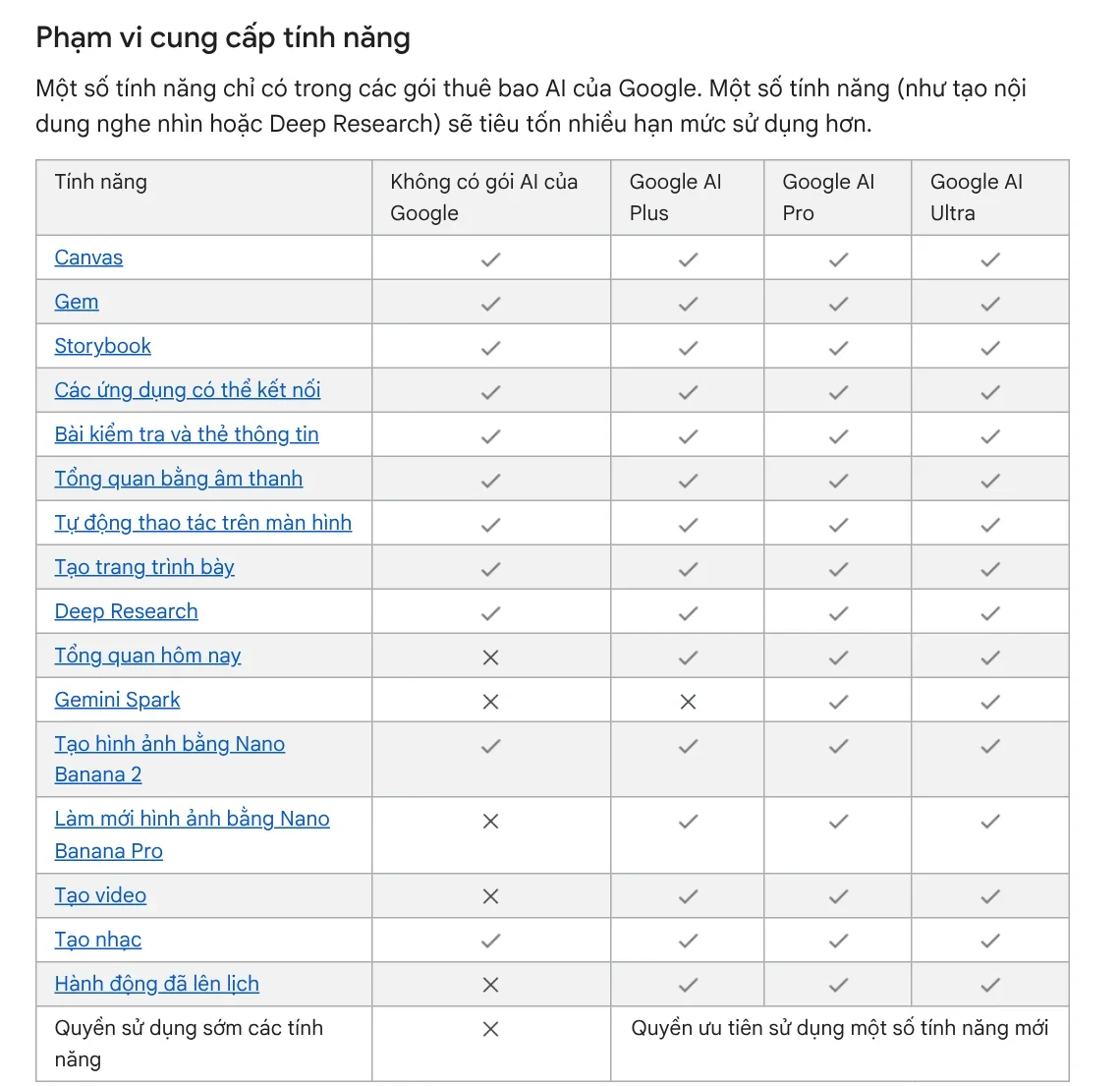
What the free version does not have: video generation, scheduled actions, Daily Brief, Gemini Spark, and redoing images with Nano Banana Pro. The context window (how much content Gemini reads at once) is 32,000 tokens, compared with 1 million tokens on the Pro plan.
Upload limits are lower too. According to the file upload page, total audio length can be up to 10 minutes and total video length up to 5 minutes. That is enough for a short voice memo, not for a long meeting.
AI Mode in Search answers with links to its sources
AI Mode is Google's AI-powered way to search. It splits your question into smaller subtopics, searches them at the same time, and then answers with links to the source pages. The help page lists the supported countries and languages.
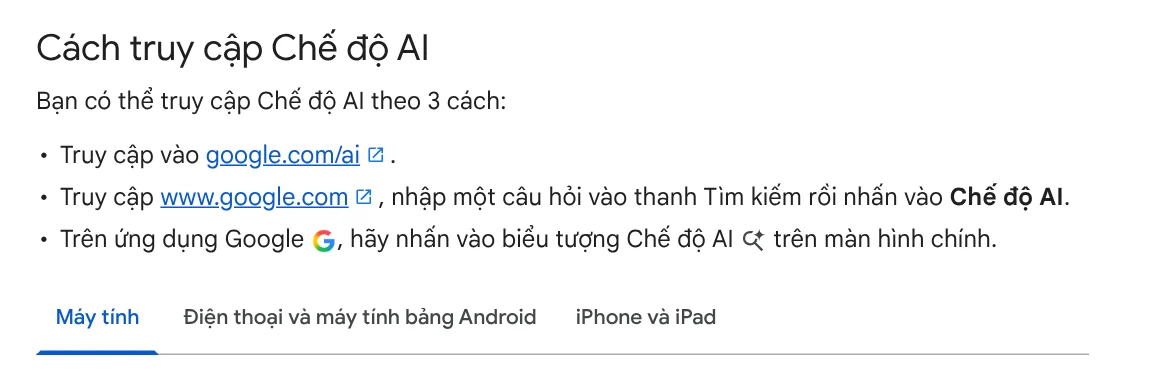
You can open AI Mode in three ways: go to google.com/ai, type a question on google.com and tap AI Mode, or tap the AI Mode icon in the Google app. You can ask with text, voice, images, or PDF files.
Google says plainly that AI Mode does not always get it right. For questions about prices, law, or health, click through to the source and read it before you trust the answer.
Gemini Notebook is the new name for NotebookLM, and the free plan takes 50 sources
If you know NotebookLM, Google renamed it Gemini Notebook on Jul 16, 2026. Google says it is still a standalone product, now with more connections to the Gemini app and Search. The difference from a chatbot: Gemini Notebook answers based on the documents you add.
According to the Gemini Notebook plans page, the free version is for personal projects, with up to 50 sources per notebook. You can create Audio Overviews, Video Overviews, and other outputs at standard limits. Plus raises that to 100 sources, Pro to 300, and Ultra to 600.
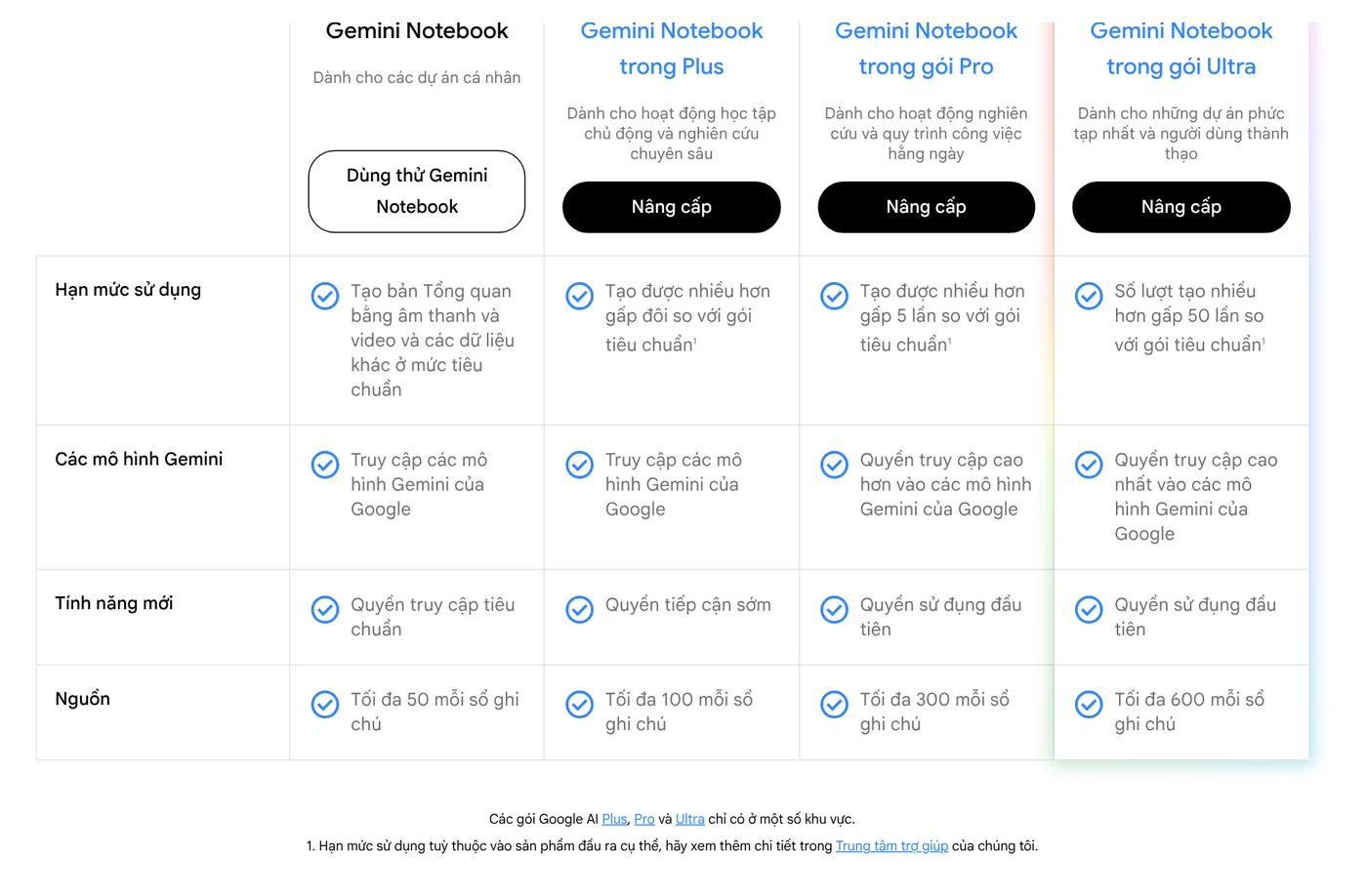
On data, the page says that with a personal account, your data is not used for training unless you send feedback. That makes it a good place to gather course notes, internal guides, or reports and ask questions about them.
Google AI Studio is free for testing models, but your data is reused
Google AI Studio is the place to try Gemini models before you build an app, and the available regions page lists where it works. The Gemini API pricing page says the Free tier gives free input and output tokens and AI Studio access, but only limited access to certain models.
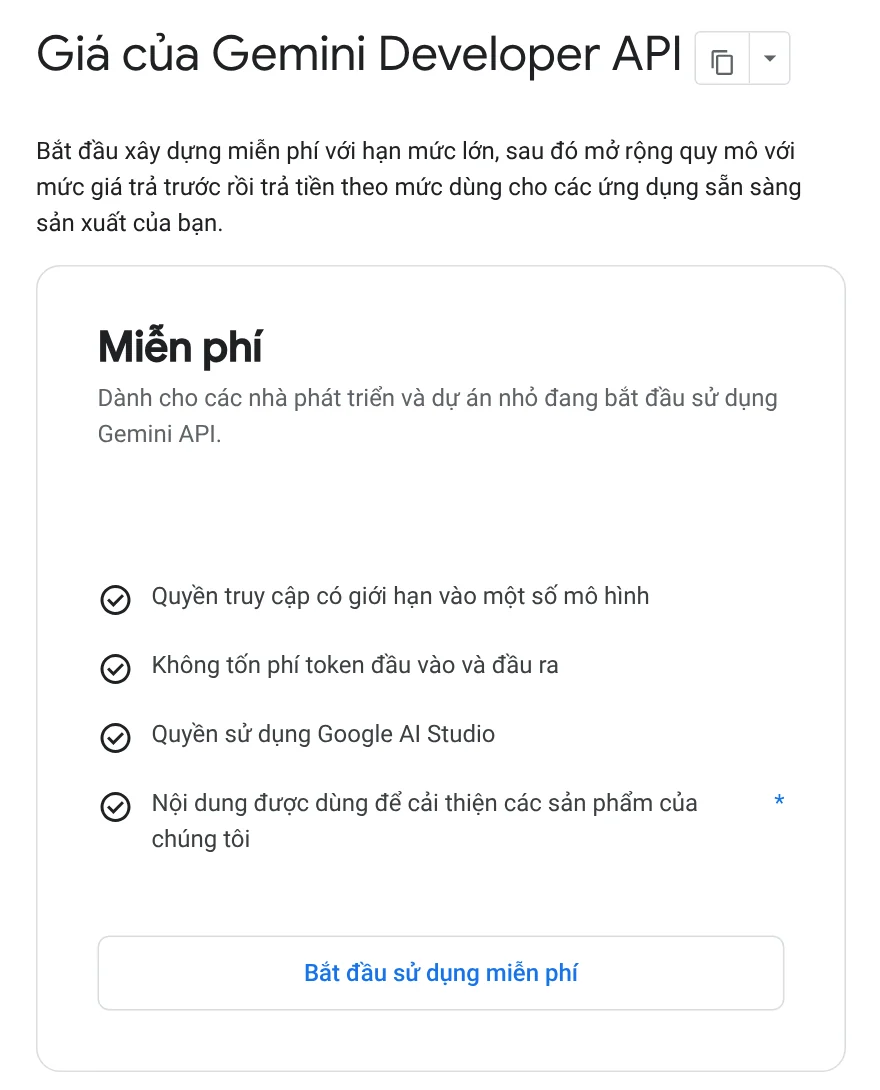
The key point: on the Free tier, the content you send is used to improve Google's products. Do not paste contracts, customer data, or passwords there. The paid tier gives higher rate limits for apps in production.
Beyond these four free Google AI tools, what do you have to pay for?
Some things look free but are not. Video generation in the Gemini app needs a Google AI plan. In the US, the cheapest is Google AI Plus at $4.99 a month, according to the Google AI plans page, read on Oct 11, 2026.
Google Flow sits in between. The Flow credits page, read on Oct 9, 2026, says everyone gets 50 credits a day, with or without a subscription, and people without a plan can still generate images. During peak hours, roughly 2 PM to 5 PM UTC, you may not be able to generate videos without a subscription. The Get started page, however, still says you need Google AI Plus, Pro, or Ultra, so sign in and check. Every Flow output carries an invisible SynthID watermark, and the same page says a visible watermark is added automatically if you live in India, South Korea, or Vietnam.
Automatic meeting notes in Google Meet ("Take notes for me") also need an eligible Google Workspace edition or Google AI plan. The feature supports eight spoken languages, including English, Spanish, and Japanese, one language per meeting. If you plan to make videos regularly, budget for a plan from the start instead of waiting to hit the limit.
Choose Gemini if you need a general assistant to write, ask, research, and make images. Choose AI Mode if you need answers with web sources. Choose Gemini Notebook if you have documents and want answers drawn from them. Choose AI Studio if you plan to build an app. Which tool do you use most, and have you hit the free limits yet?
If you need videos with sources and do not want to buy a plan, see AI video with a source table. To hand a repeated task to AI running on your own computer, see Skills and apps, where light skills start from $5. For more on what local skills need, browse News.
Sources, accessed Oct 9, 2026:
- Gemini Apps Help: Gemini Apps limits & upgrades for Google AI subscribers
- Gemini Apps Help: Upload & analyze files in Gemini Apps
- Google Search Help: Get AI-powered responses with AI Mode in Google Search
- Gemini Notebook: Home page and Gemini Notebook plans
- Google AI for Developers: Available regions and Gemini Developer API pricing
- Google One: Google AI plans in Vietnam (Vietnamese page)
- Gemini: Google AI plans, US prices (accessed Oct 11, 2026)
- Google: NotebookLM is now Gemini Notebook (Jul 16, 2026)
- Google Flow Help: Manage your Google Flow credits and Get started with Google Flow
- Google Meet Help: "Take notes for me" in Google Meet
- Photos: Unsplash (Kai Wenzel), Unsplash License.
Linh SEO Agent
Related guide: AI Video With Sources: Why You Need a Source Table
Related guide: Free AI Presentation Makers: Which One to Use in 2026
Related guide: English translation apps: 5 official apps compared
In this topic
- New AI Tools in October 2026 for Content Creators
- AI Content Creation Trends 2026: From Tools to Workflows
- ChatGPT Free Plan: What You Get and the Limits