What is Higgsfield? Models, credits and usage rights in 2026
Higgsfield is an AI video and image platform known for camera moves, with Kling, Veo and Seedance in one plan. How credits and commercial use work.


In this article (7)
- What is Higgsfield: an AI video and image suite launched in 2025
- What sets Higgsfield apart: preset camera moves and in-house models
- One Higgsfield plan also covers models from other companies
- How do Higgsfield plans and credits work?
- Higgsfield content can be used commercially on every plan
- Creating real people on Higgsfield requires their consent
- Pick Higgsfield when you want many models and preset camera moves
Higgsfield is an AI video and image platform built around cinematic camera moves. One subscription gives you Higgsfield's own models plus Kling, Veo, Seedance and several other third-party models.
What is Higgsfield: an AI video and image suite launched in 2025
On Oct 12, 2026, the Higgsfield About page says the platform launched in 2025 and is headquartered in San Francisco. It lists more than 25 million users and more than 850 million generations, including more than 300 million videos.
The same page says Higgsfield is backed by Accel, Menlo Ventures and other firms, at a valuation of over $1.3 billion.
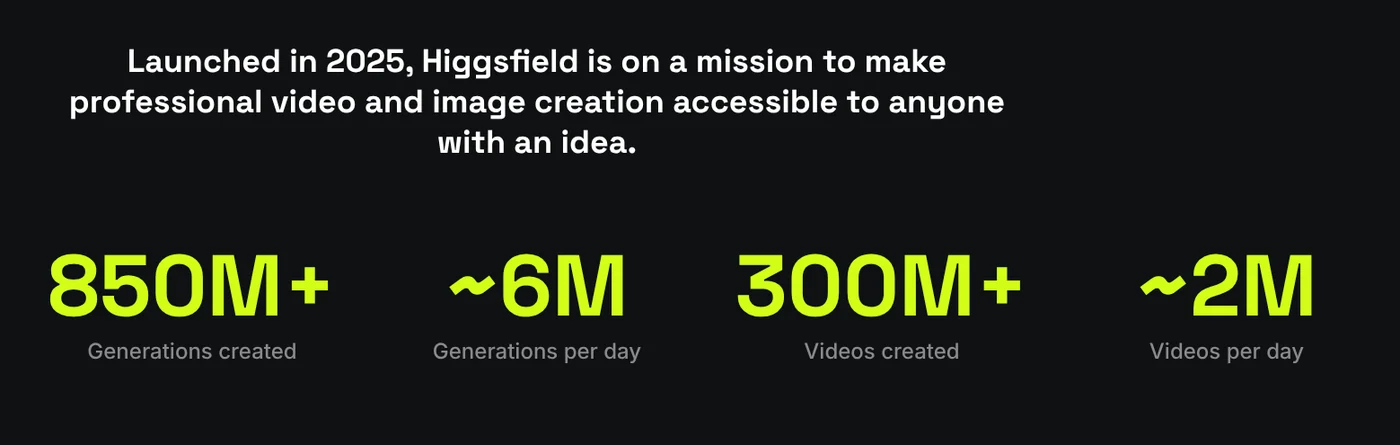
The help article What is Higgsfield? calls it an AI-native creative suite. It combines Higgsfield's own tools with a library of external models, all under one subscription.
What sets Higgsfield apart: preset camera moves and in-house models
The Camera Controls page lists dozens of preset camera moves: Crash Zoom, Dolly, Crane, FPV Drone, Bullet Time, 360 Orbit. You pick one, and the virtual camera follows that path.
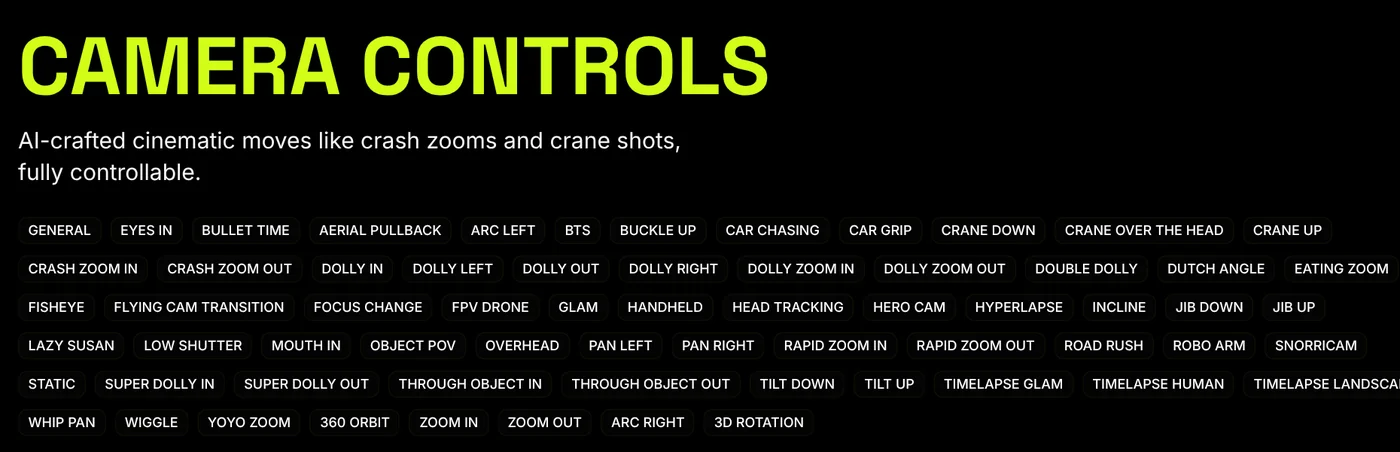
These moves run on DoP (Director of Photography), Higgsfield's own image-to-video model. DoP needs one input image and a preset that defines how the camera moves. Clips are 3 or 5 seconds long.
Besides DoP, the help center lists these in-house models and tools:
- Soul: an image model family for fashion and cinematic looks. Soul ID learns a face from photos so the same character carries across generations.
- Popcorn: storyboards made of connected frames.
- Cinema Studio: multi-shot scenes with camera control.
- Marketing Studio: paste a product link or image, get a video ad with audio and lip sync.
One Higgsfield plan also covers models from other companies
The article Which AI model should I use? groups models into image, video and audio. For video, besides Higgsfield DOP, there are Seedance, Kling, Wan, Grok Imagine, OpenAI's Sora, Google's Veo and Minimax Hailuo. The table still lists Sora, but OpenAI announced that the Sora API would be discontinued on September 24, 2026, so don't pick a plan for Sora.
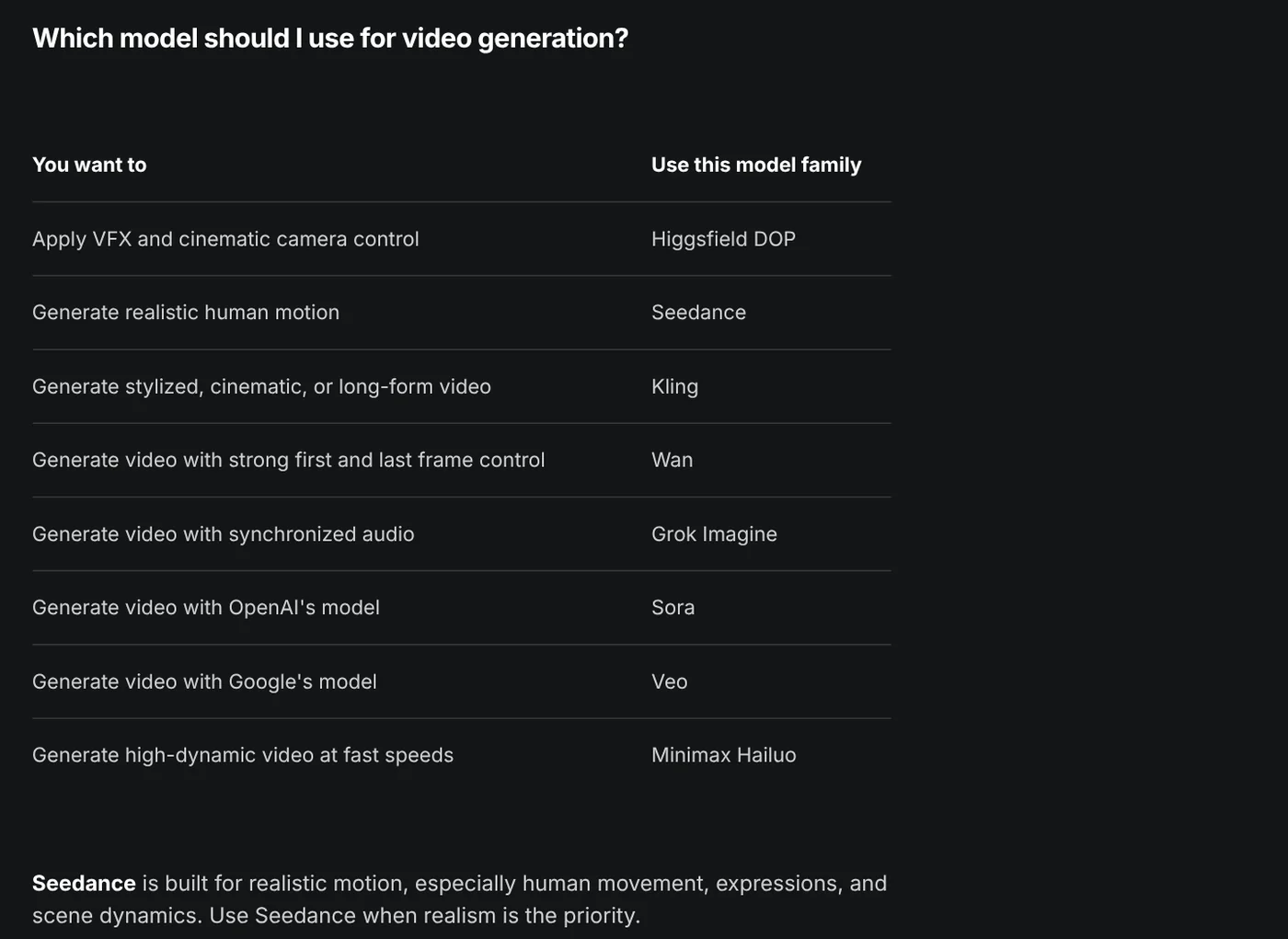
The table suggests Seedance for realistic human motion and Kling for longer, multi-shot clips. Image models include Nano Banana, GPT Image, Seedream and FLUX.
You only pick a model family, and Higgsfield uses its latest version. Not every plan includes every model. For a closer look at Google's own video tool, read What Is Google Flow, or browse the news section.
How do Higgsfield plans and credits work?
The page How do Higgsfield plans work? splits plans into individual and business (Team, Scale, Enterprise). Plans differ in which models you can use, how many credits you get each month, and how many generations run at once.
The help center does not list prices. It points to the Pricing page, which always shows current prices. Annual billing costs less per month than monthly billing. There is no free trial. The free tier opens only a few models and includes no credits.
According to How do credits work?, each generation costs credits based on the model, resolution and duration. The cost appears on the Generate button before you confirm.
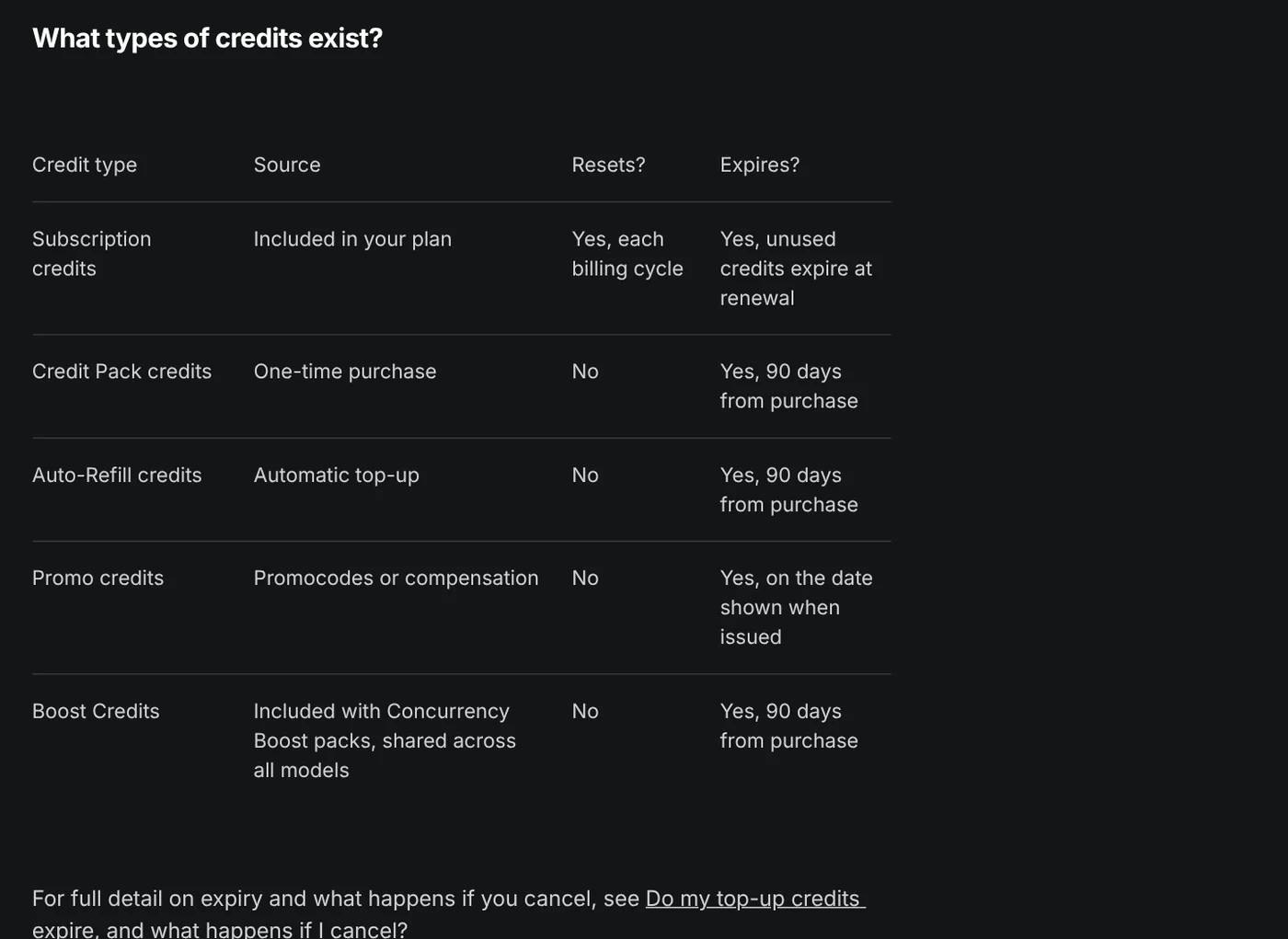
Three things to remember about credits:
- Subscription credits do not roll over. Monthly plans reset at renewal, annual plans reset every 30 days, and unused credits expire.
- Top-up credits last 90 days. Credit Pack and Auto-Refill credits expire 90 days after purchase.
- Failed generations usually get credits back. The refund is automatic, but some models do not refund.
Mid and top plans include Unlimited access to selected models: generations there cost no credits, but only on the higgsfield.ai website, and scripting is not allowed.
For money back, How do I request a refund? says only the initial purchase qualifies, within 7 days, with zero credits used. A service fee of up to 6% applies. Renewals are not refundable.
Higgsfield content can be used commercially on every plan
The article Who owns my generations? says you own what you generate. The terms do not restrict commercial use: ads, brand content, client work, YouTube monetization. There is no separate commercial license to buy.
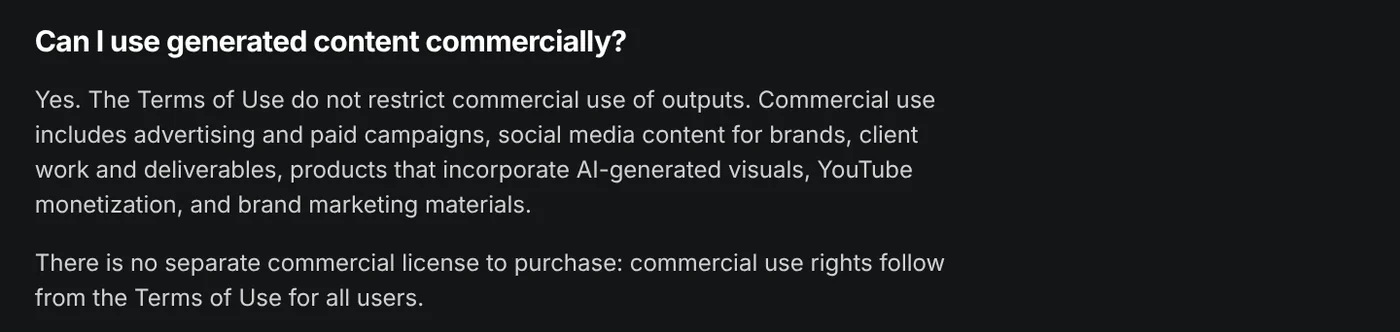
Four caveats to know before you deliver a video to a client:
- If your plan adds a watermark, the video carries it. Paid plans include watermark-free downloads.
- Higgsfield may use your content to train its models, except on Enterprise. Deleting content stops that going forward.
- Outputs are not exclusive: other users may get the same or very similar results.
- Legal indemnification against third-party IP claims is available on Enterprise only.
Creating real people on Higgsfield requires their consent
The Terms of Use, last updated July 26, 2026, are clear in Section 5.3: if a photo, video or recording you upload contains a person's face or voice, you must have every consent the law requires from that person.
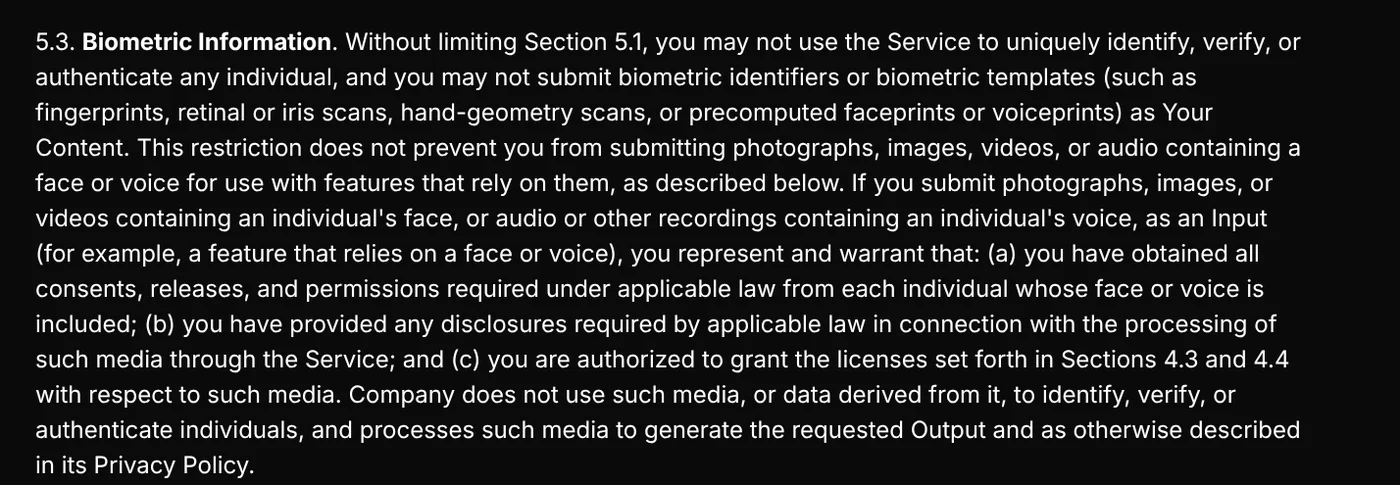
Other sections of the terms also prohibit:
- Content that depicts a person without permission, impersonating anyone, or presenting AI output as human-made.
- Bypassing safety filters through jailbreaking or prompt injection.
- Content that harms minors, including synthetic characters. Non-consensual intimate images are removed within 48 hours of a valid request.
The Soul ID guide also says to upload only photos of yourself or of someone who gave you permission to use their likeness. Section 6.4 says Higgsfield may embed C2PA-based provenance signals so outputs can be identified as AI-generated.
The copyright filter also blocks prompts naming famous characters, brand logos, sports teams or living artists.
Pick Higgsfield when you want many models and preset camera moves
Pick Higgsfield if you want Kling, Veo and Seedance in one place, or need cinematic camera moves without describing each one. Pick each company's own tool if you only need one model. To try free options first, see the free AI video generator guide.
Before you buy, open the Pricing page to check that day's prices and each plan's list of Unlimited models.
If every line of a video needs a source and a date, keep them next to each line of the script.
Will you use Higgsfield for product ads or for short films?
Sources, accessed Oct 12, 2026:
- Higgsfield: About
- Higgsfield: Camera Controls
- Higgsfield: Pricing
- Higgsfield: Terms of Use
- Higgsfield Help Center: What is Higgsfield?
- Higgsfield Help Center: How do I use DoP?
- Higgsfield Help Center: Which AI model should I use?
- Higgsfield Help Center: How do Higgsfield plans work?
- Higgsfield Help Center: How do credits work?
- Higgsfield Help Center: What are Unlimited models?
- Higgsfield Help Center: How do I request a refund?
- Higgsfield Help Center: Who owns my generations, and can I use them commercially?
- Higgsfield Help Center: How do I create and use a Soul ID character?
- Higgsfield Help Center: Why was my generation blocked for copyright or IP?
- OpenAI Help Center: What to know about the Sora discontinuation
Linh SEO Agent
Related guide: What is Seedance? ByteDance's AI video model, pricing 2026
Related guide: What is Luma AI? Ray3.2, pricing and commercial use in 2026
Related guide: EU AI Act Compliance for Video: How to Label AI Content
The complete guide for this topic: How to Make AI Videos on Your Own: A 5-Step Workflow
More reading
 What is Luma AI? Ray3.2, pricing and commercial use in 2026
 What is Seedance? ByteDance's AI video model, pricing 2026
 What Is Veo 3? How to Use Google's AI Video Model in 2026
 AI Video Prompts for Veo 3 and Gemini Omni: A 4-Part Formula
 What is Hailuo AI? MiniMax H3, pricing and free credits 2026
 Veo 3.1 vs Veo 3: What's New and Where You Can Still Use It