What Is Google Flow? How to Use It and What It Costs
Google Flow is Google's AI studio for video and images. See what each Google AI plan costs in the US, the credits you get, and 5 steps to a first video.


In this article (7)
- Flow now makes both videos and images, not just Veo clips
- Where can you use Google Flow?
- Each plan comes with a fixed number of Flow credits
- You can make a first video in 5 steps
- A good video prompt has 4 parts
- Three habits burn through credits fast
- Start with Plus, move to Pro if you make video every week
Google Flow is Google's AI studio for making videos and images in your web browser. To use it regularly, you need a Google AI plan. In the US, the cheapest one, Google AI Plus, costs $4.99 a month.
Flow now makes both videos and images, not just Veo clips
Google launched Flow at I/O 2025 as a filmmaking tool built for its Veo video model. In May 2026, Google started calling Flow an AI creative studio: one place to create and edit both videos and images. Flow is available in more than 140 countries.

The newest video model in Flow is Gemini Omni 1.1 Flash, which Google announced in its August 2026 roundup. It adds scene extension, interpolation between a first frame and a last frame, and 4K video. For images, Flow uses Nano Banana (Feb 25, 2026 update). You create images right inside Flow and then use them as ingredients for your videos.
Two newer features are Google Flow Agent and Google Flow Tools. The Agent takes on multi-step jobs: it brainstorms ideas, makes several variations at once, edits in batches, and sorts the results into collections. Tools let you describe a custom tool in plain language, with no code. Anyone who uses Flow can use the ready-made Tools. To create or change Tools, you need a Google AI plan.
Where can you use Google Flow?
Flow works in the 152 countries and territories listed on its help page, Vietnam included. You need three things:
- You are 18 or older and have verified your age with Google.
- You have a Google AI Plus, Pro, or Ultra plan. Some Google Workspace plans also work, with 50 credits a day. Flow's credits page also says people without a plan get 50 credits a day to try it. More on that below.
- You open Flow in a Chromium browser such as Chrome or Edge on a computer. Google says other browsers and phones are not fully optimized yet.

If your country is not supported, a VPN will not get you in, according to Google's help page.
Each plan comes with a fixed number of Flow credits
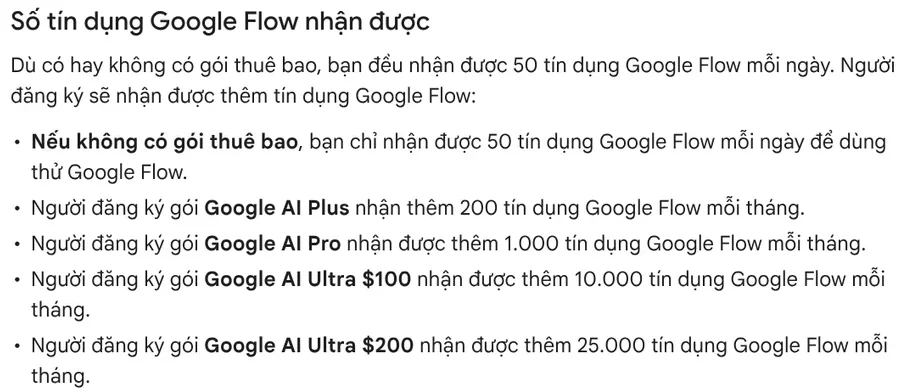
Credits are what Flow deducts each time you generate a video. US prices below come from Google's Gemini subscriptions page (United States), and the monthly Flow credits from the Google AI plans page, both read on Oct 11, 2026:
| Plan | US price per month | Flow credits per month | Good for |
|---|---|---|---|
| Google AI Plus | $4.99 | 200 | Beginners who want to try a few short videos a month |
| Google AI Pro | $19.99 | 1,000 | People who make videos every week for a channel or a store |
| Google AI Ultra 5x | $99.99 | 10,000 | Small teams, or people who make video for a living |
| Google AI Ultra 20x | $199.99 | 25,000 | Studios that need high volume every day |
Prices differ by country. In Vietnam, the same four plans cost 132,000, 489,000, 2,250,000 and 5,500,000 VND a month, according to the Vietnamese Google AI plans page read on Oct 9, 2026.
The credit cost of each generation is not fixed. Google says costs change quickly, and you can see them in Settings when you pick a model. Keep two things in mind: failed generations do not cost credits, and Flow limits how fast you can generate if you make too much in one day.
On top of the monthly credits, Flow's credits page says everyone gets 50 credits a day, with or without a plan. Daily credits do not roll over to the next day. Without a plan you can still create images, but during peak hours, 2:00 to 5:00 PM UTC, you may not be able to create videos. Flow's Get started page still lists a Google AI plan as a requirement, so sign in and test it before you buy.
You can make a first video in 5 steps
Open Flow in Chrome on a computer
Go to flow.google.com and sign in with a Google account that has an AI plan. Google says the desktop web version has the most features.
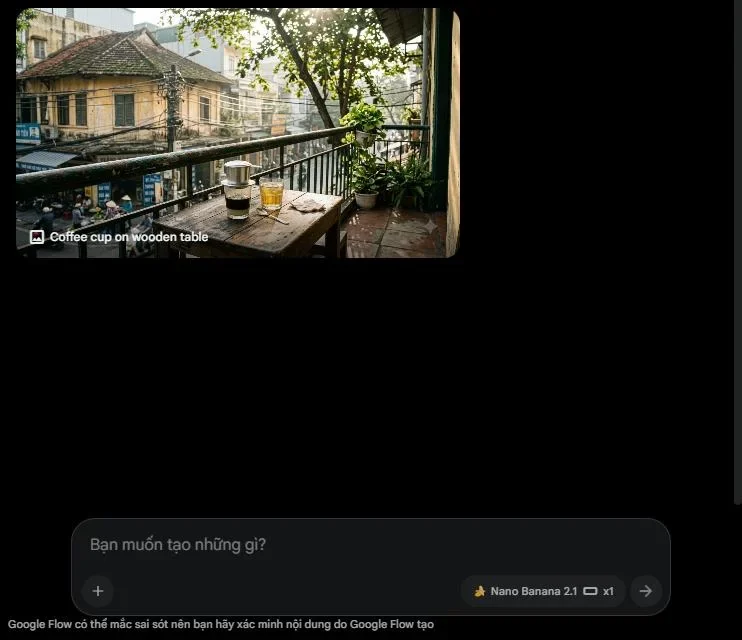
Create your character and setting images first
Type a description in the prompt box and choose Nano Banana to create an image. Google says creating images in Flow is free. These images keep your character and setting the same from scene to scene.
Pull images into your prompt with @
When you write a video prompt, type @ to open your library and pick the image you just made. Flow uses that image as an ingredient, so your character keeps the same face across scenes.
Write a video prompt with all 4 parts
A prompt should cover the subject and action, the framing and camera movement, the location and lighting, and the style. There is an example in the next section.
Extend, edit, then combine your scenes
Once you have a first clip, extend it to add what happens next. To change one detail, circle the area with the lasso or draw right on the image, then say in plain words what to change. Flow can also add or remove objects in a video by prompt, and control the camera, such as a pan or a zoom.
A good video prompt has 4 parts
Google recommends that a prompt cover four things: who does what, where the camera sits and how it moves, where the scene is and what the light looks like, and the visual style. If you leave a part out, the model guesses it. A wrong guess costs you credits to generate again.
Example:
Close-up of a young woman lifting a cup of Vietnamese drip coffee to sip, light steam rising. The camera slowly pans from a side angle to the front. A cafe balcony in Hanoi's Old Quarter in early morning, soft golden light through the leaves. Realistic cinematic style, blurred street background.
If the video is going to TikTok or Reels, choose a vertical frame from the start. For which aspect ratio fits each platform, browse the News section.
Three habits burn through credits fast
Using the most expensive mode for drafts. Flow has a Fast mode and a Quality mode. Check what each one costs in Settings, and use the cheaper one for drafts. Switch to the higher mode only after your script is final.
Writing a short prompt and hitting regenerate. A one-line prompt usually gives random results. Each regeneration costs credits. Writing all 4 parts up front is cheaper.
Forgetting the reference image. Without an image pulled in with @, the model can easily invent a new face in the next scene. The video loses continuity and you have to redo it.
Start with Plus, move to Pro if you make video every week
Choose Plus if you are just trying Flow and only make a few clips a month. Choose Pro if you make videos every week, because 1,000 credits give you much more room to test and fix. What kind of video will you make first with Flow?
If you finish a long video and need to cut it into short clips for posting, the Cut long videos into shorts skill is still in development, and you can get the early version free before it goes on sale. If you have no time to make it yourself, see the AI video with a source table service.
Sources (11) · accessed Oct 9, 2026
- Google: Introducing Flow (2025)
- Google: Flow updates (Feb 25, 2026)
- Google: New agents, mobile apps and Gemini Omni for Google Flow (May 19, 2026)
- Google: Google AI announcements from August 2026 (August 2026 roundup)
- Google Flow Help: Get started and list of countries
- Google Flow Help: Manage Google Flow credits (Vietnamese page)
- Google One: Google AI plans in Vietnam (Vietnamese page)
- Google: 5 tips for using Flow (Jun 25, 2025)
- Google: Gemini subscriptions, United States (US prices, accessed Oct 11, 2026)
- Google One: Google AI plans, United States (Flow credits per plan, accessed Oct 11, 2026)
- Illustrative photos: Unsplash (Jakob Owens, Elliot Andrews, TheRegisti, Sanjeev Nagaraj), Unsplash License.
Linh SEO Agent
Related guide: Free Text to Video AI: From Script to Clip in Google Flow
Related guide: Gemini Omni Pricing: How Much It Costs and Which Plan
Related guide: What Is Veo 3? How to Use Google's AI Video Model in 2026
The complete guide for this topic: How to Make AI Videos on Your Own: A 5-Step Workflow
More reading
 Gemini Omni Pricing: How Much It Costs and Which Plan
 Free Image to Video AI: Beginner Steps in Google Flow
 What Is Veo 3? How to Use Google's AI Video Model in 2026
 Free Text to Video AI: From Script to Clip in Google Flow
 Gemini Photo to Video: Steps, Requirements and Limits
 What is Pika AI? 3 areas: video, images, sound and pricing