
Claude Skill for Research: Find and Summarize Sources
How to write a Claude skill for research: pair a skill with Research and web search so Claude finds, summarizes, and cites sources. SKILL.md sample.


In this article (7)
- A skill packages the process, Research does the searching
- A Claude skill for research should set five rules
- Write SKILL.md: the name and description decide when the skill runs
- Research with sources
- Install the skill: zip it and upload it in Customize > Skills
- How do you know your research skill works?
- Common mistakes when you write a Claude skill for research
A Claude skill for research is a folder of instructions that teaches Claude to find, read, and summarize sources with a fixed process. Pair it with web search or Research, and you get a summary with citations every time.
A skill packages the process, Research does the searching
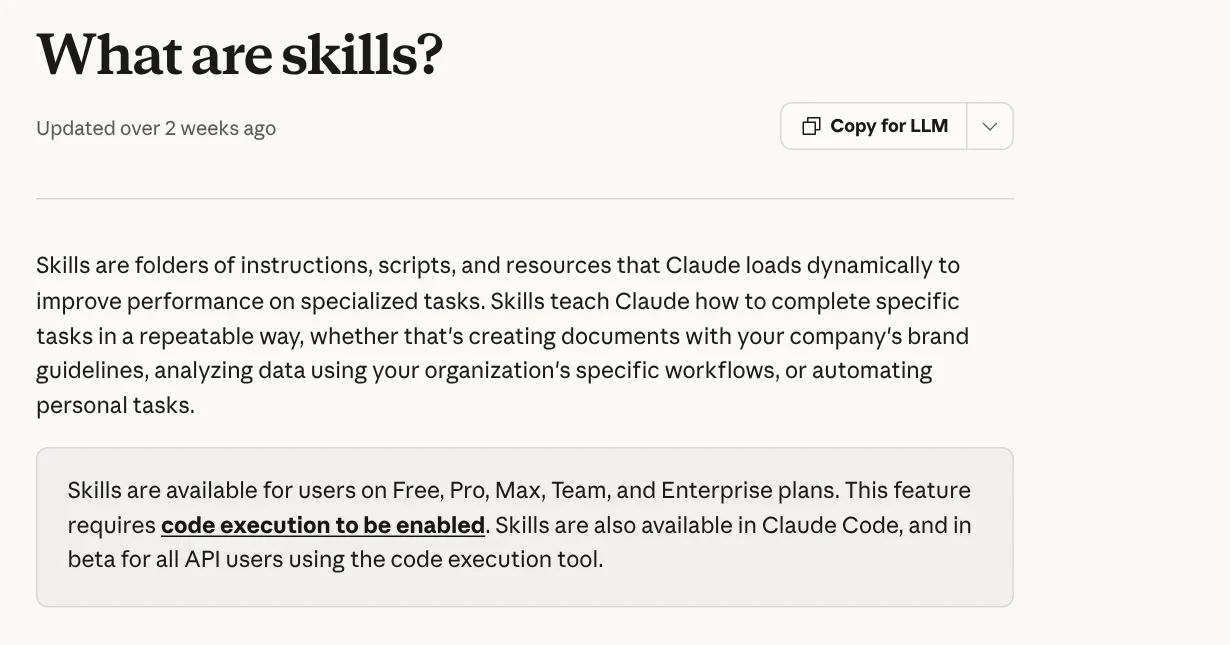
The Claude Help Center, read on Oct 9, 2026, defines skills as folders of instructions, scripts, and resources that Claude loads when needed. A skill teaches Claude to do a specific task in a repeatable way. Skills are available on the Free, Pro, Max, Team, and Enterprise plans, and they require code execution to be turned on.
A skill does not search for information by itself. Two other features do the searching:
- Web search: Claude calls a search tool when a question needs current information. According to the web search guide, every response includes citations so you can check the sources yourself.
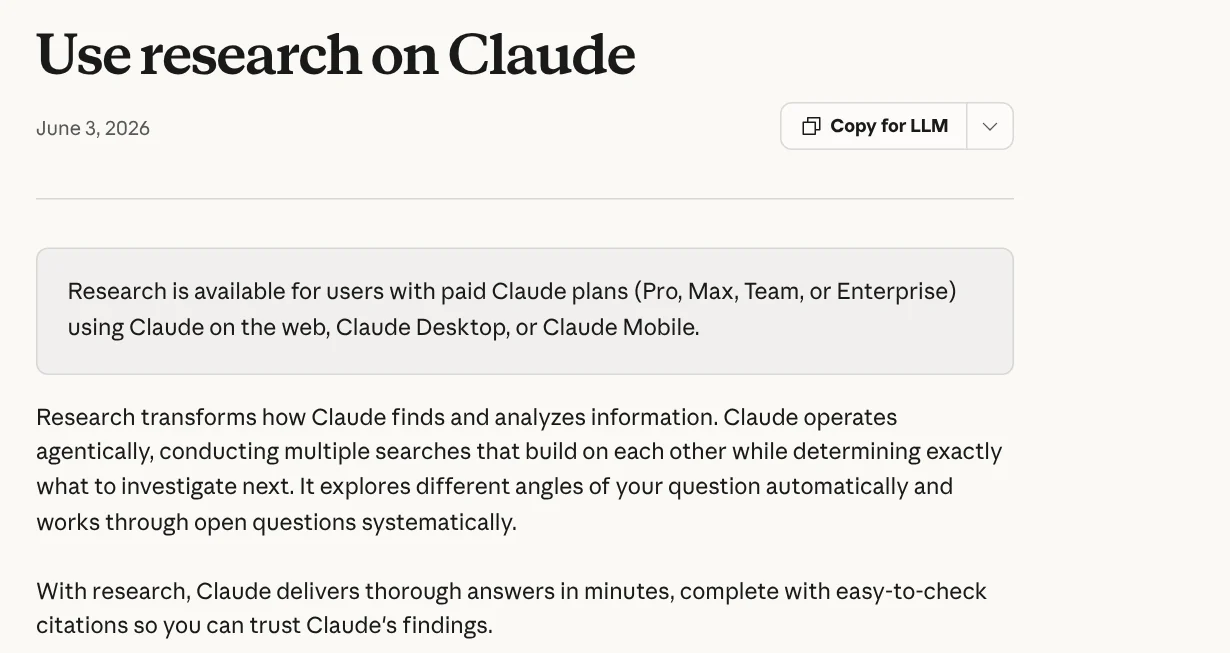
- Research: Claude runs several connected searches, decides what to look into next, and answers with citations that are easy to check. Research is for the paid Pro, Max, Team, and Enterprise plans, and it needs web search turned on.
In short: web search and Research do the finding, and the skill sets how to search and how to present the results. Anthropic also separates skills from MCP. MCP connects Claude to outside services, while skills teach Claude how to use those tools well.
A Claude skill for research should set five rules
A good research skill does not need to be long. It answers five questions you would otherwise repeat every time you ask Claude to look something up:
- Which sources to trust. For example: the company's own help pages, blog, and official docs first; news sites and personal blogs only for background.
- What to record for each source. Page name, link, publish or update date, and the date you read it.
- What to do with conflicts. Record both sources and state where they differ, without picking one.
- Which summary format to use. For example: three key points, a table of facts, and a list of claims that could not be checked.
- When to stop. For example: three official sources for each important fact.

Anthropic's help page on how to create custom skills gives similar advice. A good skill solves a specific, repeatable task, has clear instructions, and includes examples when helpful. It also defines when it should be used.
Write SKILL.md: the name and description decide when the skill runs
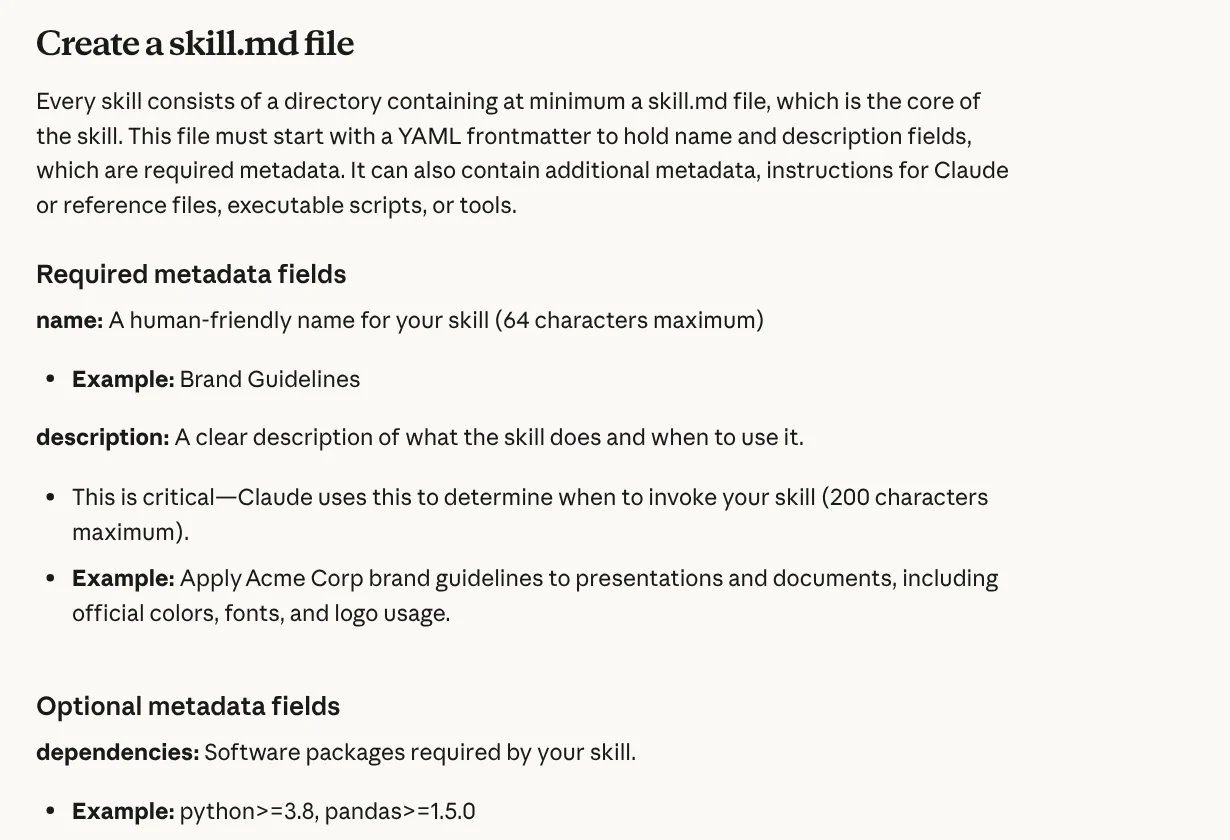
Each skill is a folder with at least one skill.md file. The file starts with YAML frontmatter that has two required fields: name, up to 64 characters, and description, up to 200 characters on the Help Center page (the developer docs allow up to 1,024). Anthropic stresses that the description is the most important part, because Claude uses it to decide when to invoke the skill.
A short sample for a research skill:
```markdown
name: researching-official-sources description: Finds and summarizes official sources for a question, with links and access dates. Use for research, fact checks, or compiling documents.
Research with sources
- Search the company's official pages first (help, blog, docs, pricing).
- For each fact, record: page name, link, update date, access date.
- If two sources disagree, record both and do not pick one.
- Answer in this format: three key points, a fact table, a "Not verified" section.
- If there is no official source, say so and do not guess.
```
Anthropic's best practices guide adds a few notes. Write the description in the third person. Keep the SKILL.md body under 500 lines, and move longer content into separate files. Only the name and description are loaded up front, and the body is read only when the skill becomes relevant.
Install the skill: zip it and upload it in Customize > Skills
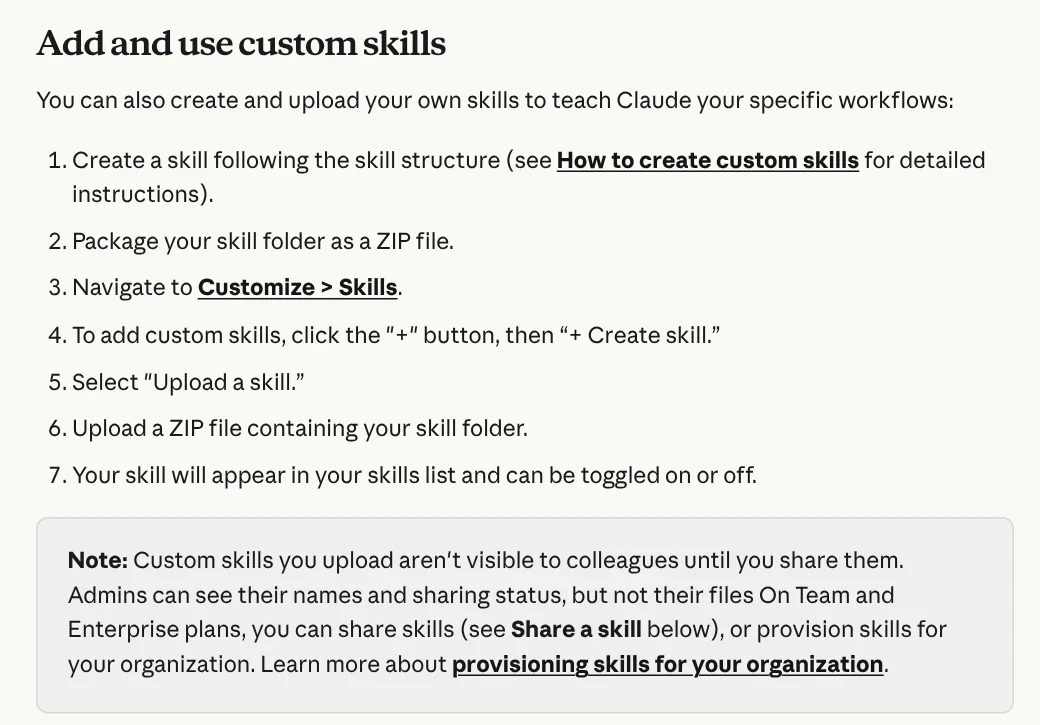
According to Use skills in Claude, on the individual Free, Pro, and Max plans you do this:
- Go to Settings > Capabilities and turn on Code execution and file creation.
- Compress the skill folder into a ZIP file.
- Go to Customize > Skills, click +, choose + Create skill, then Upload a skill.
- Upload the ZIP file. The skill appears in your list and can be toggled on or off.
For Claude to actually search, also turn on web search or Research for the chat. If Research is on but Claude does not search, the help page suggests asking directly: "Claude, please use the research tool to..." followed by your request.
How do you know your research skill works?
Anthropic advises you to build evaluations before you write extensive instructions. Create at least three test scenarios, measure how Claude does without the skill, then compare the results with the skill. Anthropic also advises testing the skill with every model you plan to use, because the same instructions can behave differently.

For a research skill, three easy scenarios are: a question with a clear official source, a question with two conflicting sources, and a question with almost no sources. The skill passes when Claude records every link and access date and says clearly what it could not check.
Common mistakes when you write a Claude skill for research
A vague description. If you write "helps with research," Claude has a hard time knowing when to call it. State what the skill does and when to use it.
Forgetting to turn on web search. A skill is only instructions; it does not search on its own. Research also needs web search to run. Before you ask, click + at the bottom left of the chat window and select Web search.
One skill that does everything. Anthropic advises keeping each skill focused on one workflow. Keep your research skill separate from your writing skill.
A SKILL.md that is too long. Past 500 lines, move examples and source lists into reference files.
Trusting the summary without opening the sources. Citations are there so you can check them. Open at least the sources behind important numbers.
If you do not want to write one from scratch, see the skills and apps catalog: lightweight skills start from $5, and video skills and an on-device setup service are also listed there. Guides on what your computer needs to run a skill, and on adding skills to Codex, are in News.
Sources, accessed Oct 9, 2026:
- Anthropic: What are skills?
- Anthropic: How to create custom skills
- Anthropic: Use skills in Claude
- Anthropic: Use research on Claude
- Anthropic: Enable and use web search
- Anthropic: Skill authoring best practices
- Illustrative photos: Unsplash (American Jael, Jakub Żerdzicki, Brian Huynh), Unsplash License.
Linh SEO Agent
Related guide: How to Tailor Your Resume to a Job Description with AI
Related guide: How to Write a Claude Skill: SKILL.md Structure
Related guide: What Is an AI Agent? Simple Examples for Beginners
The complete guide for this topic: What Is a Claude Skill? How to Install and Use One
More reading
 How to Write a Claude Skill: SKILL.md Structure
 What Is an AI Agent Skill, and How Is It Not a Prompt?
 How to install a skill in Codex: folder, SKILL.md, invoking
 AI Skill Requirements: Plans, Apps and Hardware to Run Locally
 What Is an MCP Server and How to Add One to Claude
 What Is MCP in AI? A Plain-English Guide for Non-Coders








