
What Is MCP in AI? A Plain-English Guide for Non-Coders
MCP is an open standard that connects Claude, ChatGPT and other AI apps to your files, calendar and tools, like a USB-C port for AI. Plus safety tips.


In this article (6)
- MCP launched on Nov 25, 2024 so AI would not be stuck inside the chat box
- MCP works like a USB-C port for AI apps
- Can you use MCP if you do not write code?
- MCP is now a shared standard, not just Anthropic's
- Connecting MCP means granting access, so connect only servers you trust
- Three common myths about MCP
MCP (Model Context Protocol) is an open standard that lets AI apps like Claude or ChatGPT connect to files, calendars, databases and outside tools. Think of it as a USB-C port for AI.
MCP launched on Nov 25, 2024 so AI would not be stuck inside the chat box
On Nov 25, 2024, Anthropic open-sourced the Model Context Protocol. The reason was stated clearly: even the smartest AI model is cut off from real data, because every new data source needs its own custom connection.

So what is MCP in everyday terms? Think back to when every phone had its own charger. Connecting AI to Google Drive took one approach, Slack another, and a GitHub code repository yet another. MCP replaces that pile of one-off connections with one shared standard. A tool maker builds to the standard once, and any AI app that supports MCP can use it.
MCP works like a USB-C port for AI apps
The official MCP site defines MCP as an open-source standard for connecting AI apps to outside systems. It uses the same familiar picture: USB-C is the standard way to connect electronic devices, and MCP is the standard way to connect AI apps.
Through MCP, an AI app can connect to three kinds of things:
- Data sources, such as files on your computer or databases.
- Tools, such as search engines or calculators.
- Workflows, such as specialized prompt templates.
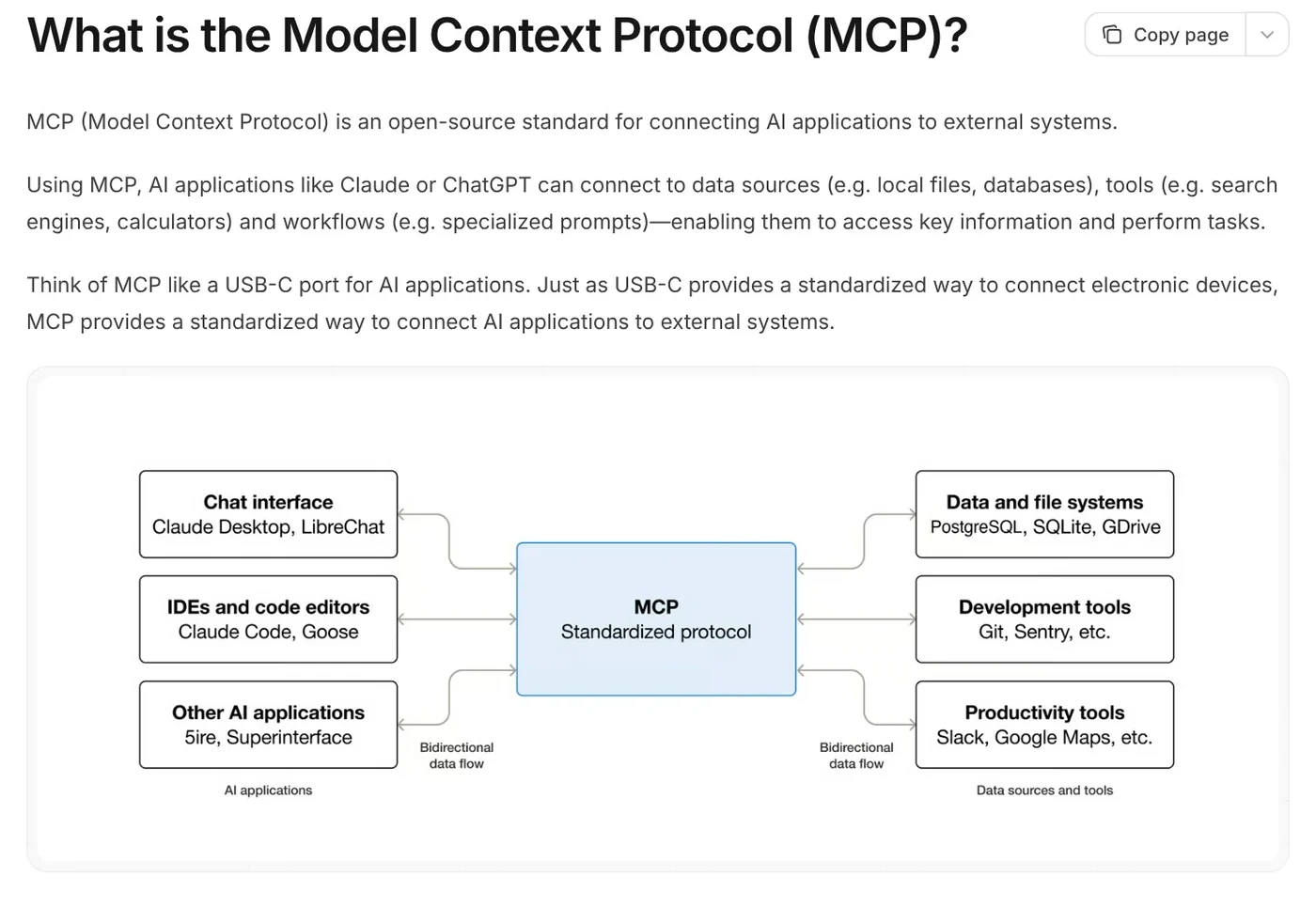
The diagram has two roles. An MCP server is the "plug" written by the tool maker. It opens their data or features to AI. An MCP client is the AI app that plugs into it, such as Claude Desktop or Claude Code.
The official site gives a few easy examples. An AI assistant can read your Google Calendar and Notion to give more personal help. Claude Code can build a whole web app from a Figma design. A company chatbot can query several databases at once from a chat window.
Can you use MCP if you do not write code?
Yes, and most of the time you will not even know you are using it. In Claude, connectors run on MCP. By December 2025, Claude had a directory of more than 75 connectors powered by MCP. You just click connect and sign in.
If a service gives you an MCP server address, you can add it yourself. According to the Claude Help Center, custom connectors are available on the Free, Pro, Max, Team and Enterprise plans. The Free plan allows only one custom connector. On Pro or Max, the steps are:
- Go to Customize > Connectors.
- Click + Add, then Add custom connector.
- Enter a name, paste the MCP server address, and click Continue.
- Review the authentication settings, choose how people sign in, then click Add to finish.
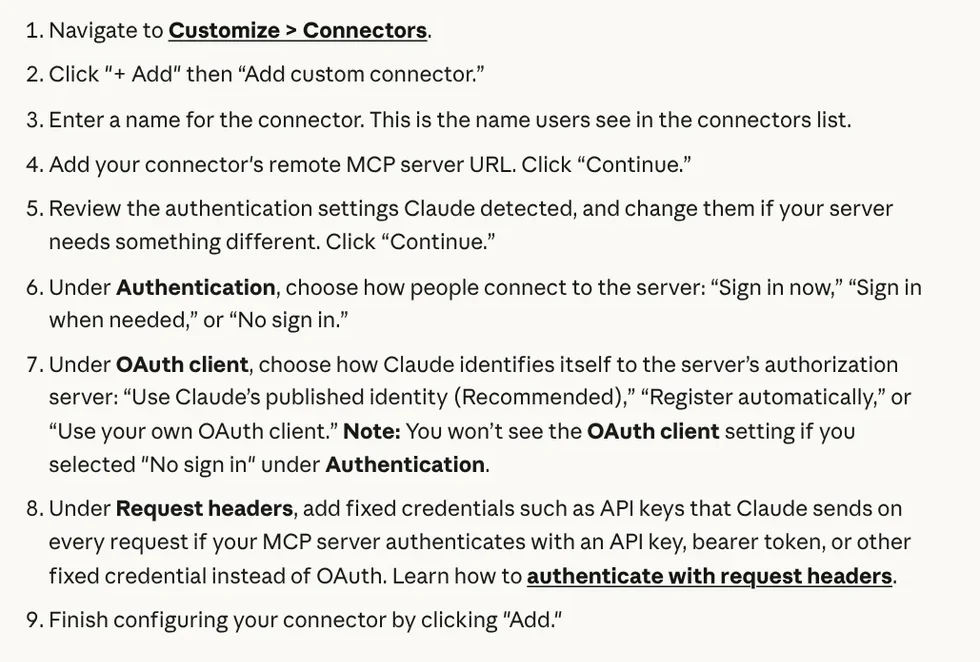
On a Team plan, only the organization Owner can add connectors. Enterprise also lets people with a granted admin role do it. Members then go to Customize > Connectors and click Connect.
MCP is now a shared standard, not just Anthropic's
On Dec 9, 2025, Anthropic donated MCP to the Agentic AI Foundation, a foundation under the Linux Foundation. The foundation was co-founded by Anthropic, Block and OpenAI, with support from Google, Microsoft, AWS, Cloudflare and Bloomberg. The way the MCP project is governed stays the same.
In the same post, Anthropic said MCP was already in ChatGPT, Cursor, Gemini, Microsoft Copilot and Visual Studio Code. At that point there were more than 10,000 active public MCP servers. OpenAI also has a guide to building MCP servers for use in ChatGPT, Codex and through the API.
Because it is a shared standard, an MCP server written once can work with many AI apps. That is why you will see the letters MCP more and more on software websites.
Connecting MCP means granting access, so connect only servers you trust
This is the part non-coders often skip. The Claude Help Center says it directly: a custom connector can point to a service that Anthropic has not verified. Once connected, Claude can read and even change data in that service, within the permissions you grant.
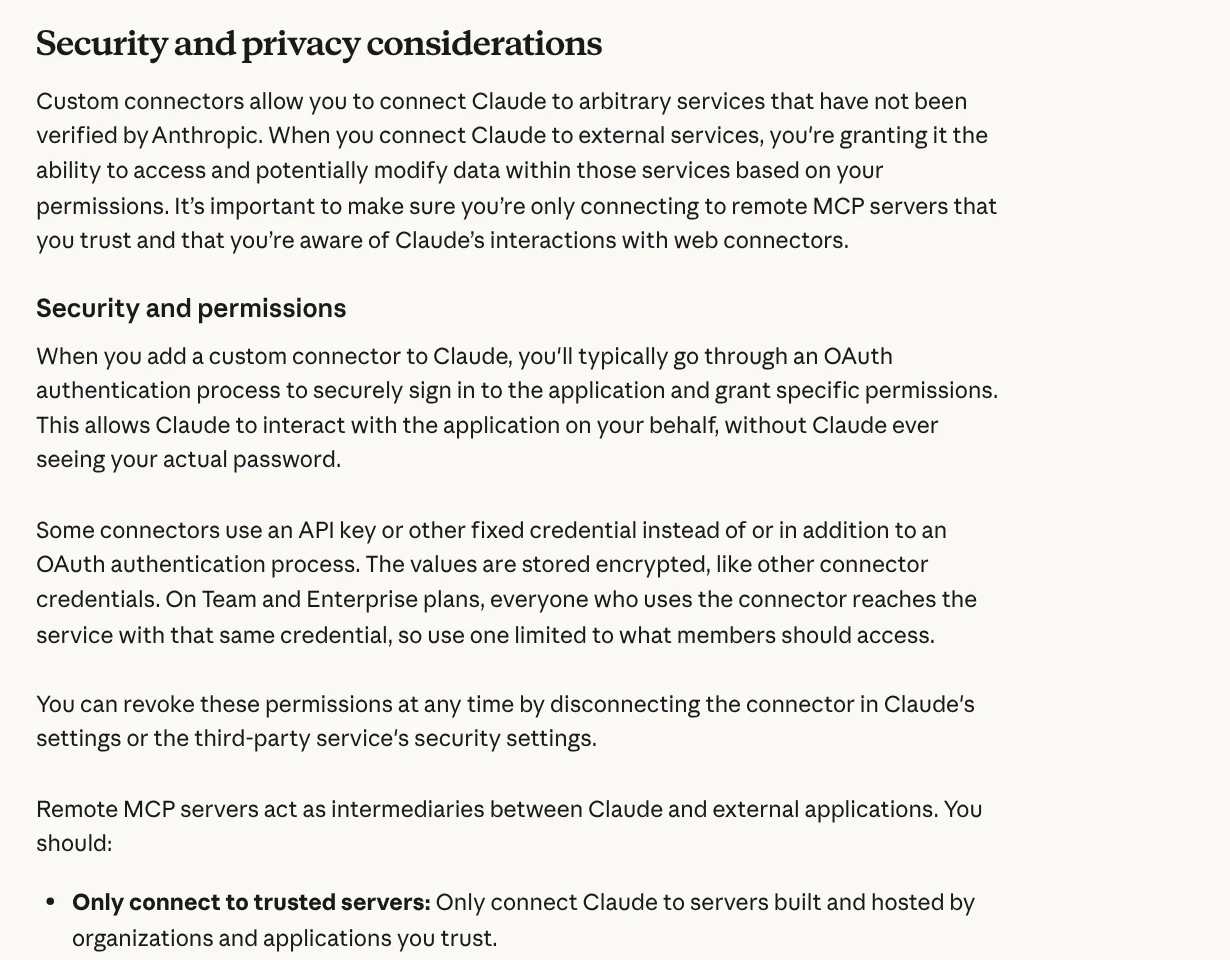
Four safe habits from the help page:
- Connect only servers from organizations you trust. An MCP server sits between the AI and your account.
- Read the permissions requested when you sign in. Deny any that look unnecessary.
- Watch out for prompt injection. A malicious server can hide instructions that make the AI do things you do not want.
- Click "Allow always" only for tools you trust. Turn off tools you do not need for the current conversation.
You can revoke access at any time by disconnecting the connector in Claude's settings.
Three common myths about MCP
"MCP is an AI app." It is not. MCP is a connection standard, the same way USB-C is not a phone. You keep using Claude, ChatGPT or any other app as before.
"You have to know how to code to use it." Writing an MCP server takes programming. Using a ready-made connector only takes a click and a sign-in.
"Every server is safe because the standard is open." An open standard only defines how things connect. Whether a server is safe depends on who wrote it.
MCP connects AI to outside tools, while a skill teaches AI to do a specific job your way. To get started with skills, News has guides on what a skill needs to run on your computer and how to install a skill in Codex. When you are ready, browse Skills and apps, where light skills start from $5.
Sources, accessed Oct 9, 2026:
- Anthropic: Introducing the Model Context Protocol (Nov 25, 2024)
- Anthropic: Donating the Model Context Protocol and establishing the Agentic AI Foundation (Dec 9, 2025)
- Model Context Protocol: What is the Model Context Protocol (MCP)?
- Claude Help Center: Get started with custom connectors using remote MCP
- OpenAI: Building MCP servers for plugins and API integrations
- Images: Unsplash (Lucian Alexe, John Barkiple), Unsplash License.
Linh SEO Agent
Related guide: What Is an MCP Server and How to Add One to Claude
The complete guide for this topic: What Is a Claude Skill? How to Install and Use One
More reading
 What Is an MCP Server and How to Add One to Claude
 English translation apps: 5 official apps compared
 AI Skill Requirements: Plans, Apps and Hardware to Run Locally
 Claude Skill for Research: Find and Summarize Sources
 How to Write a Claude Skill: SKILL.md Structure
 What Is an AI Agent Skill, and How Is It Not a Prompt?








