
AI Skill Requirements: Plans, Apps and Hardware to Run Locally
Running an AI skill locally takes a plan with skills, Claude Code or Codex, and Python for its scripts. A GPU matters only for local image models.


In this article (6)
- The Free plan includes skills, but Claude Code needs a paid plan
- Does the skill run on your computer or on Claude's servers?
- Claude Code and Codex run on an ordinary office computer
- Skills with Python scripts need Python and the right libraries
- A graphics card matters only when the skill runs an image model locally
- Common mistakes when preparing your computer for a skill
To run an AI skill on your own computer, you need a plan that includes skills, Claude Code or Codex, and Python for any bundled scripts. A graphics card matters only when the skill runs an image model locally.
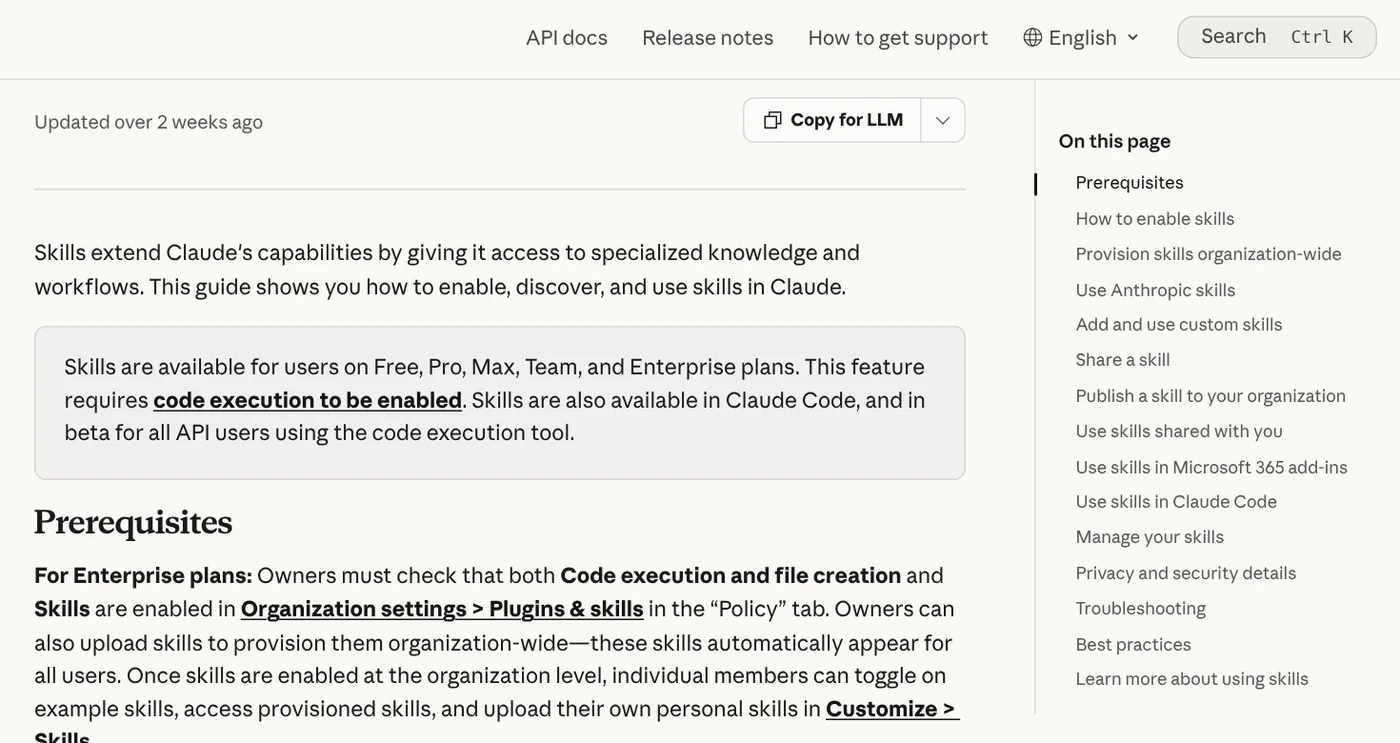
As of Oct 12, 2026, the Claude Help Center lists skills on all five plans: Free, Pro, Max, Team and Enterprise. What a skill is and how to turn one on in Claude is covered elsewhere in News. This guide covers only the setup: account, app, software and hardware.
The Free plan includes skills, but Claude Code needs a paid plan
In the Claude app, skills require code execution. On Free, Pro and Max, turn it on in Settings > Capabilities under Code execution and file creation. Team plans have it on by default at the organization level. On Enterprise, an owner enables it in Organization settings > Plugins & skills, on the Policy tab.
Claude Code is different. The Claude Code setup page says it requires a Pro, Max, Team, Enterprise or Console account. If you want Claude to run a skill's scripts directly on your machine, Pro is the lowest plan that does it.
For OpenAI's Codex, the official pricing page says Codex is included in ChatGPT Free, Go, Plus, Pro, Business, Edu and Enterprise. Free and Go get Codex in the desktop app, still rolling out. Plus, at $20 a month, adds Codex in the CLI, the IDE extension and on the web.
Does the skill run on your computer or on Claude's servers?
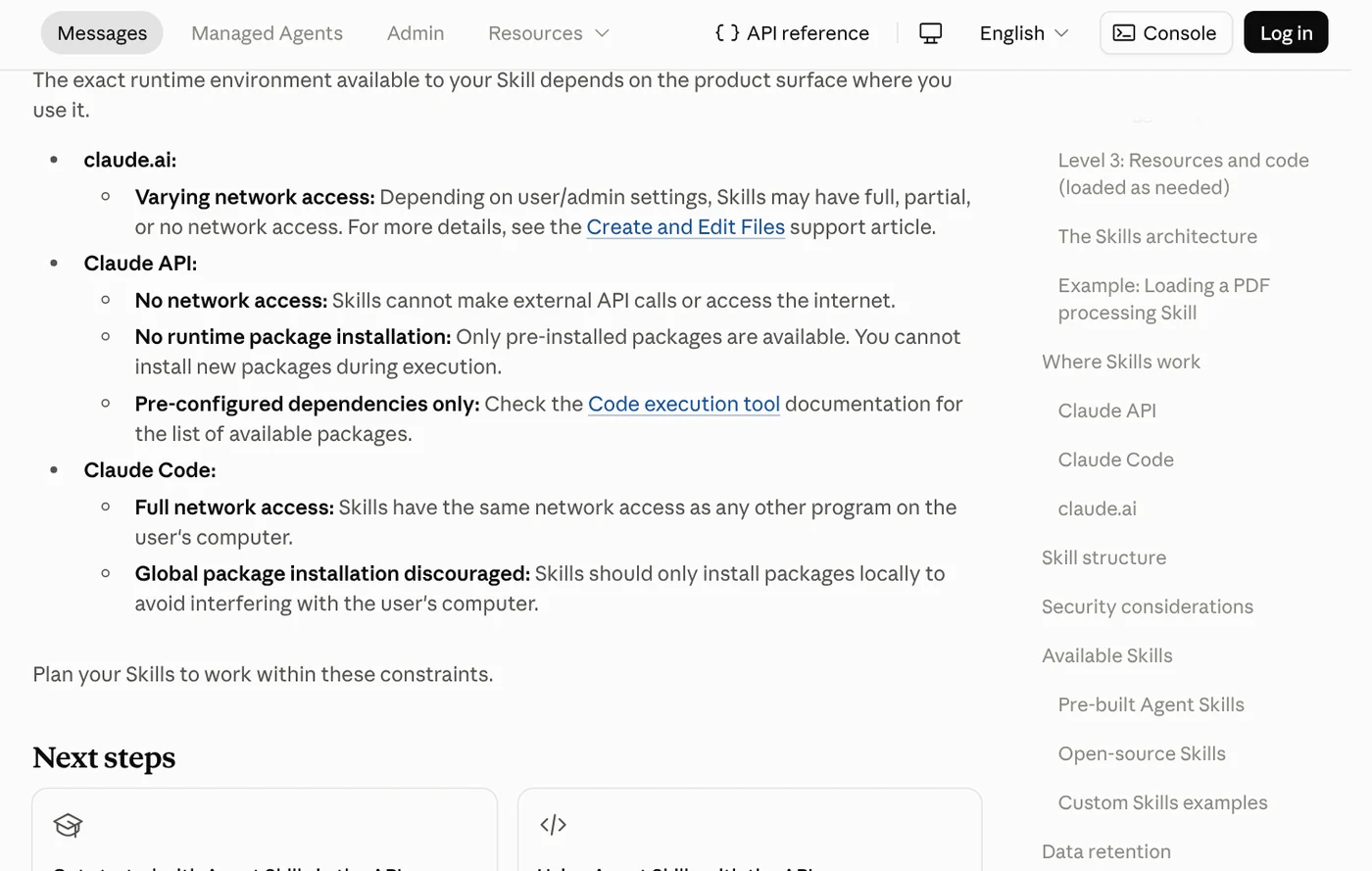
Where a script runs depends on the app you open. Anthropic's Agent Skills overview explains that skills run in a virtual machine with a filesystem and bash. On claude.ai that machine sits on Claude's side, so you don't install Python on your own computer.
In Claude Code, skills live in ~/.claude/skills/ on your machine. Anthropic notes that skills there have the same network access as any other program on your computer. The scripts call the Python you installed, so a missing library means an immediate error.
Codex works the same way. OpenAI's skills guide says Codex reads skills from $HOME/.agents/skills or from .agents/skills folders in your project. The Codex CLI page says Codex runs the tools already installed on your machine, so whatever the skill needs must be there first.
Claude Code and Codex run on an ordinary office computer
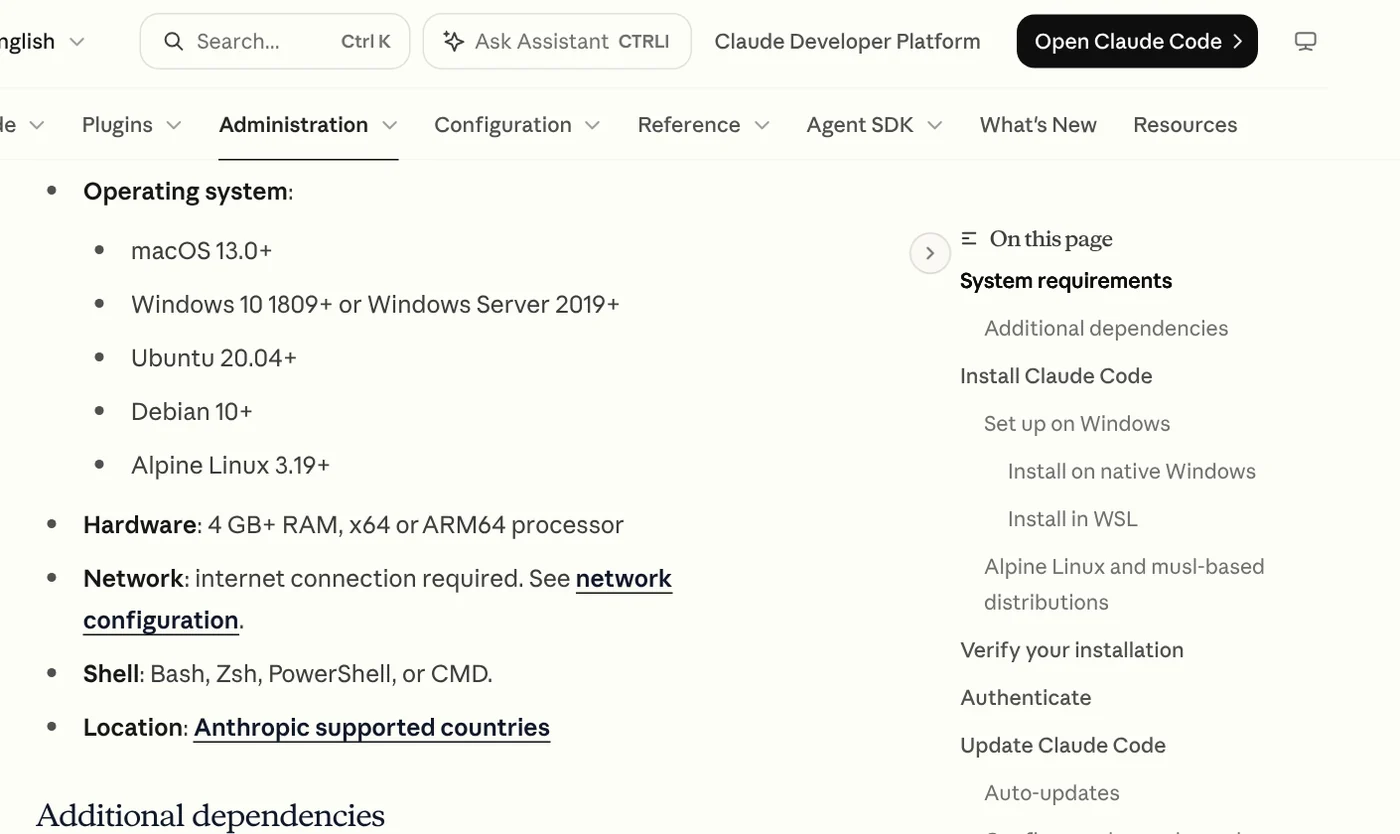
Claude Code's system requirements are modest: macOS 13.0 or later, Windows 10 version 1809 or later, or Ubuntu 20.04 or later. You need 4 GB of RAM or more, an x64 or ARM64 processor and an internet connection. If you'd rather avoid the terminal, use the Claude Code Desktop app. On Windows without Git for Windows, Claude Code runs commands through PowerShell.
Codex is part of the ChatGPT desktop app for macOS, Windows and Linux; pick Codex from the ChatGPT dropdown, as OpenAI's quickstart shows. Codex picks up new skills automatically. If one doesn't appear, restart Codex.
Skills with Python scripts need Python and the right libraries
Open the skill's SKILL.md file and its scripts/ folder to see what it calls. If you find .py files, you need Python, which you can get from the official python.org downloads page.
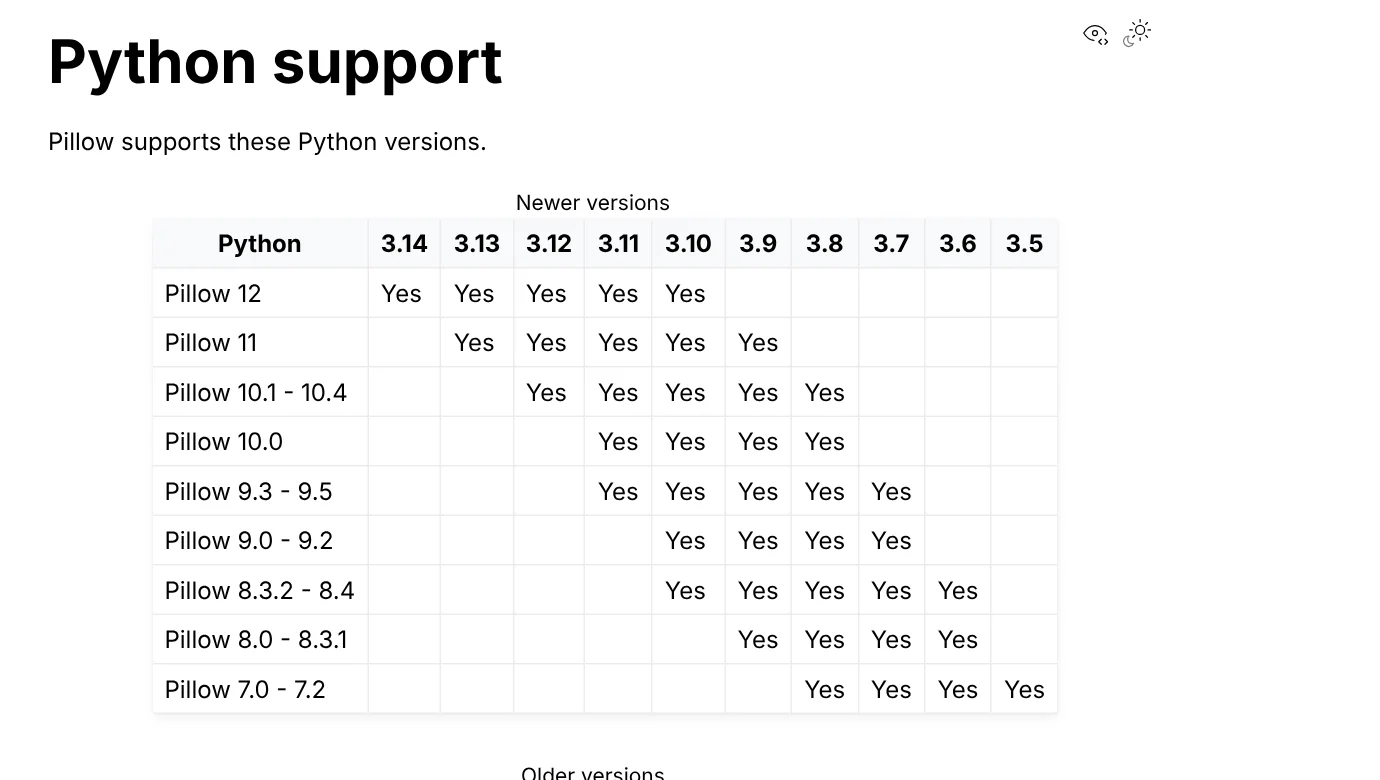
Image skills usually rely on the Pillow library. Pillow's Python support table shows Pillow 12 working with Python 3.10 through 3.14, and Pillow 11 with 3.9 through 3.13. Pick a Python version in that table and pip can fetch a prebuilt package instead of compiling one. The install command is python3 -m pip install --upgrade Pillow.
Take a photo text skill as an example. Its guide lists Windows, macOS or Linux, Python 3.9 or later, and no graphics card. You install the image library once with pip install pillow, test one photo, then run the whole folder. If you'd rather install nothing, hand the method file to ChatGPT, Claude or Codex and send your photos in the chat.
A graphics card matters only when the skill runs an image model locally
Adding text, resizing or cropping photos runs on the CPU, which any office computer handles. A skill that only sends requests to an online service doesn't need a graphics card either, because the heavy work happens on the provider's servers.
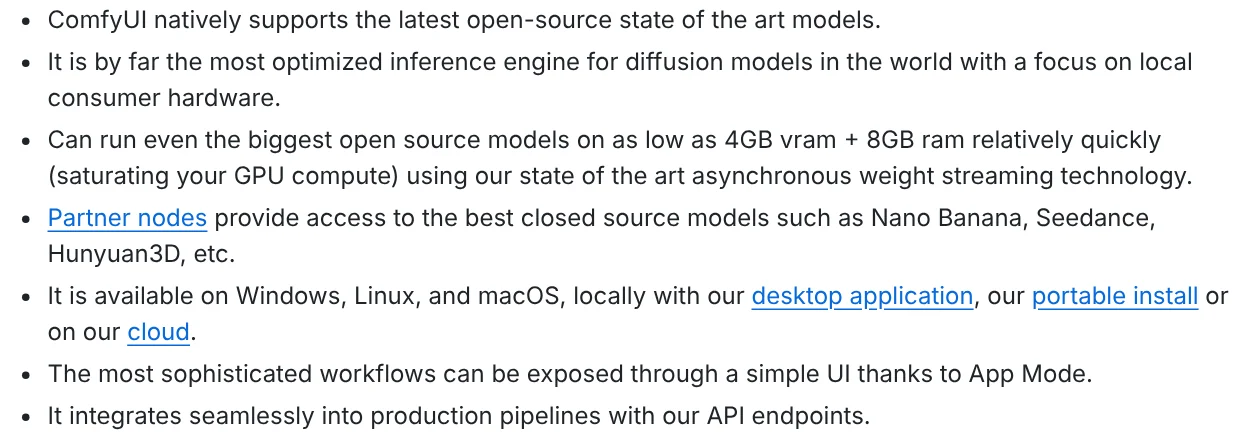
A GPU matters when the skill downloads an image generation model and runs it on your machine, often through ComfyUI. The ComfyUI GitHub page says it runs on Windows, Linux and macOS, with support for NVIDIA, AMD and Intel cards and Apple Silicon. The same page claims ComfyUI can run large models on as little as 4GB of VRAM plus 8GB of RAM.
That figure comes from ComfyUI itself, and real speed depends on the model. The Windows portable build can also run on the CPU alone, and ComfyUI offers a paid cloud option for anyone without the hardware. Before buying an image generation skill, ask which model it runs and how much VRAM that model needs.
Common mistakes when preparing your computer for a skill
- No Skills section: code execution is off in Settings > Capabilities. On Team or Enterprise, ask your organization owner.
- Skills are grayed out: code execution is turned off for you or for your organization.
- Claude ignores the skill: check its toggle in Customize > Skills, then reread the skill's description.
- A local skill is missing in Cowork: the Claude Code skills page says Cowork and cloud sessions don't read
~/.claude/skills/. - The script says PIL is missing: Pillow isn't installed for the Python version the skill calls.
- Accented text shows as boxes: the font lacks those characters; on Linux, install
fonts-dejavuwith apt.
Anthropic advises installing skills only from trusted sources and reading the bundled scripts before turning a skill on, since a skill can install packages.
To see how a skill is installed and used before you set up Python, read What Is a Claude Skill? How to Install and Use One.
Sources, accessed Oct 12, 2026:
- Claude Help Center: Use skills in Claude
- Claude Docs: Agent Skills overview
- Claude Code Docs: Advanced setup and Extend Claude with skills
- OpenAI: Build skills, Pricing, Quickstart, CLI
- Python.org: Download Python
- Pillow: Python support and Basic installation
- ComfyUI: Official GitHub page
Linh SEO Agent
Related guide: What Is an MCP Server and How to Add One to Claude
Related guide: How to Write a Claude Skill: SKILL.md Structure
Related guide: How to Install Claude Code on Windows, Step by Step
More reading
 How to install a skill in Codex: folder, SKILL.md, invoking
 What Is an AI Agent Skill, and How Is It Not a Prompt?
 What Is an MCP Server and How to Add One to Claude
 How to Write a Claude Skill: SKILL.md Structure
 Claude Skill for Research: Find and Summarize Sources
 What Is an AI Agent? Simple Examples for Beginners








