
How to Write a Claude Skill: SKILL.md Structure
A Claude Skill is a folder with a SKILL.md file: YAML frontmatter with name and description, then instructions. See field limits, a sample, and packaging.


In this article (8)
- A Claude Skill is a set of instructions Claude reads only when needed
- A SKILL.md file has two parts: YAML on top, instructions below
- The description decides whether Claude calls your skill
- A sample SKILL.md file you can copy
- Writing product captions
- Why doesn't a skill slow Claude down?
- Package and test your skill before you rely on it
- Four common mistakes when writing SKILL.md
A Claude Skill is a folder with a SKILL.md file inside. The file starts with a YAML block that holds name and description. Below it are the instructions Claude follows.
A Claude Skill is a set of instructions Claude reads only when needed
The How to create custom skills page in the Claude Help Center, updated July 22, 2026, says skills are available on the Free, Pro, Max, Team, and Enterprise plans. The feature needs code execution turned on.

A skill can be a few lines of instructions, or a full package of files with code that runs. The help page lists what makes a good skill. It solves one specific, repeatable task, has clear instructions, includes examples when helpful, says when to use it, and focuses on a single workflow.
The Agent Skills documentation for developers compares a skill to an onboarding guide for a new team member. You write down how to do the job once, and Claude reads it again each time the same job comes up.
A SKILL.md file has two parts: YAML on top, instructions below
Every skill needs a SKILL.md file with YAML frontmatter, the block of information at the top of the file between two --- lines. The two required fields are name and description. Below that is the body, written in Markdown: the steps and the examples.
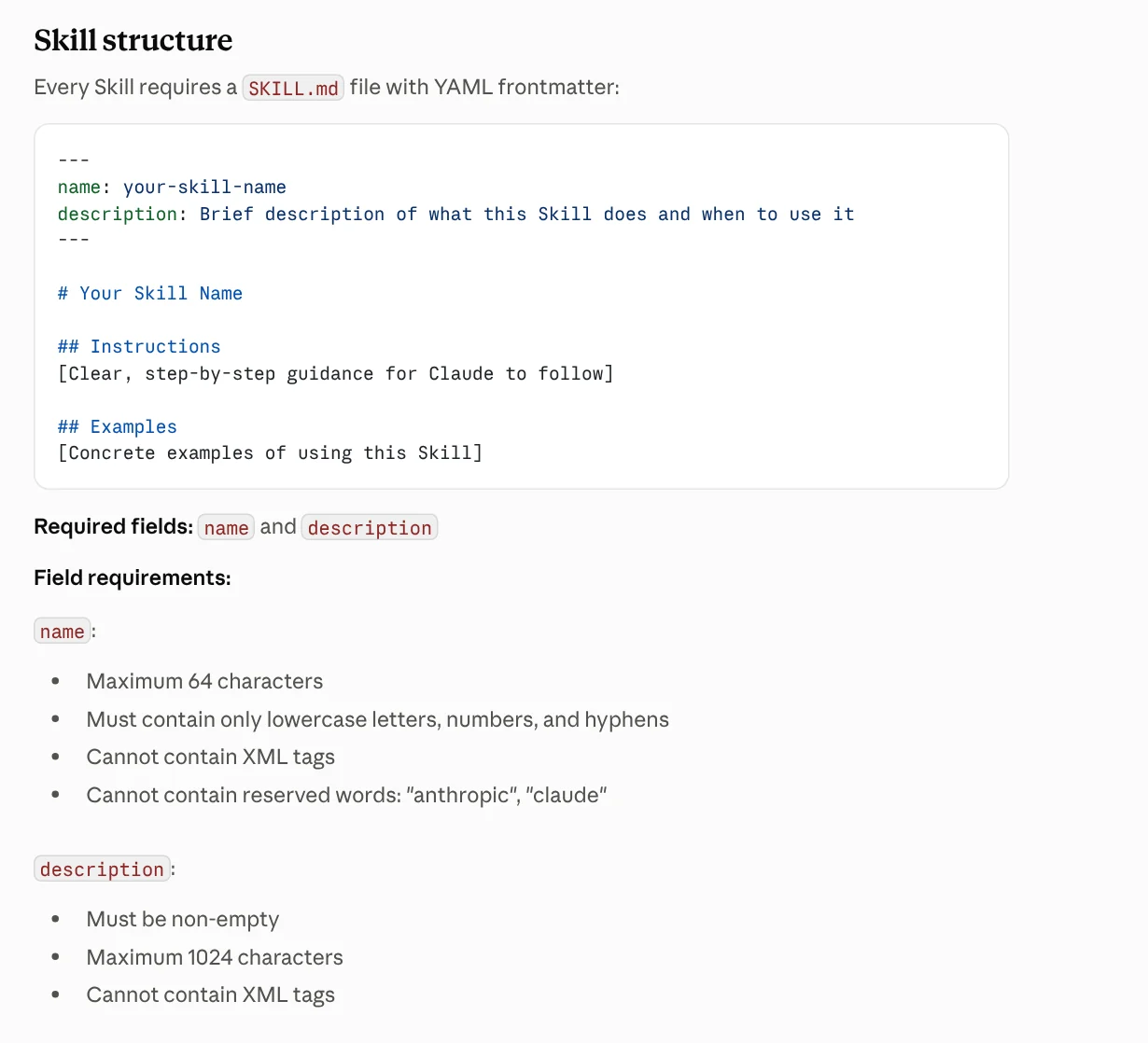
The Agent Skills docs set the name field to a maximum of 64 characters, using only lowercase letters, numbers, and hyphens. The name cannot contain XML tags or the two reserved words "anthropic" and "claude". So a name like claude-helper is not valid.
The description field cannot be empty and cannot contain XML tags. The developer docs give a limit of 1,024 characters. The help page for claude.ai users gives a maximum of 200 characters. To make sure your skill works everywhere, keep the description under 200 characters.
The description decides whether Claude calls your skill
The docs are clear on this point: Claude compares your request with the description to decide whether to use a skill. So the description has to say two things: what the skill does, and when to use it.
The Skill authoring best practices page says to write the description in the third person, such as "Processes Excel files and generates reports". Avoid "I can help you..." because the description is injected into the system prompt, and a shifting point of view can make Claude pick the wrong skill.
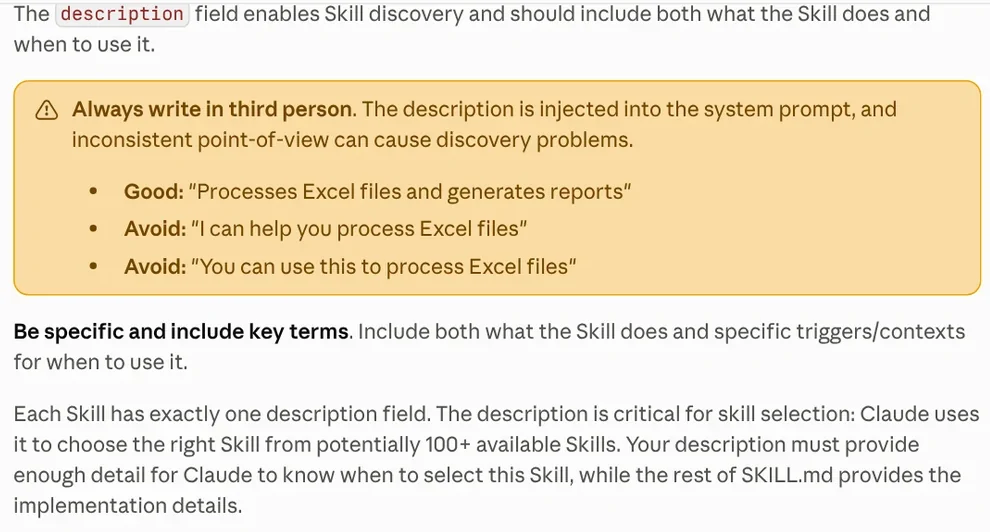
The page also gives examples of descriptions to avoid: "Helps with documents" or "Processes data". A vague description makes it hard for Claude to choose correctly, and it may be choosing from more than 100 skills. For names, the page suggests the gerund form (verb plus -ing), such as processing-pdfs, and warns against generic names like helper or utils.
A sample SKILL.md file you can copy
Here is a small skill that writes product captions. The description is 161 characters long, inside the 200-character limit.
```
name: writing-product-captions description: Writes short product captions for sales posts in a brand voice. Use when the user asks for a caption, short description, or post copy to go with a product photo.
Writing product captions
Process
- If the product name, price, or main benefit is missing, ask before writing.
- Write 3 options, each under 60 words.
- End with a short call to buy.
Examples
See examples.md for the tone of voice to use. ```
Keep the body short. The best practices page recommends keeping the SKILL.md body under 500 lines and adding only what Claude does not already know. Put longer content in separate files, like the "See examples.md" line above.

Why doesn't a skill slow Claude down?
The answer is progressive disclosure, which means loading content step by step. The Agent Skills docs split a skill's content into three levels, and each level enters the context at a different time.
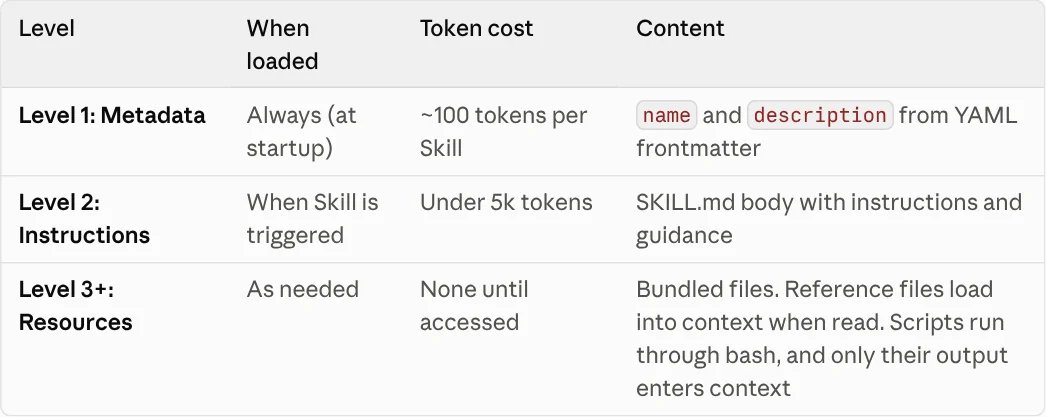
Level 1 is the name and description. It always loads at startup and costs about 100 tokens per skill. Level 2 is the SKILL.md body. It loads only when the skill is triggered and stays under 5,000 tokens. Level 3 is the bundled files and scripts, which cost tokens only when Claude reads them.
Claude runs scripts through bash and receives only the output. The script code itself never enters the context. That is why you can install many skills without filling up the context, as long as each skill has an accurate description.
Package and test your skill before you rely on it
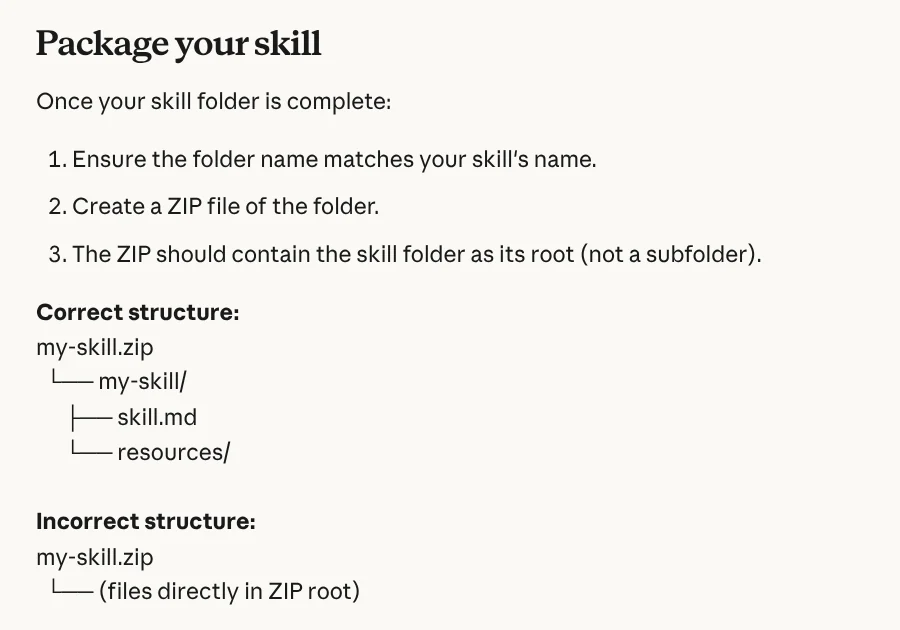
To upload a skill to claude.ai, the help page says to give the folder the same name as the skill and compress it into a ZIP file. Inside the ZIP, the skill folder must sit at the root. Do not put the files loose at the root of the ZIP.
After uploading, turn the skill on in Customize > Skills, then try several different prompts that should call the skill. If Claude does not use the skill when you expect it to, fix the description first.
Four common mistakes when writing SKILL.md
The description says what the skill does but not when to use it. Claude relies on the description to pick a skill. Without the "use when" part, the skill is easy to skip.
The name contains "claude" or capital letters. Names accept only lowercase letters, numbers, and hyphens, and cannot contain reserved words.
Everything goes into one file. A long body uses up context every time the skill runs. Move reference material into separate files and point to them from SKILL.md.
Using a skill from an unknown source. The Agent Skills docs warn that a malicious skill can lead Claude to run tools or code for the wrong purpose. Only use skills you wrote yourself or got from a trusted source, and read every file before you install one.
Don't want to write a skill from scratch? Pick a ready-made one from Skills and apps. Light skills start at $5, and the same page lists video skills and setup on your computer. Guides on what your computer needs to run a skill locally and how to install skills in Codex are in News.
Sources, accessed Oct 9, 2026:
- Claude Help Center: How to create custom skills
- Claude Platform Docs: Agent Skills overview
- Claude Platform Docs: Skill authoring best practices
- Photos: Unsplash (Camille TINON, Vitaly Gariev, Jeffrey Betts), Unsplash License.
Linh SEO Agent
Related guide: What Is an AI Agent Skill, and How Is It Not a Prompt?
Related guide: How to install a skill in Codex: folder, SKILL.md, invoking
The complete guide for this topic: What Is a Claude Skill? How to Install and Use One
More reading
 Claude Skill for Research: Find and Summarize Sources
 What Is an AI Agent Skill, and How Is It Not a Prompt?
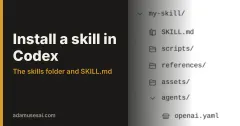 How to install a skill in Codex: folder, SKILL.md, invoking
 AI Skill Requirements: Plans, Apps and Hardware to Run Locally
 What Is an MCP Server and How to Add One to Claude
 What Is an AI Agent? Simple Examples for Beginners








