
What Is an MCP Server and How to Add One to Claude
An MCP server gives AI apps like Claude tools and data through the open MCP standard. Add one with a custom connector or one Claude Code command.


In this article (6)
- MCP is an open standard that lets AI apps plug into outside tools
- What is an MCP server, and how is it different from an MCP client?
- An MCP server gives Claude three things: tools, resources and prompts
- Add an MCP server to Claude with a custom connector
- Add an MCP server to Claude Code with one command
- Four common mistakes when adding an MCP server
What is an MCP server? It is a program that gives an AI app like Claude tools and data, using the open MCP standard. To add one to Claude, you only need the server's URL or a single command.
MCP is an open standard that lets AI apps plug into outside tools
As of Oct 9, 2026, the MCP documentation matches protocol version 2026-07-28. It defines the Model Context Protocol as an open-source standard for connecting AI apps to outside systems. The same page compares MCP to a USB-C port for AI apps.
USB-C lets one kind of cable connect many devices. In the same way, MCP lets Claude or ChatGPT connect to data sources such as files and databases. It also connects them to tools such as search engines, and to workflows such as prompt templates.
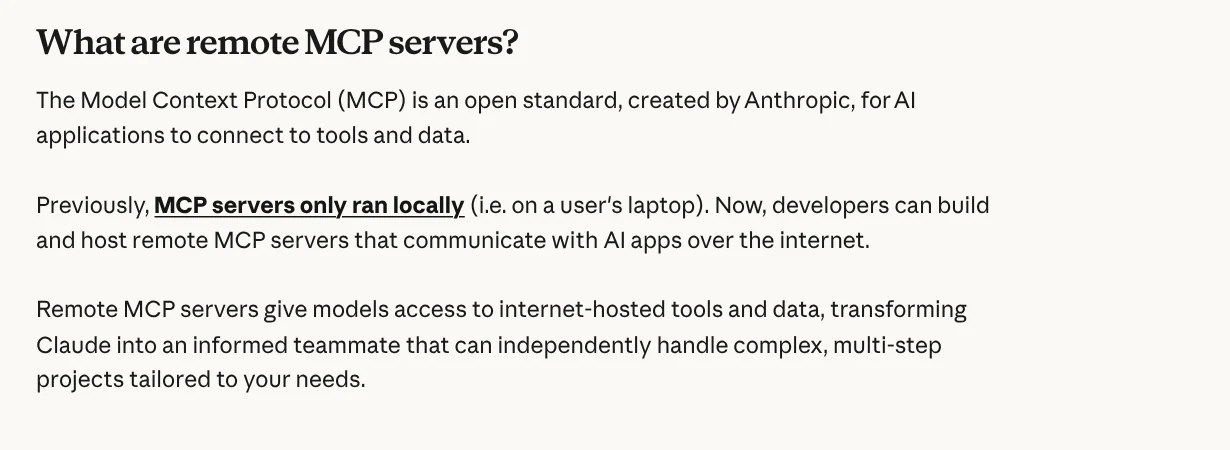
The Claude Help Center says MCP is an open standard created by Anthropic. At first, MCP servers ran only locally on the user's own computer. Now developers can also build remote MCP servers that talk to AI apps over the internet.
What is an MCP server, and how is it different from an MCP client?
The MCP architecture page splits the system into three roles. The MCP host is the AI app, for example Claude Code or Claude Desktop. The MCP client is the component that keeps a connection to one server. The MCP server is the program that provides context to the client.
Each time a host connects to an MCP server, it creates a separate MCP client for that server. A host connected to three servers has three clients, and each client keeps its own dedicated connection.
MCP servers run in two ways. A local server uses the STDIO transport (standard input and output), runs right on your computer, and usually serves one client. A remote server uses Streamable HTTP, runs on the provider's platform, and usually serves many clients at once.
An MCP server gives Claude three things: tools, resources and prompts
The architecture page calls these the three primitives a server can offer. Tools are functions the AI calls to do work, such as file operations or database queries. Resources are data used as context, such as file contents or database records.
Prompts are reusable templates that shape how you talk to the model. The documentation uses a database server as its example. That server has tools to query the database, a resource that holds the database schema, and a prompt with examples of how to use the tools.
The MCP introduction page lists a few things the standard makes possible. An agent can read your Google Calendar and Notion and act as a more personal assistant. Claude Code can build a whole web app from a Figma design.
Add an MCP server to Claude with a custom connector
On claude.ai, Claude Desktop and Cowork, you add a remote MCP server as a custom connector. The Claude Help Center says this feature is available on the Free, Pro, Max, Team and Enterprise plans. The Free plan allows only one custom connector.
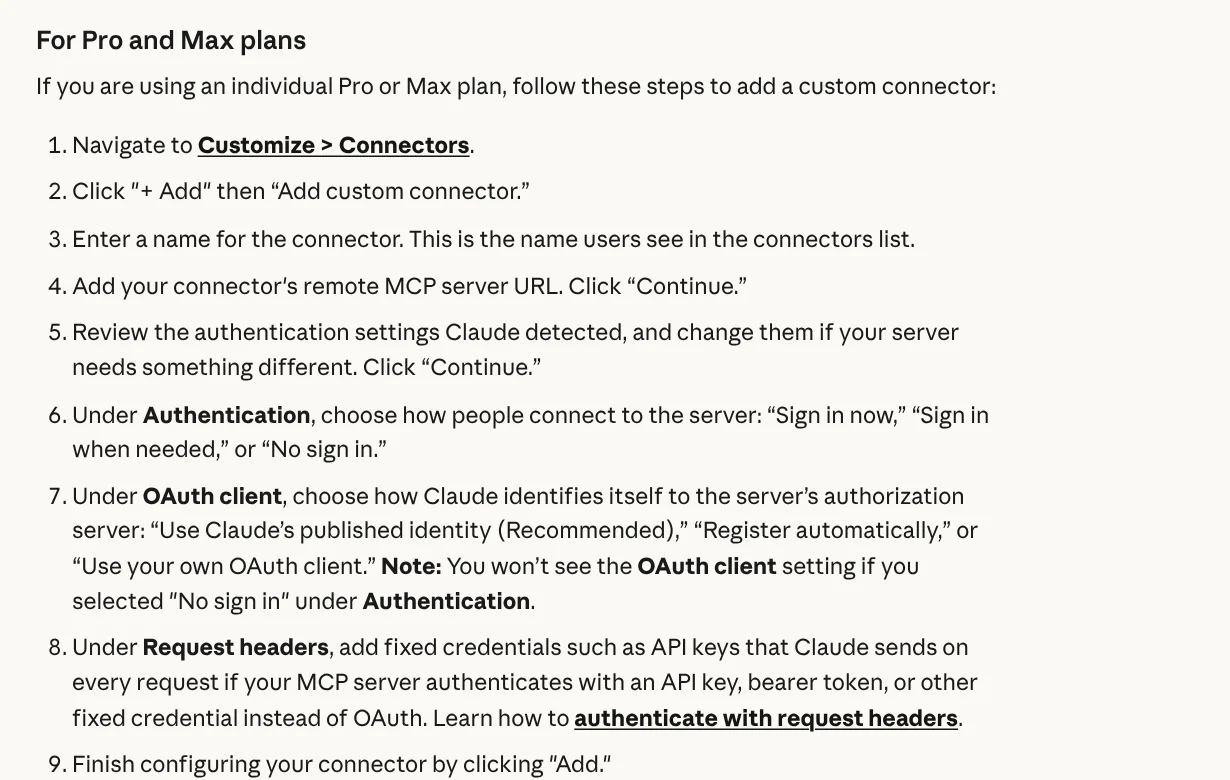
On a Pro or Max plan, go to Customize > Connectors, click + Add, then choose Add custom connector. Enter a name, paste the remote MCP server URL, and click Continue. Review the authentication settings Claude detects, click Continue, then choose how to sign in. Finally, click Add.
Once it is added, you turn the connector on for each conversation with the "+" button in the lower left corner, then Connectors. On Team and Enterprise plans, an organization owner adds the connector, and each member then connects to it on their own.
One point people often miss: Claude connects to the MCP server from Anthropic's cloud infrastructure, not from your computer. The server must be reachable from the public internet. A server behind a VPN or a firewall will not connect, even if your own computer can reach it.
Add an MCP server to Claude Code with one command
For developers, the Claude Code documentation recommends remote HTTP servers. The syntax is claude mcp add --transport http <name> <url>. For example, to connect Notion: claude mcp add --transport http notion https://mcp.notion.com/mcp.
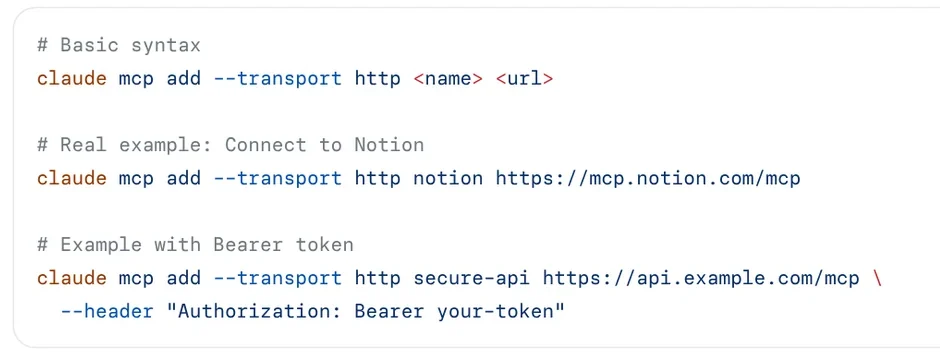
For a local server, use --transport stdio and put the command that starts the server after --. The command claude mcp list shows your servers with a status such as Connected, Needs authentication or Failed to connect. As of Oct 9, 2026, the SSE transport is marked as deprecated, so use HTTP whenever you can.
Four common mistakes when adding an MCP server
Pasting the URL of a server on your internal network into claude.ai. Custom connectors connect from Anthropic's cloud. The server must be open to the internet, or your firewall must allow Anthropic's published IP ranges.
Connecting to a server from an unknown source. The Claude Help Center advises connecting only to servers from organizations you trust. A malicious server can hide instructions that make Claude do things you did not intend.
Granting more access than needed. When you sign in, read the permissions the server asks for. Deny the ones you do not need, especially permissions to edit or delete data.
Forgetting that tools can change. The server's developer can update how a tool behaves at any time. Check now and then which tools Claude called and with what data.
MCP gives Claude more tools, while a skill teaches Claude how to do a job step by step. The two work well together. Skills and apps has light skills from $5, plus a hands-on setup service on your own computer, with the price listed on that page. News also has guides on what a skill needs to run on your computer and how to install a skill in Codex.
Sources, accessed Oct 9, 2026:
- Model Context Protocol: What is the Model Context Protocol (MCP)?
- Model Context Protocol: Architecture overview
- Claude Help Center: Get started with custom connectors using remote MCP
- Claude Code Docs: Connect Claude Code to tools via MCP
- Images: Unsplash (Jordan Harrison, Markus Spiske, TheRegisti), Unsplash License.
Linh SEO Agent
Related guide: What Is MCP in AI? A Plain-English Guide for Non-Coders
Related guide: What Is OpenAI Codex and How It Differs From Claude Code
Related guide: AI Skill Requirements: Plans, Apps and Hardware to Run Locally
The complete guide for this topic: What Is a Claude Skill? How to Install and Use One
More reading
 What Is MCP in AI? A Plain-English Guide for Non-Coders
 AI Skill Requirements: Plans, Apps and Hardware to Run Locally
 English translation apps: 5 official apps compared
 Claude Skill for Research: Find and Summarize Sources
 How to Write a Claude Skill: SKILL.md Structure
 What Is an AI Agent Skill, and How Is It Not a Prompt?








