
What Is a Claude Skill? How to Install and Use One
A Claude Skill is a folder of instructions Claude loads when needed. Turn skills on in Customize > Skills, write SKILL.md, and use them in Claude Code.


In this article (6)
- A Claude Skill teaches Claude a workflow you can reuse
- A skill only takes up context when Claude actually uses it
- To turn on Claude Skills on claude.ai, enable code execution first, then open Customize
- To write your own skill, you need one folder and one SKILL.md file with a name and description
- Where do Claude Skills go in Claude Code?
- Three common skill problems and how to fix them
A Claude Skill is a folder of instructions, code, and resources that Claude opens on its own when your task matches the skill's description. On claude.ai, you turn skills on or upload your own in Customize > Skills.
A Claude Skill teaches Claude a workflow you can reuse
On Dec 18, 2025, Anthropic updated its Agent Skills announcement with three changes. Organizations can now manage skills centrally, there is a directory of partner skills, and the skill format is now an open standard. The same skill can run in the Claude apps, Claude Code, and the API.
The "What are skills?" help page defines a skill as a folder of instructions, scripts, and resources that Claude loads when it needs them. A few easy examples: applying your brand colors and fonts to a document, drafting emails from a company template, or taking meeting notes in a fixed format.

How is a skill different from three features you may already know? A Project holds background knowledge that is always loaded when you chat inside it. Custom instructions apply to every conversation. MCP connects Claude to outside services, while a skill teaches Claude how to use those tools the way your workflow needs.
A skill only takes up context when Claude actually uses it
Skills work through progressive disclosure. The Agent Skills overview splits a skill's content into three levels, and each level enters the context window at a different time.
Level 1 is the name and description. It always loads at startup and costs about 100 tokens per skill. Level 2 is the body of the SKILL.md file. It loads only when the skill is triggered and stays under 5,000 tokens. Level 3 is the reference files and scripts bundled with the skill. Claude reads or runs them only when needed, and only a script's output enters the context.
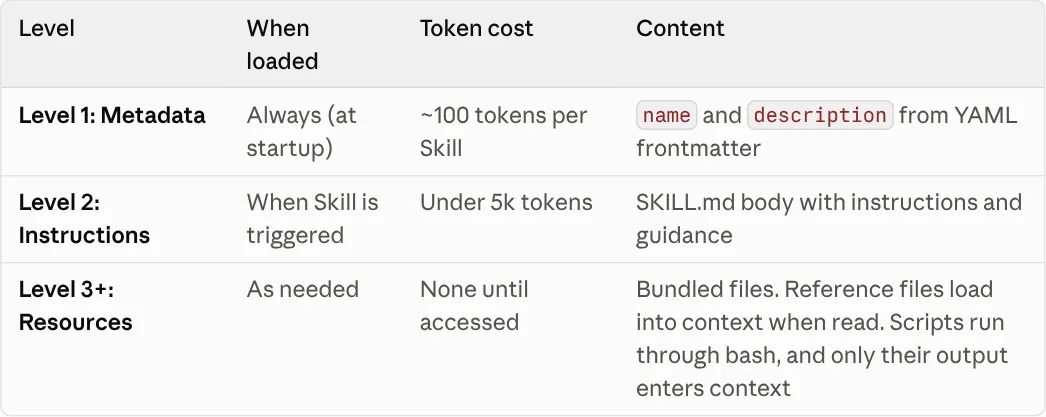
This means you can install many skills without crowding the context window. One thing to remember: Claude compares your request with the description line to decide whether to use a skill. If the description is vague, the skill sits idle even when it is turned on.
To turn on Claude Skills on claude.ai, enable code execution first, then open Customize
Skills need an environment that can run code. The Use skills in Claude help page lists these steps for individual accounts:
- Go to Settings > Capabilities and turn on Code execution and file creation.
- Go to Customize > Skills.
- Use the toggle to turn each skill on or off.
On Team and Enterprise plans, an organization owner turns on both settings in Organization settings > Plugins & skills, on the Policy tab. Team plans have this on by default at the organization level.
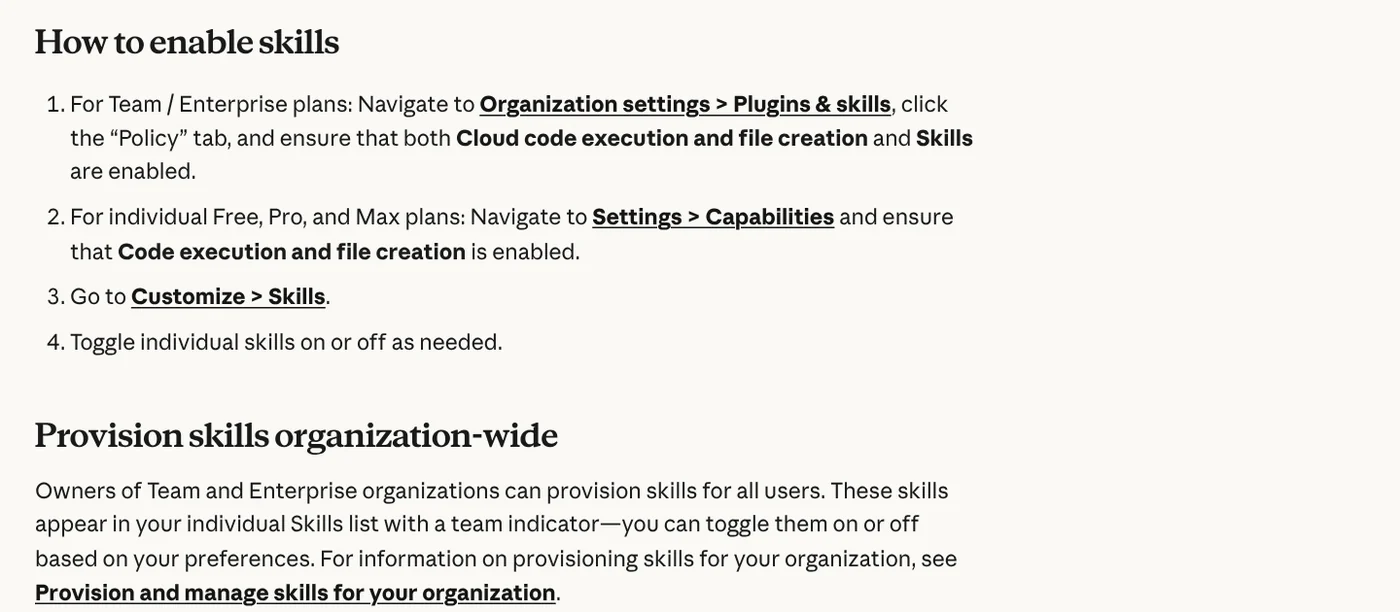
Once this is done, you get Anthropic's built-in skills for creating and editing Excel, Word, PowerPoint, and PDF files. You do not need to call them by name. Claude uses them when your request needs them. The Claude help center (checked again Oct 11, 2026) says skills are available on the Free, Pro, Max, Team, and Enterprise plans.
To write your own skill, you need one folder and one SKILL.md file with a name and description
Each skill is a folder that contains at least a SKILL.md file. The file starts with YAML frontmatter that has two required fields, name and description, according to the How to create custom skills page. Below the frontmatter you write step-by-step instructions and examples.
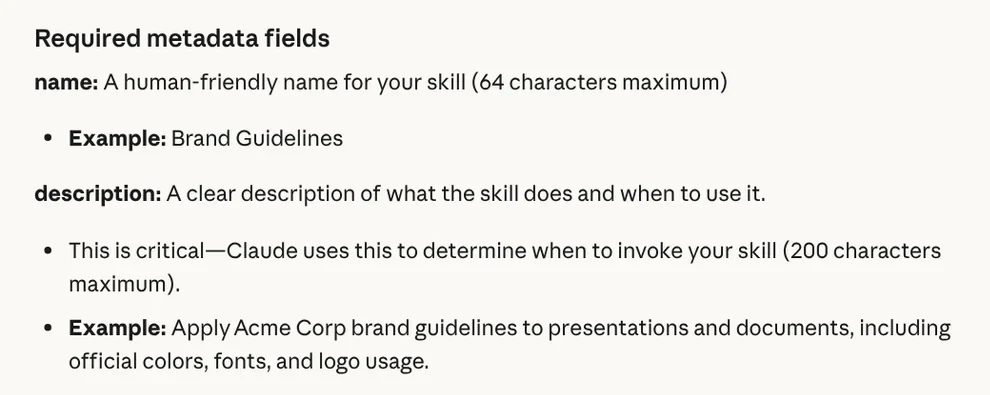
Follow a few rules so your skill works wherever you upload it. The naming rules come from the Agent Skills overview, which is stricter than the claude.ai help page:
- The name has at most 64 characters, uses lowercase letters joined by hyphens, and does not contain the words "anthropic" or "claude".
- The description says clearly what the skill does and when to use it. Keep it under 200 characters, as the claude.ai help page requires.
- The folder name matches the skill name.
To upload to claude.ai, compress the folder into a ZIP file so the skill folder sits at the root of the archive. Go to Customize > Skills, click +, choose + Create skill, then Upload a skill, and pick the ZIP file. Your coworkers cannot see your private skill until you share it.
Don't want to write it by hand? The Agent Skills announcement mentions a "skill-creator" skill. Claude asks about your workflow, builds the folder structure, and formats the SKILL.md file for you.
Where do Claude Skills go in Claude Code?
Claude Code does not need a ZIP file. The Claude Code skills page explains that where you save a skill decides which sessions load it. Personal skills go in ~/.claude/skills/<skill-name>/SKILL.md and work in every project on that computer.
Project skills go in .claude/skills/<skill-name>/SKILL.md inside the repository. Commit this folder and your whole team gets the skill. The folder name becomes a command, so you can call it directly with /skill-name, or let Claude use it when your question matches the description.
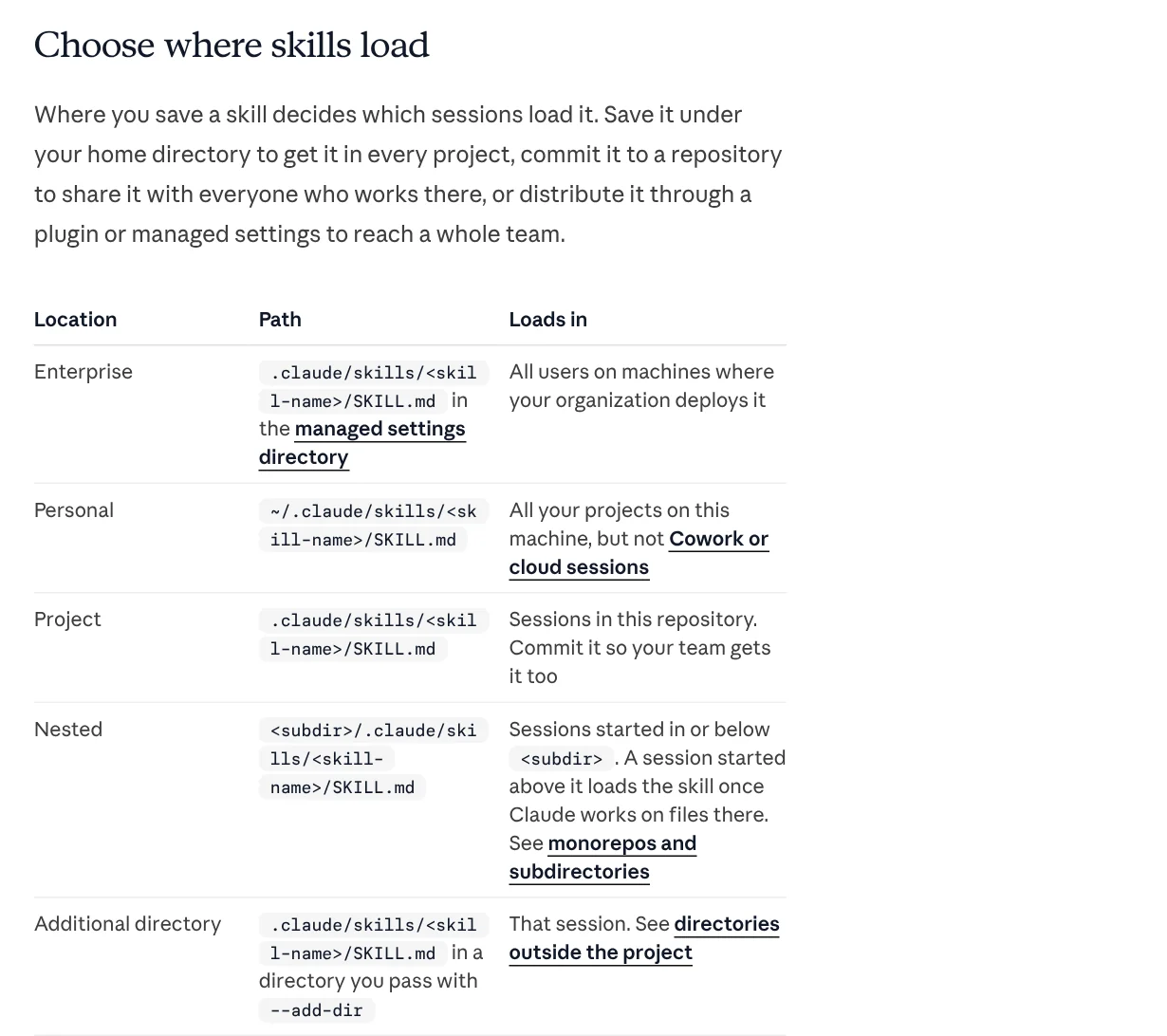
One point that is easy to miss: skills in ~/.claude/skills/ on your computer do not load in Cowork sessions or in sessions that run in the cloud. To use them there, turn the skill on for your claude.ai account. Because the skill format is an open standard, some other tools can read skills too, such as Codex.
Three common skill problems and how to fix them
You can't find the Skills section. Usually Code execution and file creation is still off. Turn it on in Settings > Capabilities, or ask your organization owner to turn it on if you are on a Team or Enterprise plan.
The skill is on, but Claude doesn't use it. Check the toggle in Customize > Skills, then rewrite the description so it says clearly when the skill is needed. You can also name it in your request, for example "use my brand identity skill to make a presentation".
The upload fails with an error. Check the structure against the create skills page: the folder name matches the skill name, the skill folder sits at the root of the ZIP file, and SKILL.md has both name and description.
On safety: a skill can run code and install software packages. The Agent Skills overview warns that a malicious skill can lead Claude to call tools or run code for the wrong purpose, which can leak data. Only use skills you wrote yourself or got from Anthropic, and read every bundled file before you turn on a skill someone else sent you.
Want to know what your computer needs to run a skill locally, how to install skills in Codex, or the simplest way to start with photo skills? Find those guides in News. If you need ready-made skills, the Skills and apps page lists them. Skills start at $5, and setup on your computer is available as a separate service.
Sources, accessed Oct 9, 2026:
- Claude Help Center: Use skills in Claude
- Claude Help Center: What are skills?
- Claude Help Center: How to create custom skills
- Claude Platform Docs: Agent Skills overview
- Claude Code Docs: Extend Claude with skills
- Claude by Anthropic: Introducing Agent Skills
- Photos: Unsplash (Vitaly Gariev, Jakub Żerdzicki), Unsplash License.
Linh SEO Agent
Related guide: What Is an MCP Server and How to Add One to Claude
Related guide: Claude Skill for Research: Find and Summarize Sources
Related guide: What Is an AI Agent Skill, and How Is It Not a Prompt?
In this topic
- English translation apps: 5 official apps compared
- What Is an AI Agent Skill, and How Is It Not a Prompt?
- What Is an MCP Server and How to Add One to Claude
- Claude Skill for Research: Find and Summarize Sources
- How to Write a Claude Skill: SKILL.md Structure
- What Is MCP in AI? A Plain-English Guide for Non-Coders
- What Is an AI Agent? Simple Examples for Beginners
- How to install a skill in Codex: folder, SKILL.md, invoking
- AI Skill Requirements: Plans, Apps and Hardware to Run Locally
More reading
 How to Write a Claude Skill: SKILL.md Structure
 What Is an AI Agent Skill, and How Is It Not a Prompt?
 How to install a skill in Codex: folder, SKILL.md, invoking
 Claude Skill for Research: Find and Summarize Sources
 AI Skill Requirements: Plans, Apps and Hardware to Run Locally
 What Is an MCP Server and How to Add One to Claude








