
Free AI Presentation Makers: Which One to Use in 2026
Free AI presentation makers compared: Gemini Notebook works from your files, Gemini Canvas from a prompt, Gamma 10 slides a time, Copilot needs a plan.


In this article (5)
- Gemini Notebook builds slides from your documents and exports to PowerPoint
- Gemini Canvas builds slides from a prompt when you have no documents yet
- Gamma's free plan makes up to 10 slides per prompt
- Copilot in PowerPoint builds slides from a Word file, but you need a paid plan
- Which free AI presentation maker should you choose?
Three free AI presentation makers are worth a try: Gemini Notebook if you already have documents, Gemini Canvas if you only have an idea, and Gamma if you need a PowerPoint file fast.
As of October 2026, you can use all three without a paid plan, according to each company's help and pricing pages. They differ in what goes in and what comes out. Some build slides from files you upload. Others build them from a single prompt. This guide compares them on those two questions, using the official help and pricing pages.
Gemini Notebook builds slides from your documents and exports to PowerPoint
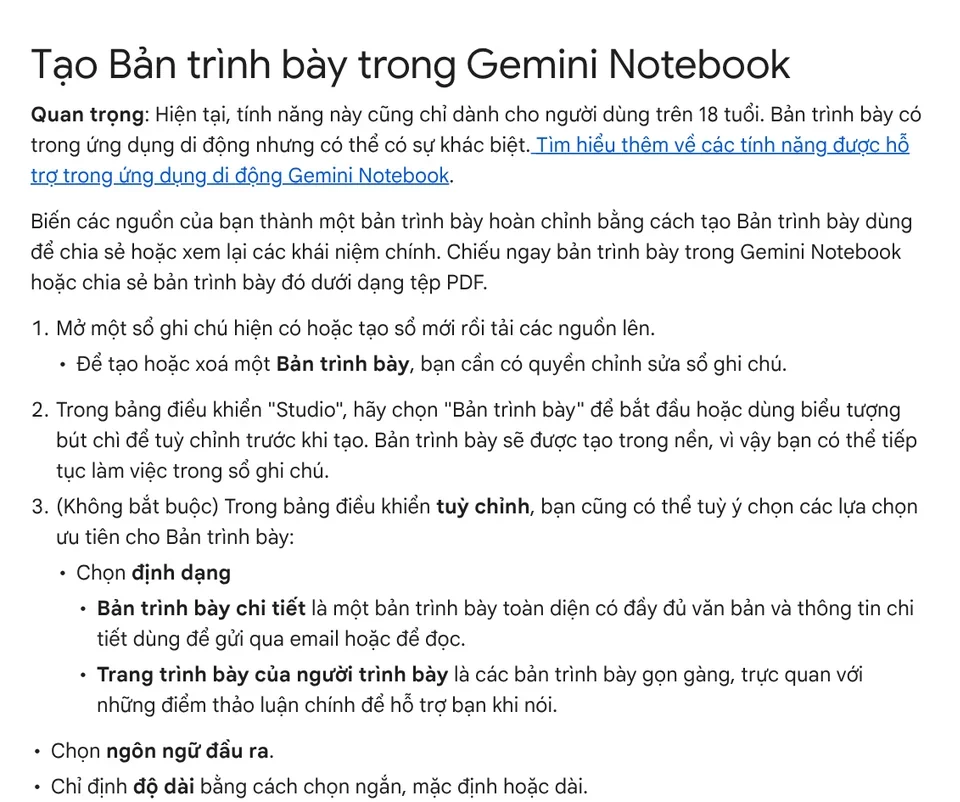
If you already have a report, meeting notes, or research, Gemini Notebook is the closest fit. It is the new name for NotebookLM. Google renamed it on July 16, 2026. The Slide Deck help page lists the steps:
- Open or create a notebook and upload your sources.
- In the Studio panel, select Slide Deck, or click the pencil icon to customize it first.
- Choose the format, the output language, and a length: short, default, or long.
- Enter a prompt that describes the audience, style, and focus.
There are two formats. A Detailed Deck has full text and details, so it works well when you email it to people who will read it on their own. Presenter Slides are clean and visual, with only the key talking points to support you while you speak.
You can download the deck as a PDF or a PowerPoint file (.pptx). You can also revise individual slides with instructions, delete slides, or drag them into a new order. There is no limit on how many slides you revise within one deck, but there is a quota on how many decks you can revise, so batch your changes. Google notes that the feature is only for users over 18, and that slides can contain visual or factual errors.
According to the Learn about Gemini Notebook page, it works in a web browser with a personal Google Account, in the supported countries and territories listed on that page.
Gemini Canvas builds slides from a prompt when you have no documents yet
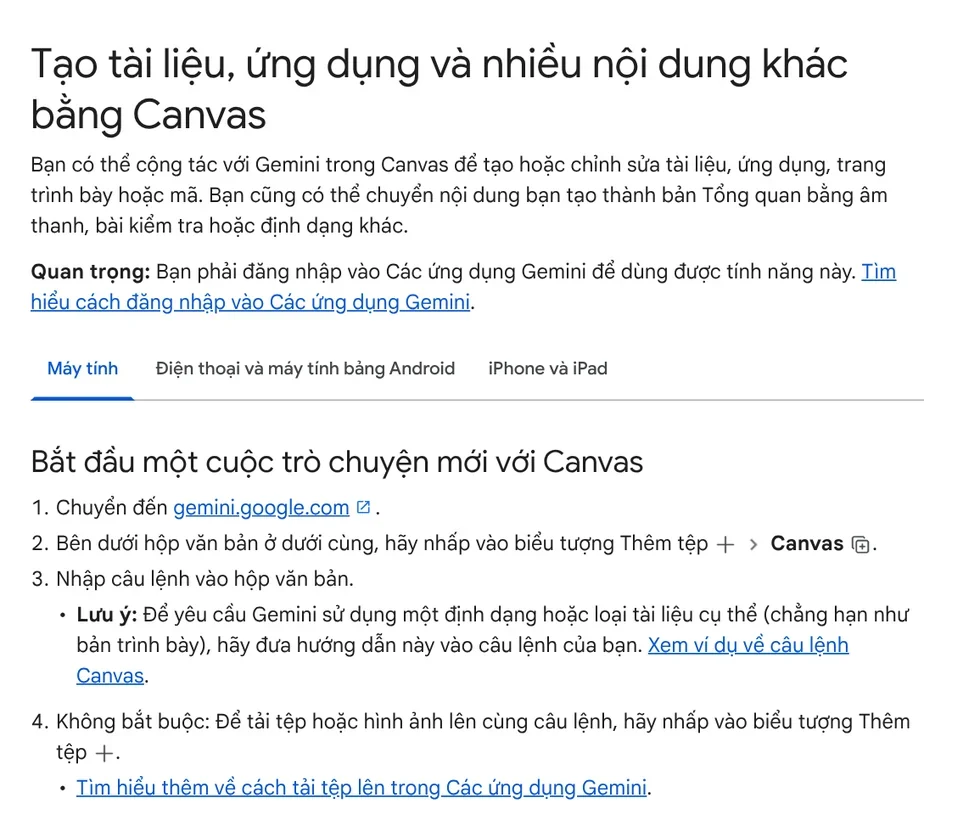
When you only have a topic in mind, Canvas in the Gemini app is the better fit. Google says Canvas can create or edit docs, apps, slides, and code. The only requirement on the page is that you sign in to the Gemini app.
The steps:
- Go to gemini.google.com.
- Below the text box, click Add files, then choose Canvas.
- Enter a prompt and say clearly that you want a presentation. For example: "Create a presentation on the receiving process for new warehouse staff, 8 slides."
- To base it on an existing document, upload the file with your prompt, then click Submit.
You keep editing by typing requests in the prompt box. Every change in Canvas saves automatically.
Gamma's free plan makes up to 10 slides per prompt
Gamma's pricing page says the Free plan creates up to 10 slides per prompt. The plan covers simple presentations, docs, websites, social posts, and images.

For office work, the strong point is the output. The Free plan exports to PDF, PPTX, PNG, and Google Slides, and imports from PDF and PPTX. You can open the result in PowerPoint or Google Slides and adjust it to your company template. The Plus, Pro, and Ultra plans add more features, including removing Gamma branding from what you make.
Copilot in PowerPoint builds slides from a Word file, but you need a paid plan
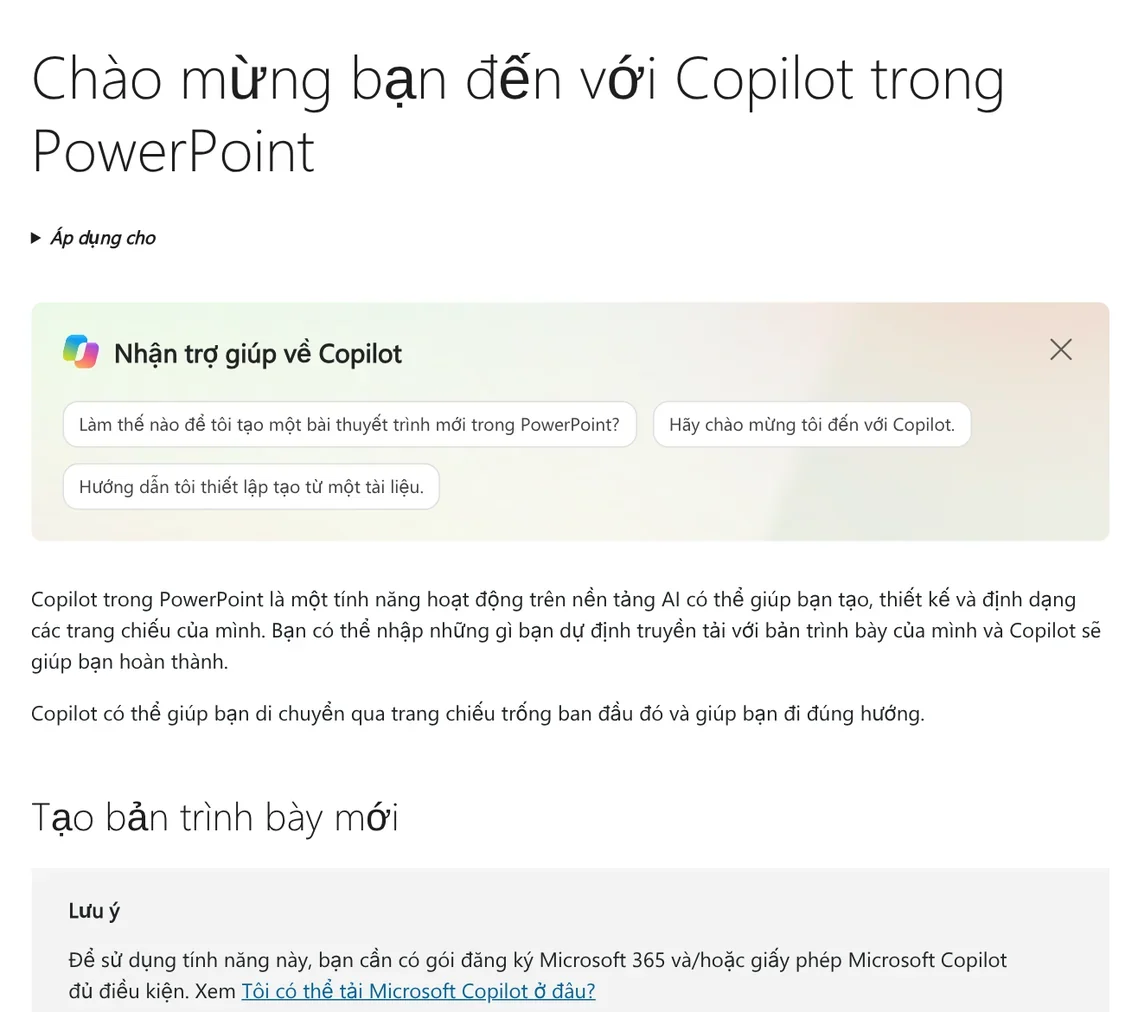
Many people search for an AI slide maker because they have seen the Copilot button in PowerPoint. The Microsoft Support page says Copilot can draft a presentation from a prompt, add a slide or an image, give the whole deck a new design, and summarize a long presentation.
The Create presentation from file feature uses a Word document as its base. It requires a Microsoft Copilot (work) license. If you open your company's template or .potx file first and then ask Copilot to create the deck, the slides follow that template. The other Copilot features also need an eligible Microsoft 365 subscription and/or Microsoft Copilot license, so this is not a free option.
Which free AI presentation maker should you choose?
Choose Gemini Notebook if you already have documents and need slides that stick to that content, with a .pptx file you can keep editing.
Choose Gemini Canvas if you only have a topic and want to go back and forth to build an outline and a draft deck.
Choose Gamma if you need to export straight to PowerPoint or Google Slides, and each deck is under 10 slides per generation.
Choose Copilot in PowerPoint if your company already has the license and you need slides that follow your internal .potx template.
Whichever tool you pick, check the numbers, names, and images before you present. Both Google and Microsoft warn that AI-generated content can be wrong.
What do you make slides for most often: internal reports, sales pitches, or training?
Once the slides are done, you often need matching images with headline text. That repeated work can go to a skill that runs on your own computer. See Skills and apps, and read more guides on picking the right image format in News.
Sources, accessed Oct 9, 2026:
- Gemini Notebook Help: Generate a Slide Deck in Gemini Notebook
- Gemini Notebook Help: Learn about Gemini Notebook
- Google: NotebookLM is now Gemini Notebook (Jul 16, 2026)
- Gemini Apps Help: Create docs, apps & more with Canvas
- Gamma: Pricing
- Microsoft Support: Welcome to Copilot in PowerPoint
- Photos: Unsplash (Julio Lopez, Adrien Olichon), Unsplash License.
Linh SEO Agent
Related guide: How to Add Text to a Picture in PowerPoint and Word
Related guide: What Is NotebookLM, Now Gemini Notebook: Use It for Work
Related guide: Write Work Emails with AI: Prompt Templates and Tips
The complete guide for this topic: AI Tools for Office Work: 10 Tasks You Can Do Faster
More reading
 What Is NotebookLM, Now Gemini Notebook: Use It for Work
 AI for Excel: Copilot, Claude for Excel and Gemini in Sheets
 Write Work Emails with AI: Prompt Templates and Tips
 AI Meeting Summary in Vietnamese: Which Tools Work
 How to Automate Work With AI Agents in n8n
 How to Tailor Your Resume to a Job Description with AI








