
AI Meeting Summary in Vietnamese: Which Tools Work
AI meeting summaries in Vietnamese, Oct 2026: Google Meet does not support it yet, Teams does. How to record and summarize with Gemini, plus mistakes.


In this article (5)
If you want an AI meeting summary for a meeting held in Vietnamese, Microsoft Teams can do it right inside the meeting. Google Meet does not support Vietnamese yet, so the alternative is to record the meeting and upload it to Gemini.
Google Meet cannot take notes for meetings held in Vietnamese yet
As of Oct 9, 2026, the Help page for "Take notes for me" in Google Meet supports only eight spoken languages: English, French, German, Italian, Japanese, Korean, Portuguese, and Spanish. Vietnamese is not on the list yet.
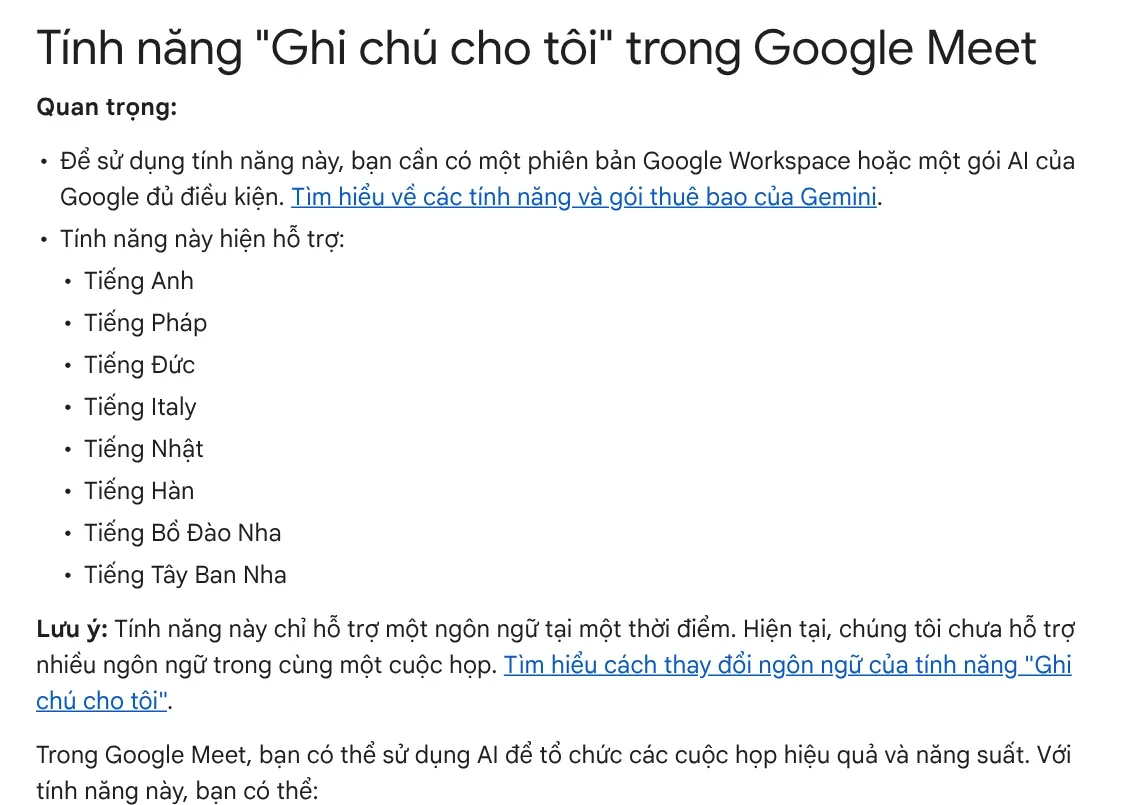
The feature also handles only one language per meeting, and it needs an eligible Google Workspace edition or Google AI plan. If your team meets in English with partners abroad, it still works well. Google recommends it for meetings of 15 minutes to 8 hours.
The notes are saved as a Google Doc in a "Google Meet" folder in the organizer's Drive. The doc has two tabs. Quick notes holds the key takeaways and action items. Full notes has the summary, decisions, action items, and details.
Microsoft Teams supports Vietnamese for transcription and Copilot
For Teams, the support page on meeting transcription lists Vietnamese (Vietnam) among the supported spoken languages. This is the foundation, because Copilot summarizes from the transcript.
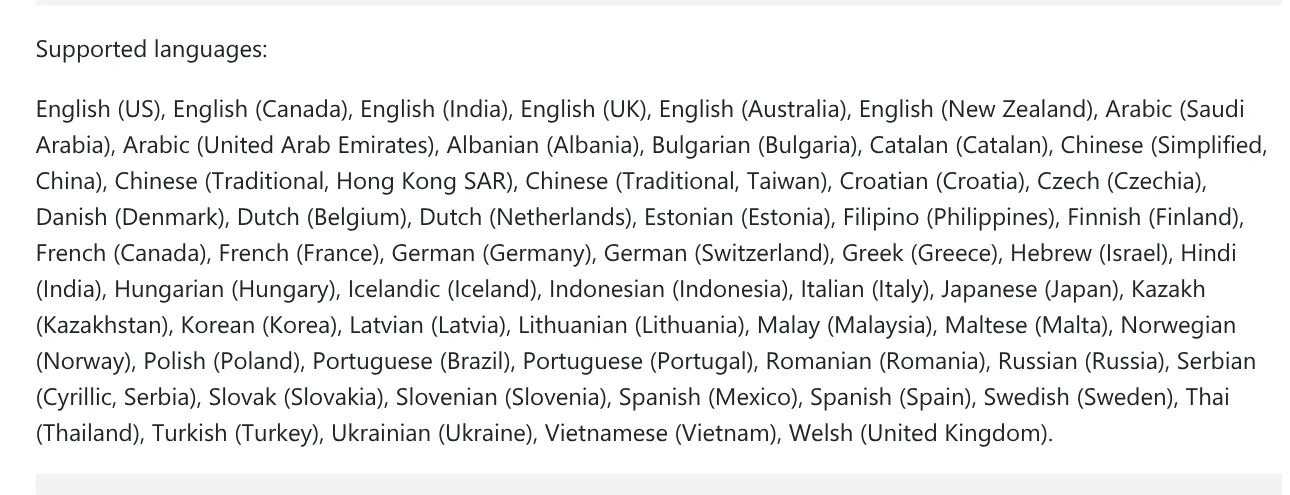
To transcribe Vietnamese correctly, set the spoken language of the meeting:
- Select More actions (the three dots) in the meeting controls.
- Hover over Record and transcribe, then choose Show transcript.
- In the transcript pane, choose Language settings.
- Under Spoken language in this meeting, choose Vietnamese, then select Update.
According to Microsoft's guide to Copilot in Teams meetings, Copilot summarizes the key points and who said what, and suggests action items. You can also ask it where people disagree. The meeting needs to be transcribed, unless the organizer turns on Copilot without transcription.
The after-meeting summary (intelligent recap) needs a Teams Premium or Microsoft Copilot license. Copilot does not work in meetings hosted by another organization. The Microsoft Copilot language page, updated in September 2026, lists Vietnamese for both work and personal accounts.
In-person meetings or other platforms: record, then upload to Gemini
If the meeting happens outside Teams, record it and ask an AI assistant to summarize it. The Gemini app accepts audio files. According to the Gemini Help page on uploading files, total audio length is capped at 10 minutes. Google AI Pro or Ultra raises that to 3 hours.
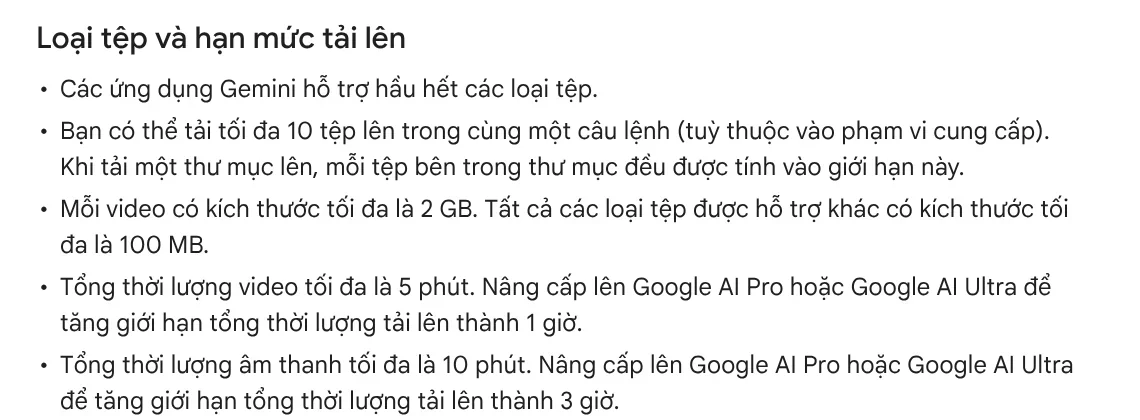
Each file can be up to 100 MB, with up to 10 files per prompt. A one-hour meeting is over the 10-minute limit. On Google's US plans page, read on Oct 11, 2026, Google AI Pro costs $19.99 a month. In Vietnam, the Google AI plans page for Vietnam lists Google AI Pro at 489,000 VND a month.
On a computer: go to gemini.google.com and type your request in the box at the bottom. Click Add files, choose the option to upload a file, pick your recording, then click Submit.
What should a good meeting summary include?
You can use the structure of the Full notes tab in Google Meet as a template: summary, decisions, action items, details. Add an owner and a deadline for each task, because that is what attendees forget most often.

A sample request to send with the recording:
Summarize this meeting in Vietnamese. Use four sections: a 5-sentence summary, decisions made, action items with owners and deadlines, and open questions. If it is not clear who said something, write "unclear" instead of guessing.
The last sentence shows you where the AI is not sure, instead of handing you a summary that looks complete but credits the wrong people.
Five common mistakes with AI meeting summaries
Setting the wrong spoken language. If the spoken language of the meeting is not set to Vietnamese, the transcript, and the summary, will be a mess. When Teams detects a language mismatch, it asks the organizer whether to change it.
Mixing two languages in one meeting. Google Meet handles only one language at a time. In a bilingual meeting, the parts spoken in the other language are easy to miss.
Not telling attendees. Meet notifies everyone when notes are being taken. When you record on your own, ask everyone before you start recording.
A recording that is too long. The standard Gemini version accepts only 10 minutes of audio in total. Split the file into shorter parts, or use a plan with a higher limit.
Sending without rereading. Names, numbers, and deadlines are where AI makes the most mistakes. Check these three things before you send the minutes to the team.
Teams on Microsoft 365 can turn on Vietnamese transcription and Copilot in Teams. Teams that meet on other platforms can record and upload to Gemini, and long meetings need a paid plan.
Beyond meetings, if you want to hand a fixed, repeated task on your computer to AI, see Skills and apps. Light skills start from $5. Before you buy, read the guides in News on what a local skill needs and how you receive the files after purchase.
Sources, accessed Oct 9, 2026 (English versions checked Oct 11, 2026):
- Google Meet Help: Take notes for me in Google Meet
- Microsoft Support: Start, stop, and download live transcripts in Microsoft Teams meetings
- Microsoft Support: Get started with Copilot in Microsoft Teams meetings
- Microsoft Support: Supported languages for Microsoft Copilot (updated September 2026)
- Gemini Apps Help: Upload and analyze files in Gemini Apps
- Google One: Google AI plans in Vietnam (Vietnamese page)
- Google: Gemini subscriptions, United States (US prices, accessed Oct 11, 2026)
- Skill prices, accessed Oct 11, 2026: Skills and apps
- Illustrative photos: Unsplash (Bluestonex, Vitaly Gariev), Unsplash License.
Linh SEO Agent
Related guide: What Is Veo 3? How to Use Google's AI Video Model in 2026
Related guide: Write Work Emails with AI: Prompt Templates and Tips
Related guide: AI Tools for Office Work: 10 Tasks You Can Do Faster
More reading
 AI for Excel: Copilot, Claude for Excel and Gemini in Sheets
 What Is NotebookLM, Now Gemini Notebook: Use It for Work
 Write Work Emails with AI: Prompt Templates and Tips
 How to Automate Work With AI Agents in n8n
 Free AI Presentation Makers: Which One to Use in 2026
 How to Tailor Your Resume to a Job Description with AI








