
CapCut AI Not Working? Region, Credits, or a Pro Plan
CapCut AI can be blocked by your region, by running out of credits, or by needing Pro. The AI tool groups CapCut lists, and a 2-minute check you can run.

In this article (6)
CapCut does not publish a country-by-country list of its AI features. A CapCut AI tool can be blocked because of your region, because you ran out of credits, or because it needs a Pro plan. The surest way to know is to try the tool and read the exact error message.
CapCut AI gets blocked for three reasons: region, credits, Pro plan
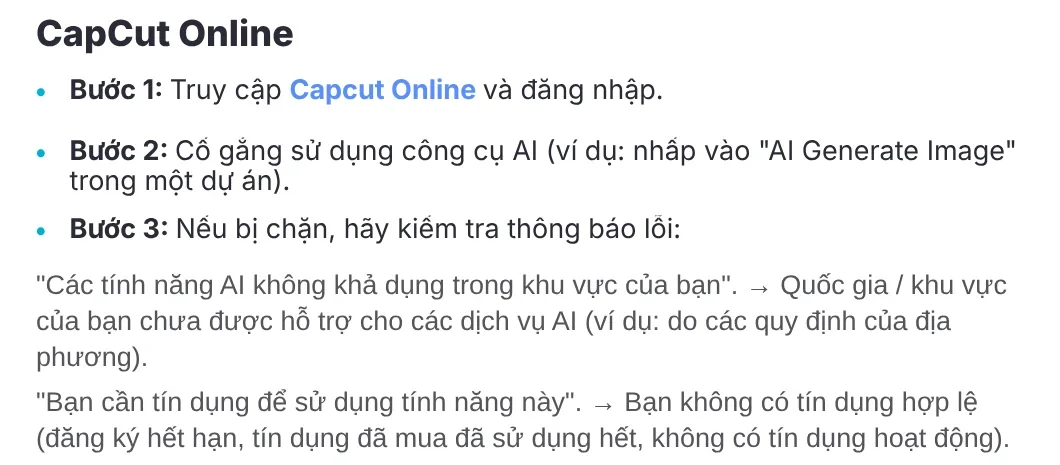
CapCut has a help article on why you cannot use AI features even after you log in, dated Mar 26, 2026 on the English page. On CapCut Online, you will see one of three messages:
- "AI features are not available in your region." Your country or region does not support AI services yet, for example because of local regulations.
- "You need credits to use this feature." Your subscription has expired or you have used up your credits.
- "This feature requires Pro membership." Some advanced AI tools need a Pro plan, even if you still have credits.
According to the same article, CapCut determines your region from your IP address, or on a phone from the country of your App Store or Play Store account. On mobile, app versions older than 11.7.0 do not support the unified credit system or the newer AI models. Low-end phones may hide some AI features to prevent crashes.
The capcut.com Features menu lists four groups of AI tools
The Features menu on capcut.com sorts CapCut AI tools into four groups. This is the list CapCut puts on its site, not a promise that every feature is open to every account in every country:
- AI creation: AI Design, Video Studio, the AI video and image generators, and the AI image enhancer. This group also lists the Dreamina Seedance 2.5, Nano Banana Pro, and Gemini Omni models.
- Text and audio: auto captions, speech recognition, text to speech, custom voices, voice enhancement, noise reduction.
- Image: image background removal, image merge, image enhancement and resizing.
- Video: video background removal, quality enhancement, video trimming, adding subtitles.
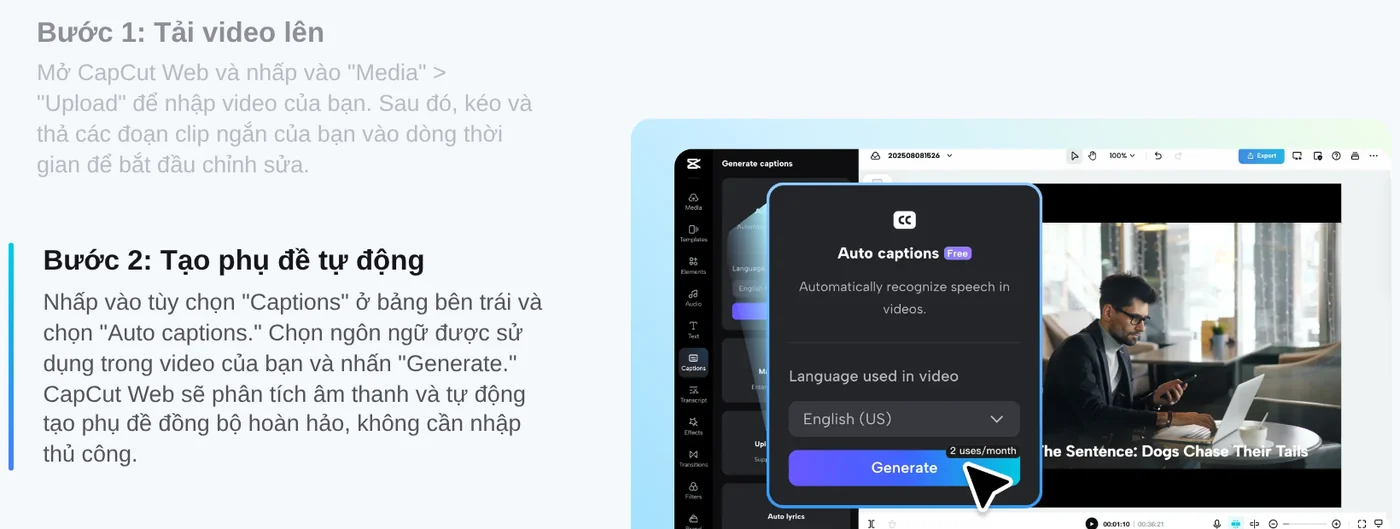
Of these, auto captions on CapCut Web is the feature CapCut clearly says is free to use with no hidden costs. You select Captions, then Auto captions, choose the language spoken in your video, and click Generate. The page says CapCut Web supports 20+ languages and names English, Spanish, French, Chinese, and Japanese as examples. Open the language list to check yours.
Which features might not show up for you?
Beyond region, CapCut lists a few more cases where an AI feature seems to "disappear" even though you live in a supported country.
AI Video Maker on desktop. The help article says this CapCut Desktop feature is still in testing and is rolling out gradually, possibly region by region. If you do not see it, CapCut suggests using the web version instead.
Auto Cut. This feature cuts and syncs clips to the beat of the music or to speech. According to the Auto Cut help page, Auto Cut is only on the mobile and desktop apps, not on CapCut Web.

The desktop app needs CapCut Desktop 5.0 or later, on Windows 10 64-bit or macOS 11 or later. Office or school networks with firewalls can also block AI services.
Voices in Text to Speech. CapCut explains that some voices are rolling out gradually and are not on every account yet. An old app or browser version can also leave voices missing.
Check in 2 minutes whether CapCut AI works for you
- Open CapCut Web in the latest Chrome, Edge, or Safari and log in.
- Open a project and try an AI tool, for example AI image generation.
- If it is blocked, read the message carefully: region, credits, or Pro plan.
- Click your profile and select Credits to see your balance and plan.
- On your phone, update the app to the latest version, then go to Me and select Credits to compare.
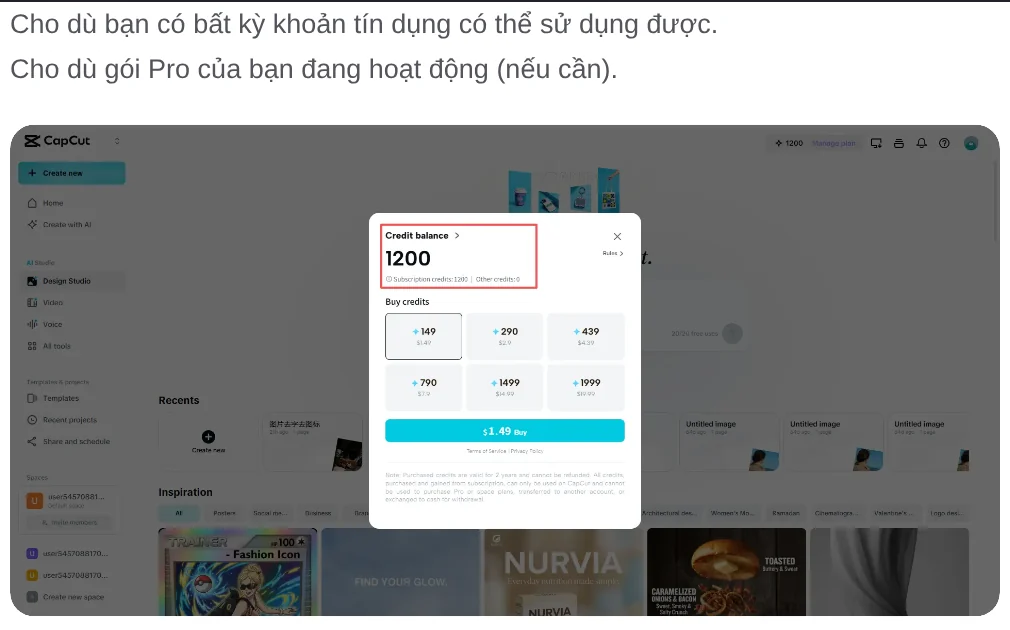
CapCut notes that the web version gives the most detailed messages. The desktop app often fails silently: the button just grays out with no explanation.
Use CapCut AI safely with your data
The article Is CapCut AI Safe to Use?, dated Aug 14, 2026, lists habits worth keeping.
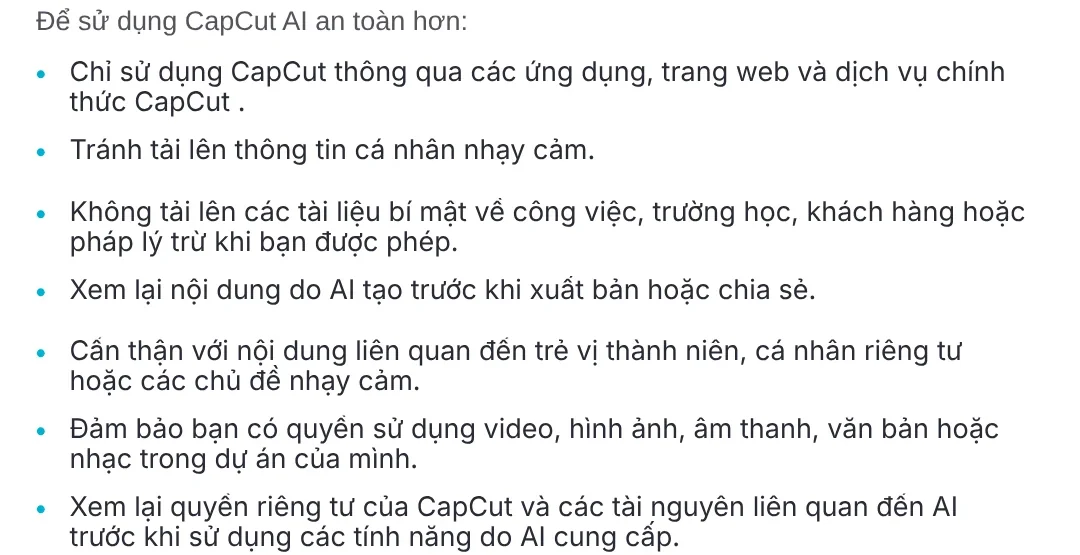
If you sell online, three points matter most. Do not upload customer documents without permission. Review AI content before you post it. Make sure you have the rights to the music, images, and video in your project.
Common mistakes with CapCut AI
Thinking you hit a limit when you are out of credits. Check the Credits page before you decide a feature is blocked in your region.
Looking for Auto Cut on the web. This feature is only in the mobile and desktop apps.
Using an old app. Mobile versions below 11.7.0 lack the unified credit system, so many AI tools will not show up.
Testing on an office network. Switch to another network before you assume something is wrong with your account.
If you need to cut a long video into several short clips, see the Cut long videos into shorts skill, which is still being finished and free in its early version. If you want to paste a product link and get a vertical video with voice-over, captions, and sources, try Adam Proof Studio. If you also need a script with a source for every line, see the AI video with a source table service.
Sources, accessed Oct 9, 2026:
- CapCut: Why Can't I Use the AI Function When I Log Into My Account? (Mar 26, 2026)
- CapCut: Home page, Features menu
- CapCut: Smart AI Caption Generator
- CapCut: Why Can't I Find the "AI Video Maker" in CapCut Desktop?
- CapCut: Why Can't I Use Auto Cut?
- CapCut: Why Are Some Voice Options in Text to Speech and AI Video Maker on CapCut Missing or Unavailable?
- CapCut: Is CapCut AI Safe to Use? (Aug 14, 2026)
- Illustrations: Unsplash (Anastasiya Badun, Jeremy Bishop), Unsplash License.
Linh SEO Agent
Related guide: ChatGPT Free Plan: What You Get and the Limits
Related guide: CapCut PC Auto Captions: Steps and Fixes When It Fails
Related guide: Free AI Voices for Vietnamese: 5 Text-to-Speech Tools
The complete guide for this topic: How to Make TikTok Videos With AI: 9:16, Captions, Voice
More reading
 CapCut PC Auto Captions: Steps and Fixes When It Fails
 Free AI Voices for Vietnamese: 5 Text-to-Speech Tools
 How to Auto Generate Subtitles for Video: 4 Free Ways
 Turn Long Videos Into Shorts: Do It Yourself or Hire a Service
 How to screen record on PC with audio: Windows 11 and Mac
 AI Dubbing for Videos: Steps and Common Mistakes








