
AI Dubbing for Videos: Steps and Common Mistakes
How to dub videos with AI on YouTube and ElevenLabs: the steps, the published limits, how to label AI content, and six common mistakes to avoid.

In this article (5)
AI dubbing translates the speech in a video and replaces it with a new voice track. On YouTube, the feature is built in. For more language choices, use a tool like ElevenLabs.
AI dubbing translates speech and swaps the voice while keeping the original character
The ElevenLabs documentation, read on Oct 9, 2026, defines automatic dubbing as translating and replacing the original audio of a video with a new language. The dub keeps the voice characteristics of the original speaker.
AI voice-over reads a script you already have. AI dubbing is different: it works on a video that already has speech. The tool has to recognize the speech, translate it, and then read it again in a new voice. Each step can go wrong, so the common mistakes section at the end matters as much as the steps.
YouTube auto dubbing is on by default, but language pairs are limited
YouTube has an automatic dubbing feature that creates translated audio tracks in several languages. It is enabled by default for eligible creators, and dubs are created when you upload a new video. Viewers can pick the audio language, and a dubbed video is marked "auto-dubbed" in its description.
Check the language table before you count on it. Videos in English can be dubbed into 20 languages, including Spanish, French, Hindi, Japanese, and Portuguese. Other source languages have fewer options. A video in Vietnamese, for example, can only be dubbed into English, and Vietnamese is not a target language for English videos.
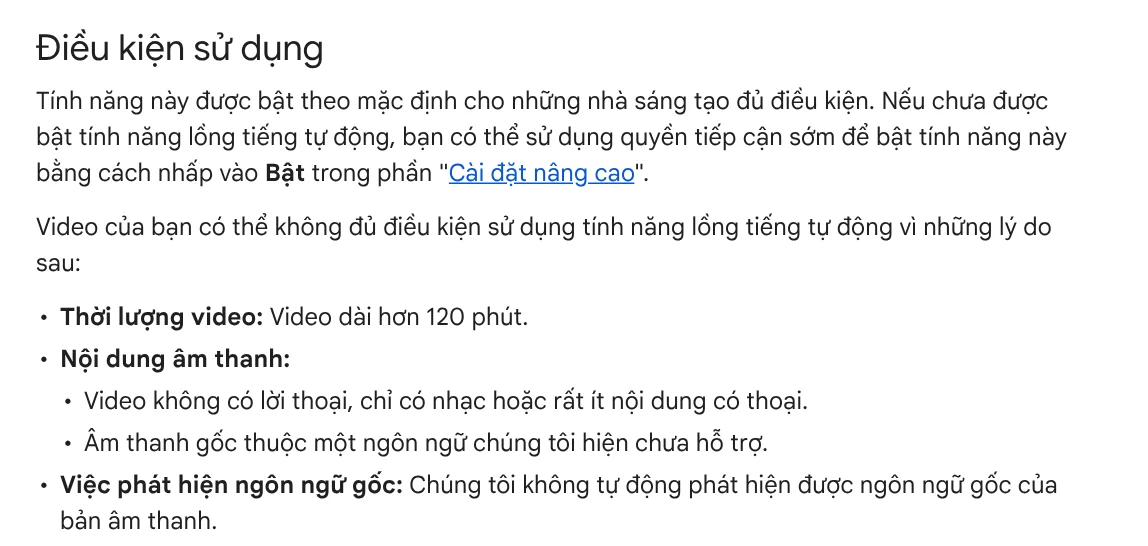
A video may not qualify if it is longer than 120 minutes, has almost no speech, or the speaker talks too fast. To listen before your viewers do, open the YouTube Studio app, tap your profile picture, go to Settings > Content > Automatic dubbing, and tap Publish manually. The dubs then wait for you to publish them in the video's Languages section in YouTube Studio on a computer.
YouTube is also testing lip sync, which adjusts mouth movements to match the dubbed voice, for some eligible channels and languages.
ElevenLabs dubs in six steps and lets you tune how close the voice sounds
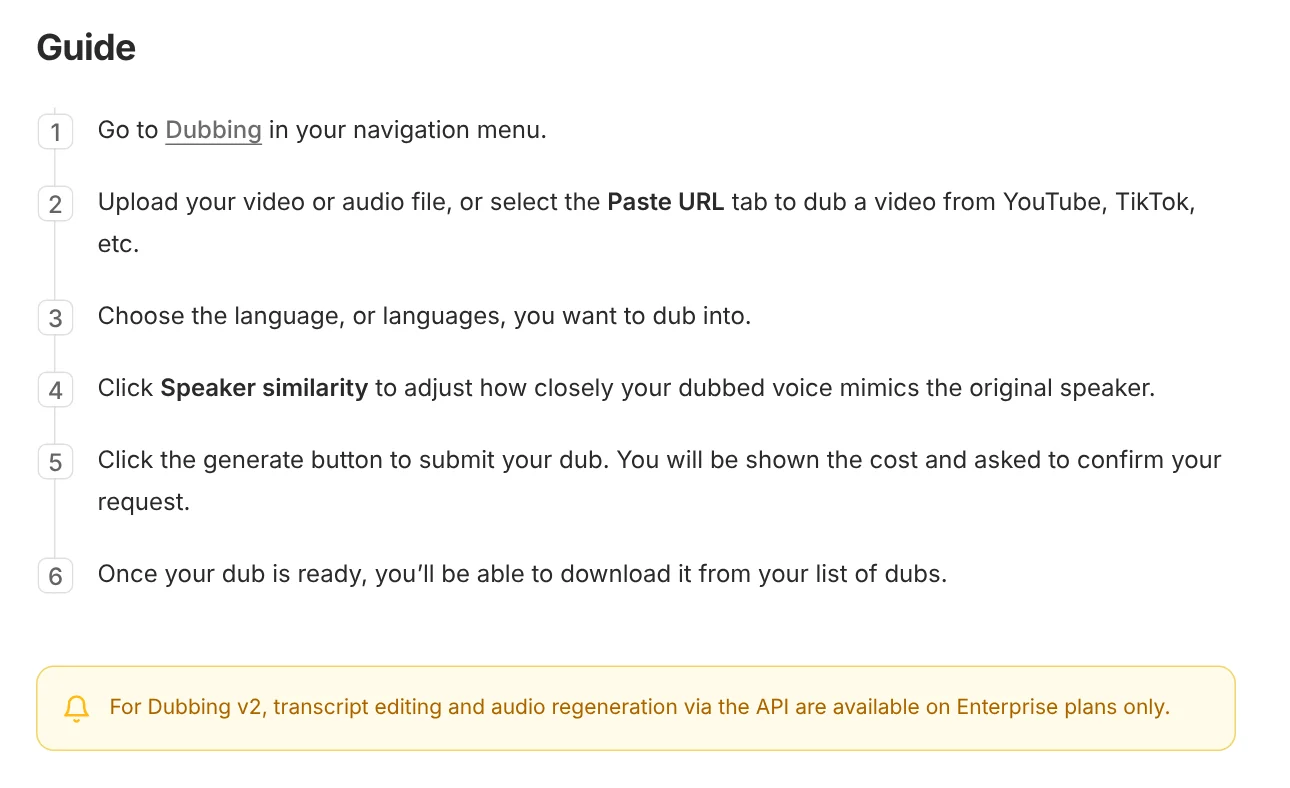
ElevenLabs supports translation into more than 90 languages. These are the steps in the official docs:
- Open Dubbing in the navigation menu.
- Upload a video or audio file, or choose the Paste URL tab to paste a video link.
- Choose one or more target languages.
- Click Speaker similarity to set how closely the dub matches the original voice.
- Click the create button, review the cost, and confirm.
- When it is done, download the dub from your list.
A few numbers to remember. On the web, uploaded files must be under 2 GB and under 180 minutes. The default Speaker similarity is 7 on a scale of 0 to 10. A higher value sounds more like the original voice but can sound less natural and carry over the speaker's accent. The free plan includes Dubbing, but those dubs carry an ElevenLabs watermark.
ElevenLabs also says the dubbed video it exports is a preview, usually at 1080p. For the final version, it recommends downloading the dubbed audio and replacing the audio track on your original video.
Do you need to label AI-dubbed videos?
On YouTube, automatic dubs are already noted in the description. For videos you dub yourself with another tool, follow YouTube's rules on disclosing AI content. You must disclose if the video shows a real person appearing to say something they did not say, or a realistic scene that did not happen.
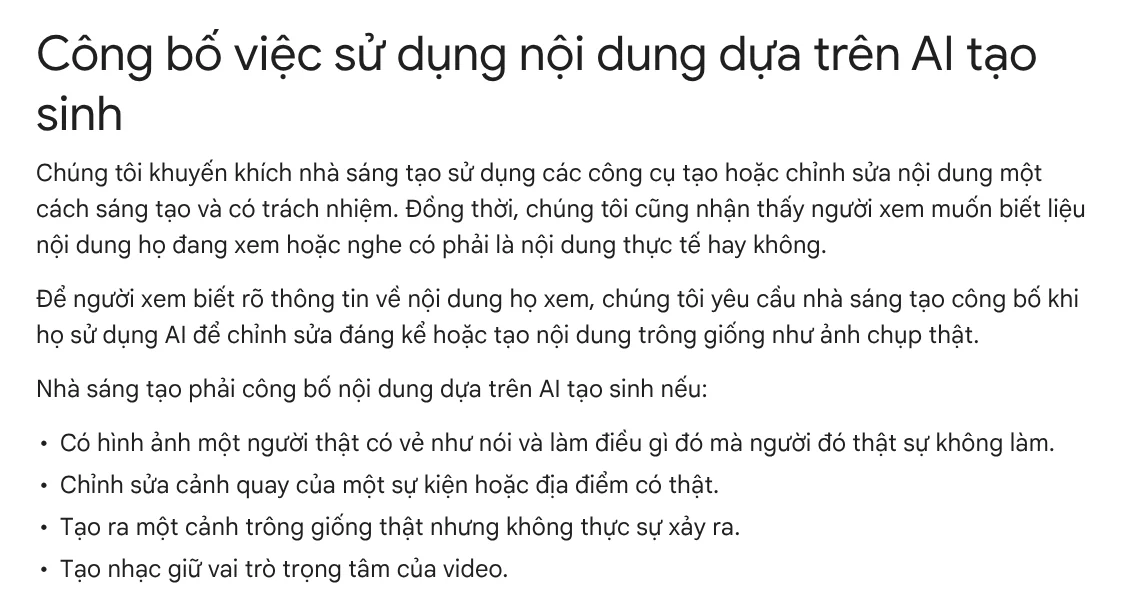
How to disclose: when you upload a video in YouTube Studio, go to the Attributes section, find AI use, and choose Yes. YouTube says disclosure won't limit a video's audience or affect its eligibility to earn money. On the other hand, channels that keep failing to disclose may have content removed or be suspended from the YouTube Partner Program.
If you clone someone's voice, ElevenLabs requires you to confirm you have the right and consent to clone it before you save the voice.
Six common AI dubbing mistakes
Setting the wrong original language. YouTube says a wrong default language can lead to a mistranslated dub. Fix the original language and the dubs are created again.
Noisy original audio. YouTube lists mispronunciation, accents, dialects, and background noise as sources of errors. Clean audio from the start saves you fixes later.
Talking too fast. Very fast speech makes the dub sped up and hard to follow, and the video may not qualify at all.
Names and terms translated wrong. YouTube admits the feature struggles with proper nouns, idioms, and jargon. Check the transcript before you publish.
Not listening before you post. You can't edit YouTube's automatic dubs right now. Turn on manual review to catch a bad dub.
Using the preview video as your final file. With ElevenLabs, take the dubbed audio track and add it to your original video to keep the resolution.
If you need a new video with a voice-over from the start instead of dubbing an old one, see Adam Proof Studio. Paste a link to a product or an article, and the Studio makes a vertical video with voice-over, captions, and music, in English or Vietnamese. If you need every spoken line backed by a source and an access date, see the AI video with a source table service, or read why the demos are real screen recordings in News.
Sources, accessed Oct 9, 2026:
- YouTube Help: Use automatic dubbing
- YouTube Help: Disclosing use of GenAI content
- ElevenLabs: Dubbing
- ElevenLabs: Instant Voice Cloning
- Photos: Unsplash (Videodeck .co, Emmanuel Ikwuegbu), Unsplash License.
Linh SEO Agent
Related guide: AI Sales Videos: 5 Mistakes That Make Shoppers Scroll Past
Related guide: How to Auto Generate Subtitles for Video: 4 Free Ways
Related guide: How to Make an AI Video With Source Citations in 5 Steps
The complete guide for this topic: How to Make TikTok Videos With AI: 9:16, Captions, Voice
More reading
 pyVideoTrans: Free Open Source AI Video Dubbing Software
 How to Auto Generate Subtitles for Video: 4 Free Ways
 AI Sales Videos: 5 Mistakes That Make Shoppers Scroll Past
 Free AI Voices for Vietnamese: 5 Text-to-Speech Tools
 Turn Long Videos Into Shorts: Do It Yourself or Hire a Service
 Social Media Aspect Ratios: 4:5, 1:1, 16:9 and 9:16








