How to Make Video Ads With AI for a Small Product
Make video ads with AI inside your ad account: TikTok Symphony Creative Studio and Google Ads Asset studio, plus the 9:16 video specs you need.

In this article (5)
- AI video ad tools already sit inside your ads manager
- TikTok Symphony turns a product photo into a clip in a few minutes
- Google Ads Asset studio builds a script and storyboard from your landing page
- What should you prepare before you make a video ad with AI?
- Five common mistakes in AI video ads for small products
The fastest way to make a video ad with AI for a small product is to use the tool already inside your ad account. TikTok has Symphony Creative Studio. Google Ads has Asset studio.
AI video ad tools already sit inside your ads manager
As of October 2026, both TikTok and Google Ads put an AI video tool right inside the ad account. You don't need to hire a video crew or buy separate software to get a first video for one product.

The two tools start from different places. Symphony starts from a product photo or a one line description of a scene. Asset studio starts from your landing page, the product page your ad links to. If you run a small shop, pick the tool based on where you plan to run the ad: TikTok or YouTube.
TikTok Symphony turns a product photo into a clip in a few minutes
The About Symphony Creative Studio page describes it as a free AI video tool for both organic content and paid ads. You sign in with your TikTok for Business account and accept the Creative GenAI Terms the first time.
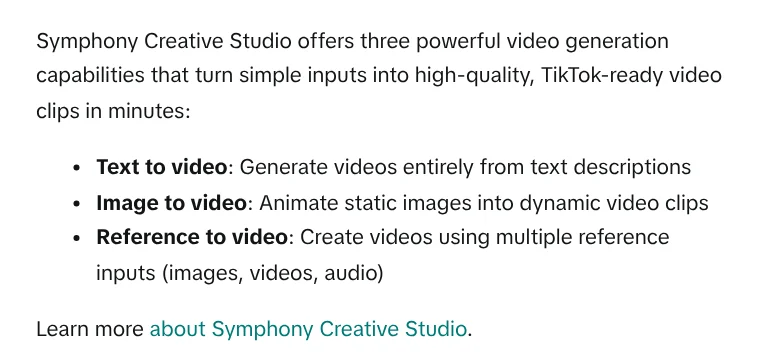
The tool has three ways to make a video, according to the video generation guide:
- Text to video: builds the whole video from a written description.
- Image to video: animates a still image, which suits product photos best.
- Reference to video: uses several images, videos, and audio clips as references.
With Image to video, you upload a product photo, describe the motion you want, pick an AI model and a length, then generate. TikTok says a typical generation takes a few minutes. When it's done, open the editor to add music, a voice-over, captions, and text. Then download the clip or click Sync to Ads Manager to send it straight to your ads manager.
Know two things before you start. Every exported video gets an AI-generated label under TikTok's ad policy. And the guide, updated in June 2026, says the Dreamina Seedance 2.0 model does not accept images or videos with real faces as references in its initial rollout.
Google Ads Asset studio builds a script and storyboard from your landing page
On the Google side, the About Asset studio page calls it the place to create, edit, and manage all your ad assets. Asset studio includes SynthID, a digital watermark that lets anyone check whether an image was made or edited with Google AI.
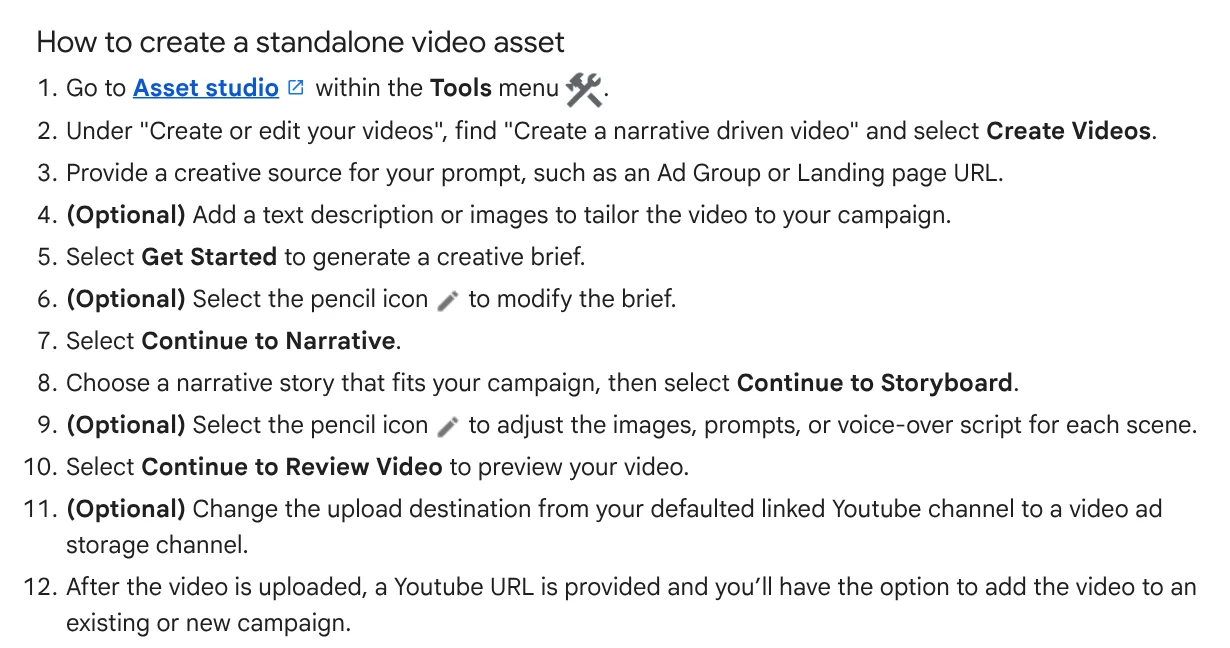
Here is how to create a standalone video, based on the guide to creating assets with a prompt:
- Open Asset studio from the Tools menu, then select Create Videos under "Create a narrative driven video".
- Give the prompt a source, such as an ad group or a landing page URL. You can add a description and images.
- Select Get Started so the AI writes a creative brief. Edit it if needed.
- Choose a story, then adjust the images, prompts, or voice-over script for each scene in the storyboard.
- Review the video. It uploads to your linked YouTube channel, and you can add it to a campaign.
One point matters if you sell in a language other than English: as of Oct 9, 2026, Google says prompts support English only. You can upload up to 5 product images, and Google says the AI keeps your product's shape, color, and texture accurate. Projects you generate stay in your history for 55 days, then get deleted.
What should you prepare before you make a video ad with AI?
AI makes the visuals fast, but the facts have to come from you. Have these four things ready before you click generate:
- A clear product photo with a clean background.
- Three key facts about the product, such as price, size, and material.
- A landing page with the current price and stock.
- One single call to action.
Your video also has to match the platform's specs. TikTok's In-Feed ad specs page, updated in June 2026, recommends a vertical 9:16 frame of at least 540x960 px. Videos can run up to 10 minutes, files can be up to 500 MB, and the page accepts .mp4, .mov, and a few other formats.
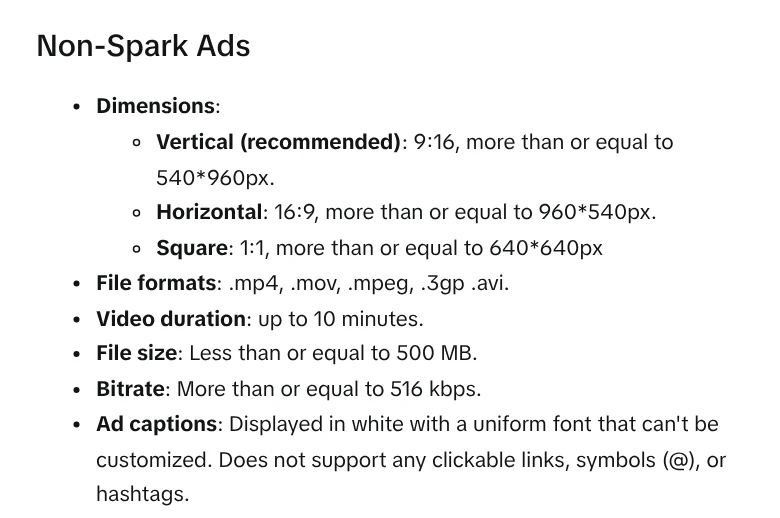
The same page says ad captions show in white, in a fixed font, and don't support clickable links, the @ symbol, or hashtags. So don't put key information only in the caption. If you're not sure which frame fits each platform, a guide on when to use the 4:5, 1:1, and 16:9 aspect ratios is in News.
Five common mistakes in AI video ads for small products
Long, rambling prompts. TikTok recommends keeping it simple and describing the scene you want to see directly, for example "A person runs on a treadmill in a gym." Avoid back and forth questions or asking the AI to play a role.
Writing Asset studio prompts in another language. The help page says prompts currently support English only. Write the prompt in English, then read the voice-over for each scene closely at the storyboard step before you export.
Using photos of real faces with Seedance 2.0. As of June 2026, this model blocks real faces as references, so pick a different model for scenes with a model or presenter.
Placing key text near the edges. Each size has its own safe zone. TikTok lets you download safe zone files from the specs page so you can check first.
Voice-over claims with no proof. AI writes smooth copy, but lines like "best seller" or "results in 3 days" still need evidence. Before you write the voice-over, read the guide on not promising business results in News.
If you need every line of the script to have a clear source, see the AI video with a source table service. Each line comes with its source, a link, and the date it was accessed. To make one yourself from a product link, Adam Proof Studio turns a link into a vertical video with voice-over, captions, and music.
Sources, accessed Oct 9, 2026:
- TikTok Business Help Center: About Symphony Creative Studio
- TikTok Business Help Center: How to generate videos with Symphony Creative Studio
- TikTok Business Help Center: TikTok Auction In-Feed Ads
- Google Ads Help: About Asset studio
- Google Ads Help: Create image, text, and video assets with a prompt in Asset Studio
- Photos: Unsplash (Campaign Creators, Jay), Unsplash License.
Linh SEO Agent
Related guide: How to Make a Product Video With AI: a 30-Second Script
Related guide: How to Create a Consistent AI Character Across Images and Videos
Related guide: Social Media Aspect Ratios: 4:5, 1:1, 16:9 and 9:16
The complete guide for this topic: AI for Online Sellers: 5 Jobs to Hand Off to AI