How to Make a Product Video With AI: a 30-Second Script
A 30-second script to make a product video with AI: say what you sell in 3 seconds, join four 8-second Google Flow clips and match TikTok ad specs.


In this article (5)
To make a product video with AI without wasting time, write a 30-second script split into four scenes. Each scene runs about 8 seconds. The first three seconds say what you sell, and the last seconds tell viewers what to do next.
A 30-second video needs four parts: hook, selling point, proof and call to action
TikTok's creative best practices, last updated in June 2025, suggest a structure that sells. Open with a hook, highlight your unique selling points and end with a clear call to action. Four numbers on that page are worth keeping in mind while you write.
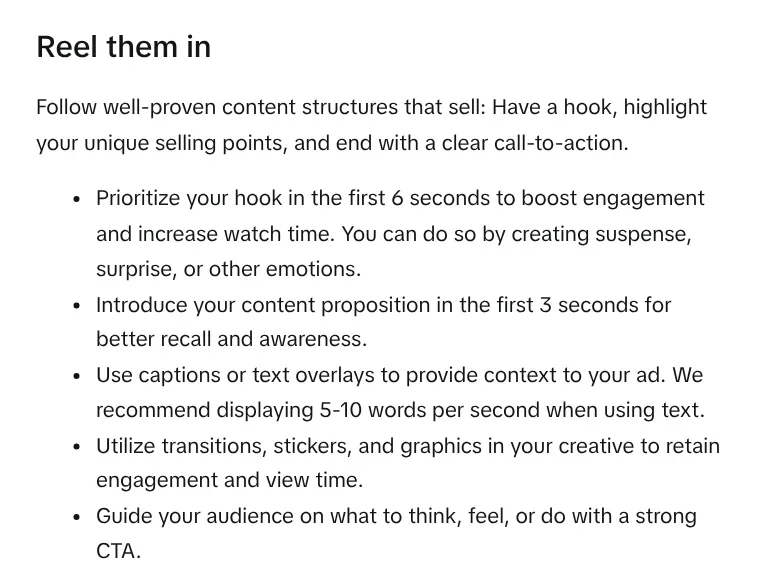
First, introduce your main message in the first 3 seconds so viewers remember the brand. Second, put your hook in the first 6 seconds using suspense, surprise or emotion. Third, keep on-screen text at 5 to 10 words per second. Fourth, shoot vertical 9:16 video at 720p or higher, with music or sound.
TikTok also recommends putting real people on screen, such as creators, employees or customers. A DIY style that is not overly polished often fits the feed better than a glossy video.
A sample 30-second script for one product
The example below is for an insulated bottle sold online. Swap in your own product name, numbers and proof.
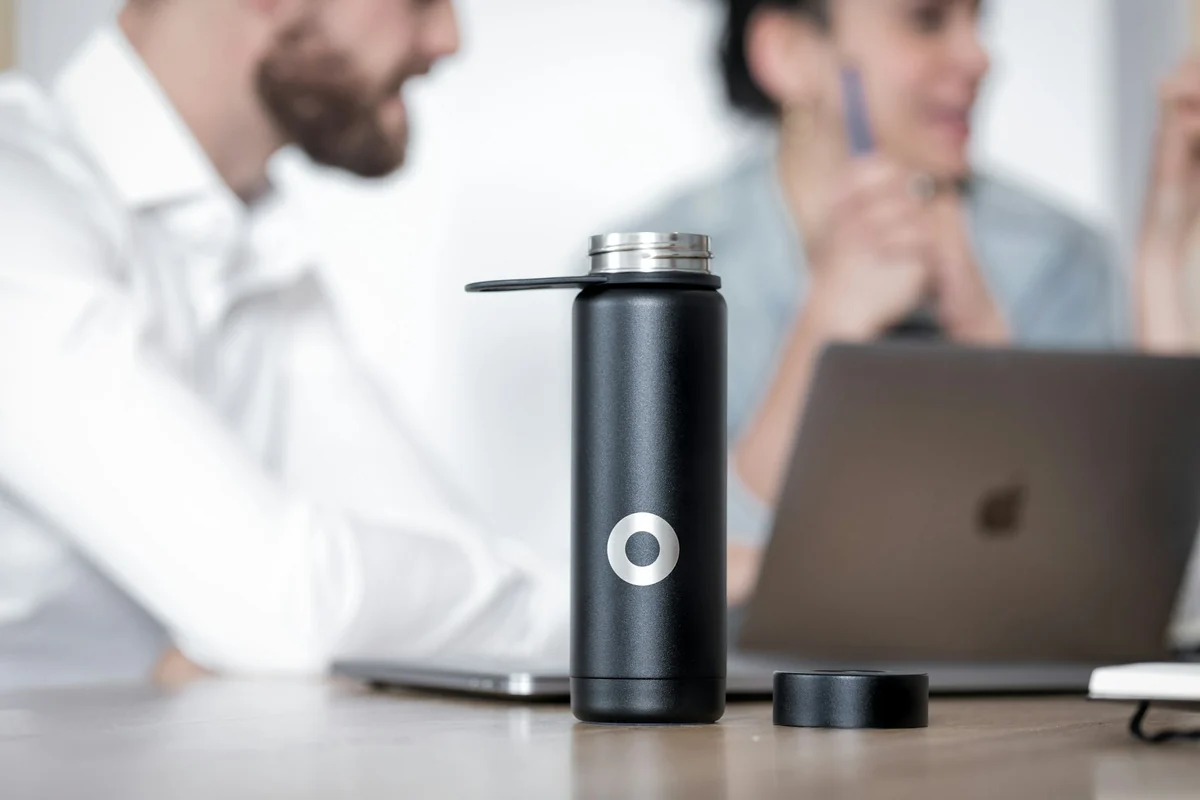
| Seconds | Visual | Voice-over | On-screen text |
|---|---|---|---|
| 0 to 3 | Hand holding the bottle, close-up of the logo | "The insulated bottle for office workers" | Product name. |
| 3 to 8 | Pouring ice into the bottle in the morning | "Ice at 7 a.m., still there in the afternoon" | Real hours it stays cold. |
| 8 to 16 | Bottle in a bag, then on a desk | "Light, leak-proof, fits your cup holder" | Two key selling points. |
| 16 to 24 | Real customer review photo | "What last month's buyers said" | One quoted review line. |
| 24 to 30 | Product, price, buy button | "Tap the cart, same-day delivery" | Price and call to action. |
The 16 to 24 second slot is the one many people leave empty. A good-looking AI video still needs real proof: review photos, screenshots of orders with personal details hidden, or certificates. Do not let AI invent praise. Viewers spot it faster than you think.
Keep the voice-over shorter than you expect, so there is room to breathe and the on-screen text does not rush. Read the script out loud with a timer before you generate any scene.
Make a product video with AI in Google Flow by joining four 8-second clips
Each generation in Google Flow gives you only a short clip, so a 30-second video is several clips joined together. The Google Flow models page says the Veo 3.1 models create videos 4, 6 or 8 seconds long, in both aspect ratios.
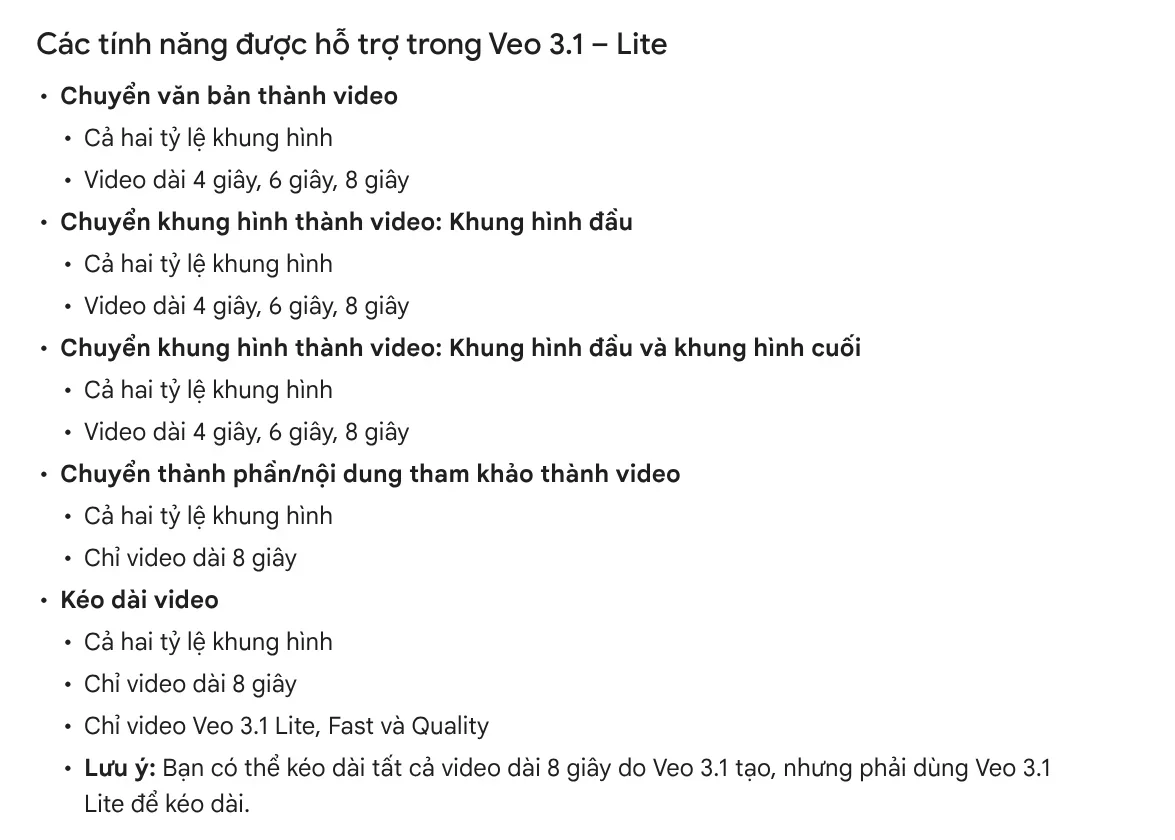
Four 8-second scenes give you 32 seconds. Trim the start and end and you land at 30. The Gemini Omni Flash 1.1 model can make 10-second clips, so three clips are enough. An Omni draft at 360p costs half the credits of 720p, which makes it a cheap way to test your script before the final version.
On access, two Flow help pages read on Oct 9, 2026 do not quite agree. The Get started page says you need a Google AI Plus, Pro or Ultra plan. The credits page says every account gets 50 credits a day, and unused credits do not roll over. Without a plan, you may not be able to generate video during peak hours, roughly 2 PM to 5 PM UTC. Sign in and test to see what your own account can do.
To keep the product looking the same in every scene, use the Ingredients feature. The Create videos in Google Flow guide recommends product photos on a plain or segmented background. Note that Veo 3.1 videos made from ingredients are 8 seconds only.
The Flow Agent can create several variations at once, for example five versions with different lighting. That gives you several ads to test, in line with TikTok's advice to run 3 to 5 different creatives per ad group.
Match TikTok's ad specs before you post
The TikTok ad specifications page was last updated in June 2026. It recommends vertical 9:16 video at 540x960 px or higher. For non-Spark ads, videos can run up to 10 minutes, files can be up to 500 MB, and formats include .mp4, .mov and a few others.
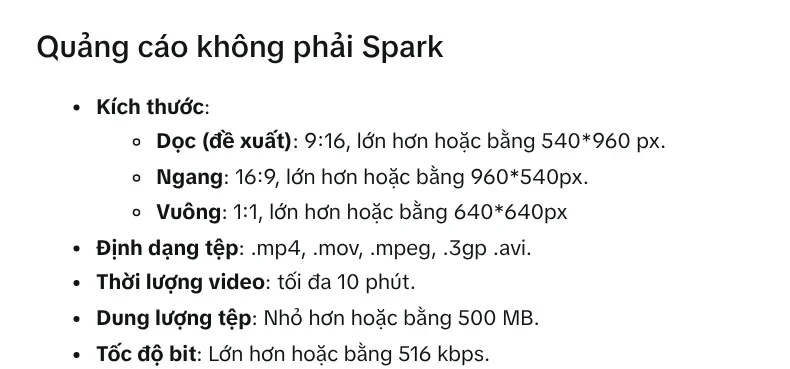
The same page has a safe zone file to download. Keep your text and product inside that zone, or the buttons and captions will cover them. If you need the same video for Facebook or YouTube, the News section explains when to use the 4:5, 1:1 and 16:9 frames.
Why do AI product videos get scrolled past?
Most of the problems come from the script, not the model. Five common mistakes:
A pretty opening that never says what you sell. Three seconds pass and viewers still do not know the product. Put the name or the main benefit in the first frame.
The product changes between scenes. The bottle cap is black in one scene and silver in the next. Use ingredients with real product photos, and check every scene.
Too much on-screen text. Nobody can read a long sentence that stays up for 2 seconds. Keep it to 5 to 10 words per second.
Overpromising. AI likes to write "number one best seller" or "instant results". Only say what you can prove. The News section has more on why you should not promise business results.
No call to action. The video ends and viewers do not know where to tap. Make the last line one specific action: tap the cart, send a message or visit the page.
If you do not want to join scenes yourself, paste a product link into Adam Proof Studio. You get a video with voice-over, captions and music in 9:16, 16:9 or 1:1, with sources for its claims. If you need a video where every line has a source and an access date, see AI video with a source table.
Sources, accessed Oct 9, 2026:
- TikTok for Business: Creative best practices for performance ads
- TikTok for Business: TikTok Auction In-Feed Ads
- Google Flow Help: Learn about Google Flow models and supported features
- Google Flow Help: Create videos in Google Flow
- Google Flow Help: Get started with Google Flow
- Google Flow Help: Manage your Google Flow credits
- Illustrative photos: Unsplash (Rifki Kurniawan, Bluewater Sweden), Unsplash License.
Linh SEO Agent
Related guide: AI for Online Sellers: 5 Jobs to Hand Off to AI
Related guide: AI Livestream Selling on TikTok: What You Can and Can't Do
Related guide: How to Make Video Ads With AI for a Small Product