
Social Media Aspect Ratios: 4:5, 1:1, 16:9 and 9:16
Social media aspect ratios for Facebook, Instagram, TikTok and YouTube: 4:5 for feeds, 9:16 for Reels and Shorts, 16:9 for videos and thumbnails.

In this article (6)
- Facebook post image size: 4:5 for the feed, 9:16 for Stories and Reels
- Instagram aspect ratio: stay between 1.91:1 and 3:4 to avoid cropping
- TikTok, Reels and YouTube Shorts: build in 9:16 and keep text off the edges
- YouTube thumbnail size: 16:9 for videos, 9:16 for Shorts
- Why not crop a vertical photo into a horizontal frame?
- Common mistakes when choosing an aspect ratio
Use 4:5 for Facebook and Instagram feed images, 9:16 for Reels, Stories, TikTok and Shorts, and 16:9 for YouTube videos and thumbnails. Give each frame its own layout.
As of Oct 12, 2026, Meta's help pages still recommend the vertical 4:5 ratio for both images and videos in Facebook Feed. Pick the wrong ratio and the platform crops, shrinks or pads your file for you, and what gets lost is usually text or a face.
The table below collects the main numbers from each platform's official help pages. Details and links are in the sections that follow.
| Where you post | Build in | Note from the official page |
|---|---|---|
| Facebook Feed | 4:5 | Meta suggests 1440 x 1800 pixels |
| Instagram Feed | 4:5 | Accepts 1.91:1 to 3:4, anything outside is cropped |
| Stories, Reels | 9:16 | Meta suggests 1440 x 2560 pixels |
| TikTok | 9:16 | Vertical is TikTok's recommended format |
| YouTube Shorts | 9:16 | Square or vertical videos up to 3 minutes count as Shorts |
| YouTube videos and thumbnails | 16:9 | Thumbnails: 3840 x 2160 pixels suggested |
Facebook post image size: 4:5 for the feed, 9:16 for Stories and Reels
Meta Business Help Center has a table of ratios by placement on its Aspect ratios supported by placements page. Facebook Feed recommends 4:5 for both images and videos. Instagram Feed recommends 4:5 for images and 9:16 for videos.
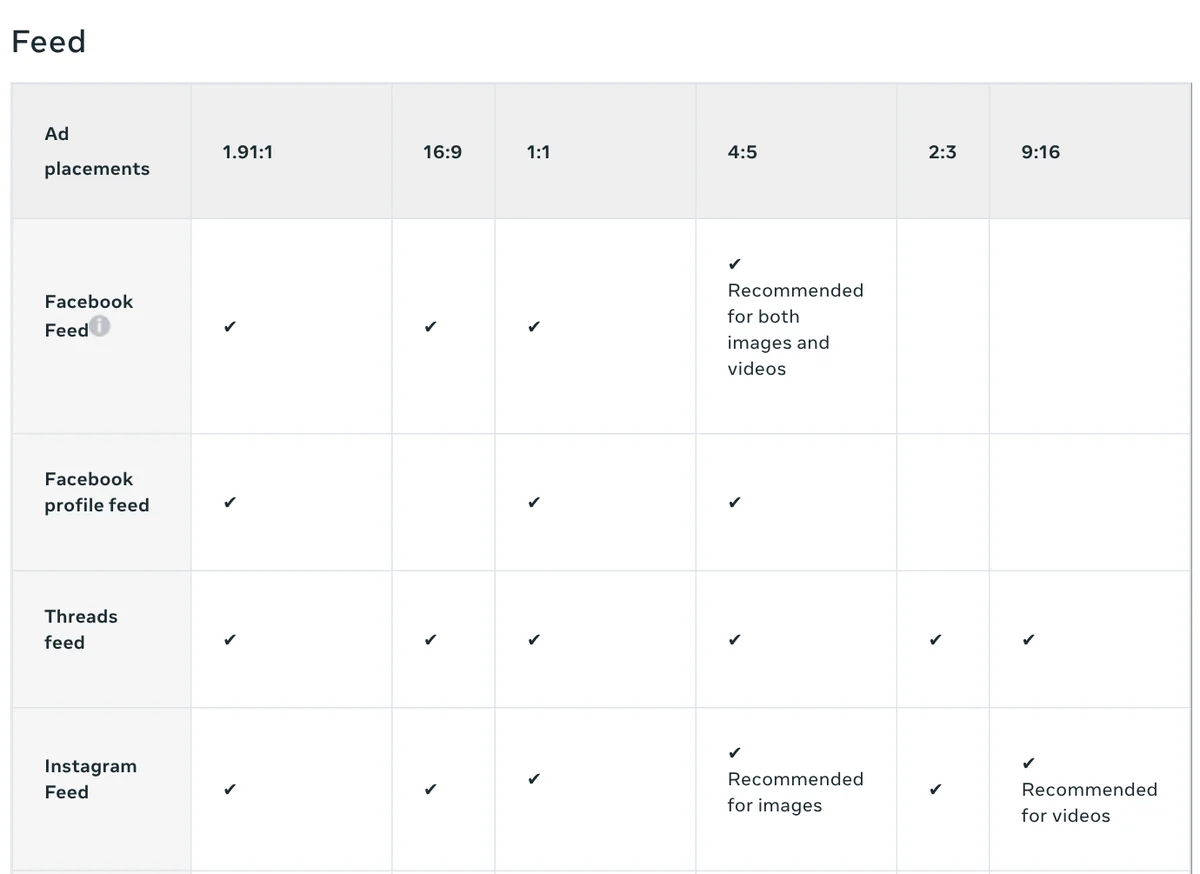
The table is written for ads, but ads and regular posts appear in the same feed, so it works as a reference. For Facebook post image size, the Facebook Feed image spec suggests 1440 x 1800 pixels as a JPG or PNG. Meta's page on finding your image's aspect ratio gives 1080 x 1350 pixels as another 4:5 example.
In the same table, Stories and Reels on both Facebook and Instagram recommend 9:16. Meta also notes that on the computer version of Facebook Feed, video is shown at 1:1, which can add black bars on the sides. That makes 1:1 a good fit when one image or video has to run in many places, desktop included.
Instagram aspect ratio: stay between 1.91:1 and 3:4 to avoid cropping
The Instagram Help Center page on image resolution spells out the range. A photo between 320 and 1080 pixels wide keeps its original resolution as long as its ratio is between 1.91:1 and 3:4. In pixels, that is 1080 wide and between 566 and 1440 tall.
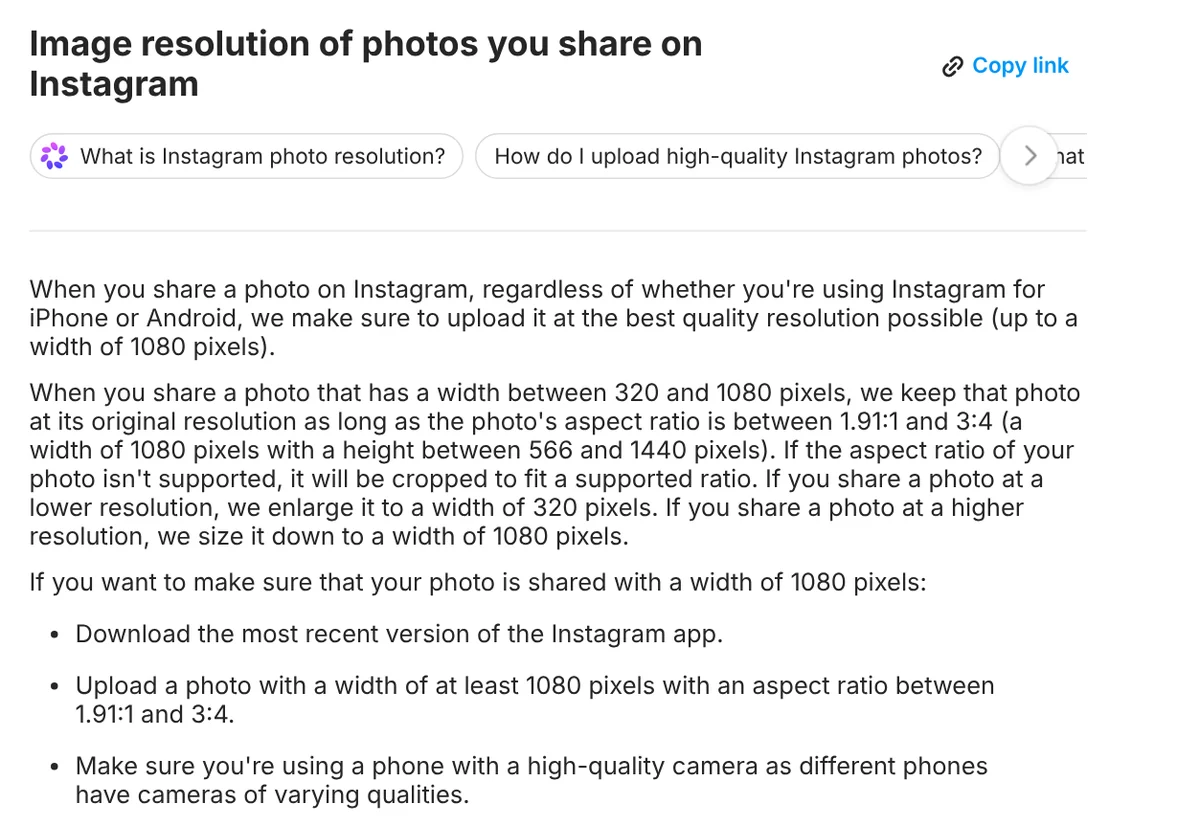
A photo outside that range is cropped to fit. A photo narrower than 320 pixels is enlarged to 320, and one wider than 1080 is scaled down to 1080. To keep a 1080 pixel width, Instagram recommends uploading a photo at least 1080 pixels wide within that ratio range.
3:4 is a little taller than 4:5, so on Instagram it fills more of the screen. Meta's Facebook Feed table has no 3:4 column, though. If one image has to go to both places, 4:5 is the safer choice.
TikTok, Reels and YouTube Shorts: build in 9:16 and keep text off the edges
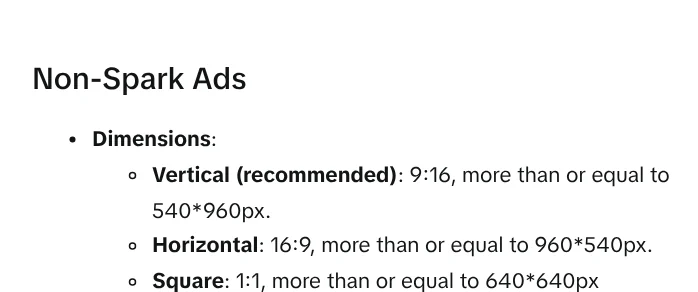
The TikTok Auction In-Feed Ads page in TikTok Business Help Center, updated June 2026, lists vertical 9:16 as the recommended format. Horizontal 16:9 and square 1:1 are still accepted, each with its own minimum size.
The 9:16 frame has a catch: buttons, the account name and captions sit on top of the upper and lower edges. TikTok's page offers safe zone files to download. For Reels videos, Meta's spec page suggests keeping about 14% at the top, 35% at the bottom and 6% on each side free of text and logos.
YouTube Shorts use the same vertical frame. According to YouTube Help on three-minute Shorts, on standard channels any square or vertical video up to three minutes uploaded on or after Oct 15, 2024 is classified as a Short. If you want a long-form video, YouTube suggests a wider ratio such as 16:9. If you make vertical video with AI, News has a guide to free AI video tools.
YouTube thumbnail size: 16:9 for videos, 9:16 for Shorts
The Add custom thumbnails page tells you to make thumbnails as large as possible. The suggested size is 3840 x 2160 pixels for videos and 2160 x 3840 pixels for Shorts. The minimum is 640 pixels wide for videos and 640 pixels tall for Shorts.
For the ratio, YouTube lists 16:9 for regular videos, 9:16 for Shorts and 1:1 for podcast playlists. Upload a JPG or PNG. The file limit is 2 MB for video thumbnails uploaded from a phone and 50 MB from a computer.
One detail is easy to miss. A vertical video with a 16:9 thumbnail gets an auto-generated 4:5 thumbnail instead on the home, explore and subscription pages. The same page notes that custom Shorts thumbnails can currently only be added in YouTube Studio on a computer, and your account must be verified.
Why not crop a vertical photo into a horizontal frame?
Take a 4:5 photo that is 1080 pixels wide and crop it to 16:9, and the height drops to about 608 pixels. You lose more than half the image, usually the head, the feet or the text placed at the top and bottom.
The opposite fix, keeping the vertical photo and padding it out to a wide frame, does not work well either. YouTube's video resolution and aspect ratios page says the standard ratio on a computer is 16:9 and the player adapts to each video. YouTube advises against adding padding or black bars directly to the video, because that stops the player from adjusting.
Meta takes the same line. Its Best practices for aspect ratios page says Ads Manager automatically adjusts media to fit more placements. Meta recommends reviewing the auto-generated crops before publishing so important content is not cut off. If Stories matter for a campaign, Meta suggests uploading a separate 9:16 asset.
So give each frame its own layout: rebalance the subject and move text into that frame's safe area. Add text only after you settle on the frame, because changing the frame later crops it. News also has a step-by-step guide to adding text to photos on a phone or computer.
Common mistakes when choosing an aspect ratio
Using a 16:9 landscape image in the feed. Meta points out that on mobile, images and videos should cover as much of the screen as possible. A landscape image fills only a thin strip of a vertical screen.
Putting text near the edges of a 9:16 frame. Text at the very top and bottom is easily hidden by buttons and the account name. Move it toward the center and keep the margins Meta suggests.
Using a 16:9 thumbnail on a vertical video. YouTube swaps in an auto-generated 4:5 image on the home page. Make a 9:16 thumbnail for Shorts.
Uploading Instagram photos that are too small or too tall. A photo narrower than 1080 pixels cannot keep a 1080 pixel width. Anything taller than 3:4 gets cropped.
If you need titled images in all three frames, build each frame on its own and never squeeze a vertical photo into a wide one. The step-by-step guide to adding text to a photo on a phone or computer is a good place to start.
Which platform do you post to most, and which frame gets cropped most often?
Sources, accessed Oct 12, 2026:
- Meta Business Help Center: Aspect ratios supported by placements in Meta Ads Manager
- Meta Business Help Center: Best practices for aspect ratios
- Meta Business Help Center: Find the aspect ratio of your image in Meta Ads Manager
- Meta Ads Guide: Facebook Feed, image format
- Meta Ads Guide: Facebook Stories, image format
- Meta Ads Guide: Instagram Reels, video format
- Instagram Help Center: Image resolution of photos you share on Instagram
- TikTok Business Help Center: TikTok Auction In-Feed Ads
- YouTube Help: Add custom thumbnails on YouTube
- YouTube Help: Video resolution and aspect ratios
- YouTube Help: Understand three-minute YouTube Shorts
Linh SEO Agent
Related guide: Turn Long Videos Into Shorts: Do It Yourself or Hire a Service
Related guide: 6 Common Mistakes When Adding Text to Photos
The complete guide for this topic: How to Make TikTok Videos With AI: 9:16, Captions, Voice
More reading
 Turn Long Videos Into Shorts: Do It Yourself or Hire a Service
 AI Sales Videos: 5 Mistakes That Make Shoppers Scroll Past
 AI Dubbing for Videos: Steps and Common Mistakes
 How to Auto Generate Subtitles for Video: 4 Free Ways
 How to screen record on PC with audio: Windows 11 and Mac
 CapCut PC Auto Captions: Steps and Fixes When It Fails








