
Translate PDF Files: 3 Ways to Keep the Original Layout
Translate PDF files as whole documents with Google Translate, Word or DeepL. File size limits, scanned PDFs and what to do with confidential files.


In this article (5)
- Translate PDF files with Google Translate: up to 10 MB and 300 pages
- Word translates the whole document, but it converts the PDF first
- DeepL Free translates 1 file a month, up to 5 MB
- Why can't scanned PDFs be translated, and what do you do first?
- Common mistakes when you translate PDF files, and how to protect confidential ones
To translate PDF files as whole documents and keep the layout, use the Documents tab in Google Translate, the Translate Document command in Word, or DeepL. Scanned PDFs need text recognition first.
As of Oct 12, 2026, the Google Translate Help page sets a limit of 10 MB per file and 300 pages per PDF. This guide covers three ways to translate a full file and the limits of each. Then it turns to the two cases that cause the most trouble: scanned PDFs and confidential files.
Translate PDF files with Google Translate: up to 10 MB and 300 pages
The Documents tab in Google Translate accepts four file types: .docx, .pdf, .pptx and .xlsx. The Help page lists these steps:
- In your browser, go to Google Translate.
- At the top, click Documents.
- Choose the languages to translate from and to. If you are not sure of the source language, click Detect language.
- Click the file button and select the PDF you want to translate.
- Click Translate and wait for it to finish.
- Click Download translation.
The Help page calls the file button Browse your computer. The live page on Oct 12, 2026 shows Browse your files, and you can also drag the file into the box on the left.
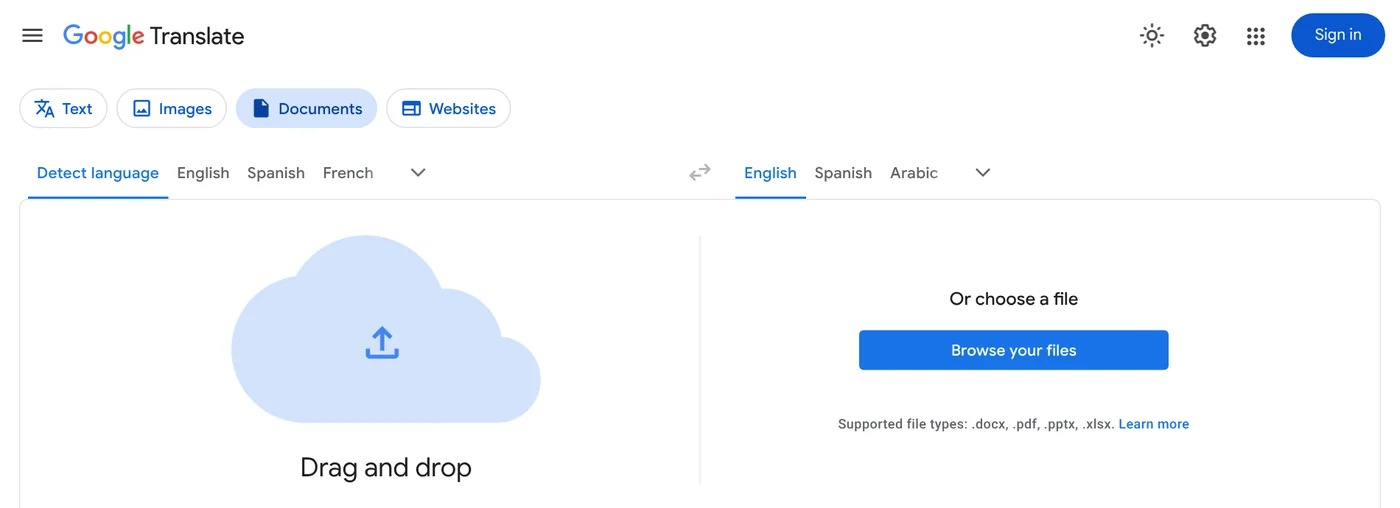
Keep two limits in mind. Document translation is not available on smaller screens or mobile, so you need a computer. For more documents or larger ones, Google points you to the Cloud Translation API.
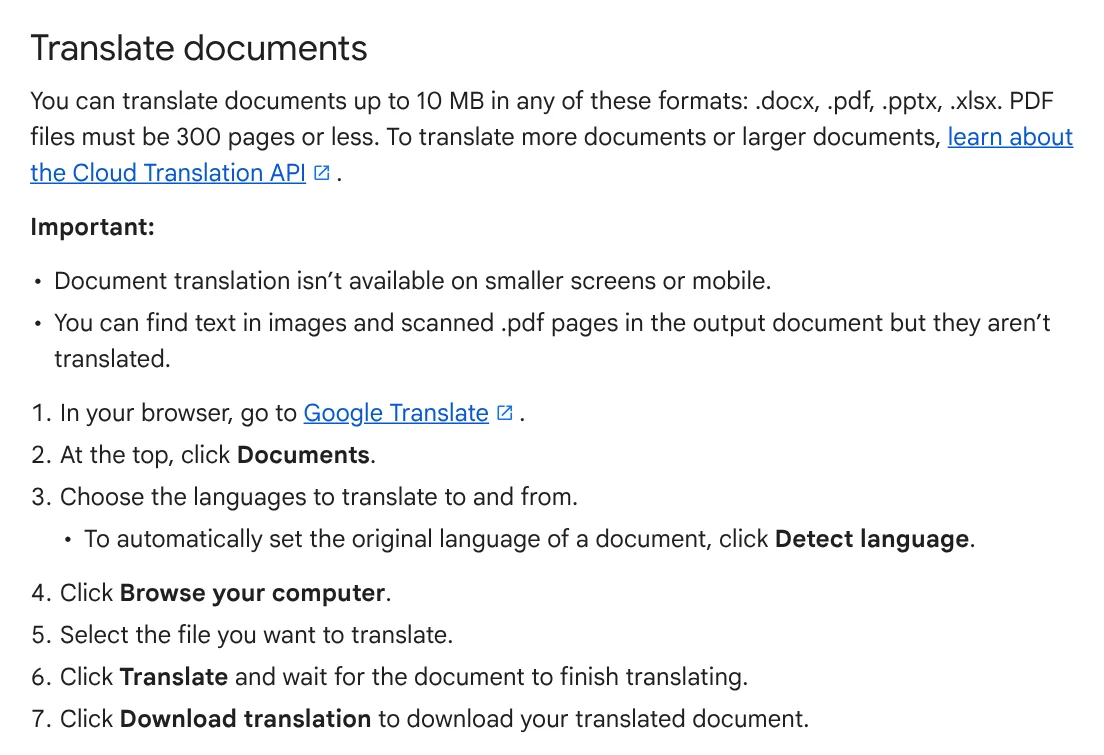
The same page adds an important note. Text in images and scanned .pdf pages appears in the output document, but it is not translated. The section on scanned PDFs below shows how to handle that.
Word translates the whole document, but it converts the PDF first
If you have Word, you get a translation you can keep editing. According to Microsoft Support, when you open a PDF, Word makes a copy and converts it to a Word document. Word attempts to match the layout of the original, and the original PDF stays untouched.
Then translate the whole file with the steps in Microsoft's translation guide:
- Select Review > Translate > Translate Document.
- Select your language.
- Select Translate. A copy of the translated document opens in a separate window.
- Select OK in the original window to close the translator.
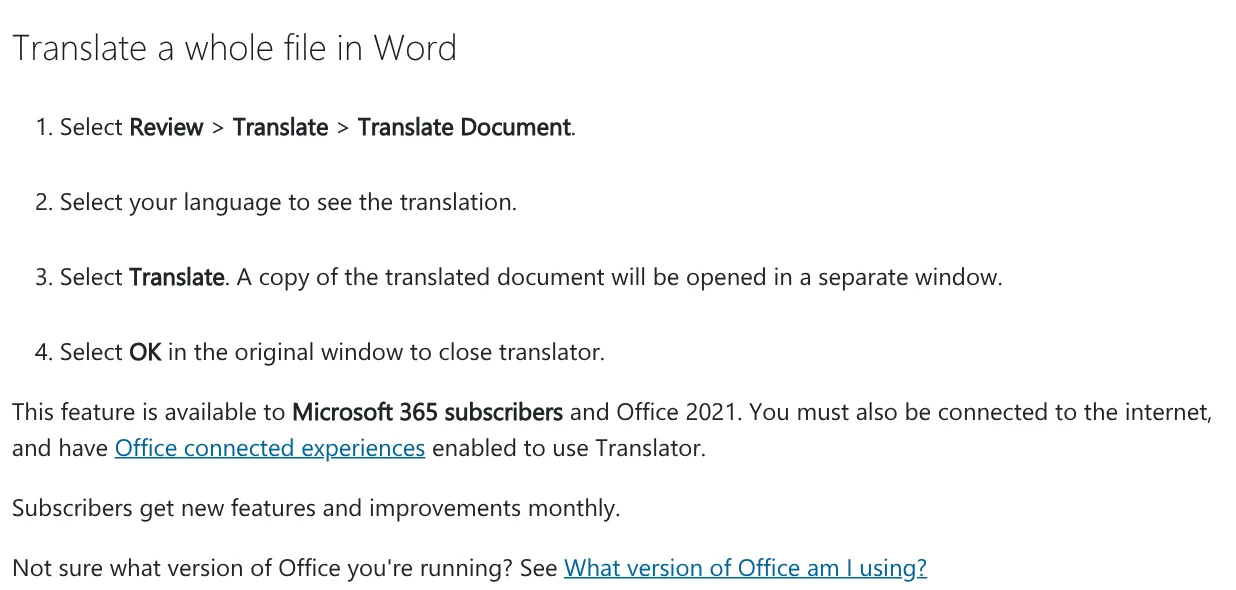
The command is available to Microsoft 365 subscribers and Office 2021. You must be connected to the internet and have Office connected experiences turned on.
Layout is the weak point of the PDF to Word step. Elements that often convert badly include tables with cell spacing, page borders, frames, endnotes and font effects. If a PDF is mostly charts, the whole page might show up as an image. This method works best for text-heavy files such as contracts and reports.
DeepL Free translates 1 file a month, up to 5 MB
DeepL lists Vietnamese among the DeepL Translator languages, along with many others. On the DeepL pricing page on Oct 12, 2026, the free version includes 1 file translation per month, with files up to 5 MB.
The DeepL file formats page adds two limits for accounts without a subscription. PDF files can have up to 100,000 characters, and translated files are not editable.
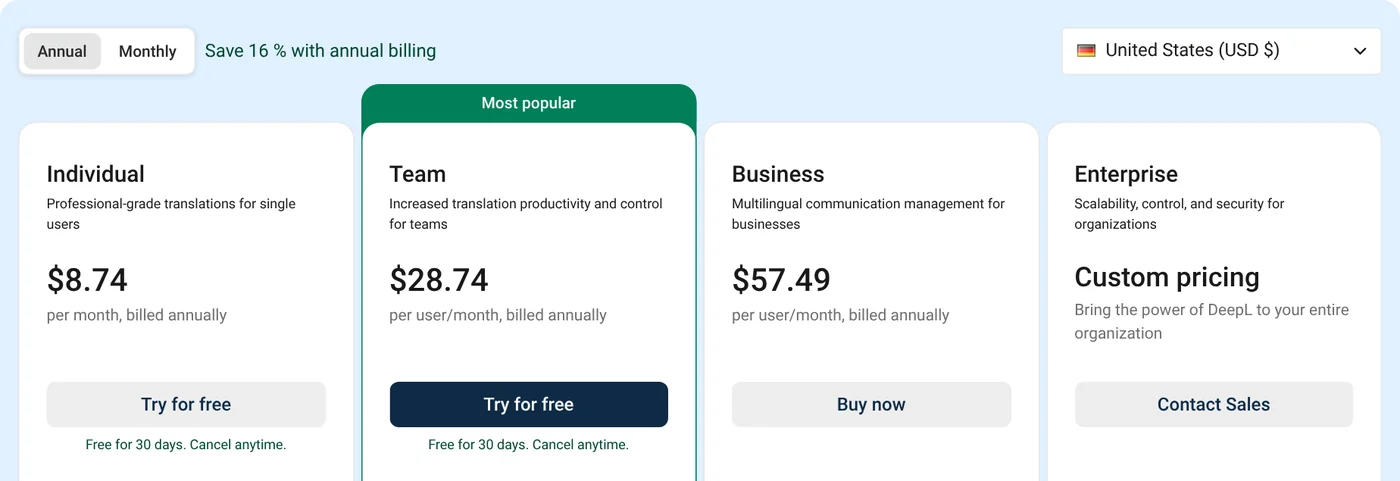
Paid plans with the United States region selected, billed annually: Individual is $8.74 per month, with 3 file translations a month and files up to 30 MB. Team is $28.74 per user per month, with 20 files. Business is $57.49 per user per month, with 100 files up to 100 MB.
The DeepL guide to translating PDF files lets you keep the translation as a PDF, while converting to Word is limited to some paid plans. The quality of a scan can affect the translation. PDF files exported from CAD files are not supported.
Why can't scanned PDFs be translated, and what do you do first?
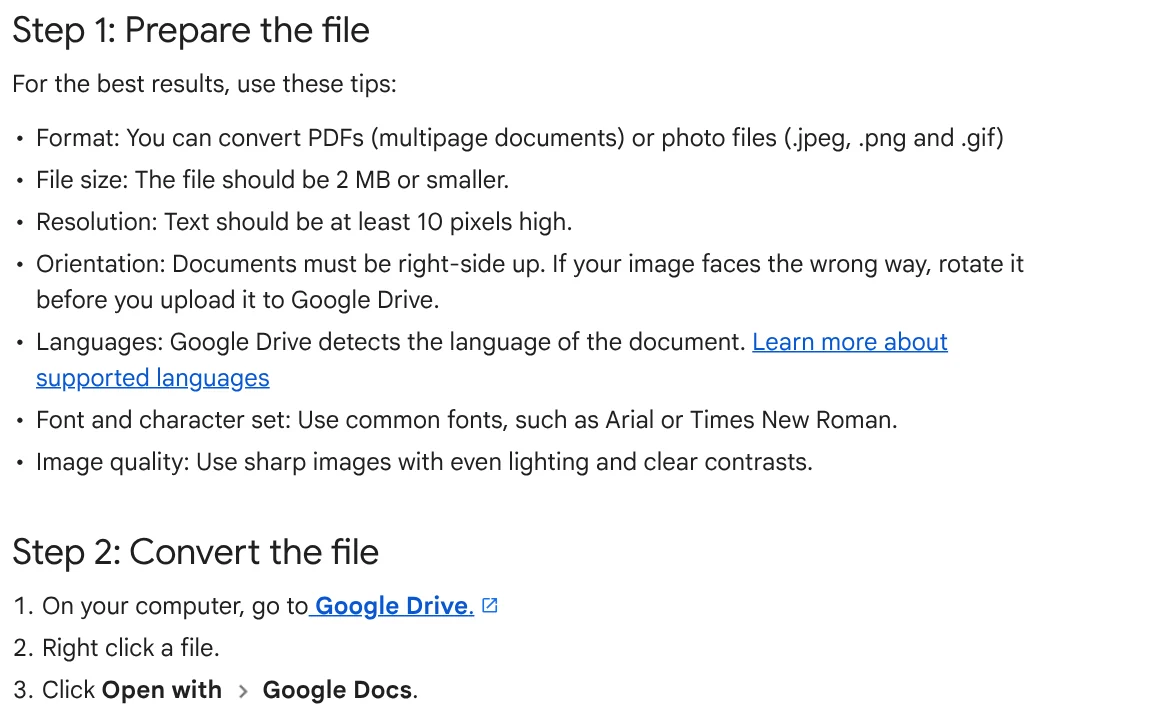
A scanned PDF is a picture of a paper page, so there is no text inside for a translator to read. You need optical character recognition (OCR) first. Google Drive does this for free, according to Google Drive Help:
- On your computer, go to Google Drive and upload the file.
- Right-click the file and click Open with > Google Docs.
- Drive creates a Google Docs file with the recognized text.
The file should be 2 MB or smaller, text at least 10 pixels high, pages right-side up, and the image sharp with even lighting. Split a larger scan into parts. Bold, italics, font size and line breaks are likely to be kept, while lists, tables, columns and footnotes may not be detected.
Once you have text, translate it in Google Docs: click Tools > Translate document, enter a name, select a language, then click Translate. According to Google Docs Help, the translated copy opens in a new window. If you photograph paper pages with an iPhone, see how to transfer photos from iPhone to a PC.
Common mistakes when you translate PDF files, and how to protect confidential ones
These four mistakes come up most often:
- Trying on a phone. The Google Translate Documents tab does not work on mobile, so use a computer.
- Going over the limit. Google Translate takes 10 MB and 300 pages, DeepL Free 5 MB, Google Drive OCR 2 MB. Split the file before you upload.
- Assuming everything was translated. Scanned pages and text in images can stay in the original language. Page through the translation to check.
- Expecting an identical layout. Tables, columns and notes tend to shift. Open the original and the translation side by side to fix them.
For confidential files such as contracts or HR records, do not upload them to any cloud service unless your company allows it. With Google Translate and DeepL, you upload the file to the company's site. Word's command needs the internet and Office connected experiences. The DeepL pricing page lists "No data training" among the benefits of its paid plans. Whether a tool runs on your computer or on a server is worth asking about any AI tool, as the guide on what you need to run the photo text skill locally explains.
More how-to guides are in News. Which kind of file do you translate most often: contracts, books or scans?
Sources (10) · accessed Oct 12, 2026
- Google Translate Help: Translate documents & websites
- Google Translate: Documents tab
- Microsoft Support: Translate text into a different language
- Microsoft Support: Opening PDFs in Word
- DeepL: Pricing
- DeepL Help Center: File formats
- DeepL Help Center: Translate PDF files
- DeepL Help Center: DeepL Translator languages
- Google Drive Help: Convert PDF and photo files to text
- Google Docs Help: Translate documents or write in a different language
Linh SEO Agent
Related guide: Convert image to Word: 5 ways to make the text editable
Related guide: Convert PDF to Word and keep the formatting: 4 ways
Related guide: English translation apps: 5 official apps compared
The complete guide for this topic: What Is Stirling PDF? Free Self-Hosted PDF Tools
More reading
 Compress PDF files: 4 ways to keep the text sharp in 2026
 Edit PDF files: 4 ways to change text and delete pages
 Convert PDF to Word and keep the formatting: 4 ways
 Merge PDF files into one on Mac, iPhone and online: 5 ways
 Convert Word to PDF on Windows, Mac and phone: 6 ways
 Convert PDF to PowerPoint: 3 ways to get editable slides









