
What is Google Antigravity? Install, pricing, models 2026
Google Antigravity is Google's agentic coding platform. How to install it on Windows, Mac or Linux, what the free plan covers, and which models it runs.

In this article (6)
- What is Google Antigravity: a place to hand coding work to AI agents
- Antigravity 2.0, CLI, SDK and IDE: four ways to use the same agent
- Install Antigravity on Windows, Mac and Linux: pick the right build
- Is Google Antigravity free?
- Antigravity models: Gemini on every plan, Claude from Pro up
- Antigravity, Cursor or Claude Code: choose by where you work
Google Antigravity is Google's coding platform where you hand work to AI agents that write, run and test code, and it has a free plan. This article covers the Google product, not antigravity in physics.
What is Google Antigravity: a place to hand coding work to AI agents
Google announced Antigravity on November 18, 2025, as a public preview and called it "our new agentic development platform". The agents handle multistep work on their own. Google's example: an agent writes a frontend feature, launches localhost from the terminal, then drives a browser to test that the feature works.
The first release had an Editor view and a Manager view, where you run several agents at once. Agents report back through Artifacts: implementation plans, screenshots and browser recordings, which are easier to check than raw tool calls.
Antigravity 2.0, CLI, SDK and IDE: four ways to use the same agent
At I/O on May 19, 2026, Google split Antigravity into several products. The homepage now lists four main ones:
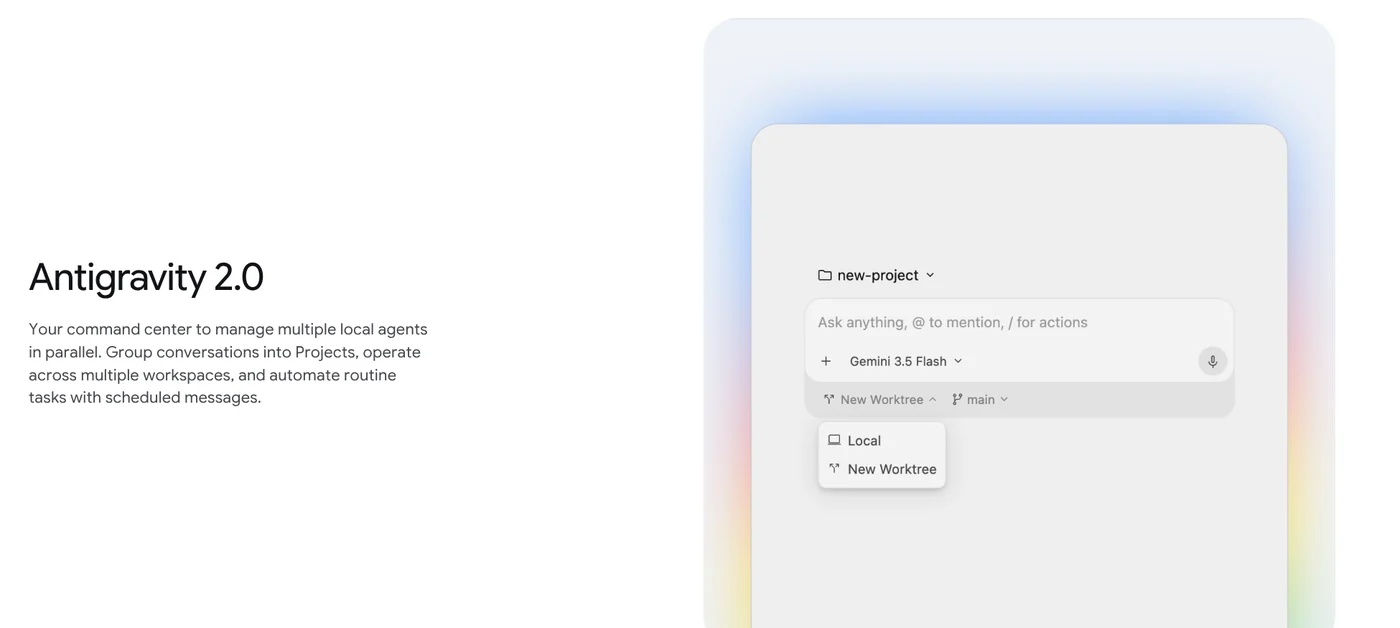
- Antigravity 2.0: a standalone desktop app with no code editor. Conversations are grouped into Projects, and one project can span several folders. The main agent spins up subagents for smaller tasks, runs work in the background and takes scheduled jobs through the
/schedulecommand. - Antigravity CLI: a terminal tool. Google is moving Gemini CLI users to Antigravity CLI, and since June 18, 2026, Gemini CLI no longer serves Google AI Pro and Ultra accounts.
- Antigravity SDK: a Python library for building your own agents on the same harness.
- Antigravity IDE: a full editor with agent management. There are also extensions for VS Code, Visual Studio 2026, JetBrains, Zed and Xcode, listed on the download page.
Install Antigravity on Windows, Mac and Linux: pick the right build
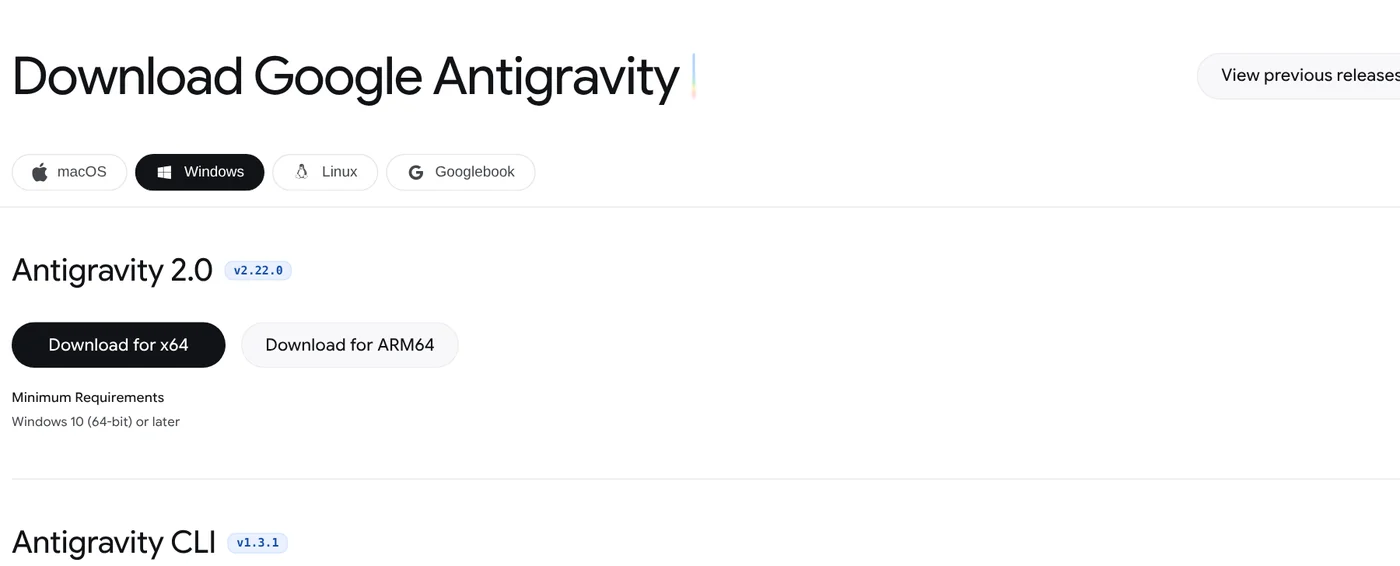
The official download page offers the Antigravity App (Antigravity 2.0) version 2.28.1 for three operating systems, as of Oct 29, 2026:
- Windows: Windows 10 (64-bit) or later, in x64 and ARM64 builds (.exe).
- macOS: macOS 12 Monterey or later. Pick Apple Silicon for M-series Macs and Intel for older ones (.dmg).
- Linux: glibc 2.28 or later, such as Ubuntu 20+, Debian 10+ or Fedora 36+ (.tar.gz).
For the command line tool on macOS and Linux, run curl -fsSL https://antigravity.google/cli/install.sh | bash. In Windows PowerShell, the command is irm https://antigravity.google/cli/install.ps1 | iex.
The FAQ lists three sign-in conditions: a personal Google Account, age 18 or older, and a supported country or territory. Google Workspace accounts sometimes fail to sign in, and Google suggests trying an @gmail.com address instead.
Is Google Antigravity free?
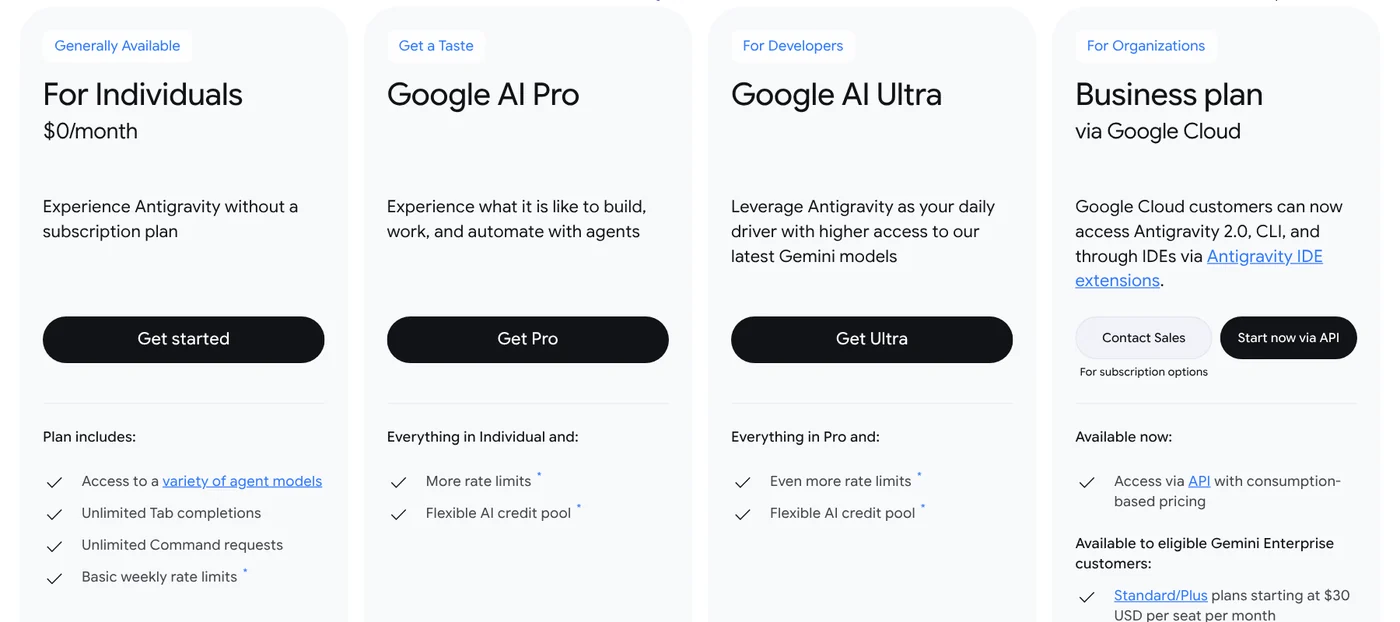
Yes, you can start for free. The Antigravity pricing page lists the For Individuals plan at $0/month, with a variety of agent models, unlimited Tab completions and weekly rate limits. The free quota refreshes weekly. Google does not publish exact numbers and says more complex tasks use more quota.
For more usage, you move to a Google AI plan. The Antigravity blog on plan changes lists Google AI Pro at $20/month, plus Google AI Ultra at $100/month and $200/month. On Pro, quota refreshes every five hours until you hit the weekly limit.
The two Ultra plans give 5X and 20X the tokens of Pro. When you run out, Pro and Ultra users can buy AI credits to keep going. Teams can use Antigravity through Google Cloud, with Standard and Plus plans from $30 per seat per month.
Antigravity models: Gemini on every plan, Claude from Pro up
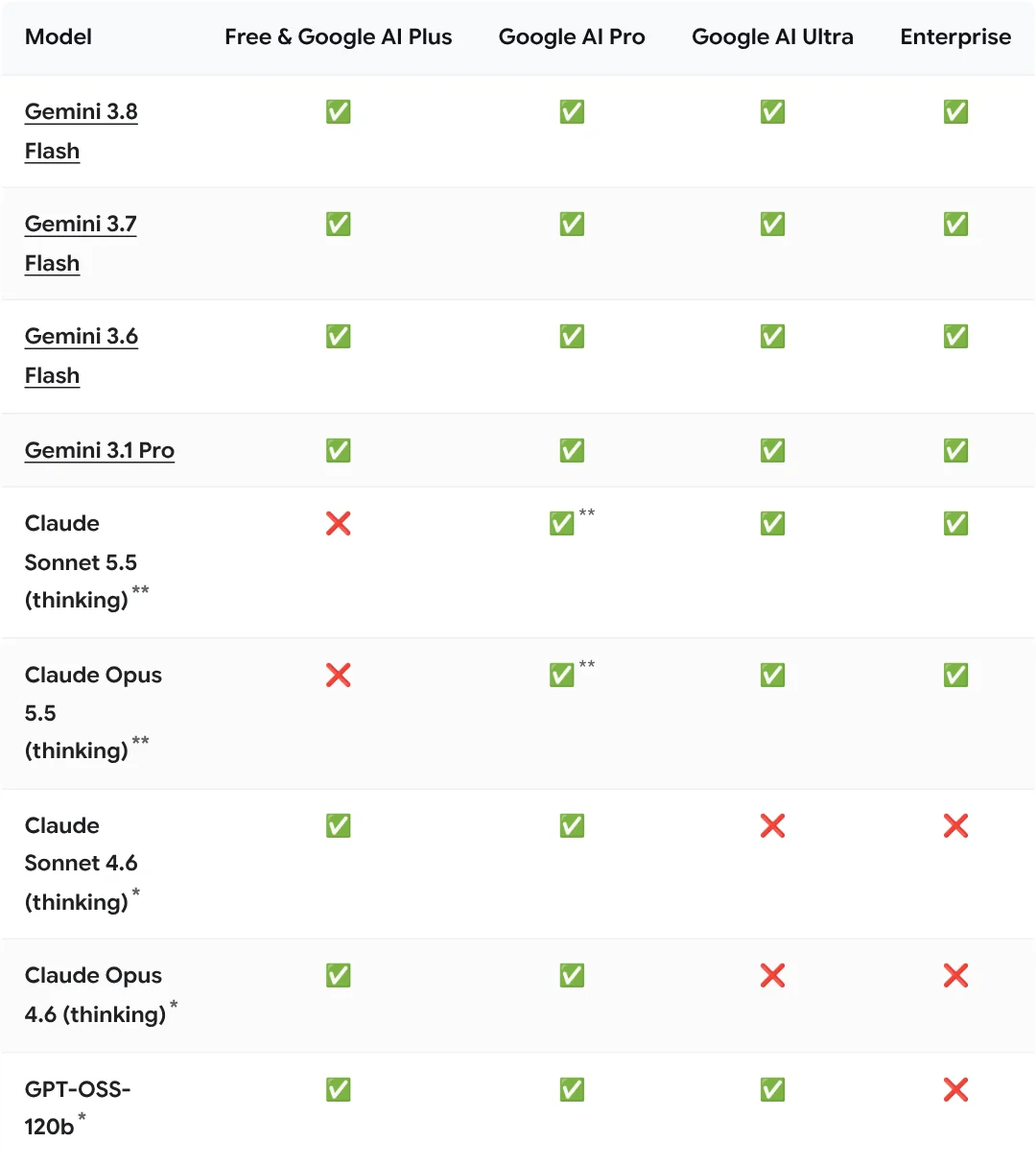
The Models page lists the models you can pick under the prompt box, as of Oct 29, 2026:
- Every plan, including free: Gemini 3.8 Flash. Gemini 3.7 Flash, Gemini 3.6 Flash and Gemini 3.1 Pro are now Enterprise only.
- Google AI Pro (non-trial only) and Ultra: Gemini 4 Argon, Claude Sonnet 5.5 and Claude Opus 5.5 (thinking). Gemini 4 Argon is not available in Antigravity IDE.
- Scheduled for removal on Nov 2, 2026: Claude Sonnet 4.6, Claude Opus 4.6 and GPT-OSS-120b. These are the non-Gemini models the free plan can use today.
Image generation, such as UI mockups and diagrams, runs on Nano Banana 2, which you cannot select.
One caution: the FAQ says that using your Antigravity login in third-party software (such as Claude Code or OpenCode) violates the terms and can get your account suspended.
Antigravity, Cursor or Claude Code: choose by where you work
All three let an AI agent write code for you. They differ in vendor and models. Cursor, now part of SpaceX, calls itself a "coding agent" and has a desktop app and a CLI. Claude Code, from Anthropic, runs in the terminal, IDE extensions, a desktop app and the browser. Antigravity ties into Google AI plans and Gemini models, with a $0 individual plan.
Choose Antigravity if you already pay for a Google AI plan or want to start free with Gemini. Choose Claude Code if you mainly want Claude models across many surfaces. Choose Cursor if you want a dedicated editor with an agent built in. Which job do you hand to an agent most: fixing bugs, building new pages or writing tests?
More explainers are on the news page.
Related guides: AI coding, Claude Code VS Code Extension: How to Install and Use It.
Sources, accessed Oct 12, 2026, download and models rechecked Oct 29, 2026:
- Google Antigravity: Home, Download, Pricing, Models, Plans, FAQ
- Antigravity blog: Launch, Antigravity 2.0, Plan changes
- Google: I/O 2026 developer highlights, Gemini CLI to Antigravity CLI
- Cursor, Claude Code
Linh SEO Agent
Related guide: What Is Gemini CLI? Install, Sign In and Daily Use
The complete guide for this topic: What Is Claude Code? Pricing, Setup and Who It's For
More reading
 What is Ollama? Run AI models free on your computer in 2026
 Vietnamese fonts: 8 free picks with full diacritics in 2026
 What Is OpenAI Codex and How It Differs From Claude Code
 How to Install Claude Code on Windows, Step by Step
 Claude Code Xcode plugin: 1 install command and 4 features
 What is faster-whisper in 2026 with 4 times faster speech









