
What is GitHub Copilot? 4 plans from $0 to $100 in 2026
GitHub Copilot is GitHub's AI coding assistant. Free $0, Pro $10, Pro+ $39, Max $100 a month, Business $19 per user. Rechecked Oct 29, 2026.


In this article (7)
- What is GitHub Copilot: an AI assistant that suggests, explains and reviews code
- GitHub Copilot pricing: $0 to $100 for individuals, from $19 per user for teams
- Is GitHub Copilot free?
- Using GitHub Copilot in VS Code and JetBrains: sign in and go
- Copilot cloud agent takes tasks on GitHub and returns a pull request
- Models you can pick: Pro has Claude Sonnet, GPT and Gemini; Opus needs Pro+
- Sources
GitHub Copilot is GitHub's AI coding assistant. It runs in VS Code, JetBrains IDEs and right on github.com. Free costs $0, Pro costs $10 a month, and verified students get it free.
What is GitHub Copilot: an AI assistant that suggests, explains and reviews code
As of Oct 27, 2026, GitHub's overview page describes Copilot as an AI assistant that helps you write, understand and ship software. It suggests code as you type, answers questions about a codebase, reviews your changes and works on tasks you assign.
The two main modes are assistive (suggestions and explanations while you work) and agentic (like an AI agent, Copilot reads the repository, makes a plan, edits files and runs tools on its own). You can also customize it with your own instructions and MCP servers.
Do not confuse it with Microsoft Copilot. That one is a general AI assistant for the web, Windows and Office apps, while GitHub Copilot focuses on programming (more in our AI tools explained guides).
GitHub Copilot pricing: $0 to $100 for individuals, from $19 per user for teams
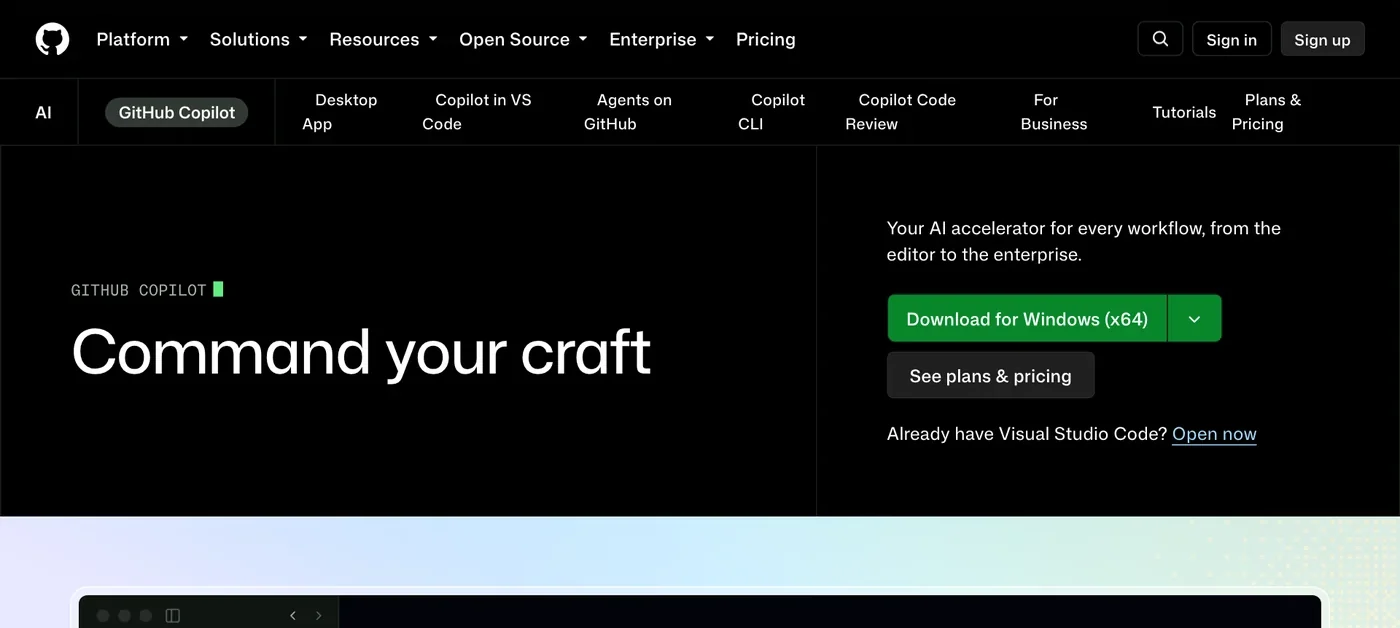
The GitHub Copilot pricing page lists four individual plans: Free at $0, Pro at $10, Pro+ at $39 and Max at $100 a month. The two organization plans are on the Plans for GitHub Copilot page: Business at $19 and Enterprise at $39 per granted seat per month.
GitHub meters usage in GitHub AI Credits. Chat, agent mode, code review, cloud agent and Copilot CLI all consume credits, at a rate that depends on the model. Code completions and next edit suggestions do not.
Monthly credits included: Pro 1,500 ($15), Pro+ 7,000 ($70), Max 20,000 ($200). Business and Enterprise include 1,900 and 3,900 credits per user, pooled across the organization, and usage beyond the pool costs $0.01 per credit. Enterprise requires GitHub Enterprise Cloud.

Is GitHub Copilot free?
Yes, in three ways. Copilot Free is open to any individual developer, with 2,000 code completions a month, limited chat and agent use, and models picked automatically. Anyone already assigned a Business or Enterprise seat cannot use the Free plan.
Students verified through GitHub Education get the free Copilot Student plan. Go to github.com/settings/education/benefits, apply for verification if needed, then activate Copilot Student. GitHub notes the benefit can take several days to apply after approval, and eligibility is checked every month.
Verified teachers and maintainers of popular open source projects can use Copilot Pro for free. To check, click your profile picture and open Copilot settings. If you qualify, you see a "GitHub Copilot Pro" page with a Get access to GitHub Copilot button.
Using GitHub Copilot in VS Code and JetBrains: sign in and go
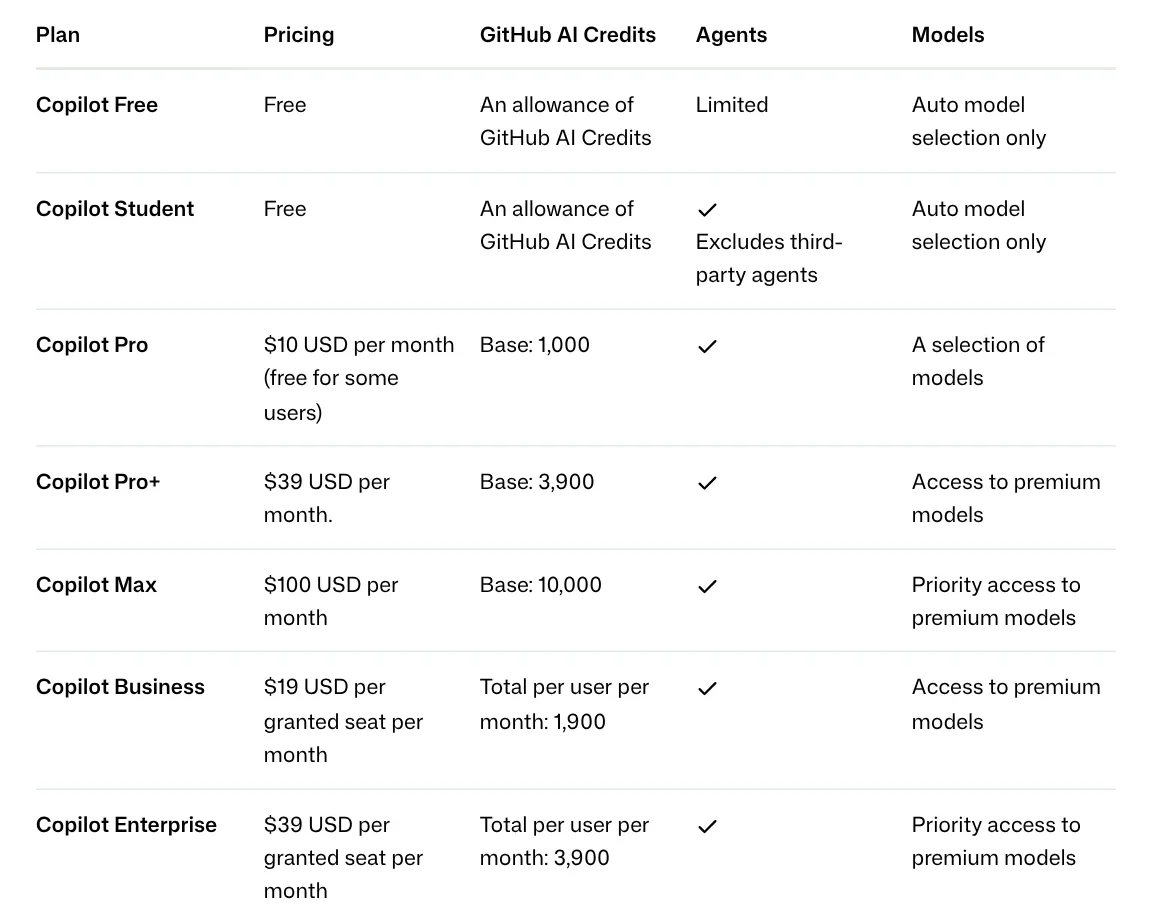
In VS Code you do not install the extension yourself. The VS Code documentation lists three steps:
- Hover over the Copilot icon in the Status Bar and select Use AI Features.
- Choose a sign-in method for your GitHub account. An account without a plan is enrolled in Copilot Free.
- Start using chat, code suggestions and agent mode.
For JetBrains IDEs (IntelliJ IDEA, PyCharm, WebStorm, Android Studio and more), GitHub Docs covers the plugin. Open Plugins, search for GitHub Copilot, click Install, restart the IDE, then go to Tools > GitHub Copilot > Login to GitHub. The pricing page also lists Visual Studio, Xcode, Eclipse, Neovim and Zed.
Copilot cloud agent takes tasks on GitHub and returns a pull request
The coding agent that runs on GitHub is called Copilot cloud agent. According to GitHub Docs, it researches the repository, plans changes and works in the background in a temporary cloud environment, running tests and linters. Copilot creates the branch, writes commits and pushes changes, and you review them before opening a pull request.
You can start a task from a repository's Agents tab, the Task box on the github.com dashboard, a chat, or by assigning an issue to Copilot. The feature is available on all paid plans and on Copilot Student, but not on Free.
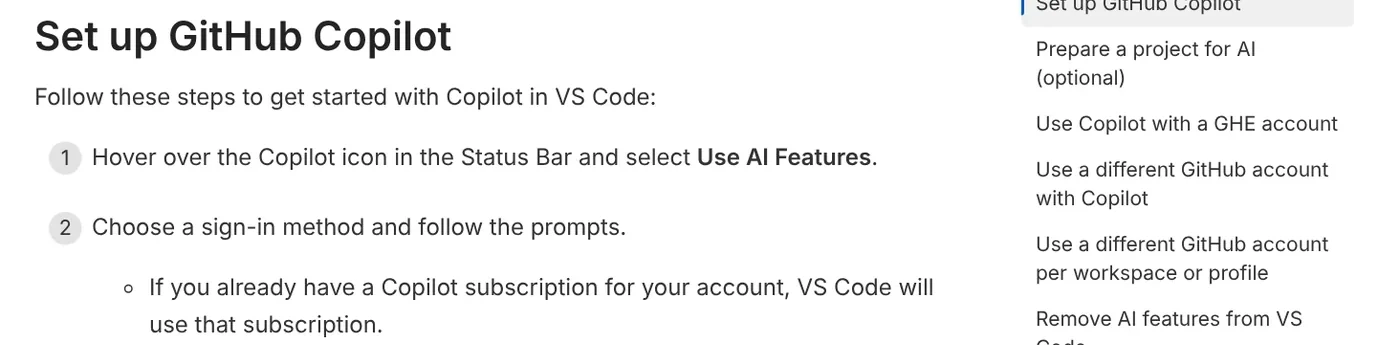
The Agents on GitHub page also lets you hand work to third-party agents such as Claude and OpenAI Codex, a feature still in preview.
Models you can pick: Pro has Claude Sonnet, GPT and Gemini; Opus needs Pro+
Free and Student use Auto model selection only. From Pro up, you choose a model from the menu at the bottom of the chat view in VS Code, per the model switching guide. Changing the chat model does not change the model used for inline suggestions.
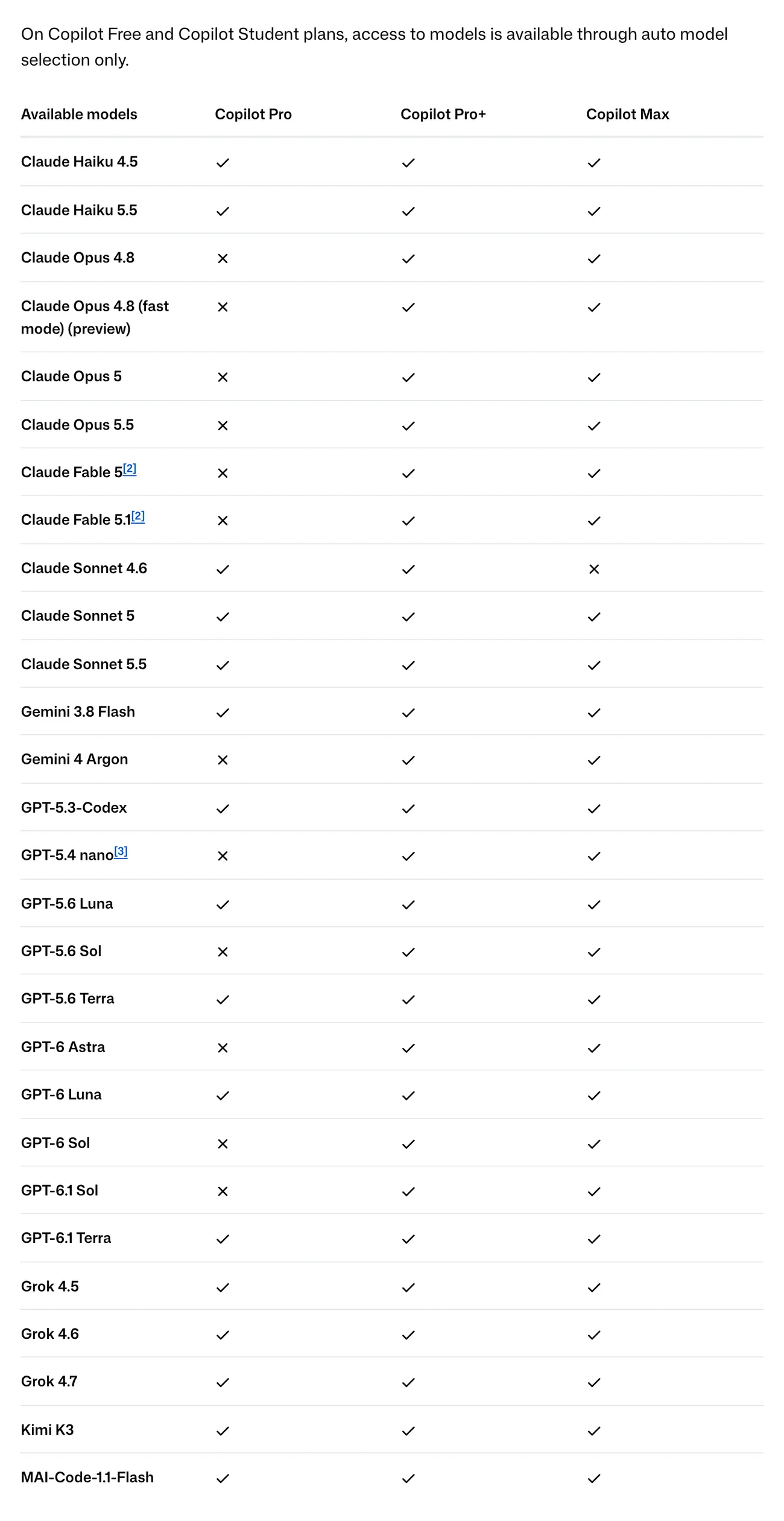
The model table on the Plans for GitHub Copilot page lists 28 models as of Oct 27, 2026:
- Pro gets 16. The newest in each family are Claude Haiku 5.5, Claude Sonnet 5.5, Gemini 3.8 Flash, GPT-6 Luna, GPT-6.1 Terra, Grok 4.7, Kimi K3 and Microsoft's MAI-Code-1.1-Flash, and older versions such as Claude Sonnet 4.6, GPT-5.3-Codex and Grok 4.5 are still listed.
- Pro+ gets all 28, adding the Claude Opus line (4.8, 5, 5.5), Claude Fable 5 and 5.1, Gemini 4 Argon, GPT-5.6 Sol, GPT-6 Astra, GPT-6 Sol, GPT-6.1 Sol and GPT-5.4 nano (only in the Codex extension for VS Code).
- Max gets 27: the same as Pro+, except Claude Sonnet 4.6.
Each model consumes credits at its own rate, based on its token pricing. On Business, an organization admin must allow members to switch models.
Choose Free if you are just trying it and mostly want code suggestions. Students, teachers and open source maintainers should claim the free option first. Choose Pro if you need cloud agent and unlimited suggestions. Choose Pro+ if you rely on Claude Opus or GPT-6 Sol. Teams should use Business to manage seats.
Which task will you give Copilot first: writing tests, fixing bugs or reviewing pull requests?
Related guides: AI coding, What Is Claude Code? Pricing, Setup and Who It's For.
Sources
Sources, rechecked Oct 29, 2026:
- GitHub: GitHub Copilot, Plans & Pricing, Agents on GitHub
- GitHub Docs: About GitHub Copilot, Plans for GitHub Copilot, Copilot Student, Free Pro for teachers and open source, Install Copilot in your IDE, Copilot on GitHub.com, Use cloud agent on GitHub, Change the Copilot Chat model
- Visual Studio Code: Set up GitHub Copilot in VS Code
Linh SEO Agent
Related guide: What is Grok? 5 plans for xAI's assistant, latest model 2026
Related guide: What is Cursor AI? Features, its 5 plans and Privacy Mode
Related guide: What is Excalidraw and its 7 tools for free whiteboards
More reading
 What is Windsurf? Now Devin Desktop, 4 plans and AI models
 What is Microsoft Copilot? Free tier and 4 paid plans, 2026
 Claude Code User-Agent email leak: 3 steps to lock it now
 Perplexity Teammates pricing: 3 things on the Max plan
 What is WhatsApp Official Account? Prices and setup in 2026
 What is Google Antigravity? Install, pricing, models 2026









