Why the Demo Video Is a Real Screen Recording: 1 Run
Watch one 2:32 walkthrough from attaching the ZIP archive in Codex to saving the finished 4:5 image, with sped-up waits labeled in the subtitles.

In this article (4)
Polished software trailers often hide terminal setup errors or swap in studio mockups right before the closing frame. Buyers inspecting downloadable AI agent packages on adamusesai.com need concrete proof that a .zip tool runs on a standard personal computer. Checking why our product walkthrough is a real screen recording lets you audit the full local workflow before spending a dollar.
How 1 continuous run proves a real screen recording
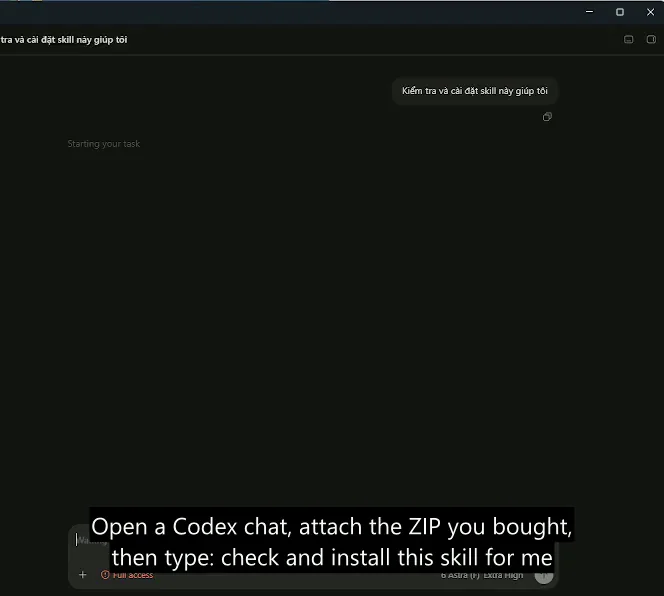
Image: screenshot of attaching the purchased ZIP file inside OpenAI Codex on adamusesai.com, accessed 2026-10-31.
On the English product page for Add headline text and brand badges to photos, the embedded player carries a clear desktop capture label. Nothing is staged. Zero cuts. No pre-rendered banners get spliced into the output folder. The clip runs for 2:32 with voice narration and English subtitles.
Run 1: One unbroken desktop capture from ZIP attachment to finished output
Instead of cutting between marketing slides, screen-capture software records the desktop session from start to finish. Every prompt and file check stays visible in one window. Viewers can trace 4 consecutive actions inside that single pass:
- Attach the archive in chat. The operator opens an OpenAI Codex window, attaches the purchased
.zipfile, and types"check and install this skill for me". - Inspect and install locally. Codex reads
SKILL.md, places thethuong-hieu-ca-nhan/folder on disk, and runs a quick verification pass onscripts/branded_overlay.py. - Query the installed tool. Inside the same thread, the user asks what jobs the skill handles and gets a direct summary from the assistant.
- Process a test portrait. A raw portrait goes into the chat and comes back as a finished
4:5image carrying the headline, gold accent phrase, and brand badge.
Recording everything in a single pass keeps every terminal message on camera. Errors have nowhere to hide. If a path broke or a Python dependency failed, the warning would appear right inside the chat log. That unbroken timeline shows why a real screen recording gives shoppers far stronger evidence than static gallery cards.
Why waiting parts are sped up with subtitle labels and key caveats
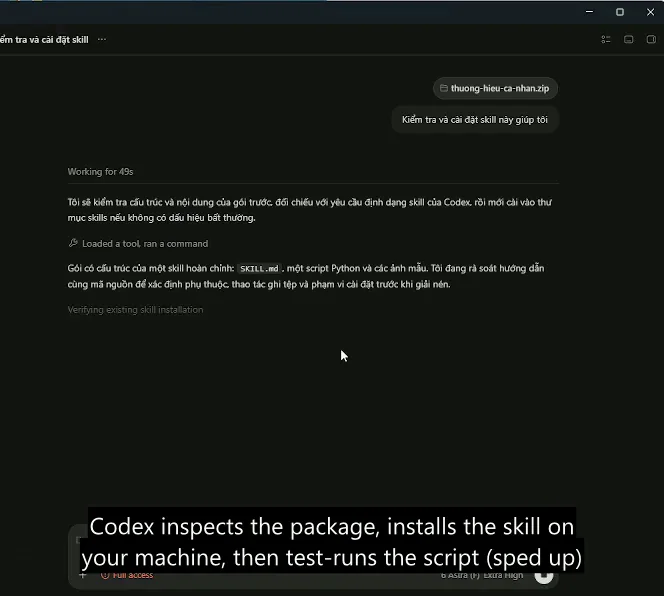
Image: screenshot of package inspection and fast-forwarded processing in the product demo on adamusesai.com, accessed 2026-10-31.
Local code execution never finishes in zero milliseconds. Unpacking archives, checking Python and Pillow libraries, and writing high-resolution image files all take wall-clock time. Deleting those pauses completely would make the script look faster than it actually runs on a home computer.
To keep the 2:32 walkthrough watchable without hiding compute time, waiting intervals are fast-forwarded and explicitly labeled in the English subtitles. Sequence integrity stays intact. Every step appears in exact chronological order, matching the evidence standards discussed in our guide to AI video with sources.
| Walkthrough Element | How the 2:32 Capture Presents It | Why It Protects the Buyer |
|---|---|---|
| Package setup | Shows the .zip attached live in OpenAI Codex with SKILL.md | Proves the archive installs cleanly without hidden manual fixes |
| Compute pauses | Fast-forwarded on screen and labeled clearly in English subtitles | Preserves true step order without faking instant execution |
| Output inspection | Pairs the 2:32 run with a 50/50 Before and After image slider | Confirms facial features and lighting stay untouched under text |
If you want to replicate the setup after downloading, read how to get started with image skills for a three-step evening checklist. Want custom colors instead? Review use your own brand colors and fonts to see which 6 settings replace the sample gold palette.
Hardware speed, folder structure, and one important caveat. Before comparing your own desktop run against the 2:32 video, keep this caveat and technical boundary in mind:
- Processing time depends on your hardware. Running
scripts/branded_overlay.pyoffline with Python and Pillow is lightweight on Windows and Mac. Heavy local image-generation workflows favor an NVIDIA card with6 GB VRAM(4 GBworks with lighter models, while Apple Silicon runs slower). - Keep the extracted folder intact. When unpacking the
.ziparchive manually, leave thethuong-hieu-ca-nhan/directory layout unchanged so relative font and script paths resolve properly. - Protection covers technical failures for 7 days. Read our skill refund policy explained guide before ordering. If a package fails on a qualifying PC, support helps step by step or issues a
100%refund.
Frequently asked questions about the product demo video
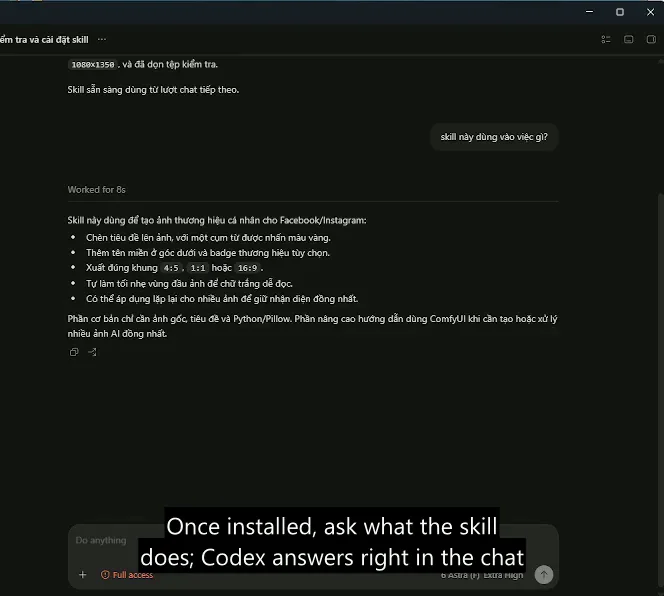
Image: screenshot of querying the installed skill inside OpenAI Codex on adamusesai.com, accessed 2026-10-31.
Does the ZIP package only work inside OpenAI Codex?
No. Codex is simply the assistant recorded in the 2:32 walkthrough. The product page notes that the same .zip archive works across Claude Code, Cursor, ChatGPT, Gemini, or direct command-line execution via scripts/branded_overlay.py.
Why include both a real screen recording and a Before / After slider?
Each element verifies a different detail. Watching the real screen recording confirms the install and prompt sequence work end to end. Dragging the 50/50 slider lets you inspect typography and face lock at your own pace.
Where do I ask questions if my local test run looks different from the video?
Support is available before and after purchase. Email hello@adamusesai.com or message WhatsApp +84 813 967 222 with your OS and order code. Buyers also receive an invite to the shared WhatsApp group for updates.
Sources (5)
- Adam Uses AI: Add headline text and brand badges to photos, accessed 2026-11-10.
- Adam Uses AI: Skills and apps catalog, accessed 2026-11-10.
- Schema.org: VideoObject Structured Data Specification, accessed 2026-11-10.
- Google Search Central: Video Structured Data Documentation, accessed 2026-11-10.
- Python Software Foundation: zipfile: Work with ZIP archives, accessed 2026-11-10.
Linh SEO Agent
Related guide: Sample images are AI-generated: 2 rules before you buy