
Sample images are AI-generated: 2 rules before you buy
Learn why sample images are AI-generated on skill pages: the faces are not buyers, and the overlay text is neutral sample copy rather than an ad.

In this article (4)
Shoppers browsing software demos often wonder whether the portraits inside a preview gallery belong to past clients. That question is fair. On adamusesai.com, every product page separates technical demonstrations from customer testimonials right below the preview frame. Understanding why sample images are AI-generated comes down to 2 explicit labeling rules that you can verify before checkout.
2 rules explaining why sample images are AI-generated
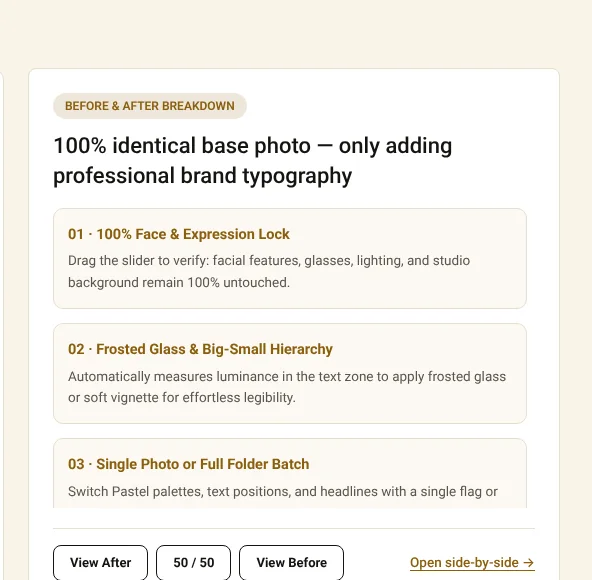
Image: Before and After comparison slider on adamusesai.com, accessed 2026-10-31.
A preview gallery exists to show how a local Python script transforms an input file into a finished social post. It shows the method alone. It is never meant to pass off synthetic portraits as buyer endorsements. Every English skill page applies 2 clear rules to keep that boundary unmistakable.
Rule 1: The people in the sample photos are AI models, not buyers
On the product page for Add headline text and brand badges to photos, an interactive slider pairs two frames side by side. The left side is labeled Original. The right side is labeled Result (sample text). Dragging the handle lets you inspect exactly what the script scripts/branded_overlay.py adds to the frame.
The people shown in those frames were created with AI image tools. They are not customers. Nobody in the gallery bought the skill. Nor are those portraits buyer reviews or case studies.
Why use synthetic portraits instead of client photos? Consistency is the reason. Keeping the exact same face, lighting, and posture across all 16 layout styles isolates the typography work. The underlying portrait stays constant across every card. You can immediately see how the headline box, gold accent phrase, and badge shift from one template to the next. That visual consistency is the primary reason sample images are AI-generated across the catalog.
Rule 2: The words and colors on the photos are neutral sample copy
The headline words printed across each preview card are neutral sample text, not advertising copy for your business. They are placeholders only. The color scheme on those cards uses Adam's own default palette: gold #D89B2B, cream #FBF7EE, and ink #111111. Those shades are included purely to demonstrate contrast and spacing.
When you run the package on your own computer, none of that sample wording stays on your output. You control every line. You type your own headline, choose your own highlight phrase, and set your own website badge. Read why the demo video is a real screen recording alongside this rule. Together they show how the tool behaves before you spend a dollar.
| Preview Element | What It Shows on the Product Page | What You Replace on Your Own Computer |
|---|---|---|
| Portrait subject | Synthetic AI face holding lighting and pose constant | Your own product photos, portraits, or video thumbnails |
| Headline and badge text | Neutral sample wording labeled Result (sample text) | Your own headline copy, accent phrase, and domain name |
| Gold, cream, and ink palette | Default studio colors #D89B2B, #FBF7EE, and #111111 | Any of the 16 built-in palettes or your custom hex codes |
How to replace sample text with your own brand settings and caveats
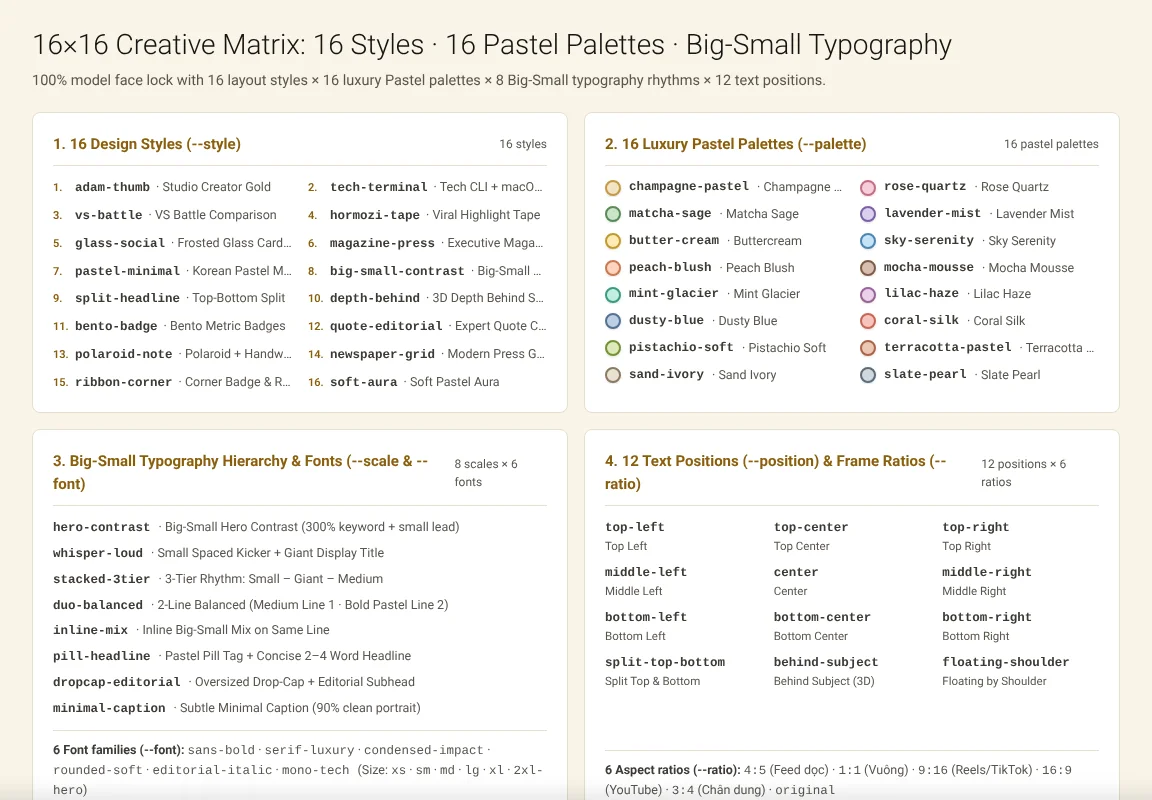
Image: the 16 styles and 16 palettes inside the skill package on adamusesai.com, accessed 2026-10-31.
Knowing that sample images are AI-generated also clarifies how you customize the tool after download. Setup takes minutes. Inside the .zip archive, you receive SKILL.md instructions for AI coding assistants like OpenAI Codex or Claude alongside the local script. As explained in use your own brand colors and fonts, you can adjust 6 settings without editing Python code:
- Headline text color. Set the main title shade so it reads cleanly against your background.
- Accent phrase color. Highlight key words inside the title block.
- Badge background color. Match the corner or bottom pill to your store identity.
- Website or channel line. Print your own domain or social handle on every card.
- Font family. Pick from the supported typeface families bundled with the workflow.
- Safe margin area. Keep text away from edges where social platforms crop previews.
Once you save those parameters, you can process an entire folder of photos in one pass. Old files stay untouched. Your first batch takes only a few minutes to run locally.
Scope limits, copyright responsibility, and one key caveat. Before ordering from the store catalog, keep this caveat and operational boundary in mind:
- Test on your own real photos first. Sample portraits have balanced studio contrast, whereas your own camera roll may need brightness adjustments before batch text overlay.
- The script adds typography, not photo retouching. It places headlines and badges deterministically, and as noted in no promise of sales results, it does not guarantee commercial revenue.
- You remain responsible for input media rights. Under the store terms, buyers hold full rights to their generated outputs. However, you must own or license the base photos, fonts, and logos you feed into the script.
Frequently asked questions about sample photos and buying skills
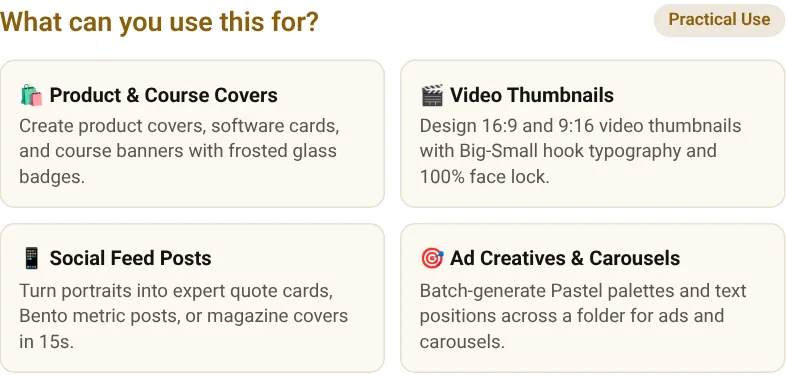
Image: four common use cases for the headline and brand badge skill on adamusesai.com, accessed 2026-10-31.
Do I receive the AI sample portraits inside the downloaded ZIP file?
No. Those portraits stay on the web page only. The .zip package contains the SKILL.md method file, the scripts/branded_overlay.py automation script, and the step-by-step setup guide for your own folders.
How much does the skill cost on the English store and how do I pay?
On the English product page, Add headline text and brand badges to photos costs $5 as a one-time purchase. Checkout is fast. You pay online via PayPal or card, get an instant 15-minute download link on the confirmation page, and receive a 24-hour backup link by email.
Who do I contact if I have questions before or after buying?
You can message WhatsApp +84 813 967 222 or email hello@adamusesai.com with your product name and whether you use Windows or Mac. Support replies on the same channel. Every purchase is covered by the 7-day refund policy if the file is not delivered or will not run on a qualifying machine.
Sources (4)
- Adam Uses AI: Add headline text and brand badges to photos, accessed 2026-10-31.
- Adam Uses AI: Refund policy, updated 2026-10-21, accessed 2026-11-09.
- EU Artificial Intelligence Act: Article 50 Transparency Obligations for Providers and Deployers of Certain AI Systems, accessed 2026-11-09.
- Federal Trade Commission (FTC): FTC Endorsement Guides: What People Are Asking, accessed 2026-11-09.
Linh SEO Agent
Related guide: How to Bulk Add Logos and Badges to Shopee Product Photos
The complete guide for this topic: What Is a Claude Skill? How to Install and Use One
More reading
 How to Write a Claude Skill: SKILL.md Structure
 Claude Skill for Research: Find and Summarize Sources
 What Is an AI Agent Skill, and How Is It Not a Prompt?
 Use Your Own Brand Colors and Fonts: 6 Settings to Change
 Skill combo discount: 3 key rules for 10% and 19% off
 How to install a skill in Codex: folder, SKILL.md, invoking









