
Midjourney thinking mode: 4 steps to rerun faulty images
Midjourney Thinking Mode is being tested on the Alpha website. The Rerun (Thinking) button regenerates images that miss the prompt, including text errors.

In this article (4)
Midjourney Thinking Mode is a test feature on the Alpha website. It lets you rerun an image so Midjourney finds where the result missed your prompt and generates it again. Right now it works on images made with V8.2.
Midjourney Thinking Mode is a test feature for rerunning images
On Oct 8, 2026, Midjourney published Testing Thinking Mode. The post says the team is testing a new "Thinking Mode" for image generation on its Alpha website at alpha.midjourney.com, and it wants feedback from users.
The key point is that it does not change how you write prompts. You generate images as usual, then rerun one specific image with this mode. In the same post, Midjourney says its tests find that the mode helps the model with prompt accuracy, typography, and coherence. The page does not give a percentage for the improvement.
Midjourney is also clear that this is not a final version. In the future it might offer the feature broadly as a "thinking" mode, or as a way to "add more thinking" after a job finishes. That means the button name and its location could change.
How do you run Thinking Mode on the Alpha website?
According to the announcement post, the steps are short:
- Go to alpha.midjourney.com and log in. The Alpha home page shows Sign up and Log in buttons.
- Open the image you want to fix in the viewer, which Midjourney calls the lightbox.
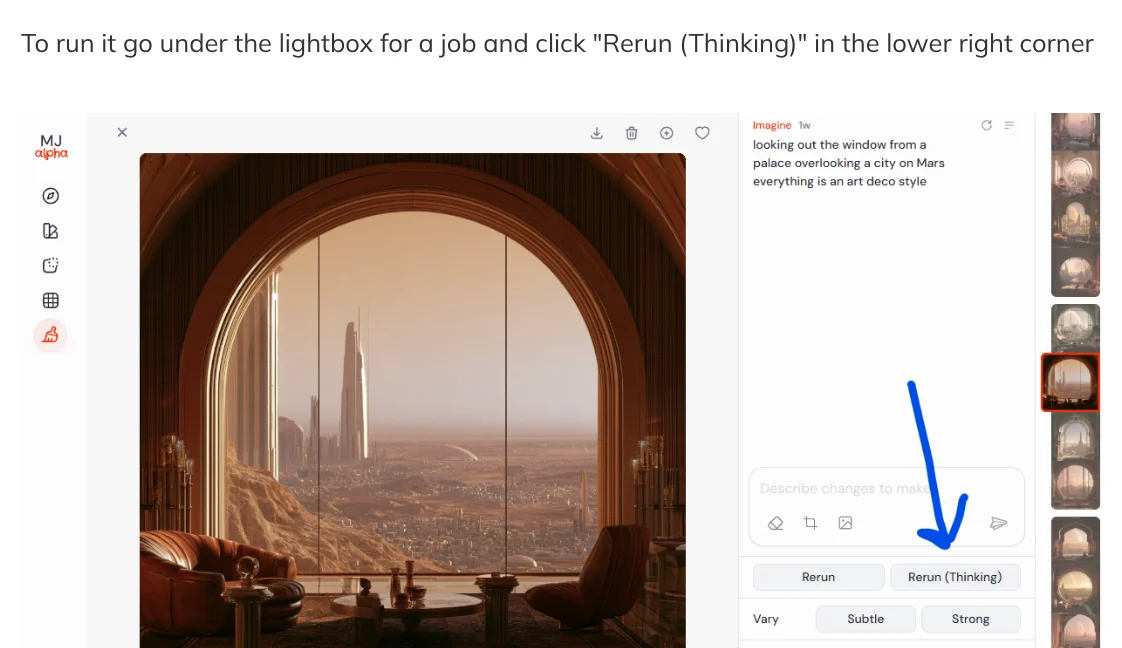
- Find the Rerun (Thinking) button in the lower right corner of the viewer.
- Click it and wait for the new image.
The button sits next to the regular Rerun button. You can run both and compare the two results side by side. That comparison is a suggestion from this article, not guidance from Midjourney.
There is a version requirement. According to the Alpha changelog for 10/7/26, published Oct 8, 2026, you can rerun jobs made with 8.2 (standard and edit) with "thinking." Images made with other versions are not mentioned.
What does Thinking Mode fix: objects, layout, anatomy, and text
The same changelog describes how the feature works. Midjourney looks at your image, finds where it missed your prompt, and generates again. Four kinds of misses are named: wrong objects, layout, anatomy, and text. Midjourney calls this an early version and asks for feedback.
Those four groups match what image makers run into often. A prompt that asks for three chairs and returns four is an object error. A hand with an extra finger is an anatomy error. A shop sign with misspelled letters is a text error. If you want to add text to a Midjourney image, this is the part most worth testing, because text is on the list of misses the mode targets.

For background, V8.2 is the image model Midjourney launched on Jul 24, 2026. According to the V8.2 announcement, that release focuses on aesthetics, image quality, and personalization. The edit model for V8 opened to the community for testing on Aug 27, 2026. Thinking Mode is an experimental layer on top of those two.
Should you use Thinking Mode when your image needs text?
Yes, as a test, but do not treat it as a sure fix. Midjourney calls it a test and an early version. Several things are not covered on the official pages cited in this article, so you need to check them yourself:
- Text language. The pages say text on images improves. They do not name a language, so run a short test line before you make a whole batch.
- Cost. The pages do not say how a Thinking rerun counts against your plan, or whether it uses extra generations. Check your plan page before running it many times.
- Speed. There is no information on how much longer an image takes.
- Where it works. The announcement only mentions the Alpha website. Whether it will reach other places is not stated.
- Size of the improvement. There is no percentage. Results can differ from image to image, so compare by eye.
One real limit: Thinking Mode is still a test, and the official pages do not say how a rerun counts against your plan, how much longer an image takes, or whether it will reach places beyond the Alpha website.
A practical flow for images with text: generate as usual, pick an image with the right layout but wrong text, click Rerun (Thinking), and compare it with the original.
The Rerun (Thinking) button in the viewer, next to Rerun. Screenshot: Midjourney Updates, Oct 18, 2026. If the text is still wrong, you have two options. One is to retry with a shorter prompt. The other is to leave the text out of the prompt, generate a clean background, and add the words afterward with a basic editor, as covered in how to add text to a photo.
The second option also helps when you need the same wording across many images. A name, price, or slogan comes out right every time, whether or not the model spells it correctly. The post on common mistakes when adding text to photos lists what to avoid at that step. If you also make video, what is Google Flow covers another Google AI tool you can compare.
In short: Thinking Mode is the Rerun (Thinking) button on alpha.midjourney.com. It reruns V8.2 images to fix wrong objects, layout, anatomy, and text, was announced on Oct 8, 2026, and is still in testing. Once you try it, which text errors remain most often after a rerun?
Sources (5) · accessed Oct 18, 2026
- Midjourney Updates: Testing Thinking Mode, Oct 8, 2026
- Midjourney Updates: Alpha Changelog - 10/7/26, published Oct 8, 2026
- Midjourney Updates: Version 8.2, Jul 24, 2026
- Midjourney Updates: Edit Model for V8, Aug 27, 2026
- Midjourney Alpha: alpha.midjourney.com
Linh SEO Agent
Related guide: What is Midjourney? V8.2, 4 plans and who owns the images
Related guide: How to Create a Consistent AI Character Across Images and Videos
The complete guide for this topic: AI Image Generator for Beginners: Pick a Tool, Write a Prompt
More reading
 What is Midjourney? V8.2, 4 plans and who owns the images
 AI Poster Prompts: Templates and How to Fix Text Errors
 How to Create a Consistent AI Character Across Images and Videos
 Create images with ChatGPT: 3 ways to start, Free vs Plus
 How to Make AI Images Look Realistic: 6 Mistakes to Fix
 What is Ideogram? AI images with clear text, pricing 2026









