
What is Midjourney? V8.2, 4 plans and who owns the images
Midjourney in October 2026: default model V8.2, web and Discord, four plans from $10 a month, image ownership, Stealth mode and the free trial question.

In this article (7)
- What is Midjourney: an image model, and the current default is V8.2
- Use Midjourney on midjourney.com, and Discord still works
- Midjourney pricing: four plans from $10, with 20% off yearly
- Is Midjourney free?
- You own your Midjourney images, with two exceptions
- Stealth hides images on the web, but not in public Discord channels
- Sources
Midjourney is a service that turns a text description into images and short videos, on midjourney.com or in Discord. There is no free trial on the web, and the cheapest plan is $10 a month.
What is Midjourney: an image model, and the current default is V8.2
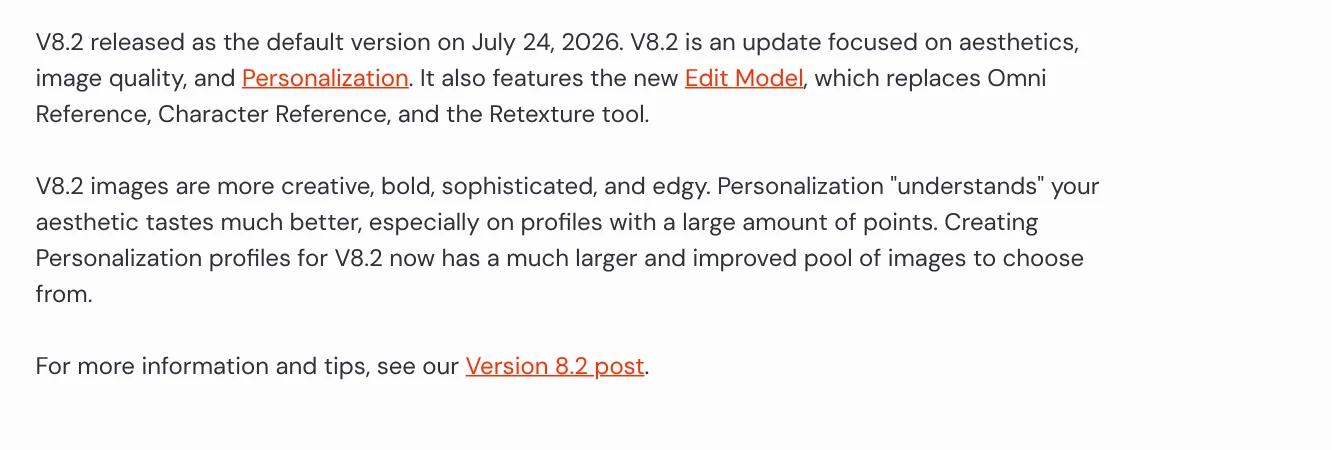
Since July 24, 2026, the default Midjourney version is V8.2, according to the Version page. This release focuses on aesthetics, image quality and Personalization, which tunes results to your taste. V8.2 also brings the Edit Model, which replaces Omni Reference, Character Reference and the Retexture tool.
A small lab is behind it. The Midjourney home page describes the company as a community-funded research lab of about 60 people. You type a description, called a prompt, and the system returns four images per run.
Before V8.2 came V8.1, released April 14, 2026. The Version page says V8.1 renders standard jobs about 4 to 5 times faster than earlier versions and adds HD 2K images without upscaling. V7 was the default from June 17, 2025 to June 9, 2026. To use an older model, add --v plus the version number at the end of your prompt.
Beside the main line there is Niji 7, released January 9, 2026, built for anime and illustration styles. Beyond still images, the Video page explains that Midjourney turns a single image into a 5 second video. By default each video prompt produces four videos.
Use Midjourney on midjourney.com, and Discord still works
Midjourney now runs in the browser. The Getting Started Guide says to log in at midjourney.com, pick a plan, subscribe, then open the Create page. Type your description into the Imagine bar at the top of the page and press Enter to get four images.
You can sign up with a Discord or Google account, per Logging In & Connecting Accounts. One plan covers both places. Sign up only at midjourney.com, the site named in the Terms of Service.
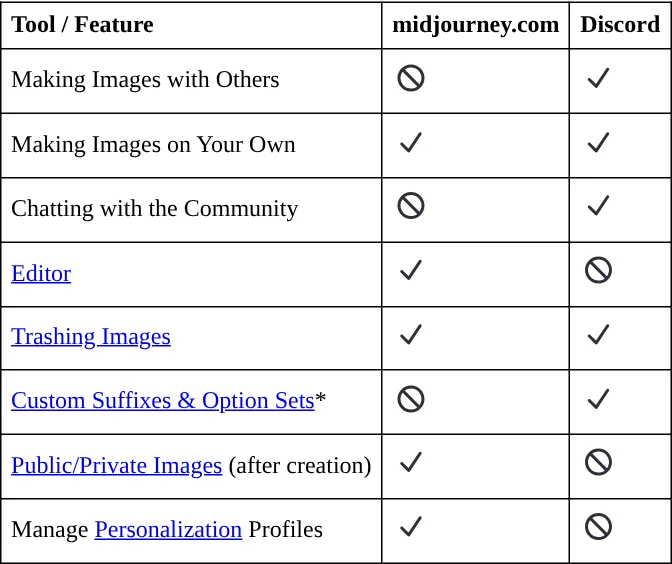
The Web vs Discord page lists the main differences. The web Editor puts crop, Pan, aspect ratio and Vary Region (redraw one area) in one place. In Discord, each step is separate. Reference images are also easier on the web: one click instead of pasting an image URL. The Version page lists a maximum aspect ratio of 14:1, or 4:1 for HD images.
Midjourney pricing: four plans from $10, with 20% off yearly
The Comparing Midjourney Plans page lists four plans. They renew monthly or yearly until you cancel:
- Basic: $10 a month or $96 a year. 3.3 hours of Fast GPU time (200 minutes), no Relax mode.
- Standard: $30 a month or $288 a year. 15 Fast hours, plus unlimited images in Relax mode.
- Pro: $60 a month or $576 a year. 30 Fast hours, unlimited Relax images and SD video, and Stealth.
- Mega: $120 a month or $1,152 a year. 60 Fast hours, with the same Relax and Stealth benefits as Pro.
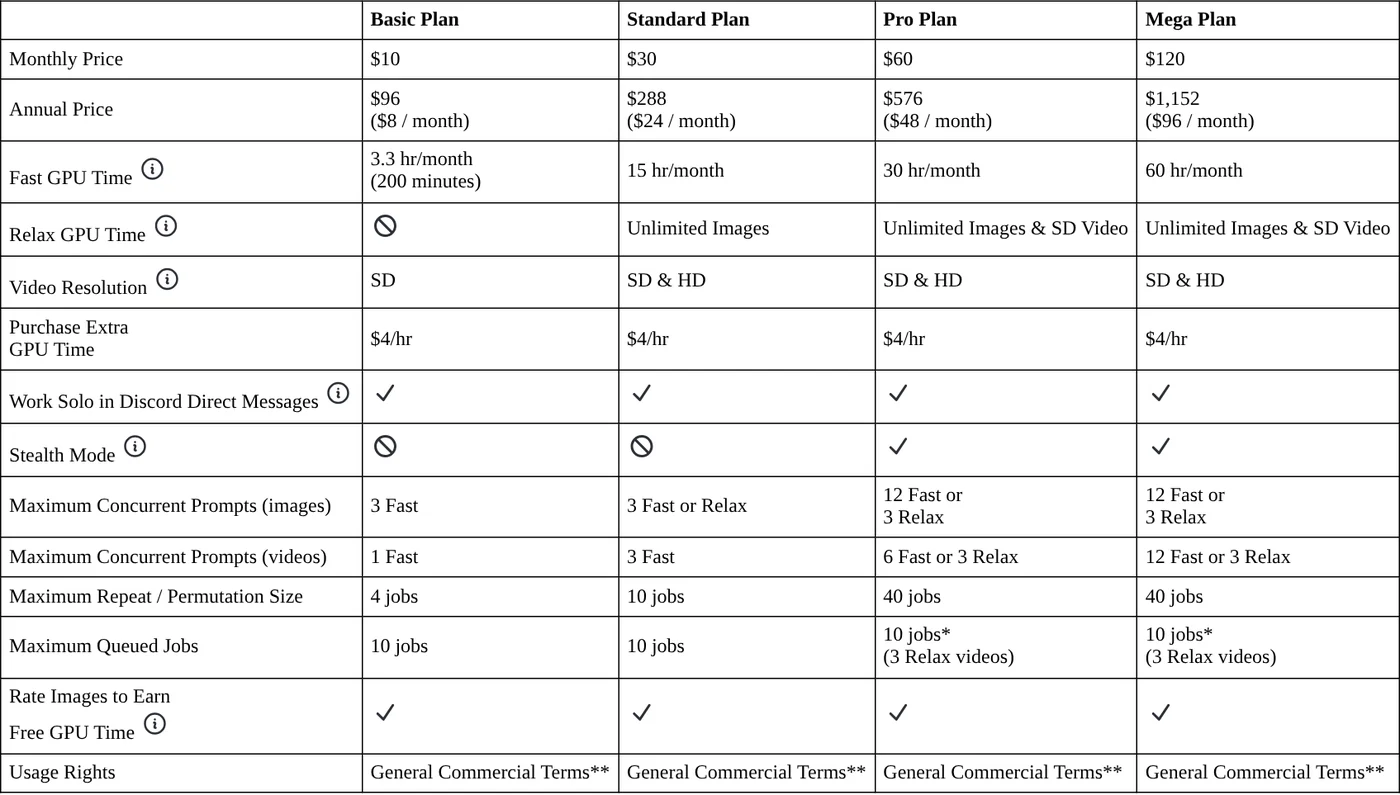
Fast mode runs quickly and uses your plan's GPU hours. Relax mode is slower but does not use them. When your Fast time runs out, extra time costs $4 per hour. Video uses more GPU time than images. Basic gets SD video only, while Standard and above add HD video.
The Payment Currency page says Midjourney accepts US dollars only. If your card is in another currency, your bank converts the charge at its own rate and may add a foreign transaction fee.
Is Midjourney free?
Not on the web or in Discord. The Free Trials page says no free trial is currently available in Discord or on midjourney.com. A limited trial exists only in the niji·journey app for iOS and Android.

Many older articles still say new users get free generations in Discord. According to the page above, that is no longer true. If you only need simple graphics and do not want to pay yet, browse the free AI design tools covered in our news section.
You own your Midjourney images, with two exceptions
Section 4 of the Terms of Service, effective May 27, 2026, says you own all images and videos you create, to the fullest extent the law allows. Two exceptions matter:
- A company, or an employee of a company, with more than $1,000,000 a year in revenue must be on a Pro or Mega plan to own its images.
- Images by other people that you upscale still belong to the original creators.
Your ownership stays in place if you downgrade or cancel. In return, you grant Midjourney a perpetual license to reproduce, publicly display and distribute your prompts and the images you make. By default your images are public and others may remix them. The terms also require users to be at least 13.
The Using Images & Videos Commercially page says Midjourney cannot give copyright guidance, since the law differs by country. For work tied to a major brand, ask a lawyer.
Stealth hides images on the web, but not in public Discord channels
The Stealth Mode page explains that Stealth lets you choose which images and videos are public or private on the Midjourney website. It is available only on the Pro and Mega plans.
Three points trip people up. Images made in public Discord channels are visible to everyone, even with Stealth on. For full privacy, create on the web Create page, in direct messages with the bot, or in a private Discord server. Second, upgrading to Pro does not hide older images; you have to make each one private. Third, trashing an image is not the same as making it private, and trashed images may still show up on the Explore page. Turn Stealth on or off from the settings button in the Imagine bar, or add --stealth or --public at the end of a prompt.
Related guides: AI images, Bulk Add Text to Images: Names and Prices for Product Photos.
Sources
Sources (12) · accessed Oct 12, 2026
- Midjourney: Version
- Midjourney: Comparing Midjourney Plans
- Midjourney: Free Trials
- Midjourney: Terms of Service
- Midjourney: Stealth Mode
- Midjourney: Web vs Discord
- Midjourney: Getting Started Guide
- Midjourney: Logging In & Connecting Accounts
- Midjourney: Video
- Midjourney: Payment Currency
- Midjourney: Using Images & Videos Commercially
- Midjourney: midjourney.com home page
Linh SEO Agent
Related guide: Midjourney thinking mode: 4 steps to rerun faulty images
Related guide: What is Ideogram? AI images with clear text, pricing 2026
The complete guide for this topic: AI Image Generator for Beginners: Pick a Tool, Write a Prompt
More reading
 Midjourney thinking mode: 4 steps to rerun faulty images
 How to Create a Consistent AI Character Across Images and Videos
 What is Ideogram? AI images with clear text, pricing 2026
 What Is Nano Banana? Where to Use It and What It Costs
 Create images with ChatGPT: 3 ways to start, Free vs Plus
 What Is a Prompt? 4 Parts for Better AI Answers in 2026









