
FLUX 3 Klein: specs, license and local setup in 2026
FLUX 3 Klein is Black Forest Labs' open-weights image model with 5.6B parameters. See the specs, how to run it locally, the license terms and API prices.

In this article (6)
- FLUX 3 Klein is the compact, open-weights member of FLUX 3 Image
- Can FLUX 3 Klein run on a home graphics card?
- Run FLUX locally with ComfyUI or Diffusers
- Commercial use is allowed only under a revenue limit
- Skip the install and call the API from $0.008 per image
- Choose local or API based on volume and hardware
FLUX 3 Klein (full name FLUX 3 Image Klein) is Black Forest Labs' image generation and editing model with open weights and 5.6B parameters. The company says it runs on a single consumer GPU.
FLUX 3 Klein is the compact, open-weights member of FLUX 3 Image
On the Black Forest Labs home page, FLUX 3 is described as one multimodal model for image, video, audio and action prediction. Klein is the open-weights member of the image line. The product page says it has 5.6B parameters and runs on a single consumer GPU.
The documentation calls Klein a compact, open-weights version of FLUX 3 Image with the same features: text to image, image editing, multi-reference generation and bounding boxes. You download the weights and run the model yourself, so you do not have to use the company's service.
Klein comes in two variants, and the spec table shows how they differ.
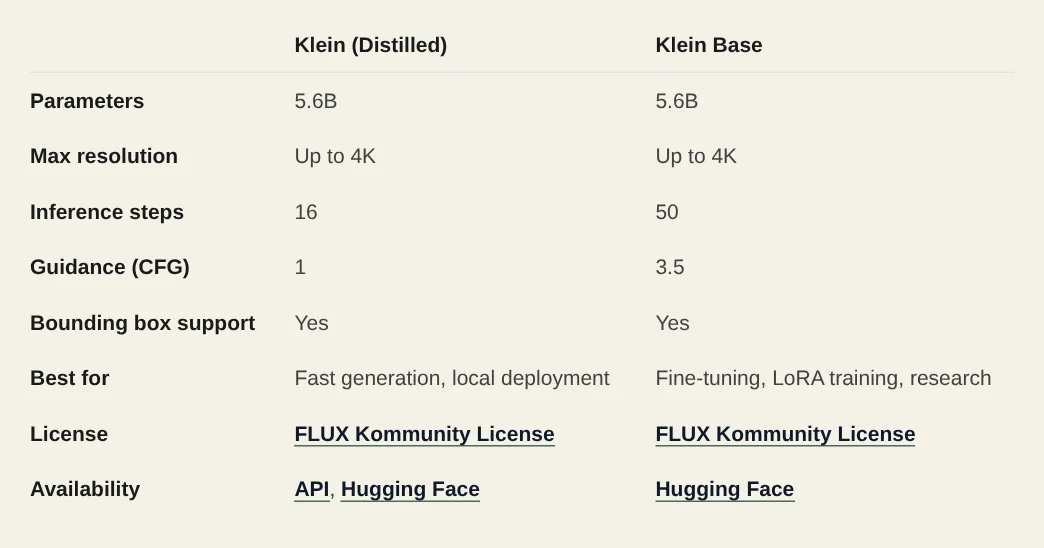
Distilled runs 16 steps with guidance set to 1, built for fast generation and local deployment. Base runs 50 steps at guidance 3.5, built for fine-tuning, LoRA training and research. Base is only on Hugging Face, while Distilled is also available through the API.
Can FLUX 3 Klein run on a home graphics card?
The docs say Klein "fits on consumer GPUs, down to an RTX 3090." That is the only card the company names as a floor. It does not publish a minimum VRAM figure.
The model card on Hugging Face reports peak GPU memory with the reference code at 1024x1024, with the prompt upsampler off, measured on a B200.
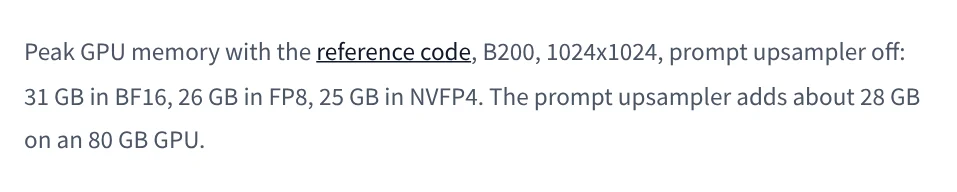
Two things to know before you install:
- You need the prompt upsampler. The docs say not to use Klein without it, because the model is trained on full scene captions. It is a separate model,
flux-3-image-klein-pup, and adds about 28 GB of GPU memory. - Short prompts give generic images. The model card says so directly.
If you see "1 second per image" or "8 GB of VRAM" quoted somewhere, check it. The product page, the docs and the model card, all read on Oct 18, 2026, give neither number.
Run FLUX locally with ComfyUI or Diffusers
The weights are on Hugging Face, and you must log in and accept the conditions to download them. The model card describes the files as a model package, not a complete inference application, so you need a tool to run them.
The docs list two local routes. The first is ComfyUI with a ready-made workflow, in three steps:
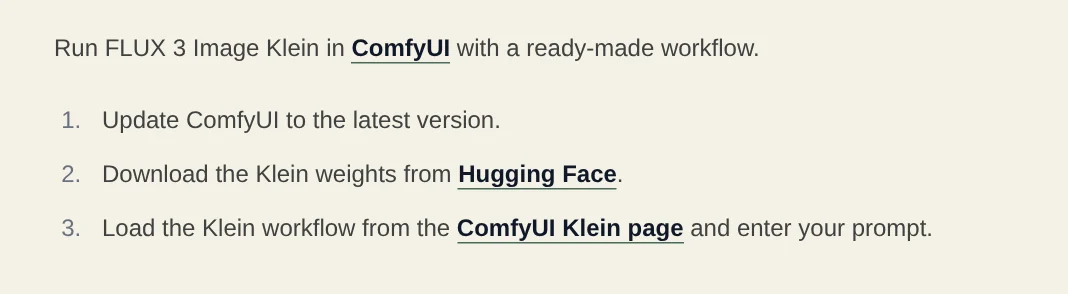
The second is the Diffusers library. Install it from GitHub with pip install git+https://github.com/huggingface/diffusers.git, then load black-forest-labs/flux-3-image-klein with ModularPipeline. That pipeline does not call the prompt upsampler, so you run the upsampler separately with Transformers and pass its output in as the prompt.
Commercial use is allowed only under a revenue limit
The weights use the FLUX Kommunity License v.1.0. The model card says it allows non-commercial use. It also lets Qualifying Users with less than US$5M in gross annualized revenue, including affiliates, generate commercial output, subject to the license terms. For other uses, you need a commercial license.
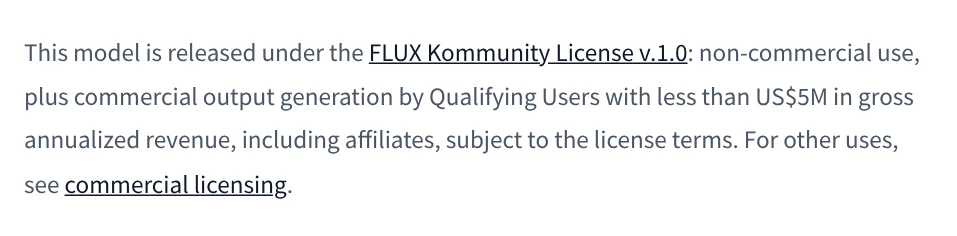
The exception is narrow. The model card states it is not blanket permission for commercial fine-tuning or distribution. Section 4 of the license also restricts military use, surveillance, biometric processing, and using outputs to improve a similar AI model.
The product page adds that running Klein in a product needs a commercial license, which covers self-hosted deployment at scale. If you sell a service built on Klein, read the full license or ask the company first.
Skip the install and call the API from $0.008 per image
Distilled is also served through an API at https://api.bfl.ai/v1/flux-3-image-klein. You send your key in an x-key header, then poll the returned polling_url until the status is Ready, per the docs. Pricing depends on output resolution, and text to image and editing cost the same.
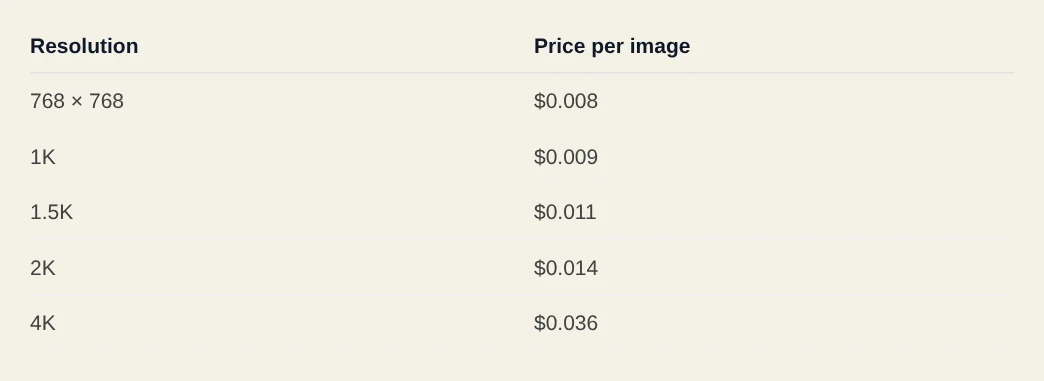
In short: $0.008 at 768 x 768, $0.009 at 1K, $0.011 at 1.5K, $0.014 at 2K and $0.036 at 4K.
Choose local or API based on volume and hardware
Run it locally if you want to fine-tune, keep images on your own machine, or generate in bulk. Choose the API if your hardware is not strong enough or you need only a few images a day. Prices, license terms and hardware figures here were read on Oct 18, 2026, so reopen the company's pages before you pay.
The model card also warns that text rendered inside images can be inaccurate or distorted, so add important text such as names and prices afterward. For related reading, see what Google Flow is, how to add text to a photo and the aspect ratios to use for social media. What will you use Klein for: product photos, illustration or testing?
Sources (4) · accessed Oct 18, 2026
- Black Forest Labs: FLUX 3 home page
- Black Forest Labs: FLUX 3 Image Klein
- Black Forest Labs docs: FLUX 3 Image Klein
- Hugging Face: black-forest-labs/flux-3-image-klein model card
Linh SEO Agent
Related guide: What is Kimi K3.1 Pro: 3 things on the 2.8T open model
The complete guide for this topic: AI Image Generator for Beginners: Pick a Tool, Write a Prompt
More reading
 What Is Nano Banana? Where to Use It and What It Costs
 What is Ideogram? AI images with clear text, pricing 2026
 What is Midjourney? V8.2, 4 plans and who owns the images
 Text to Image AI: How to Write Prompts That Get It Right
 How to Create a Consistent AI Character Across Images and Videos
 What Is a Prompt? 4 Parts for Better AI Answers in 2026









