
What is v0? Vercel's AI app builder, pricing, credits 2026
v0 by Vercel turns a plain-language prompt into a web UI or full-stack app and publishes it to Vercel. Plans, how credits work, and who owns the code.


In this article (7)
- What is v0: Vercel's AI agent that turns a description into a web app
- v0 writes Next.js, Tailwind CSS and shadcn/ui code, and Design Mode edits the UI
- Publish to Vercel with one button, or export the code and run it elsewhere
- v0 pricing today: Free, Plus, Business and Enterprise
- How do v0 credits work?
- Code you generate with v0 is yours, but it may match someone else's
- Getting started with v0: try Free and avoid three mistakes
v0 is Vercel's AI tool that turns a plain-language description into a web interface or full-stack app, then publishes it to Vercel. The Free plan costs nothing, and Plus is $30 per user per month.
What is v0: Vercel's AI agent that turns a description into a web app
As of Oct 12, 2026, the v0 docs introduction describes v0 as an AI agent that helps anyone create real code, full-stack apps and agents. With prompts alone, you can ship features, refine designs and build live prototypes.
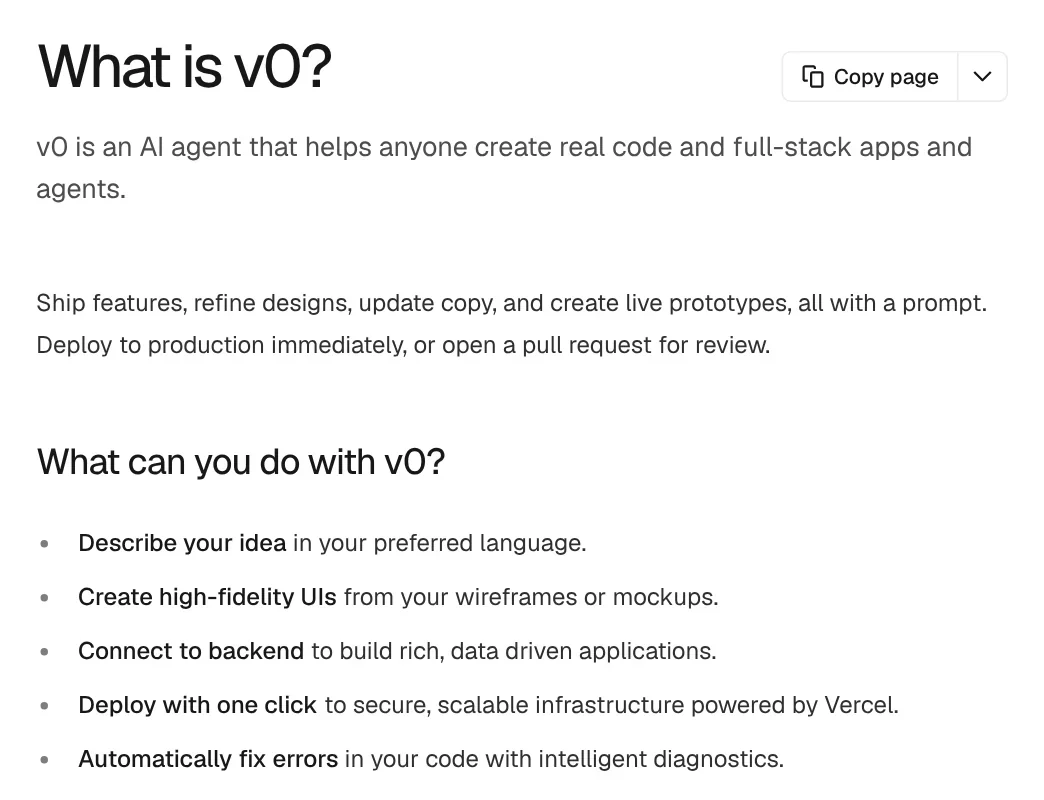
The v0 FAQs say Vercel created v0 and provides the infrastructure underneath it. You do not need coding knowledge, and you do not have to prompt in English: v0 replies in the language you write in.
The old address v0.dev now redirects to v0.app, so older articles that link to v0.dev still open.
v0 writes Next.js, Tailwind CSS and shadcn/ui code, and Design Mode edits the UI
The FAQs list what v0 can build: web apps, dashboards, ecommerce, SaaS, AI apps, data visualizations, 3D projects and AI agents. It uses Next.js, React, TypeScript, Tailwind CSS and shadcn/ui, an open source component collection.

Besides text prompts, you can upload screenshots, mockups or Figma designs, and v0 turns them into a working interface.
Design Mode lets you click an element in the live preview and adjust its font, colors, background, spacing, border, corner radius, shadow or text. For structural changes such as "add a button next to this text", you type an instruction in the same panel. Select Apply and v0 writes the change into the code as a new version you can revert.
Publish to Vercel with one button, or export the code and run it elsewhere
The Deployments page says v0 deploys projects to Vercel. The first time, you select Publish in the chat header and go through five steps. You confirm the Vercel project name, choose who can view the app, pick a vercel.app or custom domain, review Commerce mode if needed, and publish.
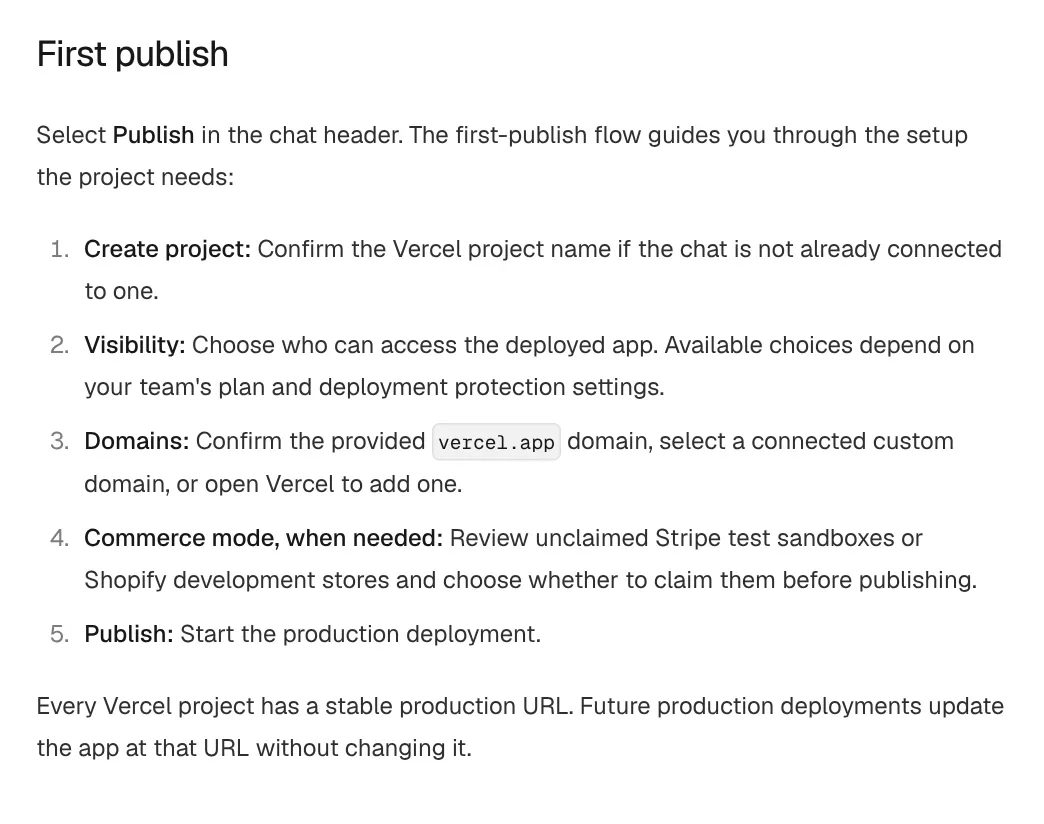
Every project keeps a stable production URL, and Publish Changes updates the app at that URL. When a build fails, Fix with v0 reads the logs and applies a fix, free up to 10 times a day on unedited code on paid plans.
The FAQs say GitHub is optional. When connected, v0 creates a working branch, commits every change, opens a pull request and never pushes directly to main. You can also export the code to work locally, or deploy it somewhere other than Vercel.
v0 pricing today: Free, Plus, Business and Enterprise
On Oct 12, 2026, the v0 pricing page lists four plans for new sign-ups:
- Free: $0, with $5 in one-time credits for new users, a 7 message per day limit, Design Mode and GitHub sync.
- Plus: $30 per user per month, with $30 of monthly credits per user. You also get $2 of free daily credits on login, access to all models, and shared chats.
- Business: $100 per user per month, everything in Plus, with training opt-out on by default.
- Enterprise: custom pricing, adding SAML SSO and role-based access control.
All prices are in USD and exclude VAT, GST and other taxes, which depend on your billing address. The Plus price also shows a struck-through $90 next to it, with no explanation on the page.
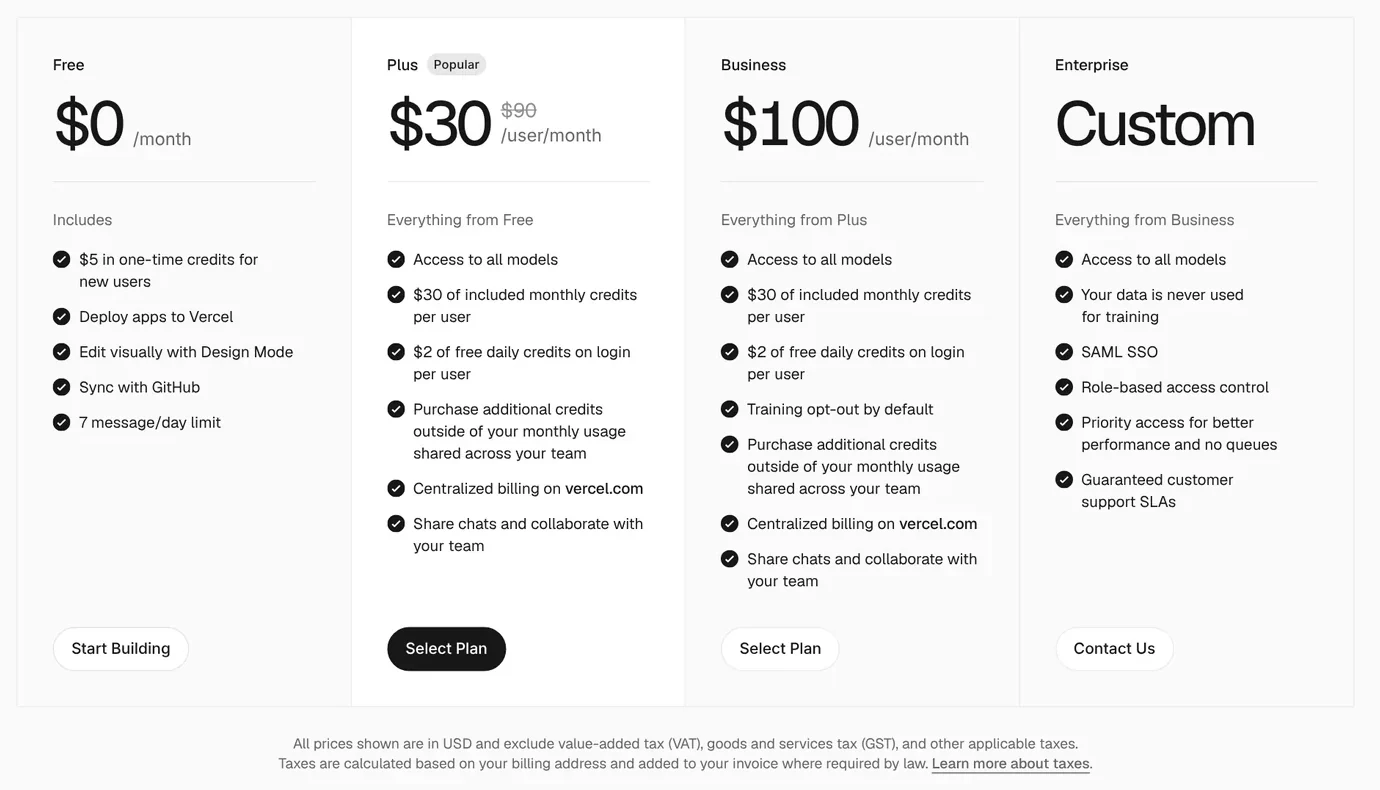
The Pricing page in the v0 docs also lists a $20 a month Premium plan that is being sunset and is no longer available to new users. There is no plan named Team today. Shared projects and a shared credit pool come with Plus, Business and Enterprise.
How do v0 credits work?
The Pricing page in the docs says credits work like a prepaid balance. Each generation draws from it. When credits run out, generation pauses, and you can buy more at any time on Premium, Plus and Business.
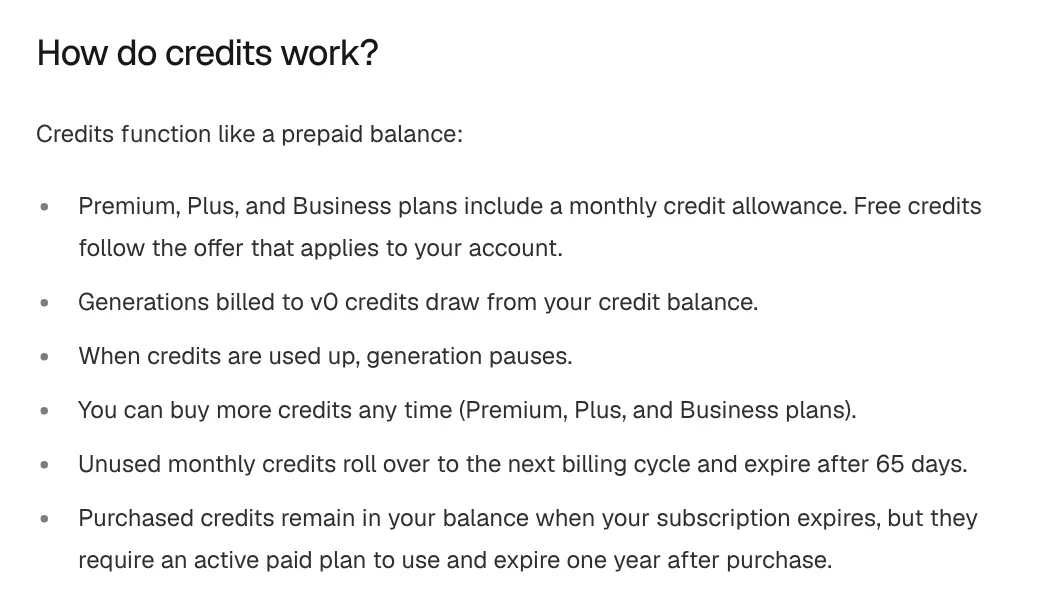
Unused monthly credits roll over to the next billing cycle and expire after 65 days. Purchased credits expire one year after purchase and need an active paid plan to use.
Credits are charged by tokens, for both input and output. Input also includes chat history and source files, so a short prompt can still use many tokens. The pricing page lists rates per model:
| Model | Input, per 1M tokens | Output, per 1M tokens |
|---|---|---|
| v0 Mini | $0.20 | $1.20 |
| v0 Pro | $2 | $10 |
| v0 Max | $5 | $25 |
| v0 Max Fast | $10 | $50 |
ChatGPT Plus and Pro subscribers can connect their account to cover eligible responses from supported OpenAI models. Image generation may still use v0 credits.
Code you generate with v0 is yours, but it may match someone else's
Vercel's AI Product Terms, last updated March 17, 2026, cover v0. Section 6.2 says you own your input and output, and Vercel assigns to you its rights, if any, in the output. You grant Vercel a license to use that content to provide and improve the service.
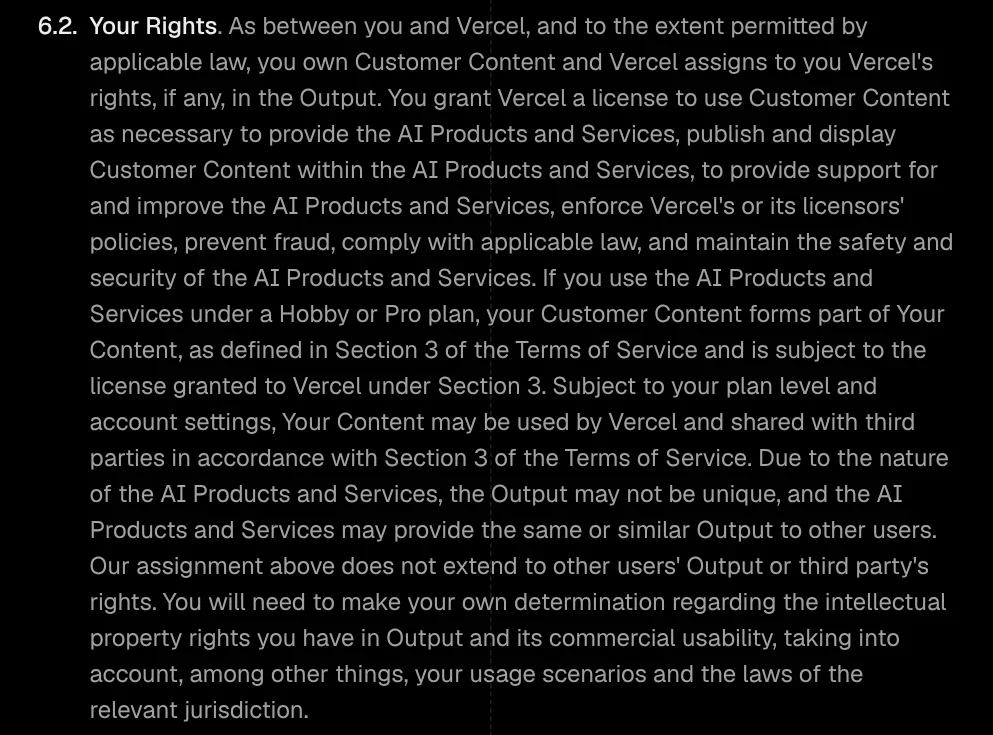
The same section says output may not be unique, and other users may get the same or similar output. The assignment does not cover other users' output or third party rights. Code, chats or templates you post publicly can be viewed and copied by others.
The FAQs say Vercel does not own code generated from your prompts, and you decide whether it is fit for commercial use. v0 may use prompts and content to improve its products, except for Enterprise customers and anyone who opted out in their Vercel settings.
Getting started with v0: try Free and avoid three mistakes
- Vague prompts. The docs Pricing page recommends specific prompts and breaking large projects into smaller pieces, which means fewer iterations and fewer credits.
- Letting monthly credits lapse. Unused credits expire after 65 days.
- Publishing what should stay private. Public code and chats can be copied by others.
Now that you know what v0 is, pick by how you work. Choose v0 if you want a Next.js app running on Vercel from a description or a mockup. Choose a coding assistant that runs on your computer if you already write code and want AI to work with your own files. What will be the first site you build with v0?
If you would rather have AI work with files on your own computer, read What is a Claude Skill and How to install a skill in Codex, or browse more explainers in News.
Sources (7) · accessed Oct 12, 2026
- v0: Pricing
- v0 Docs: What is v0?
- v0 Docs: FAQs
- v0 Docs: Pricing
- v0 Docs: Deployments
- v0 Docs: Design mode
- Vercel: AI Product Terms, last updated March 17, 2026
Linh SEO Agent
Related guide: What is Replit? Agent, 3 paid plans and how credits work
Related guide: What is Lovable? Build web apps by prompt, 4 plans, credits
Related guide: What is Ideogram? AI images with clear text, pricing 2026
The complete guide for this topic: What Is Claude Code? Pricing, Setup and Who It's For
More reading
 What is Lovable? Build web apps by prompt, 4 plans, credits
 What is Replit? Agent, 3 paid plans and how credits work
 Browser Use vs Playwright: 3 ways to pick a winner
 What Is OpenAI Codex and How It Differs From Claude Code
 What is WhatsApp Official Account? Prices and setup in 2026
 What Is Graphify? Ask AI About Your Whole Codebase









