
What is Lovable? Build web apps by prompt, 4 plans, credits
Lovable builds web apps from a plain-language description, with a built-in backend and two-click publishing. Plans, how credits work, who owns the code.

In this article (9)
- What is Lovable: you describe the app, Lovable writes the code
- The backend comes built in with Lovable Cloud, or you connect your own Supabase
- Publishing takes two clicks, and code syncs both ways with GitHub
- Lovable pricing: Free at $0, Pro at $25 and Business at $50 a month
- How do Lovable credits work?
- You own the code you create, but the Free plan cannot download it
- When should you hire someone instead of building it yourself?
- Getting started with Lovable: try the Free plan and avoid three mistakes
- Sources
Lovable is an AI platform that builds web apps from a plain-language description: the interface, the database, sign-in and hosting. The Free plan costs nothing, and Pro starts at $25 a month, billed in credits.
What is Lovable: you describe the app, Lovable writes the code
As of Oct 12, 2026, the Lovable welcome page describes the product as an AI platform for building, iterating on and deploying web applications in natural language. You say what you want, and Lovable generates a working app with a frontend, backend, database and authentication, all as editable code. Plans are priced by credits, not by projects or seats.
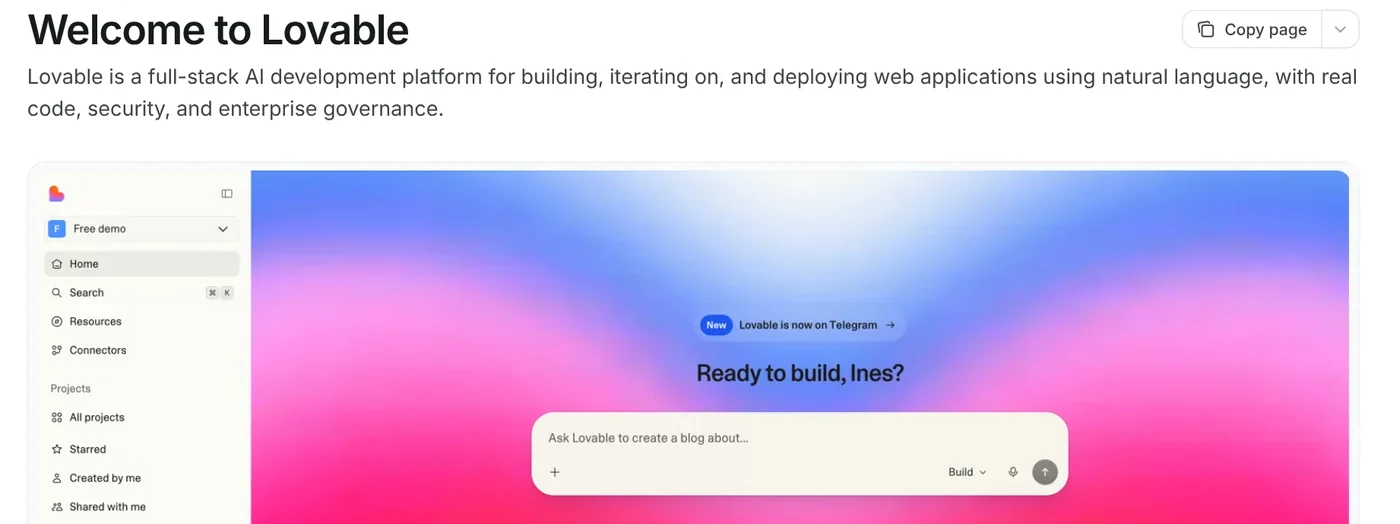
The Lovable FAQ lists common builds: SaaS products, internal tools, dashboards, CRMs, booking apps, company websites, landing pages and chatbots. One limit to know up front: Lovable does not build native iOS or Android apps. For a home screen icon, you turn the web app into a PWA (progressive web app), or wrap it yourself with a tool such as Capacitor.
The backend comes built in with Lovable Cloud, or you connect your own Supabase
The Lovable Cloud page says every app gets a built-in backend with a database, file storage, authentication and server-side functions. Cloud is on by default and runs on Supabase's open-source foundation. When you ask for a feature that needs a server, Lovable turns Cloud on or asks you first.
The Supabase integration page says most projects never need a separate Supabase account. Connect your own when you want to pay Supabase directly, use the full Supabase dashboard, or reuse a project you already have. The integration is available on all plans.
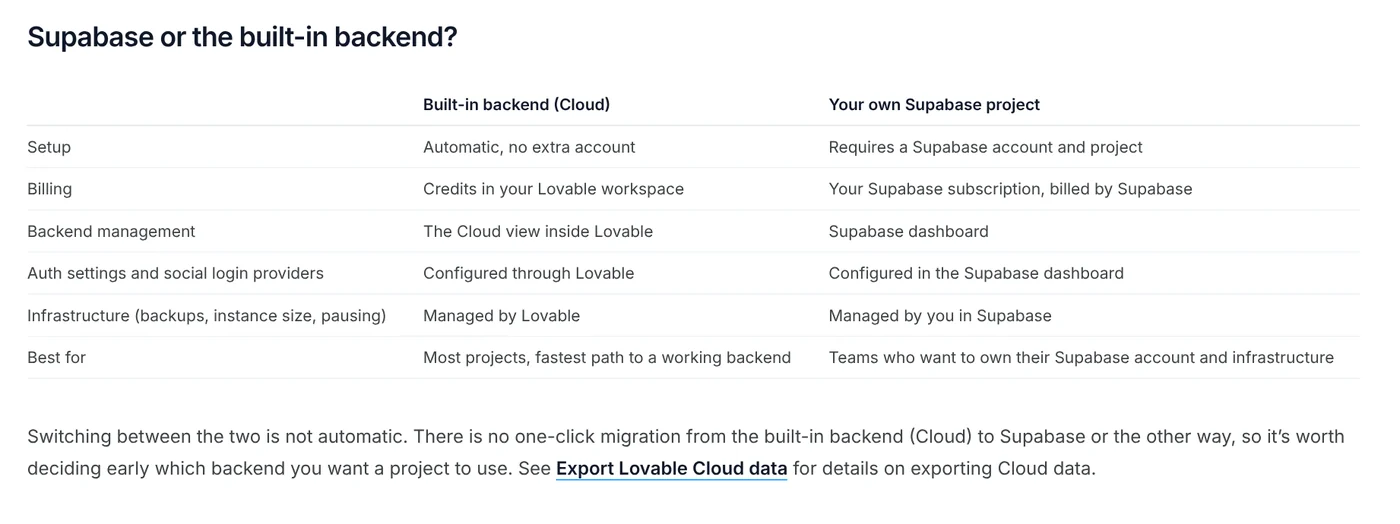
One catch: there is no one-click switch between Cloud and Supabase, so pick your backend when you start the project.
Publishing takes two clicks, and code syncs both ways with GitHub
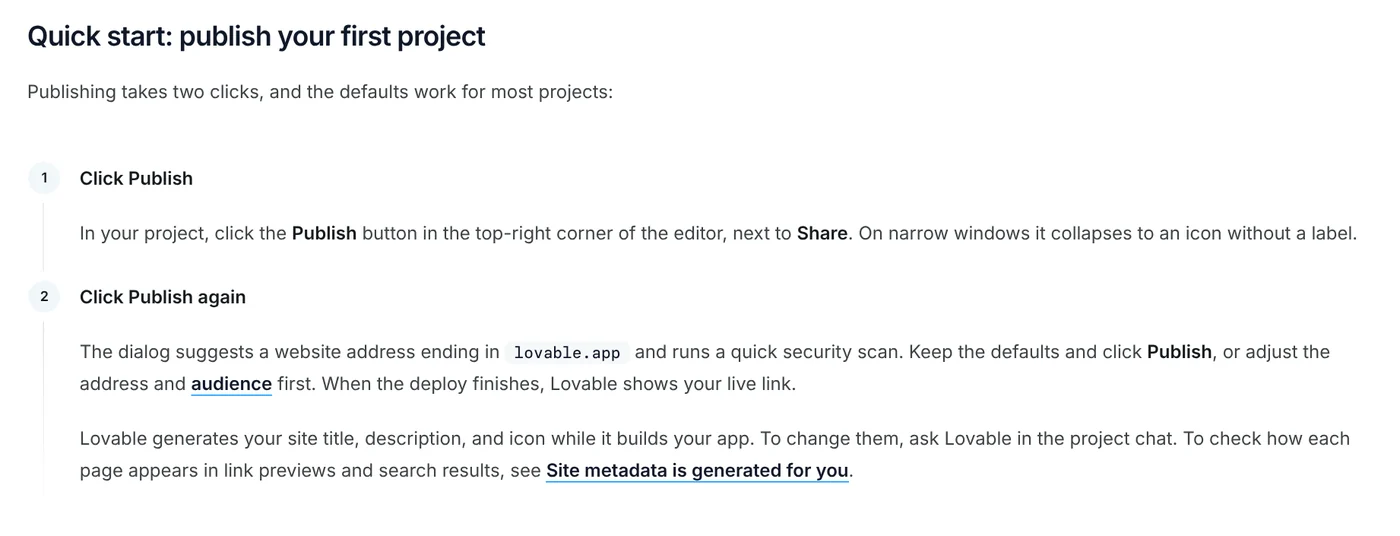
The Publish guide lists two steps: click Publish in the top-right corner, then click Publish again. Lovable suggests an address ending in lovable.app and runs a quick security scan of about 10 seconds. After later edits, click Publish changes.
The GitHub sync page describes two-way sync: changes in Lovable go to your GitHub repository, and commits you push to the active branch come back into Lovable. GitHub is optional, and many people build and launch entirely inside Lovable.
Lovable pricing: Free at $0, Pro at $25 and Business at $50 a month
On Oct 12, 2026, the Lovable pricing page listed four plans:
- Free: $0, no credit card, 5 lovable.app domains.
- Pro: $25 a month, 100 credits, custom domains, no Lovable badge.
- Business: $50 a month, 100 credits, plus SSO and internal publishing.
- Enterprise: custom pricing.
Yearly billing gives you 2 months free. The pricing page also says credits are not refundable or redeemable for cash.
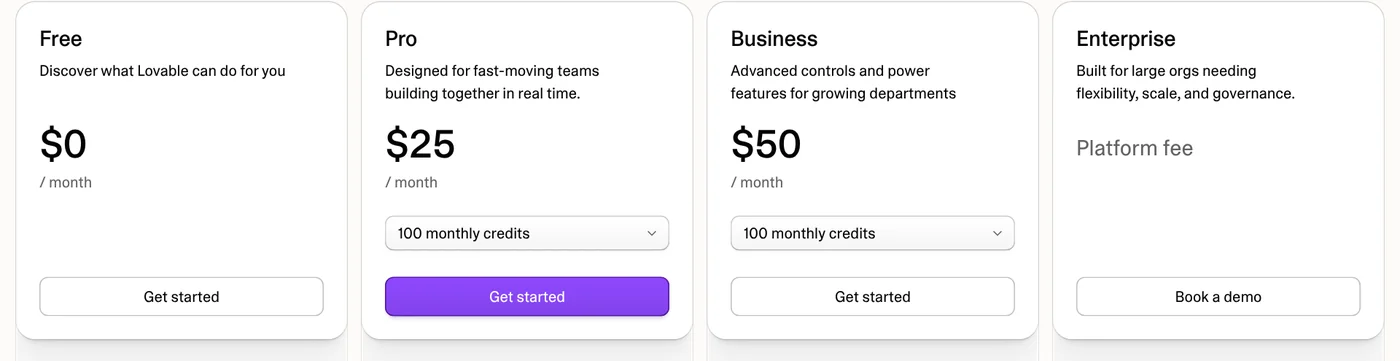
The subscription plans page says Pro and Business come in tiers from 100 to 10,000 credits a month, for example Pro with 400 credits at $100. Verified students and teachers get 50% off Pro with 100 credits for up to 12 months.
How do Lovable credits work?
The credits and usage page says one credit balance pays for building, chatting with Lovable, hosting the app with its Cloud backend, and AI features inside the published app.
Plan mode costs 1 credit per message, plus the cost of any subagent research Lovable runs while planning, and never changes your code. Build mode charges by complexity: making a button gray costs 0.50 credits, adding authentication 1.20, and a landing page with images 2.00. Lovable labels these as examples, and real costs vary by project.
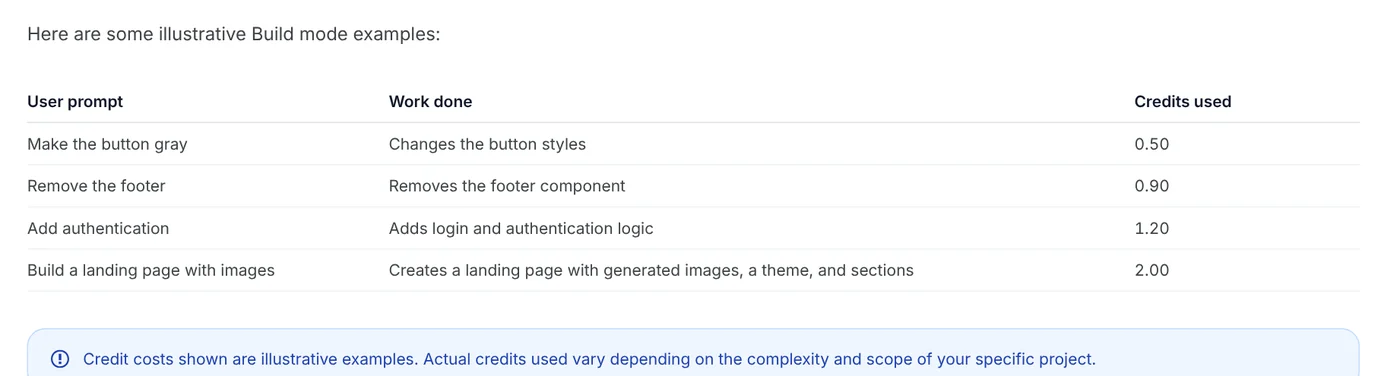
Free, Pro and Business all include 5 free daily build credits, capped at 30 a month on Free. Each month also adds 20 Cloud credits and 4 AI credits. Monthly plan credits on monthly billing expire 2 months after they are issued. The more visitors and data your app has, the more credits its Cloud usage takes.
You own the code you create, but the Free plan cannot download it
The ownership page says the apps, code and content you create with Lovable are yours, subject to third-party rights such as open-source licenses. You can modify them, use them commercially and host them wherever you choose.
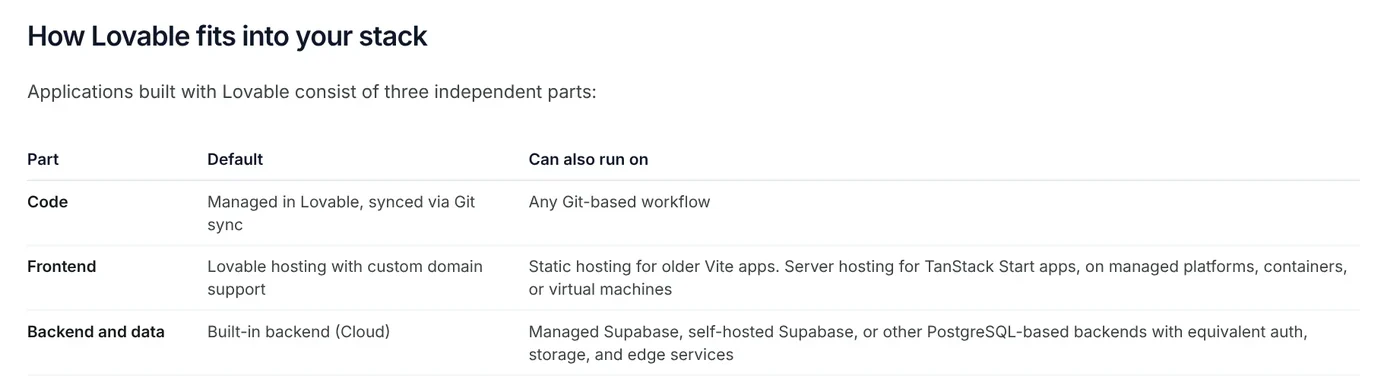
Ownership is not the same as plan features. The plan feature table shows Free includes Git sync, but not code editing, code download or custom domains. On Free and Pro, you opt out of AI model training per account yourself. Business excludes workspace data by default.
When should you hire someone instead of building it yourself?
Lovable gets you from idea to a working app quickly, but it does not replace knowing how software works. The support policy says the support team does not debug the code in your project. If you want someone to build your product, it points to Lovable experts, verified developers and agencies who build with Lovable.
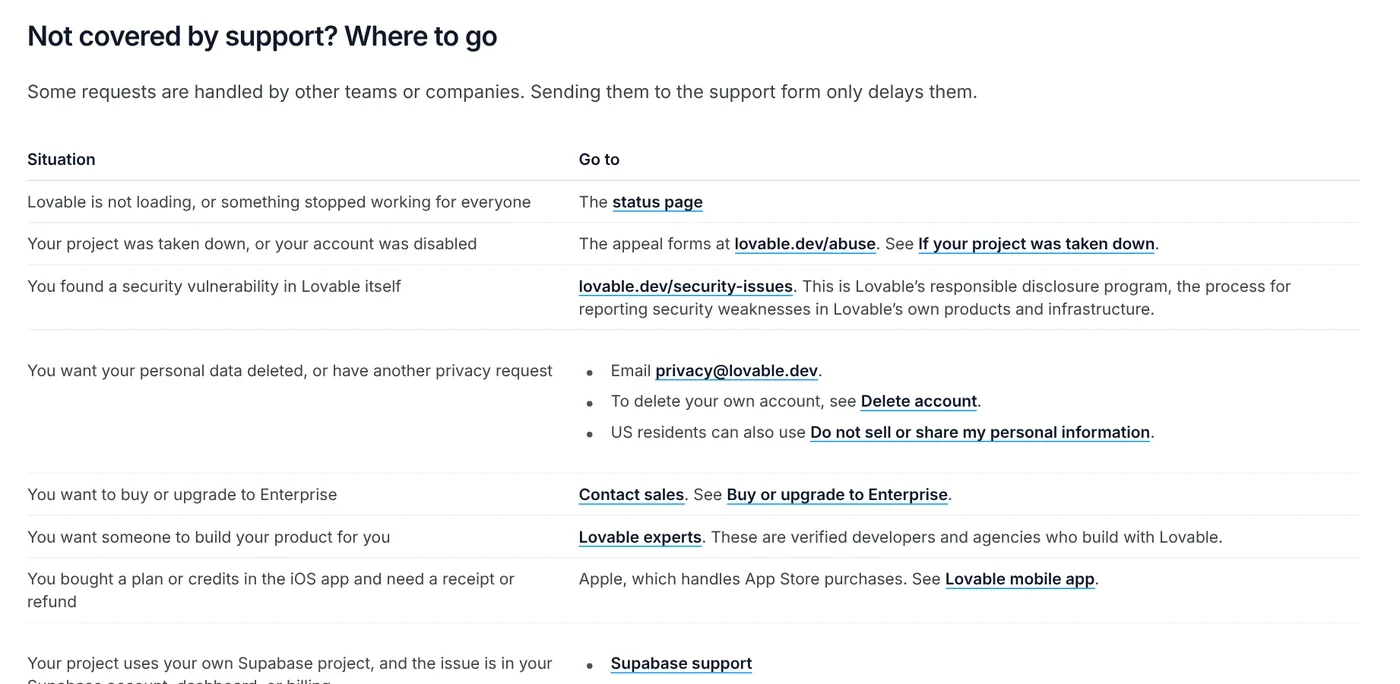
Building it yourself fits landing pages, small internal tools and prototypes. Hire someone, or have a technical person review the work, when:
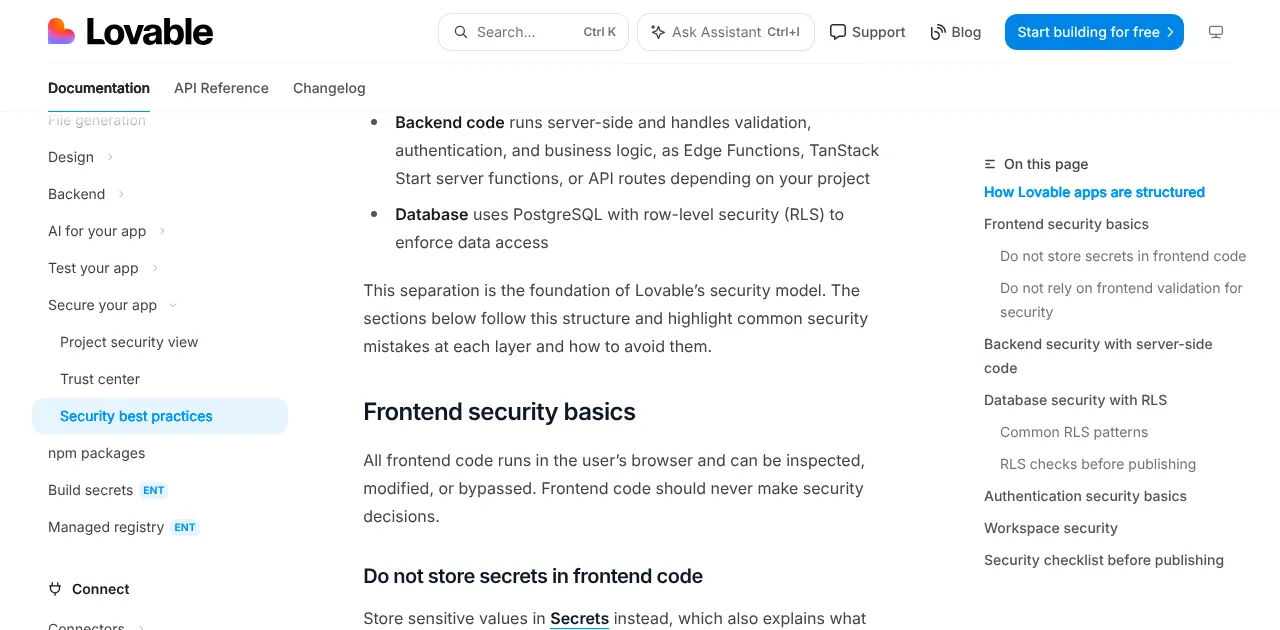
- The app holds personal or payment data. The security best practices page notes that frontend code runs in the browser where anyone can inspect it, so an API key placed there should be treated as exposed.
- The business logic has many steps or must connect to older systems.
- You plan to move off Lovable: then servers, backups and security are on you, per the ownership page.
- You keep spending credits on one bug without understanding the cause.
Getting started with Lovable: try the Free plan and avoid three mistakes
- Broad prompts in Build mode burn credits in the wrong direction. Ask in Plan mode first.
- Pasting an API key into the interface code instead of storing it in Secrets.
- Forgetting that monthly credits expire, two months after they are issued.
Now that you know what Lovable is, pick by how you work. Choose Lovable if you want to describe an app in words and get a running web app with a backend. Choose an AI coding assistant that works inside your editor if you already write code. More explainers on coding and automation tools are in News. What will be the first app you build with Lovable?
Related guides: AI coding, What Is Claude Code? Pricing, Setup and Who It's For.
Sources
Sources (12) · accessed Oct 12, 2026
- Lovable: Pricing
- Lovable Docs: Welcome to Lovable
- Lovable Docs: FAQ
- Lovable Docs: Subscription plans
- Lovable Docs: Credits and usage
- Lovable Docs: Lovable Cloud
- Lovable Docs: Connect to Supabase
- Lovable Docs: Publish
- Lovable Docs: GitHub
- Lovable Docs: Deployment, hosting, and ownership
- Lovable Docs: Security best practices
- Lovable Docs: Support policy
Linh SEO Agent
Related guide: What is vibe coding? 5 tools for apps by prompt, and risks
Related guide: What is Replit? Agent, 3 paid plans and how credits work
Related guide: What is v0? Vercel's AI app builder, pricing, credits 2026
More reading
 What is v0? Vercel's AI app builder, pricing, credits 2026
 What is Replit? Agent, 3 paid plans and how credits work
 What is vibe coding? 5 tools for apps by prompt, and risks
 Browser Use vs Playwright: 3 ways to pick a winner
 What is Cursor AI? Features, its 5 plans and Privacy Mode
 Claude Code Xcode plugin: 1 install command and 4 features









