
What is Kling AI? Kling 4.0, 4 paid plans and free credits
Kling AI is Kuaishou's text-to-video and image-to-video tool. Kling 4.0 opened to everyone on Oct 15, 2026, the free tier is 720p, and paid plans start at $6.99.

In this article (7)
- What is Kling AI: a video generator built by Kuaishou
- Kling 4.0 is the newest model, open to everyone since Oct 15, 2026
- Text or image, Kling AI starts with a clear prompt
- What does the free Kling AI plan include?
- Kling AI paid plans start at $6.99 for the first month
- Selling with Kling AI videos requires a paid plan
- Which plan to pick and where to start
Kling AI is an AI video and image generator from Kuaishou: you type a description or upload a photo, and it turns that into a video clip with sound. The free tier is fine for testing. Using the videos to sell anything requires a paid plan.
What is Kling AI: a video generator built by Kuaishou
On Jan 13, 2026, a Kuaishou press release described Kling AI as the company's self-developed video generation model product. As of December 2025, it served more than 60 million creators, had generated over 600 million videos, and counted more than 30,000 enterprise users.
On Oct 12, 2026, typing klingai.com redirects you to kling.ai. The site covers image generation, video generation, and Motion Control (copying movement from a reference video). Besides the web version, there are apps for iOS, Android, macOS, and Windows.
Kling 4.0 is the newest model, open to everyone since Oct 15, 2026
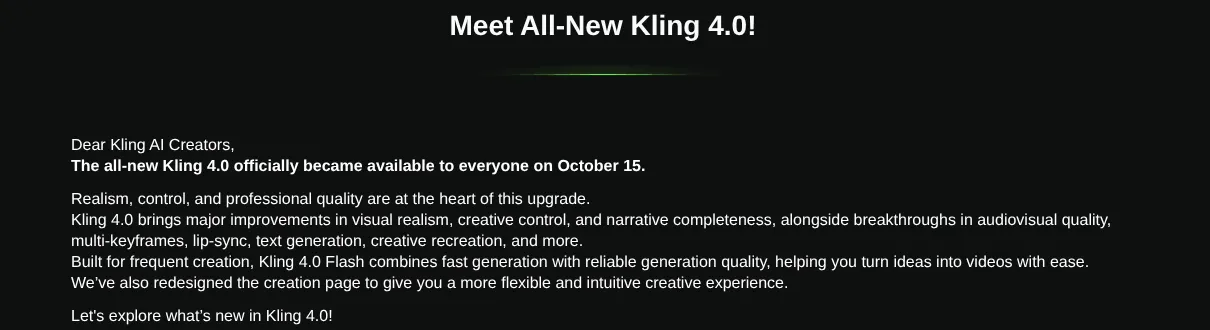
The blog post Introducing Kling 4.0, published Sep 30, 2026, announced the early access phase. The release note Meet All-New Kling 4.0 then confirmed that Kling 4.0 officially became available to everyone on Oct 15, alongside the lighter Kling 4.0 Flash for faster generation.
As of Oct 27, 2026, feature pages such as Text to Video still describe the Kling 3.0 series, so the specs there are not Kling 4.0 specs. Inside Kling 4.0 explains the new model in more detail.
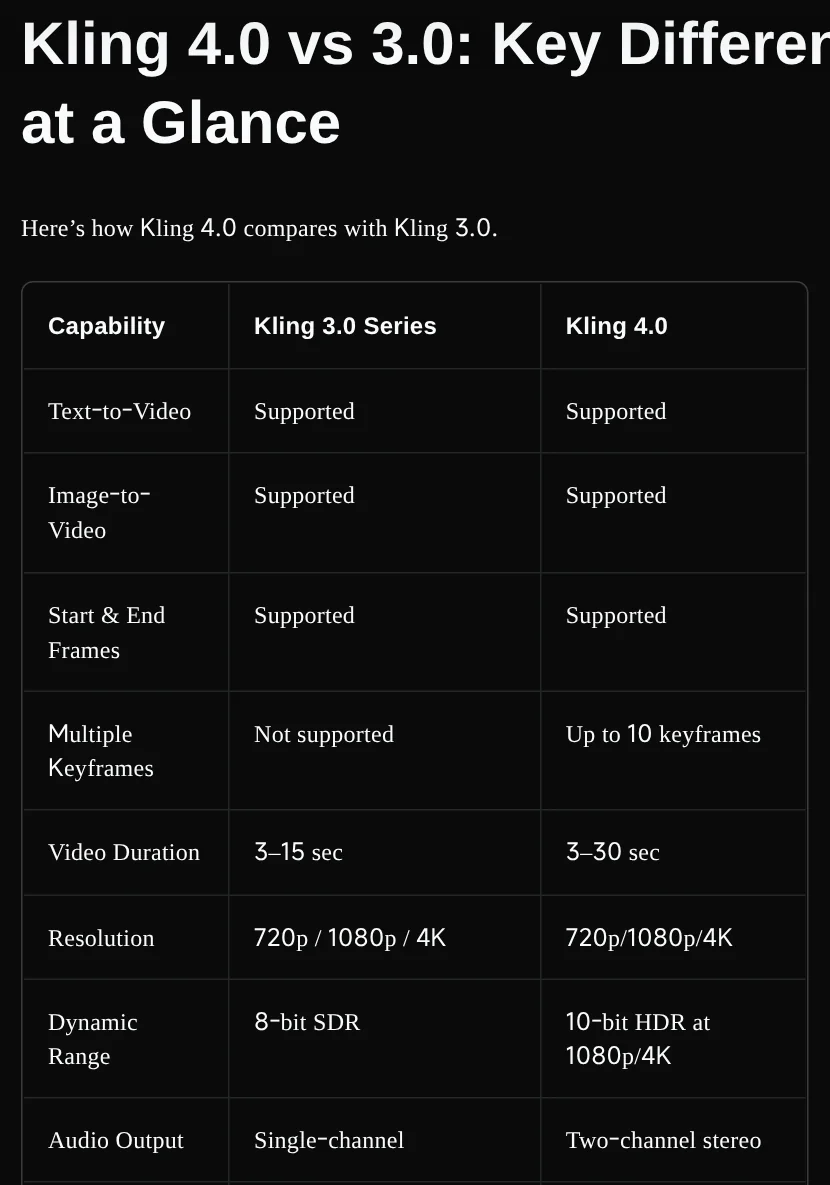
The comparison table in Kling 4.0 vs 3.0 shows the main differences:
- Length: Kling 3.0 makes 3 to 15 second videos. Kling 4.0 makes 3 to 30 seconds in one generation.
- Resolution: both offer 720p, 1080p, and 4K. Kling 4.0 adds 10-bit HDR at 1080p and 4K, though the release note still lists HDR as coming soon.
- Keyframes: Kling 4.0 accepts up to 10 images to set key moments. Kling 3.0 does not support this.
- Audio: Kling 3.0 outputs single-channel audio. Kling 4.0 outputs two-channel stereo.
The same release note lists Flash at 720p only, with clips of 3 to 20 seconds. Video extension up to 2 minutes and HDR output are both marked "coming soon."
Text or image, Kling AI starts with a clear prompt
The Text to Video page splits text-to-video into three steps:
- Write Your Prompt: pick a model and describe the scene, characters, action, and style in plain language.
- Customize Your Video: describe several scenes in one prompt. Kling 3.0 can organize them into up to five connected shots, with dialogue and sound effects.
- Generate & Export: choose 720p, 1080p, or 4K, a length of 3 to 15 seconds, and a 16:9, 9:16, or 1:1 frame.
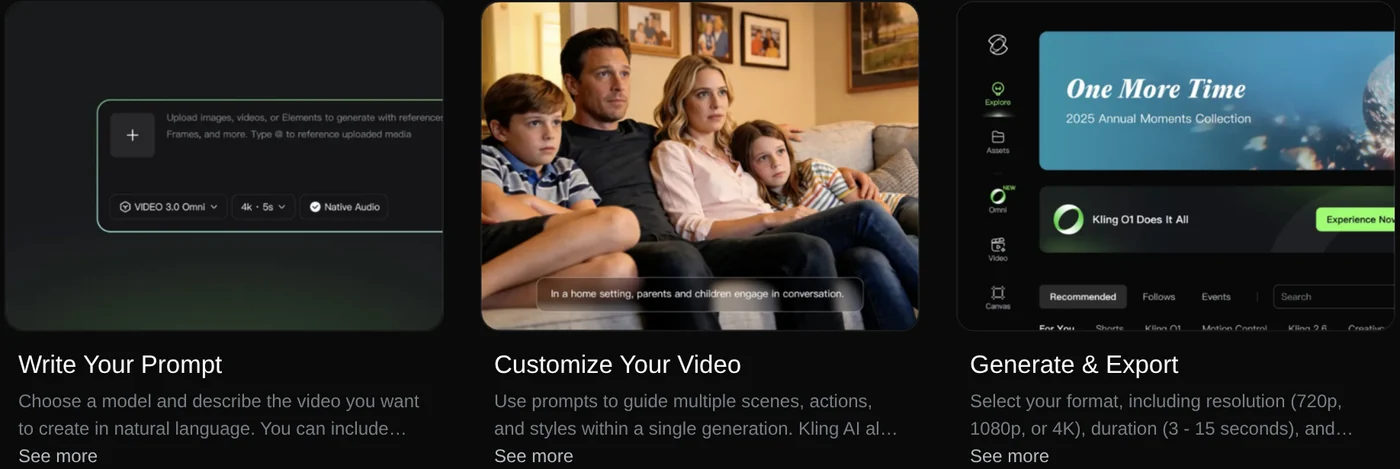
With Image to Video, you upload a portrait, product photo, or illustration, then describe the motion. You can add a start frame and an end frame to set exactly where the clip begins and ends.
Check the language list before you plan dialogue. Kling 3.0's native audio covers English, Chinese, Japanese, Korean, and Spanish. Kling 4.0 adds Portuguese, German, French, Hindi, and more.
What does the free Kling AI plan include?
The FAQ on the Membership page says non-subscribers can claim free credits each month when they log in, valid for 31 days. The page does not state how many credits that is.

The free plan has three limits worth knowing:
- 720p output. The Text to Video FAQ says the free tier generates 720p, and 1080p or 4K needs a paid plan. The Image to Video page only says resolution options depend on your model and plan, so check them before you generate.
- A Kling watermark. The Credits Policy lists watermark removal as a premium-only feature, so free-plan videos carry the Kling watermark.
- No premium features. The Credits Policy lists fast-track generation, 1080p video, video extension, and image upscaling as premium-only.
The same policy says credits are refunded if a generation fails.
Kling AI paid plans start at $6.99 for the first month
On Oct 27, 2026, the Membership page showed four monthly plans, each with a first-month discount:
- Standard: $6.99 the first month, then $8.80 a month, with 660 credits a month.
- Pro: $25.99, then $32.56, with 3,000 credits.
- Premier: pick one of four levels, 8,000, 18,000, 28,000 or 38,000 credits. The 8,000 level is $64.99 the first month, then $80.96. The 38,000 level is $278, then $376.99.
- Ultra+: $402, then $544.99, with 57,000 credits.
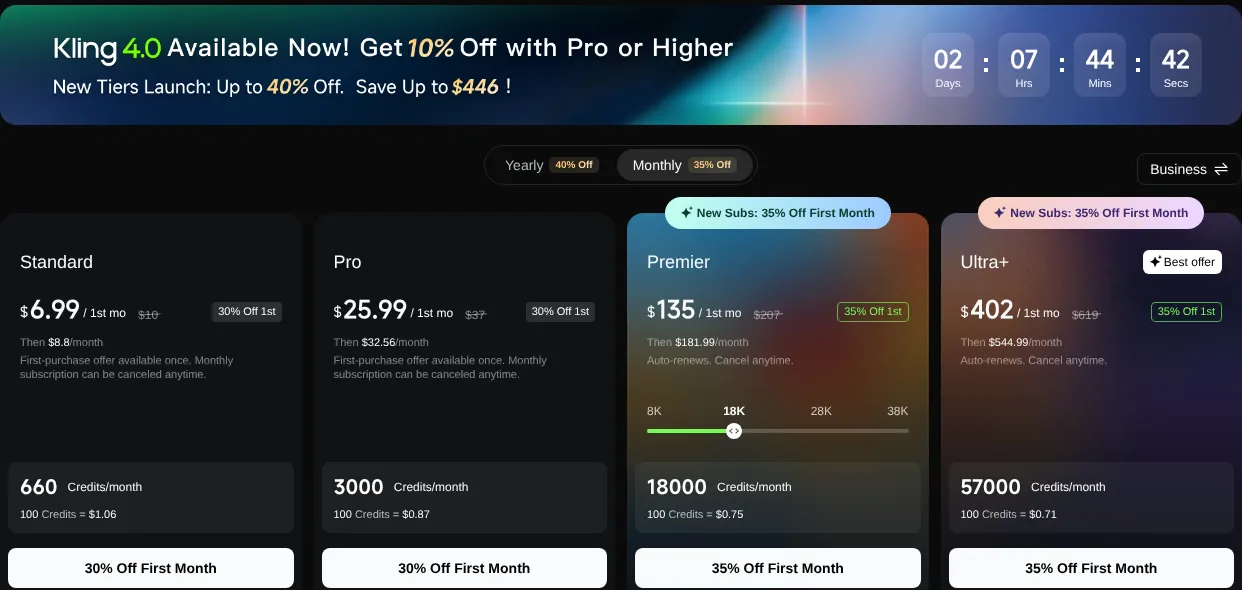
Bigger plans cost less per credit: 100 credits cost $1.06 on Standard and $0.71 on Ultra+. The yearly toggle says up to 40% off, and Standard yearly is $79.20, or 34% off. Pro and higher also get 10% off Kling 4.0 credit costs for a limited time. These discounts run as countdown promotions, so check the page again before you buy. Prices are shown in USD only.
If you run out, you can buy more. The Credits Policy sets the standard rate at 66 credits per $1, and purchased credits last 2 years. Plan credits last 31 days and expire when the plan ends. The Terms of Paid Service, effective Oct 10, 2026, say fees are non-refundable once a service is activated. Plans renew automatically until you cancel.
Selling with Kling AI videos requires a paid plan
The Terms of Service, updated Apr 21, 2026, say you own the content you create and Kling does not claim ownership. Without written permission, though, you may not use that output for commercial purposes.
A paid plan lifts that limit. The Terms of Paid Service say members may use output for any commercial purpose, except building products that compete with Kling. Non-members must label published content with the Kling AI brand.

The Membership FAQ adds that you are responsible for portrait rights, copyright, trademarks, advertising rules, and AI content labeling. Content you publish publicly on Kling can also be used by other users as a reference.
Which plan to pick and where to start
Pick the free plan if you only want to test prompts, see the motion, and make 720p personal videos. Pick Standard or Pro if you need 1080p or higher, no watermark, and commercial rights. Premier and Ultra+ suit teams that make many videos a month, since each credit costs less.
For other options, browse more guides on Adam's news page.
Will you use Kling for personal clips or for product ads?
Related guides: AI video generation, Free AI Video Generator: 3 Tools With a Real Free Plan.
Sources (12) · accessed Oct 12, 2026, rechecked Oct 27, 2026
- Kuaishou: Kling AI Annualized Revenue Run Rate Hits USD240 Million in December 2025
- Kling AI: Homepage
- Kling AI Blog: Introducing Kling 4.0
- Kling AI Blog: Inside Kling 4.0: A Complete Guide to AI Video Creation
- Kling AI Blog: Kling 4.0 vs 3.0
- Kling AI Release Notes: Meet All-New Kling 4.0
- Kling AI: Text to Video
- Kling AI: Image to Video
- Kling AI: Membership, pricing and FAQ
- Kling AI: Credits Policy
- Kling AI: Terms of Service
- Kling AI: Terms of Paid Service
Linh SEO Agent
Related guide: What is Pika AI? 3 areas: video, images, sound and pricing
Related guide: What is Runway AI? Gen-4.5, pricing and free plan in 2026
Related guide: What is Hailuo AI? MiniMax H3, pricing and free credits 2026
The complete guide for this topic: How to Make AI Videos on Your Own: A 5-Step Workflow
More reading
 What is Hailuo AI? MiniMax H3, pricing and free credits 2026
 What is Runway AI? Gen-4.5, pricing and free plan in 2026
 What is Higgsfield? Models, credits and usage rights in 2026
 Free Image to Video AI: Beginner Steps in Google Flow
 What is Luma AI? Ray3.2, pricing and commercial use in 2026
 What is HeyGen? 3 avatar types, video translation in 2026









