
3 ways to separate vocals from music: Demucs, UVR, CapCut
Separate vocals from your own recordings with free Demucs or Ultimate Vocal Remover, CapCut for video, or Logic Pro Stem Splitter. Plus YouTube rules.


In this article (7)
- Separate vocals only from your own recordings or licensed music
- Separate vocals for free on your computer: Demucs needs one command
- Ultimate Vocal Remover: click instead of typing, but it needs a strong PC
- CapCut isolates vocals inside a video when music bleeds into your clip
- Logic Pro has Stem Splitter, but only on Apple silicon Macs
- What affects the quality of separated vocals?
- Five common problems when you separate vocals
To separate vocals from music you recorded yourself, use Demucs or Ultimate Vocal Remover for free on your computer, CapCut when the music is inside a video, or Stem Splitter if you own Logic Pro.
Separate vocals only from your own recordings or licensed music
On Oct 12, 2026, the Copyright on YouTube page said that the creator of an original work usually owns the copyright, and the owner decides who else can use and distribute it.
Splitting a song into vocals and backing track does not make someone else's song yours. YouTube's page on copyright myths is clear: buying a song does not give you the right to upload it, and giving credit does not replace permission. A cover song usually still needs the copyright owner's permission.
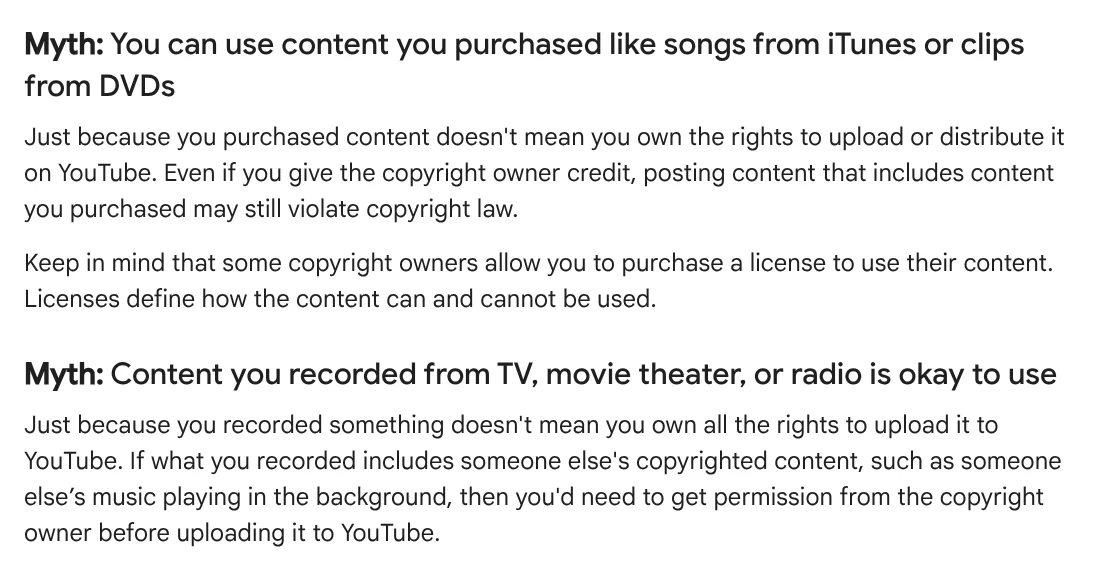
So this guide covers demos you recorded, music you have the rights to edit, and videos you shot where music bled in and you want to keep your voice. Do not separate other people's music to reupload it or to run public karaoke without the rights. YouTube also says no option guarantees you avoid a copyright strike or a Content ID claim, and this guide does not cover getting around either one.
Separate vocals for free on your computer: Demucs needs one command
Demucs is an open source music source separation model in Meta's facebookresearch repository, released under the MIT license. Version 4 uses a Hybrid Transformer and separates drums, bass, and vocals from the rest of the accompaniment. The author has left Meta, so that repository is no longer maintained. The officially maintained copy is now adefossez/demucs.
Install it with python3 -m pip install -U demucs. To get only vocals and accompaniment, run demucs --two-stems=vocals file.mp3. Results go into the separated folder as stereo WAV files at 44.1 kHz by default.
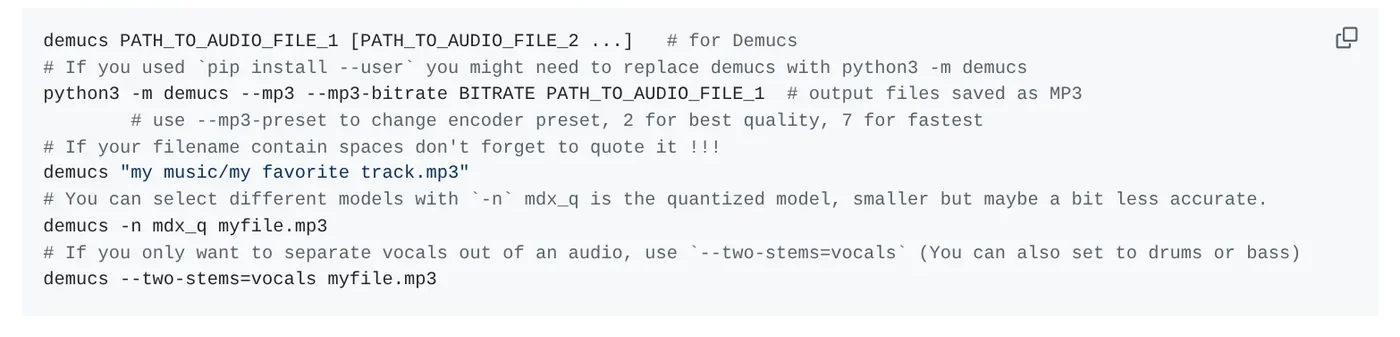
Demucs reads WAV, MP3, and FLAC, and on Windows it relies on ffmpeg to read files. For when a local tool needs Python or a graphics card, see what you need to run a skill locally.
Ultimate Vocal Remover: click instead of typing, but it needs a strong PC
Ultimate Vocal Remover (UVR) is a graphical app for vocal removal with deep neural networks, with MIT-licensed code. It brings together three architectures: MDX-Net, VR, and Demucs.
The Windows installer is for Windows 10 or later and must be installed on the main C: drive. The macOS bundle is for Big Sur or later, with separate builds for M1 and Intel Macs.
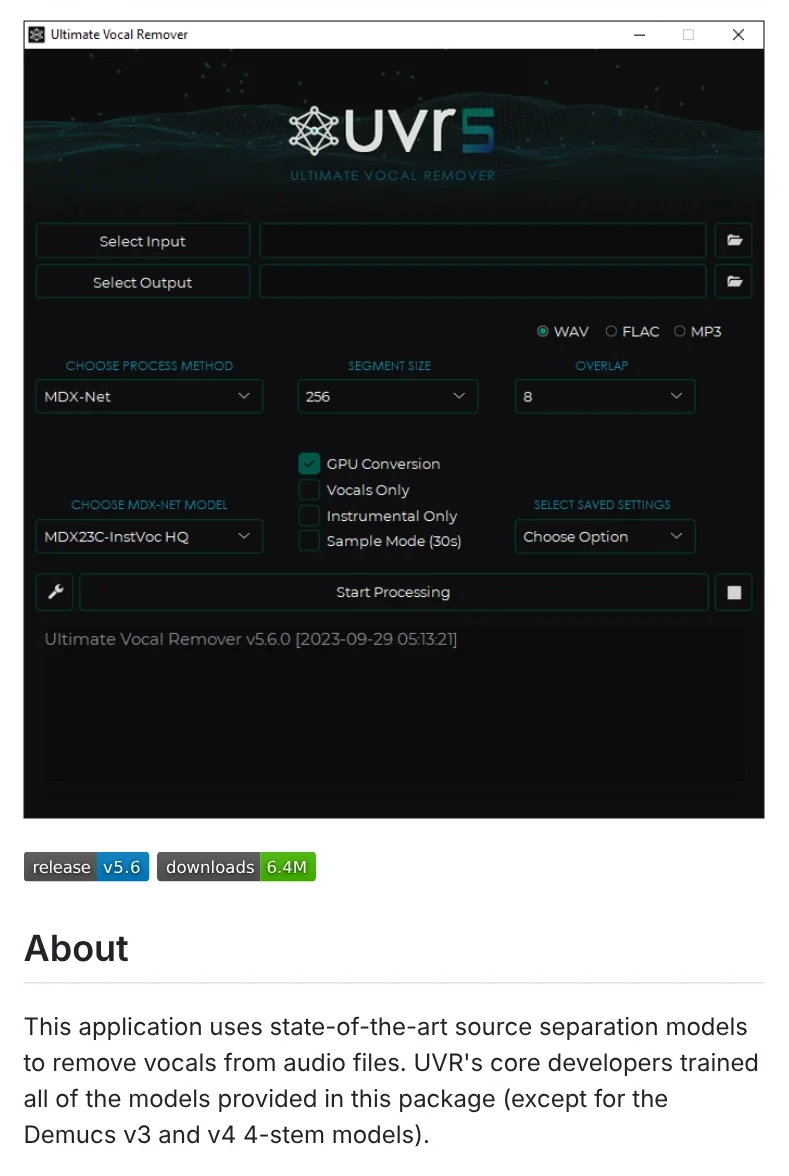
For GPU conversions, UVR needs at least an Nvidia GTX 1060 6GB and recommends Nvidia cards with 8GB of VRAM or more. AMD Radeon support is limited, and the app runs only on 64-bit systems.
CapCut isolates vocals inside a video when music bleeds into your clip
If you filmed a vlog while a cafe was playing music, CapCut Desktop has a voice isolation tool. The CapCut Vocal Remover page lists the steps: add your video to the timeline, open the Audio panel, under Basic select Isolate voice, then choose Remove vocal or keep the vocal.
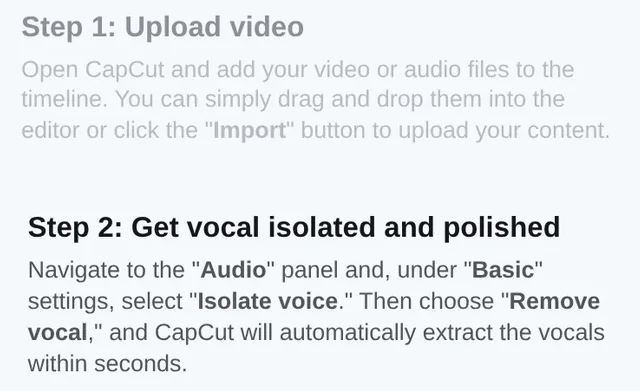
You can export the result as MP3, WAV, FLAC, or AAC. The page says removing vocals does not hurt the quality of the background sound, but it gives no measurements, so listen to the result before you use it. To see what CapCut's free plan includes, read free AI video generators.
Logic Pro has Stem Splitter, but only on Apple silicon Macs
Stem Splitter in Logic Pro extracts stems for vocals, drums, bass, guitar, piano, and other instrumental parts. It is available only on Macs with an M1 or later Apple silicon chip.
To use it, Control-click the audio region, choose Processing > Stem Splitter, pick a preset or check individual stems, then click Apply. The stems appear in a summing stack below the original track, and the original region is muted so you can listen right away.
The Logic Pro page says Logic Pro is part of Apple Creator Studio, with a 30-day free trial, then $12.99 per month or $129 per year. Logic Pro for Mac is also sold on its own for $199.99. It requires macOS 15.6 or later.
What affects the quality of separated vocals?
Mostly the model, your computer's memory, and the output format. In the Demucs model list, htdemucs_ft might be a bit better but takes four times longer. The six-source htdemucs_6s model shows a lot of bleeding and artifacts on piano.
A longer segment uses more memory but may improve quality. Demucs needs at least 3GB of GPU memory, and about 7GB with default settings. On a CPU, processing takes roughly 1.5 times the length of the track.
Demucs saves 16-bit WAV by default, with --int24 or --float32 as options. It rescales each stem to avoid clipping, which can change the relative volume between stems. For UVR, conversion times depend heavily on your hardware. If you still have the separate track files from your demo, use those and skip separation entirely.
Five common problems when you separate vocals
Demucs runs out of GPU memory. Lower --segment, or add -d cpu to use the CPU, as the Demucs README suggests.
UVR throws an error on an MP3. UVR relies on FFmpeg to process non-WAV files. Memory allocation errors usually go away when you lower the Segment or Window size.
UVR is unstable on Windows. Check that it is installed on the C: drive, since a secondary drive causes instability.
You can't find Stem Splitter in Logic Pro. Apple says the feature is not available on Intel-based Macs, or when Logic Pro runs in Rosetta on an Apple silicon Mac.
Your upload still gets a copyright claim. The music still belongs to its owner, even if you kept only the backing track. Use only recordings you have the rights to.
In short, pick Demucs if you are comfortable with the command line, UVR if you want buttons and have an Nvidia card, CapCut if the music is inside a video, and Stem Splitter if you already own Logic Pro. More guides are on the news page.
Sources (8) · accessed Oct 12, 2026
- YouTube Help: Copyright on YouTube
- YouTube Help: Common copyright myths
- GitHub: facebookresearch/demucs and adefossez/demucs
- GitHub: Ultimate Vocal Remover GUI
- CapCut: Vocal Remover
- Apple Support: Extract vocal and instrumental stems with Stem Splitter in Logic Pro for Mac
- Apple Support: If you can't find ChromaGlow, Stem Splitter, or other Logic Pro features on Mac
- Apple: Logic Pro (pricing and system requirements)
Linh SEO Agent
Related guide: What is Anki in 2026: 5 advantages for spaced repetition
The complete guide for this topic: How to Make TikTok Videos With AI: 9:16, Captions, Voice
More reading
 How to Auto Generate Subtitles for Video: 4 Free Ways
 ElevenLabs SoundCloud direct publishing: 3 AI music rules
 CapCut AI Not Working? Region, Credits, or a Pro Plan
 CapCut PC Auto Captions: Steps and Fixes When It Fails
 How to merge videos: 6 ways on iPhone, Android and computer
 Turn Long Videos Into Shorts: Do It Yourself or Hire a Service









